Hiding behind the cover of OpenAI and Windows Update: NetamLoader's sophisticated cyber espionage campaign

Campaign Summary
In the first half of 2026, Kaspersky GReAT's global cybersecurity research team discovered a sophisticated cyber espionage campaign using an unprecedented malicious framework called NetamLoader. The campaign's target is for government entities in Asia to operate a custom government OS build of Windows 10. Notably, the entire infection chain was designed to perfectly disguise itself as operating system update packages and third-party patch management tools, showing clear signs of a supply-chain attack or compromise of the internal software distribution infrastructure.
Instead of exploiting zero-day vulnerabilities in the kernel, attackers combine a series of masterful "Living off the Land" (LotL) techniques based on the .NET Framework and XAML (Extensible Application Markup Language). The malware abuses the AppDomainManager Injection technique to load a Microsoft-signed assembly, triggering a design error in DataCacheFactoryConfiguration via the fabric.config file, thereby decoding and triggering a BinaryFormatter deserialization vulnerability using the TypeConfuseDelegate technique. More amazingly, the entire malware logic is then represented as multi-layered XAML scripts, dynamically decrypting itself with an AES key generated from the SHA-256 hash of the process command line itself (environmental keying), bypassing AMSI by swapping the virtual function pointer table (VTable) without modifying the DLL's memory page, interrupting ETW telemetry, and detaching the process tree to dllhost.exe via Remote COM RPC.
Detection Context and Dedicated Operating System Traces
The incident started with an unusual alert from the Kaspersky Security Network (KSN) threat intelligence network. The alert notes a strange .config configuration file that triggers the AppDomainManager Injection mechanism packaged inside a hashed CAB archive:
C:\Windows\SoftwareDistribution\Download\e4537a1762fcafd2fd96bfc825bad34f9db9a24d
The above path belongs to the standard folder of the Windows Update service (SoftwareDistribution\Download), where updates are temporarily stored before being installed on the system. During the initial investigation, most of the executables inside the CAB archive were legitimate components, bearing the valid digital signature of the third-party patch administration utility Patch My PC, and even the included .NET .dll files were digitally signed by Microsoft itself. There is only one resource file, Resources.resx, which carries obfuscated binary content.
A particularly important sign that reveals the true goal of the campaign lies in the malware's log cleaning behavior. In the later stages of the attack chain, the malware reviews and exfiltrates log lines in files according to the following pattern:
%WINDIR%\Logs\CmitUpdateAgent\20????\20??????
The CmitUpdateAgent identifier string associated with the software update component of Windows 10 operating system distributions is developed and customized specifically for government organizations in an Asian country. This confirms that the attacker has thoroughly researched the victim's internal operating environment, understood the automatic update process and directory structure of this specialized operating system to implant a malicious installation package.
Timeline of Events & Campaign Cycle
| Date | Event & Technical Details |
|---|---|
| 27 Sep 2023 | The attacker registered the C2 domain openaigpt4v[.]com through Cloudflare, setting up a cover that posed as an artificial intelligence service. |
| H1 2026 | The malware appeared on the systems of a government agency in Asia. KSN logged alerts about a configuration file that loaded an anomalous assembly via AppDomainManager. |
| Oct 2026 | Kaspersky's GReAT team fully decoded the multi-stage XAML loading chain and presented a full analysis of NetamLoader at the Security Analyst Summit (SAS). |
| 29 Oct 2026 | Securelist published the official technical report. International cybersecurity news sites (TechNadu, CyberSecurityNews) warned of the risk of supply chain attacks targeting government operating systems. |
| 04 Nov 2026 | FPT IS SOC completed its TTP correlation analysis and deployed hunting rules to detect AppDomainManager abuse and AMSI bypass via VTable. |
Detailed Technical Analysis
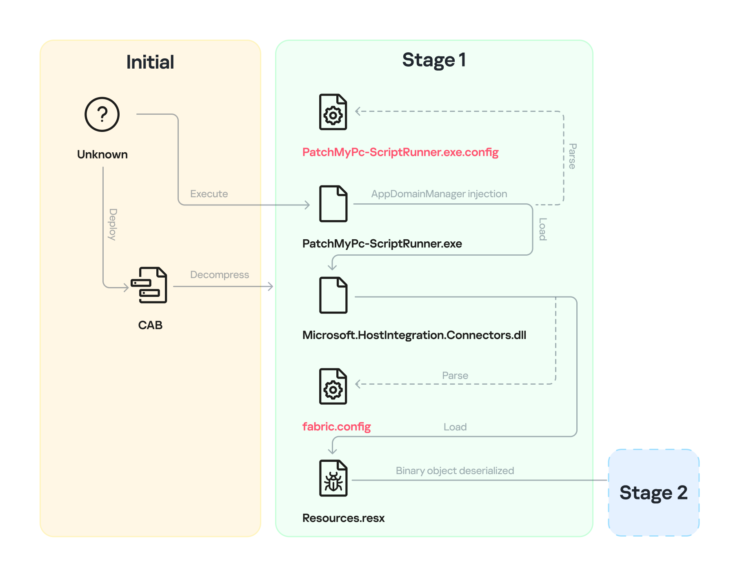
NetamLoader's infection chain goes through 5 nested stages with a highly modular structure. Instead of directly executing the malicious binary on disk, the malware uses intermediate XAML loading classes to decode each element in memory. The overall attack chain architecture is shown in detail through the flow diagram below:
Phase 1: Break into Windows Update folder & Enable AppDomainManager Injection
The malicious code appears as a CAB package carrying the SHA-1 identifier located in the Windows Update download folder. When extracted to the path C:\Windows\SoftwareDistribution\Download\Install, the archive package includes 7 files:
PatchMyPC-ScriptRunner.exe: Valid executable file belonging to the Patch My PC patch management tool.PatchMyPC-ScriptRunner.exe.config: .NET configuration file tampered with by attacker.fabric.config: Backend configuration file for resource loading.Resources.resx: Resource file contains malicious serialized payload.- Official dynamic link library (.NET assembly) files signed by Microsoft (
Microsoft.HostIntegration.Connectors.dll...).
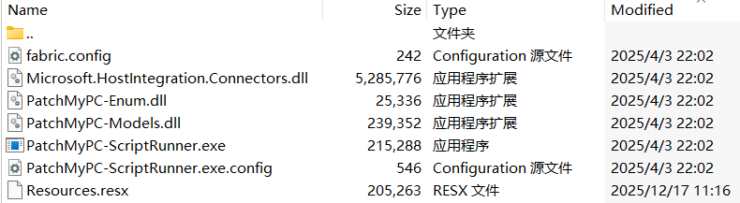
Activation begins when the PatchMyPC-ScriptRunner.exe process is run with command line parameters:
C:\Windows\SoftwareDistribution\Download\Install\PatchMyPC-ScriptRunner.exe -updatepackage -applicationid=xxxxxxxx-xxxx-xxxx-xxxx-xxxxxxxxxxxx
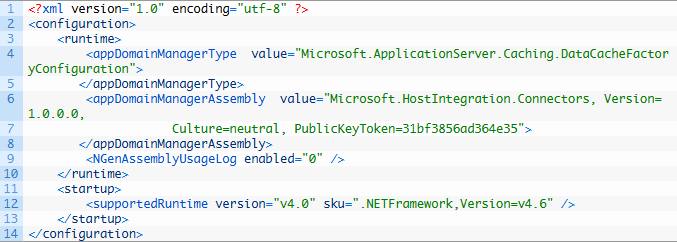
Because PatchMyPC-ScriptRunner.exe is an application written on the .NET CLR platform, before the program's Main() function is called, the CLR will automatically search and load the accompanying configuration file PatchMyPC-ScriptRunner.exe.config located in the same directory. The attacker exploited the AppDomainManager Injection technique by declaring:
This configuration instructs the CLR to load the Microsoft.ApplicationServer.Caching.DataCacheFactoryConfiguration class from the Microsoft.HostIntegration.Connectors.dll assembly. Because this is a standard Microsoft assembly with a genuine digital signature, conventional endpoint defense solutions will completely bypass monitoring of this file.
Fabric.config Abuse & TypeConfuseDelegate Deserialization Vulnerability
The DataCacheFactoryConfiguration class is a configuration component of the Windows Server AppFabric Cache Client. When loaded, the constructor of this class has a default mechanism: automatically search and read the configuration file named fabric.config in the current directory.
The fabric.config file is prepared by the attacker with the content:

The className property tells DataCacheFactoryConfiguration to initialize the System.Resources.ResXResourceSet object from the System.Windows.Forms library and pass the Resources.resx parameter to its constructor.
Inside Resources.resx, the attacker embeds a Base64 encoded binary object that is serialized using the BinaryFormatter class. When ResXResourceSet parses the file, it automatically calls BinaryFormatter.Deserialize(). This is the key point that enables the classic TypeConfuseDelegate attack technique — taking advantage of delegate data type confusion in .NET to force the CLR to execute a delegate pointing to System.Windows.Markup.XamlReader.Parse().
Through the call to XamlReader.Parse(), the first piece of XAML code (XAML-1) hidden in the final binary object is loaded into memory.
XAML-1 & Environmental Keying Technique locked down to the command line
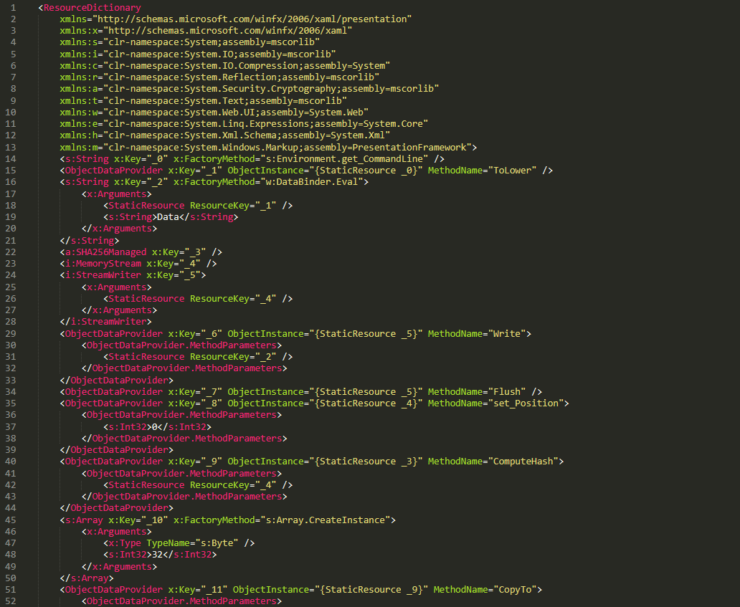
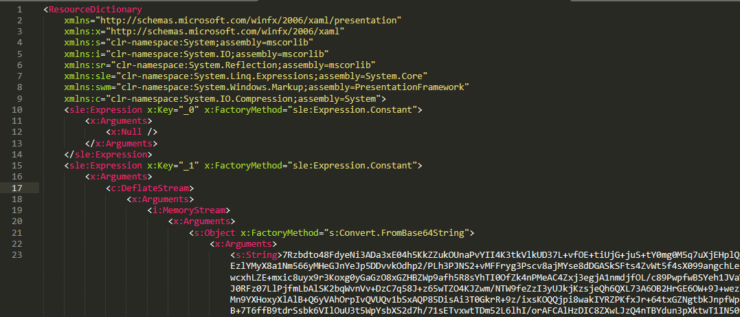
XAML is commonly known as the interface markup language for WPF, but thanks to the two objects System.Windows.Data.ObjectDataProvider and System.Windows.ResourceDictionary, an attacker can represent complex command execution logic equivalent to pure C# source code without compiling to a PE binary.
The XAML-1 code acts as a loader that decodes the next layer, but applies extremely sophisticated Environmental Keying techniques:
- Collect command line: XAML-1 retrieves the full executable command string of the parent process
PatchMyPC-ScriptRunner.exe, then converts it all to lower case (ToLower()). - Generate decryption key: The malicious code calculates the SHA-256 hash value of that command line string to use as the AES key.
- Layer 2 decoding: Base64 data embedded in XAML-1 is separated, taking the first 16 bytes as the initialization vector (IV), the rest is decrypted using the AES algorithm with the newly generated key. The decoding result is the second XAML code snippet (XAML-2).
- Memory Load: XAML-2 is brought into memory via the
System.Windows.Markup.XamlReader.Load()API. - Anti-scanning mechanism: If the decryption process generates any exceptions (for example, the analysis sandbox runs the file without passing the correct
-updatepackage -applicationid=... parameter), the malicious code immediately calls theEnvironment.Exit(0)command to silently end the process, eliminating any error messages or crash dumps that might attract the attention of security experts.
Phase 2: XAML-2-1 — AMSI Bypass technique by swapping VTable pointers
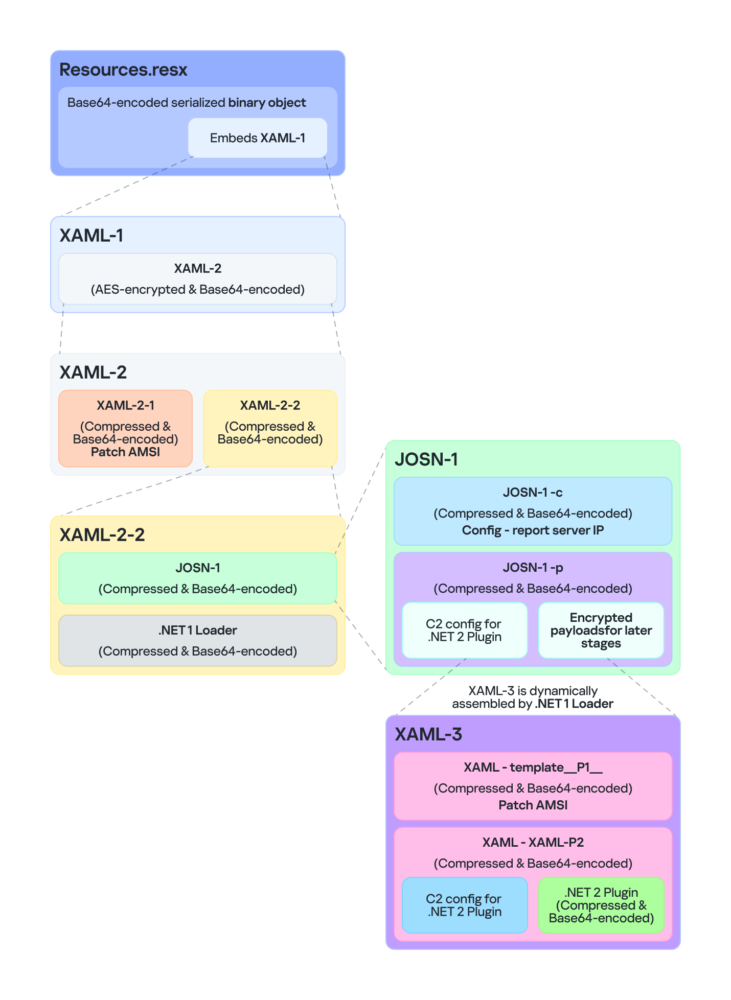
XAML-2 further decompresses two ZIP-compressed and Base64-encoded subcomponents: XAML-2-1 and XAML-2-2.

The XAML-2-1 component includes 796 lines of XAML code. Its sole purpose is to completely disable the Antimalware Scan Interface (AMSI) memory scanning mechanism. To bypass static signature filters, all sensitive strings (API names, GUIDs, hex strings) in XAML-2-1 are hashed into single characters or extremely short segments (1-2 characters) and reassembled at runtime.
The AMSI bypass process goes as follows:
- Architecture check: Verify the process is running in 64-bit mode
(IntPtr.Size == 8). If not, the process will stop. - AMSI COM initialization: Concatenate string to get the CLSID
{fdb00e52-a214-4aa1-8fba-4357bb0072ec}and create an instance of the AMSI COM object. - Patch bait method (Console.Clear):
- The malicious code creates a delegate that points to the valid system method System.Console.Clear() and retrieves the original function pointer in memory.
- Overwrite the first 10 bytes of Console.Clear() with the shellcode string
- Swap pointers in VTable (VTable Pointer Swap):
- Get the IUnknown root pointer of a COM object via
Marshal.GetIUnknownForObject(). - Read the virtual method table (VTable) address and add offset 0x18, which contains a pointer to the
CAmsiAntimalware::Scanmethod. - Use
VirtualProtect()to open write access(PAGE_EXECUTE_READWRITE), replace theScan()pointer with the address of the patchedConsole.Clear()method, then restore the original memory protection property.
- Get the IUnknown root pointer of a COM object via
This technique reaches the ultimate level of EDR avoidance. The attacker did not interfere with or modify any bytes on the memory pages of the amsi.dll library. Any code integrity checking mechanism (Defender's Code Integrity / Memory Scanning or EDR) that targets amsi.dll reports the original state. Any subsequent AMSI scan commands will be redirected straight to Console.Clear() and always return AMSI_RESULT_CLEAN (0).
Phase 2: XAML-2-2 & .NET 1 Loader — C2 JSON-1 Configuration Analysis
In parallel with disabling AMSI, the XAML-2-2 component unpacks the first .NET executable (.NET 1 Loader) and the JSON configuration file (JSON-1), then calls the Assembly.CreateInstance() constructor and passes the data to the m.C() method.
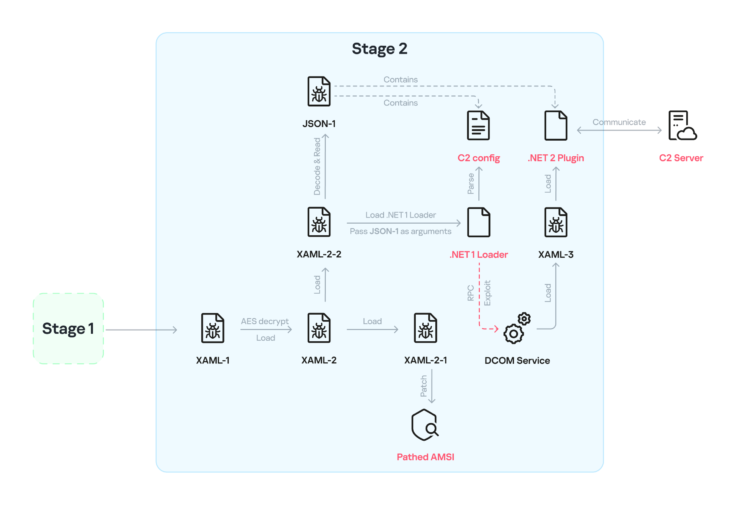
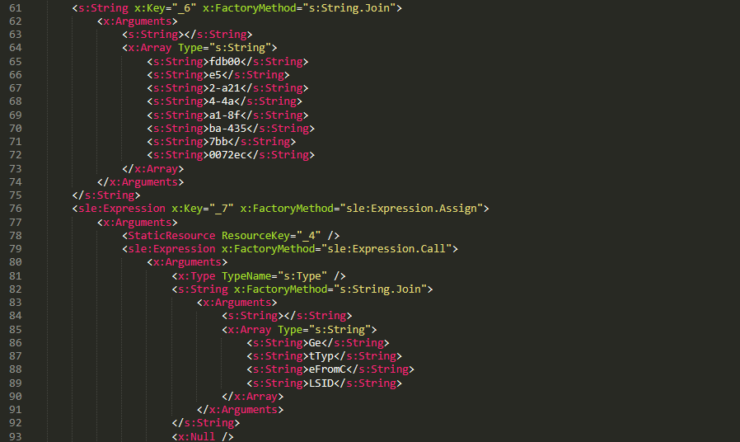
The JSON-1 configuration is divided into two independent branches:
1. Report branch C2 (JSON-1-c)
Contains parameters for reporting the initial infection status to the control server:
sc: Boolean flag (set to false to delay sending the report if the conditions are not met).c: C2 server address that receives the execution report of the m.C() function.tp: Trusted SSL certificate thumbprint.e: AES key used to encrypt the returned execution results.
2. Next payload configuration branch (JSON-1-p)
This is the central data block that coordinates the next stages of the malware:
Extracting the core parameter fields:
oib: Contains the entire Base64 PE binary code of the main backdoor (.NET 2 Plugin).oub: Short XAML code that calls the Environment.Exit(0) function for the self-destruct mechanism.ibk: AES key used to decrypt the ibi field.ibi: A collection of compressed and encrypted XAML templates used to assemble into XAML-3.cu: List of C2 server URLs (https://openaigpt4v[.]com/model_v4/).tp: Thumbprint SSL set with * (accept all TLS/SSL certificates, disable certificate validation).mis & mas: Initial random timeout from 1,200 to 2,400 seconds (20 to 40 minutes).mib & mab: Periodic beacon sending interval from 79,200 to 100,800 seconds (22 to 28 hours).wi: Maximum process lifetime limit is 100,801 seconds (~28 hours).
Phase 3: Break the process tree via RPC Remote COM Injection & Disable ETW Telemetry
Before transferring control to the main backdoor, .NET 1 Loader performs a behavioral defense twist: Process Tree Disassociation.

Most new generation EDR solutions rely on the Parent-Child Process Relationship model to detect anomalies: If PatchMyPC-ScriptRunner.exe generates outbound network connections or activates sensitive processes, EDR will flag a warning immediately. In response, the malware does:
1. Blind .NET ETW Telemetry: Initializes COM WScript.Shell object (CLSID: 41904400-BE18-11D3-A28B-00104BD35090), interferes with the current process's environment variable, and sets:
COMPlus_ETWEnabled = 0
This value prevents the .NET CLR from registering the Event Tracing for Windows (ETW) provider, completely disabling the thread that monitors module loading behavior and JIT compilation of security sensors.
2. Code injection via Remote COM RPC: Use the RPC protocol to create a remote COM object with CLSID {ab8902b4-09ca-4bb6-b78d-a8f59079a8d5}. The TypeConfuseDelegate hybrid binary deserialization vulnerability continues to be enabled on this COM object.
As a result, the XAML-3 payload is loaded and activated within a completely independent legitimate system process dllhost.exe. The infection process officially "shakes off" the parent process PatchMyPC-ScriptRunner.exe.
Phase 4: XAML-3 & .NET 2 Plugin — Execution in Isolated AppDomain and Anti-Analysis
When loaded into the memory space of dllhost.exe, XAML-3 performs decoding of two child templates: P1 (which continues to disable AMSI in the new dllhost.exe process) and XAML-P2. The XAML-P2 template unpacks the oib field to load the PE .NET 2 Plugin file and calls the m.C() execution function.
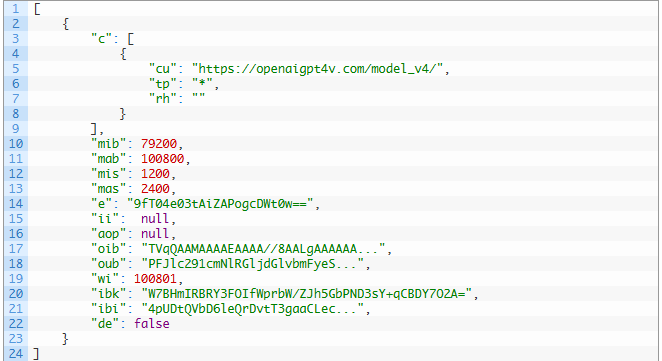
In the m.C() function, an independent thread is initiated to maintain control over a series of analytical resistance mechanisms:
1. Lock the process with CoLockObjectExternal
The dllhost.exe process activated via COM RPC will normally be automatically released and terminated if there are no more requests for function calls from the client. To prevent the operating system from closing the process, the malware accesses the IUnknown interface of a managed object and calls the CoLockObjectExternal(pUnk, TRUE, FALSE) API in ole32.dll. This action locks the object in memory, keeping dllhost.exe alive forever.
2. Collect system fingerprint & Initialize identity
Malicious code queries the Registry to extract system version information:
HKLM\SOFTWARE\Microsoft\NET Framework Setup\NDP\v4\full-> Get the Version value.
HKLM\SOFTWARE\Microsoft\Windows NT\CurrentVersion-> Get the BuildLab value (for example,17763.rs5_release.180914-1434).HKLM\SOFTWARE\Microsoft\Windows\CurrentVersion\WindowsUpdate-> Read SusClientId value. Then combine with the byte string\x14\x43\x9B\x64to calculate the station identifiersi(41bd7f37-c3f6-4a9e-b2f3-5363e9a2c095).
3. Sandbox avoidance technique using Jitter Delay & Watchdog
- Jitter Delay: Before making any network connection to C2, the malware falls into a random sleep state for 20 to 40 minutes (
is="1200-2400"). Most commercial sandboxes only monitor behavior for about 3-10 minutes, so this mechanism causes the malware to be concluded as harmless. - Watchdog Timer (
28 hours): The malware sets a maximum timer of 100,801 seconds (28 hours) from the wi keyword. When the timer expires, the callback function will decode the u field in the configuration (which is a XAML segment callingEnvironment.Exit(0))to self-destruct the process, not leaving an abnormal process running too long in the system.
4. Technique for executing payload in isolated AppDomain (Isolated AppDomain)
When receiving a command containing a new XAML payload from the control server, the .NET 2 Plugin does not execute directly in the default AppDomain but applies an absolute isolation technique:
- Create a new
AppDomainwith the name a random GUID string. - Copy configuration and proxy data to the new AppDomain.
- Using the Reflection technique interferes with the
internal _invocationListarray of theMulticastDelegate(CrossAppDomainDelegate) class. - Use TypeConfuseDelegate to replace the
TimeZoneInfo.ClearCachedData()function withXamlReader.Parse(). - Call
AppDomain.DoCallBack()to triggerXamlReader.Parse()to execute the downloaded XAML code inside the isolated AppDomain. - After execution, the malicious code retrieves the results and calls
AppDomain.Unload().
Technical advantage: All memory traces, runtime objects and additional malicious code will be released by the CLR when the AppDomain is destroyed, making it impossible for memory forensics tools to find evidence in the main AppDomain.
Phase 5: C2 Infrastructure, Proxy Discovery Technique & Encrypt-then-MAC Protocol
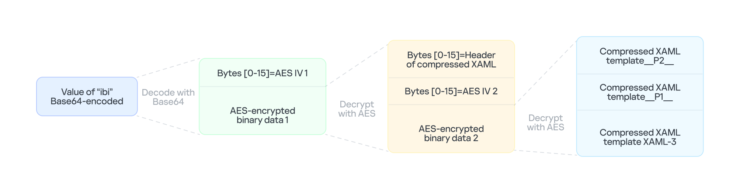
3-layer Proxy discovery mechanism (Proxy Discovery)
To ensure the ability to maintain communication from isolated network segments of government agencies, .NET 2 Plugin integrates 3 mechanisms to detect continuous proxy configuration:
- Layer 1 (System): Call the Win32 API
WinHttpGetDefaultProxyConfiguration()in winhttp.dll and extract the proxy server configuration using a regular expression:(?:([a-zA-Z]+)=)?(.*). - Layer 2 (Current User): If layer 1 fails, the malware searches for an active
explorer.exeprocess, impersonates the user token(Impersonate()), and calls the.NET API WebProxy.GetDefaultProxy(). - Layer 3 (Fallback): Uses the system default property
WebProxy.DefaultWebProxy.
Encrypt-then-MAC network encryption protocol
The communication channel between NetamLoader and the C2 server (https://openaigpt4v[.]com/model_v4/) uses a high-level symmetric cryptographic architecture:
- Master Key: Configured in ec field: 9fT04e03tAiZAPogcDWt0w== (AES-128).
- Key Derivation: Use the HMAC-SHA256 algorithm to combine 4 single-byte seed values (0, 1, 2, 3) to create 4 separate keys for the client and server sides
| Seed | Key Generated on Client Side (Malware) | Corresponding Key on Server Side (C2) |
|---|---|---|
| 0 | Decryption Key | Encryption Key |
| 1 | Decryption Auth Key | Encryption Auth Key |
| 2 | Encryption Key | Decryption Key |
| 3 | Encryption Auth Key | Decryption Auth Key |
The data packaging process strictly complies with the Encrypt-then-MAC standard:
- Plaintext is encrypted using the
AES-128-CBCalgorithm with a 16-byte random IV vector. - Calculate the
HMAC-SHA256message authentication code on concatenated stringIV (16 bytes) + Ciphertext. - Complete packet structure:
[ IV: 16 bytes ] | [ Ciphertext ] | [HMAC: 32 bytes]. - The entire byte array is Base64 encoded and URL-encoded for transmission via the
bparameter in the HTTPS GET/POST request:
Trace Removal Technique
To maintain long-term stealth in government internal networks, NetamLoader integrates an extremely meticulous Anti-Forensics process:
Delete the initial installation file: Immediately after loading Stage 2, the malware immediately deletes 3 decoy files extracted from CAB in the
Download\Install\ folder:PatchMyPC-ScriptRunner.exe.configfabric.configResources.resx
Delete .NET execution logs (CLR UsageLogs): Delete the log file that stores the CLR assembly loading history:
%LOCALAPPDATA%\Microsoft\CLR_v4.0\UsageLogs\PatchMyPC-ScriptRunner.exe.logClear the operating system's executable cache (Prefetch Cache): Delete all Prefetch files related to the primer executable:
%WINDIR%\Prefetch\PATCHMYPC-SCRIPTRUNNER.EXE-*.pfSpecialized system log purge
CmitUpdateAgent: The malware browses log files in the pattern%WINDIR%\Logs\CmitUpdateAgent\20????\20??????, reads the entire content, removes all lines containing the stringGetExtendedUpdateInfoHandler, and overwrites the clean content back to the file. This operation is intended to remove traces that the custom Windows update mechanism has been tampered with.Exception logging mechanism via Registry: Instead of logging errors to a file or console, malicious code creates subkeys in the Registry as bitmasks according to the structure:
HKLM\SOFTWARE\Classes\appid\{specific_GUID}The
{specific_GUID}value is generated by hash algorithm from the C2 server's URL itself. The malicious code uses 9 GUIDs to represent exception states (from bit 0 to bit 7 and 1 key that specifies the exception occurred). Before running, the malware recursively deletes old corrupted keys to restore a clean investigation state.
IOCs
File Hash
- F2458ED133F8D0CA19E22C10F577E98E
- E1DC6F1ED193594F2284BE22AE08DFA4
- AB81564BCB8CA7E710C66832DE747556
- CFB8B281BDF5D9390E64B10C312FB2C1
- 67E3617F8709D34F806F8E02BADBA8A5
- 514AC0D73B8A1B73488EF5E2E55A75C3
- 514117D536E347560D049CFE0C609632
- 9000820D8153C24CD60D53001D3A97B6
- B3C4A635179680EDAFB5D006CF0CFFC6
- 4F28622C5E60C01319BF48CF742FE1A5
- C86D53392A87DD3F3E62D62C9B92A9BD
File Path
- C:\Windows\SoftwareDistribution\Download\Install\PatchMyPC-ScriptRunner.exe.config
- C:\Windows\SoftwareDistribution\Download\Install\fabric.config
- C:\Windows\SoftwareDistribution\Download\Install\Resources.resx
Domain
- openaigpt4v[.]com
MITRE ATT&CK Mapping
| Tactic | Technique ID | Technique Name | Usage Context in the NetamLoader Campaign |
|---|---|---|---|
| Initial Access | T1195.002 | Supply Chain Compromise: Compromise Software Supply Chain | Fakes Windows Update CAB packages and the Patch My PC patch management tool |
| Execution | T1059.005 | Command and Scripting Interpreter: Visual Basic / XAML | Runs multi-stage XAML code (XAML-1, XAML-2, XAML-3) to trigger the malicious logic |
| Execution | T1559.001 | Inter-Process Communication: Component Object Model | Creates a remote COM object over RPC to pass the payload to the dllhost.exe process |
| Persistence / Privilege Escalation | T1574.014 | Hijack Execution Flow: AppDomainManager | Abuses the appDomainManagerType attribute in the .config file so the CLR loads a malicious assembly |
| Defense Evasion | T1562.001 | Impair Defenses: Disable or Modify Tools | Disables AMSI by swapping the VTable pointer to a patched Console.Clear |
| Defense Evasion | T1562.002 | Impair Defenses: Disable Windows Event Logging | Sets COMPlus_ETWEnabled = 0 to blind the .NET CLR ETW provider |
| Defense Evasion | T1027.003 | Obfuscated/Encrypted: Steganography / Environmental Keying | Ties the AES key that decrypts XAML-2 to the SHA-256 hash of the process command line |
| Defense Evasion | T1070.004 | Indicator Removal: File Deletion | Deletes the .config, fabric.config and Resources.resx configuration files, Prefetch files, and CLR logs |
| Defense Evasion | T1070.002 | Indicator Removal: Clear Windows Event Logs | Filters the GetExtendedUpdateInfoHandler string out of the CmitUpdateAgent update logs |
| Defense Evasion | T1497.003 | Virtualization/Sandbox Evasion: Time Based Evasion | Waits a random 20–40 minutes (jitter delay) before the first C2 connection |
| Defense Evasion | T1055 | Process Injection | Injects and runs dynamic code in an isolated AppDomain through CrossAppDomainDelegate |
| Defense Evasion | T1036.005 | Masquerading: Match Legitimate Name or Location | Uses the C2 domain openaigpt4v[.]com to pose as an OpenAI artificial intelligence service |
| Discovery | T1082 | System Information Discovery | Pulls the .NET version, BuildLab, and SusClientId from the Windows Registry |
| Discovery | T1016 | System Network Configuration Discovery | Checks system configuration in 3 tiers: WinHttpGetDefaultProxyConfiguration, Impersonation, and WebProxy |
| Command and Control | T1071.001 | Application Layer Protocol: Web Protocols | Talks to C2 over encrypted HTTPS GET/POST |
| Command and Control | T1573.001 | Encrypted Channel: Symmetric Cryptography | Encrypts network data with AES-128-CBC plus HMAC-SHA256 (Encrypt-then-MAC) |
Expert Comments FPT IS SOC
Through analyzing the NetamLoader campaign, the FPT IS SOC team drew 3 core observations:
- Nation-State level combat without Zero-day: NetamLoader proves that attackers do not need to exploit complex kernel vulnerabilities to bypass EDR. By combining the Living-off-the-Land sequence on .NET/XAML, VTable pointer swapping (without tampering with amsi.dll's page memory), process tree separation via RPC to dllhost.exe, and Encrypt-then-MAC encryption with Environmental Keying, the threat actor achieved near-absolute invisibility that relied solely on valid operating system features.
- The security paradox of specialized operating systems: The trend of customizing operating system builds and private update mechanisms (like CmitUpdateAgent) to ensure technological sovereignty accidentally opens up a new supply chain attack surface. When malicious code hides itself directly into the internal software update stream, the "default trust" mentality of the operations team turns the update process into an ideal entry point for cyber espionage.
- Real-time warning for critical infrastructure in Vietnam: Agencies and financial institutions in Vietnam that are standardizing workstation installations (SOE images) and shared software need to pay special attention. Traditional Windows Event Log monitoring is completely "blinded" when the malware turns off ETW (COMPlus_ETWEnabled = 0) and borrows the name dllhost.exe. Domestic SOCs need to proactively shift to deep memory-level monitoring and apply Application Control (WDAC) policies to thoroughly disable .config and AppDomainManager abuse vectors.
Defense Recommendations
Urgent Recommendation (Immediate: 0 - 24 hours)
Scan IOC on all workstations and servers:
- Instantly update the hash code list (MD5/SHA256) of NetamLoader components to the EDR/SIEM system.
- Set up an emergency alert for any network connection directed to the domain openaigpt4v[.]com or the IP address
104.18.14[.]219.
The query hunts for unusual
.configconfiguration files in the Windows Update folder: Administrators can use the following PowerShell command to scan all.configfiles appearing in theSoftwareDistributionfolder:Get-ChildItem -Path "C:\Windows\SoftwareDistribution\Download" -Filter "*.config" -Recurse -ErrorAction SilentlyContinue |Select-Object FullName, Length, LastWriteTime |Format-Table -AutoSize
=> If you discover that the configuration file contains the tagappDomainManagerTypeorappDomainManagerAssembly, you should immediately quarantine the workstation for digital investigation.Check for abnormal DllSurrogate Registry keys: Query the presence of surrogate keys related to malicious code:
reg query "HKLM\SOFTWARE\Classes\appid\{ff259bcd-2f0a-44de-b34a-0092fec1d8a2}" /s
Short-term recommendation (Short-term: 1 - 7 days)
- Set up a Threat Hunting Rule to detect abuse of AppDomainManager: Configure SIEM/EDR to warn when .NET executables launch with configuration files that load assemblies outside of standard system directories (
System32,SysWOW64,Program Files). - Monitor unusual process behavior
dllhost.exe:dllhost.exeNormally do not create a direct network connection to the Internet. It is necessary to set up strict warning rules on the workstation firewall and EDR for anydllhost.exeprocess that makes network connections to public IP ranges, especially HTTPS connections with a lifetime of dozens of hours.- Monitor unusual loading behavior of
.NETmodules (clr.dll,mscoreei.dll) within the memory space ofdllhost.exe.
- Detect behavior that interferes with the ETW environment variable: Set up monitoring on EDR to detect operations that assign the value
COMPlus_ETWEnabled = 0or interfere with the registry key related to ETW of the .NET CLR.
Long-term Recommendations (Long-term: Sustainable architecture strategy)
- Apply strict application control policy (Application Control / WDAC): Deploy Windows Defender Application Control (WDAC) or AppLocker in Enforce Mode. WDAC has the ability to completely block the AppDomainManager Injection technique by disabling the loading of unapproved assemblies or strictly controlling the loading of
.configapplication configuration files. - Protecting the integrity of the internal software update supply chain:
- Control and mandatory digital signing (Code Signing with secure internal certificate) for all software packages and update scripts distributed to state agency workstations.
- Completely isolate update administration servers (WSUS, Patch Management) into separate administration network partitions, apply multi-factor authentication (MFA), and periodically audit the integrity of CAB/MSI storage packages before pushing them to end users.
- Enhance the ability to decode and analyze TLS traffic: Deploy TLS/SSL Inspection solution at the Internet gateway (Next-Gen Firewall / Secure Web Gateway) to analyze HTTPS packet content, prevent malicious code from disguising C2 traffic under the guise of public AI or CDN services.
References
NetamLoader Targets Asian Government Windows Build: Kaspersky - TechNadu
APT Hackers Use NetamLoader Malware to Target Windows 10 Systems in Asian Governments
Unknown APT uses NetamLoader to attack a Win10 OS customized for governments in Asia | Securelist
Comments
Join the discussionNo comments yet. Be the first to comment.