Nimbus RAT: Hackers Exploit Microsoft Teams and Google Drive to Deliver Java-Based RAT

Nimbus RAT: 20 Minutes From a Fake IT Teams Call to a Java RAT Running Over Google Drive
282 emails hit the inbox in 90 minutes, peaking at 26 emails per minute. Forty-five minutes later, an external Teams account reached out, claiming to be IT helpdesk and offering to help clean up the spam. The victim opened Quick Assist on their instruction. Less than 20 minutes after that first call, a Java RAT was running on the machine, quietly exchanging commands over Google Drive as if it were ordinary Google Workspace traffic.
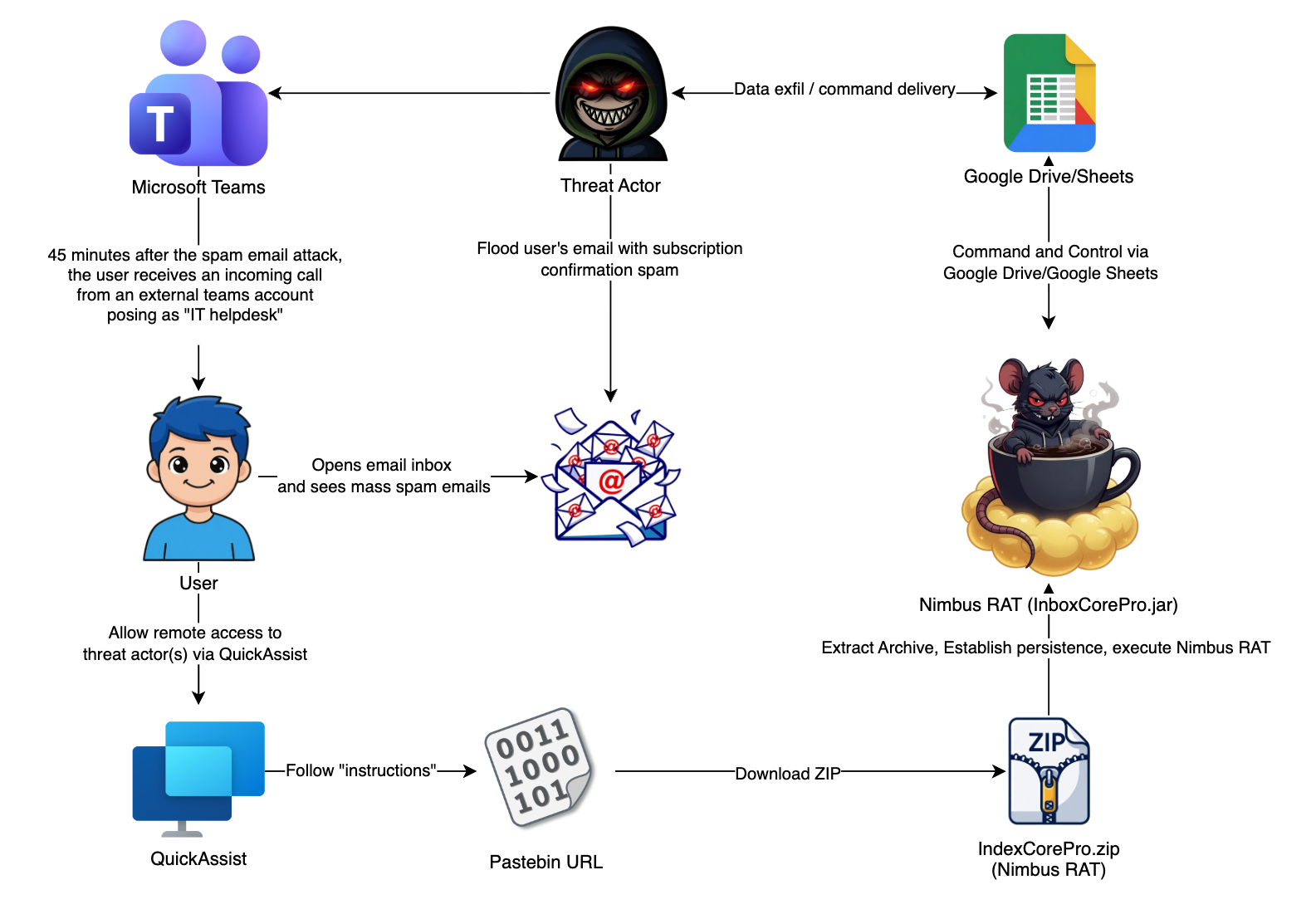
Overview of the attack flow, from email bombing to Nimbus RAT execution
Overview
Security researchers recently uncovered a campaign in which a threat actor used vishing over Microsoft Teams to trick victims into granting remote access via Quick Assist, then deployed a Java RAT that eSentire's Threat Response Unit (TRU) named Nimbus RAT.
What makes this especially dangerous: the entire kill chain relies exclusively on platforms enterprises already trust and rarely block — Microsoft Teams for initial contact, SharePoint/OneDrive to host the payload, Quick Assist for remote access, Pastebin to deliver instructions, and Google Drive/Google Sheets as the C2 channel. Every single component is a legitimate service — no spoofed domains, no suspicious certificates.
The scale isn't small either. TRU analyzed 12 months of telemetry and identified 1,540 similar events across 172 distinct customers, with an almost 8x spike over baseline in February 2026 alone. This is a standardized initial-access vector, and it's being operated by multiple groups simultaneously.
Nimbus RAT traces back to a malware family Rapid7 previously linked to BlackSuit affiliate activity, following Black Basta's internal conflict in early 2025 — a strong signal that initial access from this campaign typically leads to ransomware.
Immediate priority action: Disable the ability to receive messages from external trial tenants (*.onmicrosoft.com) in the Microsoft Teams admin center. According to TRU's data, this single control alone would have blocked 65% of the malicious Teams messages observed.
Background: From Black Basta to Nimbus RAT
The combination of email bombing, Teams vishing, and Quick Assist didn't emerge randomly in this campaign — it has a clear lineage, and that lineage tells us where the current campaign is headed if it isn't stopped early.
In April 2024, Rapid7 first documented a social-engineering campaign tied to Black Basta ransomware: victims were bombed with thousands of emails per hour, then contacted by someone impersonating IT support. Microsoft later confirmed the activity and named the group Storm-1811, noting that it used Quick Assist to deploy Qakbot, Cobalt Strike, and ultimately Black Basta ransomware.
In February 2025, leaked internal Black Basta chat logs revealed serious internal conflict, and social-engineering activity directly tied to Black Basta dropped noticeably afterward. But Rapid7 observed that the pattern didn't disappear — it shifted to BlackSuit affiliates, who appear to have inherited the playbook or absorbed former Black Basta members. Around the same time, Rapid7 spotted an upgraded version of the same Java RAT used in Black Basta campaigns, with its C2 already migrated to Google Drive and new capability added to load and execute Java classes in memory.
By April 2026, ReliaQuest published a report on a small group of former Black Basta affiliates running a large-scale intrusion campaign targeting over 100 senior executives across multiple organizations since May 2025 — using the exact same combination of email bombing and Teams helpdesk impersonation.
According to TRU's analysis, Nimbus RAT is the next generation of the Java RAT Rapid7 previously described. The fact that this malware family continues to be actively developed and expanded (particularly with in-memory second-stage execution via the jc/jcb commands) indicates the development team is still active, and that the initial access broker behind this campaign is likely continuing to sell access to ransomware groups.
Campaign Details
| Attribute | Detail |
|---|---|
| Malware name | Nimbus RAT (named by eSentire TRU) |
| Internal malware name | BackupBOX |
| Lineage | Successor to the Java RAT used in BlackSuit/Black Basta campaigns (Rapid7, 2025) |
| Discovery timeframe | Early April 2026 (specific incident: April 6, 2026) |
| Attack type | Initial Access Broker / Vishing / RAT, likely leading to ransomware |
| Target sector | Legal industry, with broader targeting evident in telemetry data |
| Target region | Global (172 distinct customers in eSentire's dataset) |
| Primary tools | Microsoft Teams (vishing), Quick Assist (remote access), Pastebin (instructions), Nimbus RAT (Java) |
| C2 infrastructure | Google Drive / Google Sheets (Service Account and OAuth2 User), with Direct TLS socket as fallback |
| Payload packaging | InboxCorePro.zip containing InboxCorePro.jar, InboxCorePro.reg, and a bundled OpenJDK 25.0.1 |
| Second-stage tool | InboxSetupPro (exfiltrates via OneDrive, targeting Signal Desktop and Outlook OST) |
| Detection source | eSentire Threat Response Unit (TRU) |
Campaign Scale Across the Full Dataset
Before diving into the specific incident, it's worth looking at the bigger picture TRU built from 12 months of telemetry — it explains why a single incident warranted such an extensive writeup.
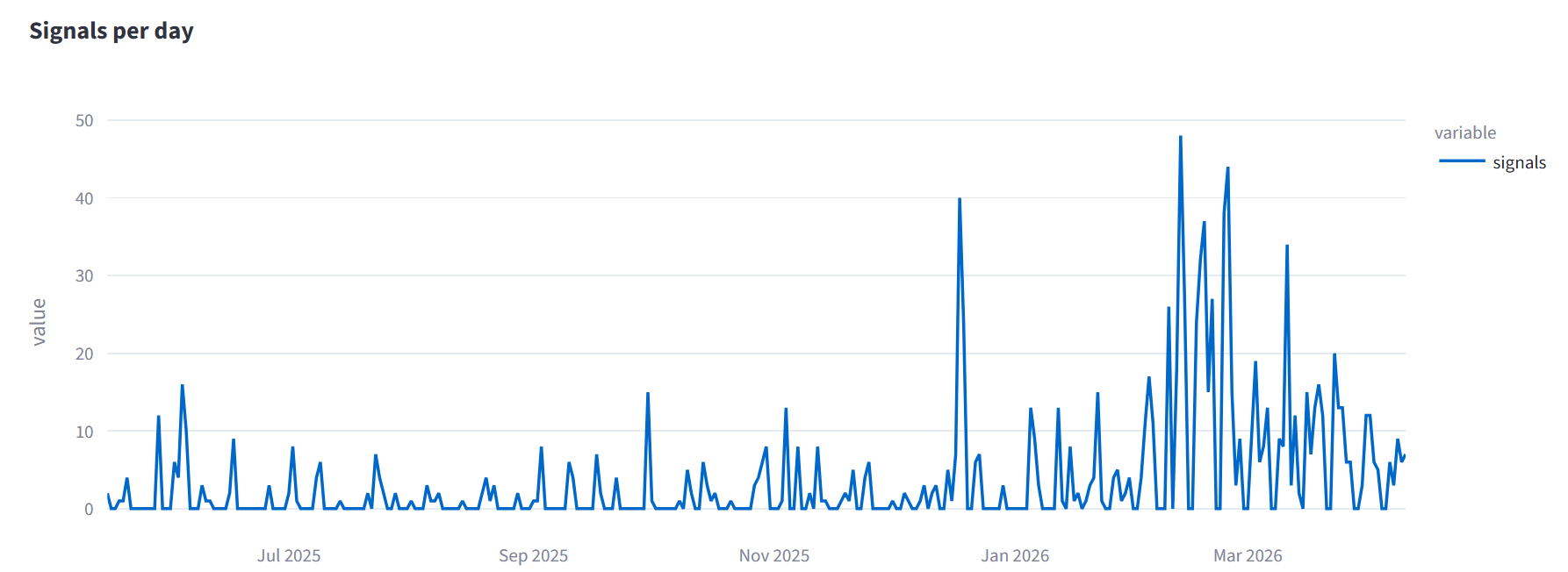
Volume trend of suspicious external Teams messages from May 2025 to May 2026
The dataset includes 1,540 suspicious external Teams message events across 172 customer environments, spanning May 2025 through May 2026. Volume was fairly steady through the second half of 2025, then spiked starting in December 2025. The period from December 2025 to March 2026 accounted for roughly 57% of the entire year's volume, with February 2026 alone recording 408 events — nearly 8x the monthly baseline average. This timing coincides with public reporting on continued exploitation of the Teams vector by Storm-1811 and 3AM ransomware.
Three infrastructure characteristics stand out for detection-rule development:
First, 49% (758/1,540) of sender accounts used usernames mimicking IT/helpdesk personas, with common patterns including helpdesk, helpdeskmanager, itsupport, it_assistance, admin, cloudsupport, and service. The Federation Brand Name shown in Teams followed the same theme: IT Support, ITProtectionDepartment, infratechopsdesk, operationshelpcenter.
Second, 65% (995/1,540) of events originated from *.onmicrosoft.com domains — Microsoft trial tenants that require no domain purchase or DNS setup. TRU identified 235 distinct tenants of this type, some following recurring naming patterns such as infratechopsdesk, advcloudopshelp, helpsupportinfra, or auto-generated forms like teams00XXXX. The highest-volume tenant appeared across 10 different customers — a level of reuse consistent with shared infrastructure belonging to a single actor group.
Third, among the non-onmicrosoft.com domains, there's a cluster of .top domains registered through PDR Ltd/PublicDomainRegistry, mostly used to send Teams messages within 24-72 hours of registration. 37% of these domains were under 7 days old at the time of the attack. Naming followed an IT/security theme: system-clean[.]top, helpdock[.]top, info-secure[.]top, serviceprohub[.]top, and a "scan" family including scanseq[.]top, scan-security[.]top, updt-scansecurity[.]top.
On the sending infrastructure side, 80% (1,229/1,540) of events came from hosting/datacenter ASNs rather than Microsoft IP space or typical enterprise ISP ranges. Recurring ASNs include NKtelecom INC (US), WorkTitans B.V. (DE), GLOBAL CONNECTIVITY SOLUTIONS LLP (DE), GTHost (US), M247 Europe SRL, and NovoServe B.V. (NL). 66 source IPs appeared across 2 or more customers, and 6 of those appeared across 10 or more customers. 221 events were flagged as using a VPN, and 74 as using Tor.
A more concerning variant: a small portion of activity originated from legitimate tenants that had themselves been compromised (schools, small businesses, NGOs). In this variant, the sending tenant has a multi-year registration history, a real domain, and a Teams external-user banner with nothing visually suspicious about it.
Incident Timeline (April 6, 2026)
| Time (UTC) | Event | Telemetry source |
|---|---|---|
| 16:00 - 17:30 | Email bombing peak: 282 emails in 90 minutes, 26 emails/minute, from 116 sending domains and 98 IPs | M365 mail-flow logs |
| ~17:45 | External Teams account contacts victim, impersonating helpdesk | EDR / Teams session log |
| 17:48 | Victim opens QuickAssist.exe | EDR, parent process explorer.exe |
| 17:52 | Threat actor runs net time /domain via cmd.exe for recon |
EDR |
| 17:53 | Victim visits pastebin[.]com/G6jA0PLU | Browser history |
| 17:54 - 17:56 | Downloads InboxCorePro.zip from the personal OneDrive of a compromised account on tenant <redacted>-my.sharepoint.com |
Download history |
| 17:59:28 | regedit.exe imports InboxCorePro.reg | EDR |
| 17:59:32 | javaw.exe executes InboxCorePro.jar; Nimbus RAT becomes active | EDR |
| 18:04 | Threat actor returns via a second Quick Assist session | EDR |
| 18:04+ | eSentire MDR isolates the host | MDR response log |
Total time from email bombing to RAT execution: under 4 hours. Time from first Teams contact to RAT execution: under 20 minutes.
Detailed Kill Chain
Stage 1: Email Bombing to Establish a Pretext
What happened: the victim received 282 emails in 90 minutes, peaking at 26 emails/minute, from 116 sending domains and 98 different IPs. Subject lines appeared in English, German, Dutch, Spanish, Japanese, French, and Polish. Content mimicked legitimate subscription services, e-commerce platforms, government portals, and SaaS account-confirmation flows. These emails weren't spoofed and weren't malicious in themselves — they were genuine transactional emails generated when the attacker entered the victim's address into hundreds of public signup forms.
Why: the goal of this stage is entirely operational, not technical. A flooded inbox creates genuine frustration and a completely plausible pretext for the victim to accept "help" when someone reaches out offering it.
Impact: because the emails aren't malicious in the traditional sense (no links, attachments, or payloads), content-based filters typically can't block them. But this is also the earliest and most reliable detection signal in the entire kill chain, since it occurs before the victim receives any Teams message at all.
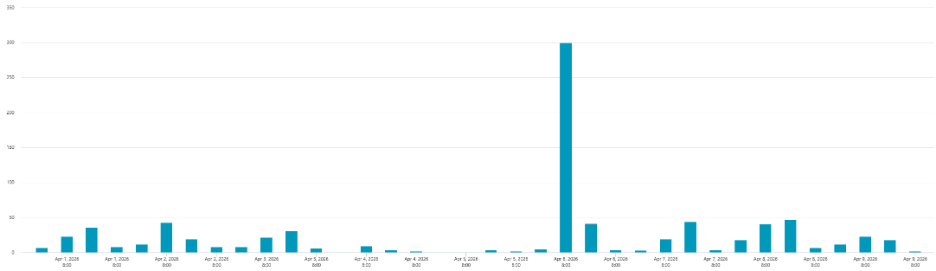
Email bombing volume during the 16:00-17:30 UTC window on April 6, 2026, peaking at 26 emails/minute
Stage 2: Vishing via Microsoft Teams
What happened: about 45 minutes after the email bombing peak, an external Teams account contacted the victim, using an email username and Federation Brand Name following the helpdesk/IT impersonation pattern described in the dataset section above. The actor referenced the spam the victim had just experienced and offered to help resolve it.
Why: the 45-minute timing isn't accidental. It's long enough for the victim to feel genuinely annoyed, but close enough to directly link the "problem" and the "solution" in their mind, significantly increasing trust in the person reaching out.
Impact: external Teams messaging is a channel many organizations allow by default, and the "external user" banner isn't enough to alert a user who's already stressed from a flooded inbox.
Stage 3: Quick Assist and Initial Recon
What happened: at 17:48 UTC, the victim launched QuickAssist.exe. EDR confirmed the parent process was explorer.exe, indicating user-initiated action. Within 4 minutes of the Quick Assist session being established, the threat actor ran net time /domain via cmd.exe to gather domain information.
Why: Quick Assist is a built-in Windows remote-access tool, signed by Microsoft, and largely unflagged by antivirus or application whitelisting by default. It's an optimal choice for bypassing controls that block third-party RMM tools like AnyDesk or TeamViewer.
Impact: once the remote session was established, the threat actor had full keyboard/mouse access as a legitimate user. Every subsequent action appeared as normal activity performed by the victim on their own endpoint.
Stage 4: Pastebin as an "Instruction Sheet"
What happened: rather than typing commands directly, the threat actor pasted a URL into the Teams chat: pastebin[.]com/G6jA0PLU. The victim visited this URL at 17:53 UTC. The content was a simple 4-line checklist, not a script or obfuscated code: line 1 was the payload download URL, line 3 the persistence path, line 5 the extraction directory, and line 7 the archive name.
Why: this approach let the threat actor "read instructions" over the phone while the victim performed each step on screen themselves. From the victim's perspective, the experience was indistinguishable from being walked through a software install by IT support. The human-readable checklist format also suggests this is a reusable document across multiple vishing calls, with only the download URL changing between them.
Impact: Pastebin is almost never blocked at the network layer because it's widely used for legitimate purposes. It's also a valuable forensic artifact: if a Teams vishing attempt is suspected, checking browser history for a Pastebin visit in the same timeframe can reveal the payload URL before it's ever executed.
Stage 5: Payload Hosted on a Compromised M365 Tenant
What happened: the Pastebin link pointed to InboxCorePro.zip (SHA-256: 9E5B1E10AD6904D3F5B48D38470CD57263974640A27D13CF793EF026D3D6B886), hosted in the personal OneDrive of an account on the SharePoint tenant <redacted>-my.sharepoint.com. This is a legitimate M365 tenant that had been compromised and used as a payload staging point — matching the "tenant-relay" pattern TRU described in the dataset section. TRU had previously observed this same SharePoint URL hosting a different configuration of the same malware family in a separate, unrelated incident.
Why: SharePoint/OneDrive is a Microsoft service that's almost certainly not blocked, and reusing the same compromised tenant across multiple campaigns weeks apart suggests this is established, stable infrastructure for the threat actor.
Impact: the extracted archive contains a single Java payload, InboxCorePro.jar (SHA-256: 91E523A46F3BB860AC2E5800B7E1EC89D75A2408410B9CD25EEBC17C8D7A92BC), along with InboxCorePro.reg and a full bundled copy of OpenJDK 25.0.1. Bundling the JDK lets the payload run on any Windows machine regardless of whether Java is already installed, and lets the threat actor control exactly which runtime executes the JAR file. This download was flagged as potentially malicious by Netskope but completed anyway, since the victim actively approved it through the remote session.
Stage 6: Nimbus RAT Execution
What happened: the victim followed the Pastebin checklist, extracted the archive into C:\ProgramData\InboxCorePro\, imported InboxCorePro.reg via regedit.exe (17:59:28 UTC), and placed the launcher in the Startup folder. At 17:59:32 UTC, javaw.exe (a copy of OpenJDK 25.0.1 signed by Oracle, SHA-256: 99813F3D0625E880158C68039C0E2FBF488DB0BE3DB77CD1CE6D382644193F0E) executed InboxCorePro.jar. All malicious logic resides inside the JAR file — the javaw.exe binary itself is entirely legitimate.
Why: the parent process for every javaw.exe launch was explorer.exe, consistent with the Startup-folder shortcut mechanism. From a pure process-tree EDR perspective, this looks like a user-launched Java application, with no injection or anomalous parent process to flag.
Impact: TRU's static analysis of InboxCorePro.jar revealed 8 custom packages named using random English words as a light layer of obfuscation: BlackStatelessness, DomitianUndrapedEpigrammatize, EpitaphDunderhead, ExtricableSophisticated, Goferindubitably, sententiousness, Splendrousstile, WorldlySiege. The remaining packages (com, io, javax, net, org) are third-party dependencies including the Google API client library, JNA, and Apache HttpClient.
The entry point class Goferindubitably.Audiometric performs an initialization sequence: creates a lock file at %TEMP%\java_app.lock to ensure single-instance execution, registers a JVM shutdown hook to delete the lock file on exit, verifies an embedded config blob against a hardcoded 4096-bit RSA public key (the config is signed with the operator's private key, so the implant only accepts configs generated by the operator), checks for the presence of license.txt in the same directory as the JAR (if absent, calls System.exit(0) — this is a kill switch), relaunches under javaw.exe to hide the console window, then enters a C2 polling loop.
The malware self-identifies internally as BackupBOX, with a hardcoded campaign UUID of 1hc1his4gmto0q1.
Detailed Technical Analysis: Nimbus RAT
Google Drive C2 Architecture
The most operationally significant characteristic of Nimbus RAT is that all command delivery and data exfiltration flow through a legitimate Google API endpoint, making the network traffic indistinguishable from an ordinary Google Workspace session.
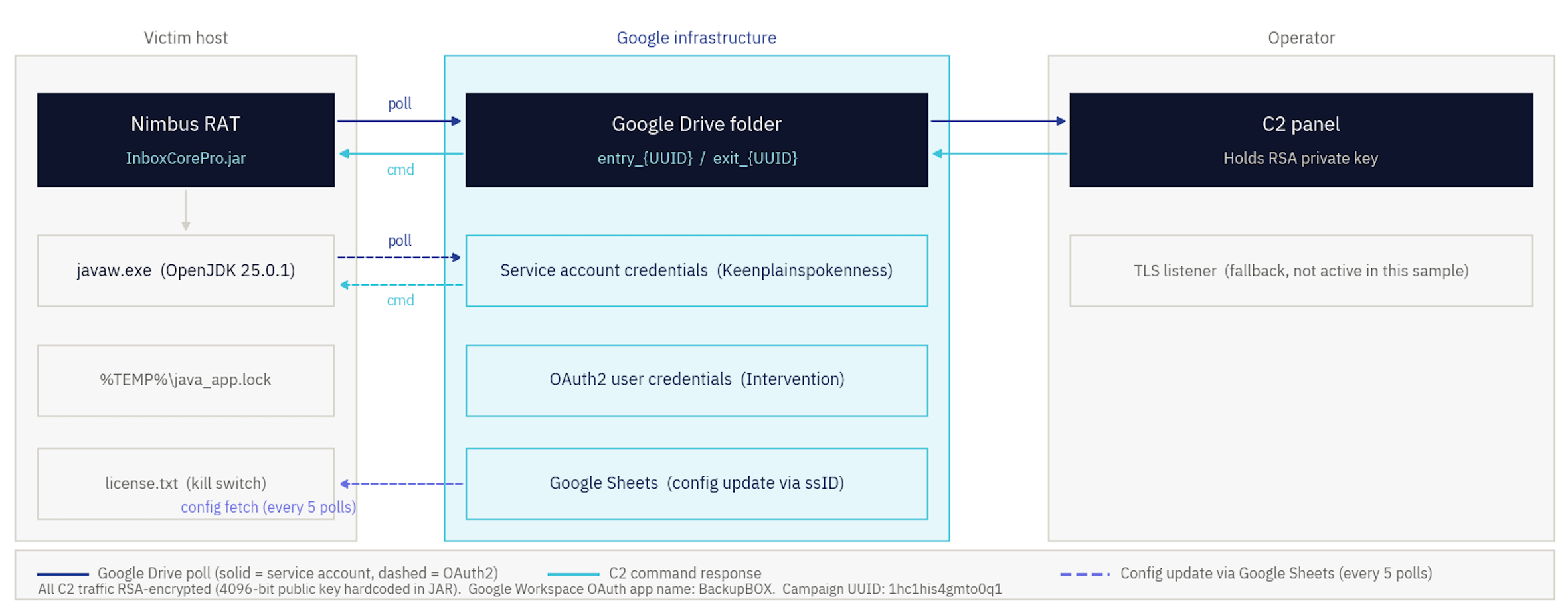
C2 architecture showing three channel types, configured in priority order
Three C2 channel types are implemented, selected based on the decrypted config:
| Channel | Authentication | Normal poll interval | Wakeup poll interval |
|---|---|---|---|
Google Drive, Service Account (Keenplainspokenness) |
JSON key via ServiceAccountCredentials | 45-75 seconds | 4-8 seconds |
Google Drive, OAuth2 User (Intervention) |
client_id + client_secret + refresh_token | 30-60 seconds | 4-8 seconds |
Direct TLS Socket (phonemicsVandalism) |
None (certificate validation disabled via a dummy X509TrustManager) | 45-75 seconds | 4-8 seconds |
The Google Drive channel polls a command file named entry_{campaignUUID} in a configured Drive folder. Responses are written to exit_{campaignUUID}. Config updates are staged with the newconfig_ prefix. The OAuth2 channel (Intervention) uses a DriveFactory that caches authenticated Drive instances in a ConcurrentHashMap, along with a Retryer allowing up to 7 attempts with exponential backoff and full jitter to handle Google API rate limiting. In the sample TRU analyzed, the TLS socket channel wasn't configured, confirming Google Drive as the only active C2 channel for this campaign.
A "wakeup mode" is implemented: the threat actor can send a command that drops the polling interval from 45-75 seconds down to 4-8 seconds across all active channels simultaneously, for up to 10 minutes, enabling near real-time interaction during hands-on activity.
All C2 traffic is encrypted using a hardcoded 4096-bit RSA public key embedded in the JAR. Large messages are split into fixed-size chunks, each processed with RSA independently. Commands sent to the implant are generated by the threat actor using the corresponding private key, ensuring the implant only processes configs originating from the actor. Data the implant sends out is encrypted with the public key in fixed-size chunks, meaning only whoever holds the private key can decrypt the responses.
Detection implications: blocking docs.google.com or googleapis.com isn't practical in any environment already running Google Workspace. Detection must instead rely on behavioral signals at the process level — for example, javaw.exe running a JAR that isn't on the approved Java application list while simultaneously calling out to a Google Drive API endpoint, or an OAuth consent grant in the Google Workspace audit log for an application named BackupBOX with Drive scope.
Full Command Table for Nimbus RAT
Every command is dispatched through the command handler in Splendrousstile.SomewhatJerky, with a 598-second timeout per command.
| Category | Command | Details |
|---|---|---|
| Shell | cmd | Runs an arbitrary command via cmd.exe /c |
| Shell | r | Direct execution via ProcessBuilder, bypassing cmd.exe, 30-second timeout |
| Shell | exec | Fire-and-forget, stdout/stderr redirected to NUL |
| Filesystem | ls / dir | Lists directory contents with timestamps and size |
| Filesystem | type | Reads file contents by path |
| Filesystem | del | Deletes a file |
| Filesystem | rm | Recursively deletes a directory |
| Filesystem | cd | Changes working directory |
| Filesystem | tree | Recursively walks directory tree, up to 5,000 entries |
| Filesystem | find | Searches files by regex, up to 5,000 results |
| Filesystem | za / tz / z | Zips a directory, zips a single file inline, extracts a zip (optionally password-protected) |
| Credential theft | lf | Displays a fake Windows Security dialog using Java Swing |
| Credential theft | cf | Calls CredUIPromptForCredentialsW directly via JNA |
| Recon | (ipconfig equivalent) | Full network adapter info via GetNetworkParams + GetAdaptersInfo (JNA) |
| Recon | (sysinfo equivalent) | OS, Java version, user, memory, environment variables, last reboot |
| Recon | (net time equivalent) | Domain, USERDNSDOMAIN, group membership of the current user |
| Registry | reg query/add/delete | Full access to HKLM, HKCU, HKCR, HKU, HKCC via Advapi32Util |
| Screenshot | screenshot | Full-screen PNG capture via Robot.createScreenCapture(), zipped then uploaded |
| Second-stage | jc / jcb | Compiles and runs Java source in memory (blocking/non-blocking) via javax.tools |
| C2 management | config update | Decrypts and applies a new RSA-encrypted config blob |
| C2 management | ping | Tests connectivity to all configured C2 channels |
| Self-destruct | self | timeout /t 2 & RD /S /Q {jdkPath} then System.exit(0) |
Two Credential-Theft Mechanisms
The lf command renders a Java Swing JFrame mimicking a genuine Windows Security dialog. Confirmed UI elements include the title "Windows Security," the header "Sign in," the prompt "Enter your credentials," a username field pre-filled in DOMAIN\username format, a password field, and a "Remember my credentials" checkbox. The dialog always requires the password to be entered twice: the first attempt returns a fake "Password is incorrect. Please try again." error while silently logging the input, and the second attempt closes the dialog. Both entries are sent back to the threat actor. The dialog uses User32.AttachThreadInput and SetForegroundWindow to seize keyboard focus from the current window.
The cf command calls the genuine CredUIPromptForCredentialsW API directly via a JNA binding into credui.dll. Confirmed dialog text: caption "Login," message "Enter your credentials." An incorrect first attempt triggers a MessageBoxA with a fake password-error message. One retry is allowed before the dialog closes. It auto-closes after roughly 10 minutes via User32.PostMessage(WM_CLOSE). An invisible, always-on-top JFrame is created to seize foreground focus before the native prompt is invoked.
The reasoning behind requiring two password entries is worth noting for defenders: it meaningfully increases the odds of capturing the correct password, since users commonly mistype on the first attempt when distracted or typing quickly, and the fake "error" gives them a plausible reason to try again.
In-Memory Java Execution: jc and jcb
The jc and jcb commands implement a full in-memory Java plugin loader through the class DomitianUndrapedEpigrammatize.MutagenInchoateness. The threat actor sends Base64-encoded Java source code. Lines beginning with /// https:// at the start of the source specify dependency JAR URLs to download into %TEMP%\libs\ (reused on subsequent calls if already present).
The source is compiled via javax.tools.JavaCompiler without writing anything to disk: the compiled bytecode is held in memory through a custom JavaClassObject, loaded into a HashMap-backed MemoryClassLoader, and the resulting class is instantiated via reflection by calling its start() method. The jc command is blocking and returns results immediately, while jcb runs in a background thread and returns right away.
This mechanism lets the operator deploy entirely new capability after compromise without dropping any additional files to disk, effectively neutralizing file-hash- or signature-based controls for any second-stage logic delivered this way.
Persistence: An Operator Decision, Not a RAT Feature
Nimbus RAT itself doesn't install persistence automatically. In this incident, persistence was manually pre-staged through the Pastebin checklist (Startup folder path) and the InboxCorePro.reg file. If the host is isolated before the threat actor actively sends a persistence command over C2, the infection doesn't survive a reboot.
Separating persistence from the RAT binary means the persistence mechanism can change from campaign to campaign without modifying the JAR file itself, reducing the value of hash-based detection for this particular aspect.
Second-Stage Tool: InboxSetupPro
While enumerating the threat actor's Google Drive infrastructure, TRU discovered a second-stage tool deployed after Nimbus RAT on at least one confirmed victim (belonging to a different organization than the legal-industry customer in the primary incident). TRU named this tool InboxSetupPro based on its install path C:\ProgramData\InboxSetupPro\; it's distinct from Nimbus RAT and uses OneDrive rather than Google Drive for exfiltration.
A config file retrieved from the threat actor's Drive contained the following targeting pattern:
local://C:/Users/<REDACTED>/AppData/roaming/signal/attachments.noindex/**
This pattern targets the local attachment store of Signal Desktop directly — the cache containing every file, image, and document shared across all of a victim's Signal conversations. The recursive glob (/**) captures every attachment across every conversation for that specific victim.
TRU also observed a 1.13 GB ZIP archive in the same Drive folder, named after the victim's email address, matching an exfiltrated Outlook OST (offline mailbox) file.
Taken together, the config file, targeting pattern, and archive point to a post-compromise objective that goes well beyond initial access: communications data from both an encrypted channel (Signal) and a traditional email channel (Outlook) were deliberately targeted.
MITRE ATT&CK Mapping
| Tactic | Technique ID | Technique Name | Implementation in this campaign |
|---|---|---|---|
| Reconnaissance | T1589.002 | Gather Victim Identity Information: Email Addresses | Collecting victim email addresses for use in email bombing |
| Resource Development | T1583.001 | Acquire Infrastructure: Domains | Newly registered, multilingual .top domain cluster |
| Resource Development | T1585.002 | Establish Accounts: Email Accounts | Throwaway *.onmicrosoft.com tenants used to send Teams messages |
| Resource Development | T1586.002 | Compromise Accounts: Email Accounts | Compromised legitimate M365 tenant used to host the payload |
| Initial Access | T1566.004 | Phishing: Spearphishing Voice | Vishing over Microsoft Teams impersonating IT helpdesk |
| Execution | T1204.002 | User Execution: Malicious File | Victim manually extracts and runs InboxCorePro.jar following the Pastebin checklist |
| Execution | T1059.003 | Command and Scripting Interpreter: Windows Command Shell | Nimbus RAT's cmd/r/exec commands run via cmd.exe and ProcessBuilder |
| Execution | T1620 | Reflective Code Loading | jc/jcb commands compile and run Java code in memory without dropping files |
| Persistence | T1547.001 | Boot or Logon Autostart Execution: Registry Run Keys / Startup Folder | InboxCorePro.reg and a shortcut in the Startup folder |
| Defense Evasion | T1027 | Obfuscated Files or Information | 8 custom packages named with random English words |
| Defense Evasion | T1140 | Deobfuscate/Decode Files or Information | Config blob decrypted at runtime with RSA 4096-bit |
| Defense Evasion | T1218 | System Binary Proxy Execution | Legitimate, Oracle-signed javaw.exe runs malicious logic contained in the JAR |
| Defense Evasion | T1620 | Reflective Code Loading | (see Execution) |
| Command and Control | T1219.002 | Remote Access Software | Quick Assist used as the initial remote-access channel |
| Command and Control | T1102.002 | Web Service: Bidirectional Communication | Google Drive/Sheets used as the primary C2 channel |
| Command and Control | T1071.001 | Application Layer Protocol: Web Protocols | C2 traffic over HTTPS to the Google API endpoint |
| Command and Control | T1573.002 | Encrypted Channel: Asymmetric Cryptography | RSA 4096-bit encryption for all C2 traffic |
| Collection | T1056.002 | Input Capture: GUI Input Capture | Fake lf/cf dialogs used to steal credentials |
| Collection | T1113 | Screen Capture | Screenshot command |
| Collection | T1005 | Data from Local System | type/ls/find commands used to read local files |
| Collection | T1213 | Data from Information Repositories | InboxSetupPro targets Signal attachments and Outlook OST |
| Collection | T1560 | Archive Collected Data | za/tz/z commands |
| Discovery | T1082 | System Information Discovery | sysinfo-equivalent command |
| Discovery | T1016 | System Network Configuration Discovery | ipconfig-equivalent command |
| Discovery | T1033 | System Owner/User Discovery | net time /domain, group membership |
| Exfiltration | T1567.002 | Exfiltration to Cloud Storage | Exfiltration via Google Drive (Nimbus RAT) and OneDrive (InboxSetupPro) |
Detection
Email Bombing: The Earliest Signal
This is the earliest detection point in the entire kill chain, occurring before the first Teams contact even happens. A spike of 20+ emails/minute from many different sender domains, with content resembling subscription/account confirmations, is a highly reliable signal.
index=o365 sourcetype="o365:management:activity" Operation="MailItemsAccessed" OR Operation="Receive"
| bin _time span=1m
| stats count as email_count dc(SenderAddress) as unique_senders dc(SenderDomain) as unique_domains by UserId, _time
| where email_count >= 20 AND unique_domains >= 10
| sort -email_count
External Teams Messages From Throwaway Tenants
Based on the pattern of 65% of senders coming from *.onmicrosoft.com, plus usernames/Federation Brand Names following an IT/helpdesk theme.
index=o365 sourcetype="o365:management:activity" Operation="MessageSent" Workload="MicrosoftTeams"
| eval sender_domain=lower(mvindex(split(SenderUserId, "@"), 1))
| where like(sender_domain, "%.onmicrosoft.com")
| eval suspicious_name=if(match(lower(SenderUserId),
    "helpdesk|itsupport|it_assistance|it\.support|admin|cloudsupport|service|infratech|cloudops|scan"), 1, 0)
| where suspicious_name=1
| table _time, SenderUserId, ParticipantsInfo, sender_domain
javaw.exe Running a JAR From an Unusual Path, Parented by explorer.exe
This is the central detection for Nimbus RAT itself, and it holds up even as IOC hashes or filenames change between campaigns.
| tstats count from datamodel=Endpoint.Processes
    where Processes.process_name="javaw.exe" Processes.process="*-jar*"
    by Processes.process, Processes.parent_process_name, Processes.process_path,
       Processes.dest, Processes.user, _time
| where Processes.parent_process_name="explorer.exe"
| where NOT match(Processes.process_path, "(?i)\\\\Program Files\\\\Java\\\\|\\\\Program Files \\(x86\\)\\\\Java\\\\")
| sort -_time
regedit.exe Importing a .reg File From ProgramData, Near javaw.exe Execution
| tstats count from datamodel=Endpoint.Processes
    where Processes.process_name="regedit.exe" Processes.process="*ProgramData*.reg*"
    by Processes.process, Processes.dest, Processes.user, _time
| sort -_time
Combine both queries above into a single correlation search with a 5-minute time window to reduce false positives and increase alert confidence.
Host-Based Indicator: java_app.lock
| tstats count from datamodel=Endpoint.Filesystem
    where Endpoint.Filesystem.file_name="java_app.lock"
    AND Endpoint.Filesystem.file_path="*\\Temp\\*"
    by Endpoint.Filesystem.dest, Endpoint.Filesystem.file_path, _time
Google Workspace: OAuth Grant for the "BackupBOX" Application
For organizations using Google Workspace, monitoring OAuth consent grants with Drive scope for an application named BackupBOX is a near-certain indicator of compromise.
index=gws sourcetype="gws:reports:activity" eventName="Authorize"
| search application_name="BackupBOX" OR scope="*drive*"
| table _time, actor_email, application_name, scope, client_id
Network: Proxy Logs With Process Attribution
Since blocking googleapis.com/docs.google.com isn't feasible in a Google Workspace environment, alerting needs to rely on the initiating process instead.
index=proxy dest_host IN ("*.googleapis.com", "docs.google.com", "drive.google.com")
| search src_process IN ("javaw.exe") OR src_process_path="*ProgramData*"
| table _time, src_ip, user, dest_host, src_process, src_process_path
QuickAssist.exe Execution (Sigma, Convertible to SPL)
Refer to the standard Sigma rule for Quick Assist launch behavior and DNS queries to remoteassistance.support.services.microsoft.com. This rule has a high false-positive rate for organizations that use Quick Assist legitimately, so it needs baselining before alerting — but it remains a useful correlation signal when combined with an email-bombing alert occurring earlier the same day.
Assessment
The most notable thing about this campaign isn't Nimbus RAT itself — technically, the malware isn't groundbreaking; a Java RAT with cloud-storage C2 is a pattern that's been documented since 2025. What's notable is the speed and the degree of standardization of the initial-access vector.
Twenty minutes from first Teams contact to RAT execution is an extremely narrow response window for any SOC relying on traditional alert triage. If detection only fires at the point javaw.exe executes, most of the available response time has already been spent. The 90-minute email bombing window that precedes it is the real, and arguably only, meaningful opportunity to intervene before a human enters the kill chain.
The figures — 1,540 events across 172 customers over 12 months, with an 8x volume spike in February 2026 — indicate this isn't the work of a small group operating manually. The degree of infrastructure reuse (a throwaway tenant appearing across 10 different customers, 6 source IPs appearing across 10+ customers) points to automated tooling and an affiliate network operating at scale.
The link to BlackSuit/Black Basta via Rapid7 places this campaign precisely where it belongs in the ransomware economy: this is initial access, not the end goal. Organizations compromised via Nimbus RAT should assume the access has been, or will be, sold to a ransomware affiliate, and the shift from "we blocked the RAT" to "we've fully eliminated the access" requires much deeper review — including checking whether credentials were captured via the lf/cf commands, since these two commands operate independently of the RAT itself and may have succeeded before the RAT was ever detected.
The mindset shift required for defense: every platform in this kill chain (Teams, SharePoint, Quick Assist, Pastebin, Google Drive) is a legitimate service that can't be blocked wholesale. Defense has to shift from "block the bad service" to "detect abnormal behavior of a good service" — which requires correlating multiple log sources (mail flow, Teams audit logs, EDR process trees, browser history, cloud API audit logs) that many SOCs today aren't doing well.
Recommendations
Disable communication with trial Microsoft Teams tenants (*.onmicrosoft.com) in the Teams admin center. This is the single highest-impact control, blocking 65% of the vector observed in TRU's dataset. Configure Teams external access to require manual approval before accepting messages from outside organizations.
Deploy an alert for mailbox volume spikes (≥20 emails/minute from ≥10 different domains within 1 minute) on the mail gateway or via the O365 management activity log. This is the earliest and lowest-false-positive signal available.
Disable Quick Assist via policy on endpoints with no legitimate IT-support need. Where Quick Assist is still required, restrict connections to pre-approved helpdesk accounts only.
Deploy the SPL detections for javaw.exe running a JAR from an unusual path with explorer.exe as parent, regedit.exe importing a .reg file from ProgramData, and the appearance of java_app.lock in %TEMP%. These signals operate independently of file hashes, giving them a chance to catch future Nimbus RAT variants.
For organizations using Google Workspace, audit OAuth application grants with Drive scope, particularly for an application named BackupBOX or any unfamiliar application name. For Microsoft 365, do the same for OneDrive/Graph permission grants related to the InboxSetupPro pattern.
Update security awareness training to emphasize that a genuine internal IT helpdesk will never reach out via an external Teams account, and that a sequence of "inbox gets spammed, then someone claiming to be IT reaches out to help" is a well-documented social-engineering pattern. Instruct users, in this situation, to call back a previously known IT helpdesk number before taking any action.
Build a correlation rule linking email-bombing alerts with external Teams message alerts within a 2-hour window for the same user, producing a composite alert with higher confidence than either signal alone.
Review and apply application control policy to block javaw.exe (and other Java runtimes) from executing out of C:\ProgramData\ or other user-writable directories outside the standard Java install path.
Add Pastebin to a watchlist for browser activity occurring immediately after an external Teams message, particularly during business hours if Pastebin isn't an approved business tool.
If a host is confirmed infected with Nimbus RAT, don't just delete license.txt — the kill switch only prevents relaunch after reboot; it isn't full remediation. Terminate all javaw.exe processes tied to the JAR, delete C:\ProgramData\InboxCorePro\ entirely, remove the Startup folder entry, and evaluate re-imaging the host, since the operator may have established additional persistence via C2 that hasn't yet been observed. Also reset credentials for the affected user, since the lf/cf commands may have captured the password before detection occurred.
Indicators of Compromise
# File Hash - SHA256
9E5B1E10AD6904D3F5B48D38470CD57263974640A27D13CF793EF026D3D6B886   # InboxCorePro.zip (payload archive)
91E523A46F3BB860AC2E5800B7E1EC89D75A2408410B9CD25EEBC17C8D7A92BC   # InboxCorePro.jar (Nimbus RAT payload)
99813F3D0625E880158C68039C0E2FBF488DB0BE3DB77CD1CE6D382644193F0E   # javaw.exe (legitimate Oracle OpenJDK 25.0.1, bundled)

# Network pattern (defanged)
pastebin[.]com/G6jA0PLU    # Instruction checklist (4 lines: download URL / persistence path / extraction dir / archive name)

# Host artifact
C:\ProgramData\InboxCorePro\          # Nimbus RAT install directory
C:\ProgramData\InboxSetupPro\         # Second-stage tool install directory
%TEMP%\java_app.lock                  # Single-instance lock file, host indicator of Nimbus RAT init
%TEMP%\libs\                          # Dependency JAR cache for jc/jcb commands
InboxCorePro.reg                      # Registry import file used to pre-stage persistence
license.txt                           # Kill switch file; its absence causes the malware to self-exit

# Cloud / SaaS artifact
BackupBOX                             # Internal malware name; may appear in OAuth app grants (Google Workspace, Drive scope)
1hc1his4gmto0q1                       # Hardcoded campaign UUID in Nimbus RAT config
entry_{campaignUUID} / exit_{campaignUUID} / newconfig_*   # Naming pattern for C2 command files on Google Drive

# Behavioral IOC
javaw.exe -jar <path> with parent process explorer.exe, path outside Program Files\Java
regedit.exe importing a .reg file from C:\ProgramData immediately before/after javaw.exe execution
Mailbox receiving >20 emails/minute from >=10 different sender domains within the same minute
External Teams message from *.onmicrosoft.com with username/brand name following a helpdesk/IT/cloudops theme
Visit to pastebin[.]com immediately after an external Teams message from an account with no prior communication history
Note: The full IOC list (including .top domains, source IPs, and throwaway tenant names) is published by eSentire on their dedicated GitHub repository. Because the naming convention for custom packages (BlackStatelessness, Goferindubitably, etc.) and the campaign UUID may change between deployments, prioritize the behavioral detections above over hash matching alone.
References:
Nimbus RAT: How Threat Actors Are Abusing Microsoft Teams and Google Drive to Deploy a Java RAT — eSentire Threat Response Unit (TRU)
New Microsoft Teams Vishing Attack Exploits Quick Assist to Deploy Stealthy Malware — Daily CyberSecurity / Do Son
BlackSuit Continues Social Engineering Attacks in Wake of Black Basta's Internal Conflict — Rapid7
Threat actors misusing Quick Assist in social engineering attacks leading to ransomware — Microsoft Security Blog
Storm-1811, Group G1046 — MITRE ATT&CK
Black Basta's playbook lives on as former affiliates launch fast-scale intrusion campaign — CyberScoop / ReliaQuest
3AM Ransomware Adopts Email Bombing, Vishing Combo Attack — Dark Reading