PamDOORa: The Linux PAM Backdoor That Turns SSH Into a Silent Trap

Executive Summary
A post-exploitation backdoor for Linux called PamDOORa surfaced on a Russian cybercrime forum in May 2026, offered at $1,600 — later dropped to $900. The tool embeds itself inside the Linux Pluggable Authentication Module (PAM) stack, giving attackers persistent SSH access via a hidden "magic password" and specific TCP port combination, while silently capturing the credentials of every legitimate user who logs in. Simultaneously, it wipes its own footprints from authentication logs — lastlog, btmp, utmp, and wtmp — meaning that incident response teams who SSH in to investigate a compromised server may have their own credentials captured without leaving any trace.
PamDOORa requires root-level access to deploy but represents a meaningful step up from existing open-source PAM abuse tools. The integration of credential harvesting, anti-forensics, anti-debugging, and a builder pipeline puts it closer to operator-grade implant than a proof-of-concept script.
Priority action: Audit PAM configuration files and loaded .so modules across all internet-facing Linux servers, and enable file integrity monitoring on /etc/pam.d/ and /lib/security/.
Background: How Linux PAM Works
Linux PAM (Pluggable Authentication Modules) is the central authentication engine on most Linux distributions. Rather than hardcoding authentication logic into each application, PAM provides a modular, policy-driven framework defined in /etc/pam.d/, where each file governs how a specific service handles authentication, session management, and password policies.
/etc/pam.d/
├── sshd          # SSH authentication policy
├── sudo          # sudo authentication policy
├── login         # console login policy
└── common-auth   # shared auth policy (included by others)
When a user connects via SSH, the flow looks like this:
User → sshd → PAM stack (/etc/pam.d/sshd) → pam_*.so modules → Grant/Deny
Each line in a PAM config file specifies:
A module type (
auth,account,password,session)A control flag (
required,sufficient,optional,requisite)A module path (
pam_unix.so,pam_exec.so, etc.)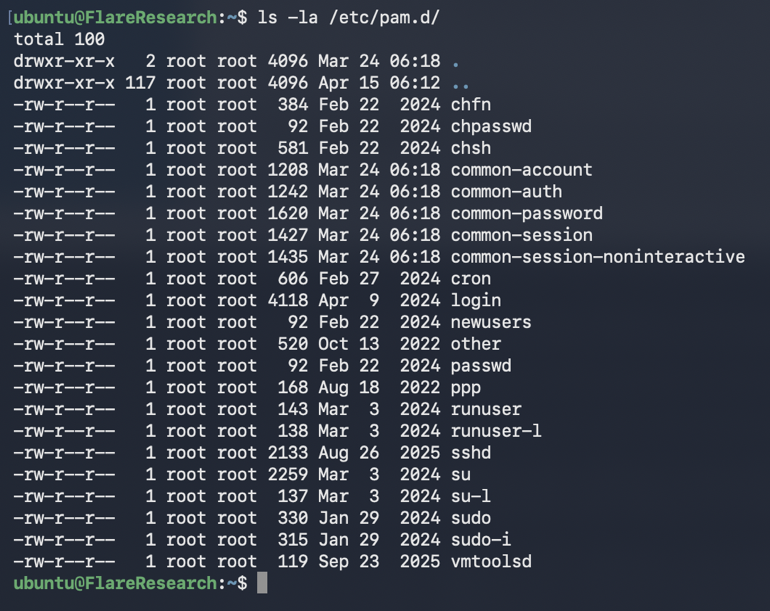
The sufficient control flag is particularly dangerous: if a module with this flag returns success, PAM immediately grants access without running subsequent modules. Attackers exploit this to inject a backdoor that authenticates before the real password check ever happens.
Because many PAM config files use @include common-auth, a single modification to /etc/pam.d/common-auth propagates across SSH, sudo, and console login simultaneously.
How Attackers Abuse PAM
PAM abuse techniques are well-documented, but infrequently detected because most organizations don't monitor PAM configurations proactively. The common patterns:
1. Inserting a sufficient flag module early in the auth chain
# Malicious insertion in /etc/pam.d/sshd
auth sufficient /lib/security/pam_backdoor.so
auth required pam_unix.so
The backdoor module runs first. If it sees the magic password, it returns PAM_SUCCESS with sufficient — the real password check is skipped entirely.
2. Abusing pam_exec.so for credential harvesting
auth optional pam_exec.so /usr/local/bin/capture.sh
pam_exec.so is a legitimate module that executes arbitrary scripts during authentication. Attacker-controlled scripts can log PAM_AUTHTOK (the cleartext password passed through the PAM stack) to a file.
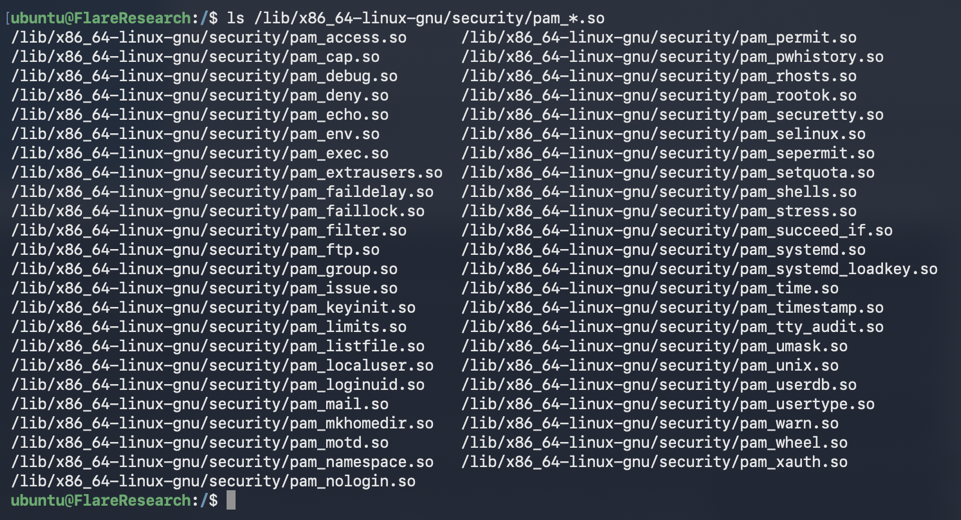
3. Dropping a custom pam_*.so module A custom shared library placed in /lib/security/ or /usr/lib/x86_64-linux-gnu/security/ blends with legitimate modules visually. It only activates during authentication events — far stealthier than cron jobs or systemd services that show up in process listings.
PamDOORa: Technical Analysis
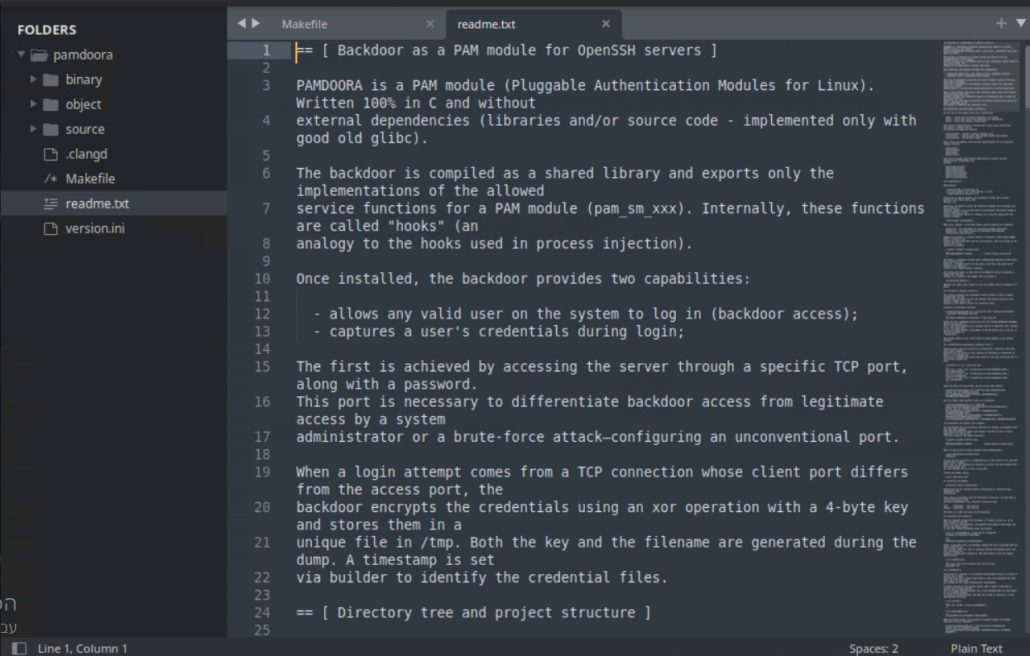
PamDOORa combines all three techniques above into a single, cohesive implant. Based on analysis of the dark web advertisement and shared screenshots by Flare Research, here is what is known:
Core Capabilities
| Capability | Description |
|---|---|
| Persistent SSH access | Magic password + specific TCP port combination triggers PAM auth bypass |
| Credential harvesting | Captures plaintext passwords of all authenticating users at the PAM layer — before any application logging |
| Anti-forensics | Manipulates lastlog, btmp, utmp, wtmp to erase attacker login records |
| Anti-debugging | Includes protections to complicate dynamic analysis |
| Network-aware triggers | Authentication behavior changes based on connection source or port |
| Builder pipeline | Modular build system suggesting the author intended operator-grade deployment |
Architecture
PamDOORa injects two components into a compromised Linux system:
A modified PAM configuration in
/etc/pam.d/sshd(orcommon-auth) referencing the malicious moduleA custom
.solibrary placed inside the legitimate PAM module directory The credential capture occurs inside the PAM stack itself, meaning passwords are intercepted beforesshdlogs anything — bypassingauth.log,syslog, and any application-layer SIEM forwarding.
The Anti-Forensics Problem for IR Teams
This is the detail that should concern incident responders most. When an IR team detects a compromised server and SSHs in to investigate:
The backdoor module intercepts their SSH credentials at the PAM layer
Their successful login is removed from
wtmp,btmp, andlastlogFrom the attacker's perspective: IR team credentials are harvested, their access is invisible, and they are now a persistence mechanism themselves The attacker can then use the harvested IR team credentials to move laterally to other systems the IR team has access to — jump servers, SIEM, ticketing systems, or their own workstations.
Attack Flow
PamDOORa is a post-exploitation tool. The attacker is responsible for achieving initial access and escalating to root separately.
[Phase 1] Initial Compromise
    └─ Attacker gains root via any initial vector
       (CVE exploit, credential reuse, supply chain, etc.)

[Phase 2] PAM Backdoor Installation
    ├─ Drop malicious pam_*.so into /lib/security/
    ├─ Modify /etc/pam.d/sshd or common-auth
    └─ Configure magic password + trigger port

[Phase 3] Persistence Established
    ├─ SSH access via magic password (any username)
    └─ Legitimate users' passwords logged to attacker-controlled file

[Phase 4] Credential Harvesting (Passive, Ongoing)
    └─ Every subsequent SSH login captured at PAM layer
       before application-layer logging

[Phase 5] Anti-Forensics (Active, Per-Login)
    └─ Attacker's sessions erased from lastlog/wtmp/btmp/utmp

[Phase 6] IR Compromise (High-Risk Scenario)
    └─ IR team credentials captured during investigation
       → Lateral movement to IR team's other systems
Dark Web Context and Threat Actor Assessment
Flare Research identified the PamDOORa listing on a Russian-language cybercrime forum. Key observations:
Initial asking price: $1,600 for full source code
Revised price: $900 (~44% reduction), suggesting limited buyer interest or accelerated sale attempt
Seller profile: Five distinct personas across multiple forums using the same alias; the PamDOORa seller shows notably higher technical credibility than the others, with code snippets and technique descriptions consistent with known PAM abuse methods
Sale format: Source code (not compiled binary), allowing buyers to customize and rebuild Important caveat: Flare's analysis — and this report — is based on the dark web advertisement and shared screenshots, not a full source code review. The tool's actual reliability and sophistication may differ from claimed capabilities.
The price reduction is worth noting: it could indicate either that the tool has reliability issues that sophisticated buyers detected, or that the seller is attempting to widen the buyer pool by lowering the barrier. Either way, a $900 price point means the tool is accessible to mid-tier threat actors without significant financial resources.
MITRE ATT&CK Mapping
| Technique | ID | Description |
|---|---|---|
| Pluggable Authentication Modules | T1556.003 | PAM modification for authentication bypass and persistence |
| OS Credential Dumping | T1003 | Credential capture within PAM stack (plaintext passwords) |
| Indicator Removal on Host | T1070 | Manipulation of lastlog, btmp, utmp, wtmp |
| Valid Accounts | T1078 | Use of harvested credentials for continued access |
| Hijack Execution Flow: Dynamic Linker Hijacking | T1574.006 | Custom .so module injection into PAM library path |
| Impair Defenses | T1562 | Anti-debugging to complicate analysis |
Detection
1. File Integrity Monitoring (Priority: Critical)
The most effective control. Monitor for any changes to PAM configuration files and the PAM module directory:
# Critical paths to monitor
/etc/pam.d/
/etc/pam.d/sshd
/etc/pam.d/common-auth
/lib/security/
/usr/lib/x86_64-linux-gnu/security/
/usr/lib/security/
auditd rule:
-w /etc/pam.d/ -p wa -k pam_config_change
-w /lib/security/ -p wa -k pam_module_change
-w /usr/lib/x86_64-linux-gnu/security/ -p wa -k pam_module_change
2. Sigma Rule — New .so File in PAM Module Directory
title: New PAM Module File Created
id: a1b2c3d4-e5f6-7890-abcd-ef1234567890
status: experimental
description: Detects creation of a new .so file in PAM module directories, which may indicate PAM backdoor installation
references:
  - https://flare.io/learn/resources/blog/pamdoora-new-linux-pam-based-backdoor-sale-dark-web
author: FPT IS SOC Team
date: 2026/05/19
logsource:
  product: linux
  service: auditd
detection:
  selection:
    type: 'PATH'
    name|endswith: '.so'
    name|contains:
      - '/lib/security/'
      - '/usr/lib/x86_64-linux-gnu/security/'
      - '/usr/lib/security/'
    syscall:
      - 'openat'
      - 'creat'
  filter_package_manager:
    exe:
      - '/usr/bin/dpkg'
      - '/usr/bin/rpm'
      - '/usr/bin/apt'
  condition: selection and not filter_package_manager
falsepositives:
  - Legitimate package manager updates to PAM packages
  - Custom PAM module deployment via configuration management (Ansible, Puppet)
level: high
tags:
  - attack.persistence
  - attack.t1556.003
3. KQL — Microsoft Sentinel / Defender for Linux
Detect PAM configuration modification:
// Detect PAM config file writes (via Microsoft Defender for Linux / auditd integration)
SecurityEvent
| where EventID == 4663
| where ObjectName has_any ("/etc/pam.d/sshd", "/etc/pam.d/common-auth", "/etc/pam.d/")
| where AccessMask in ("0x2", "0x6")  // Write access
| where SubjectUserName !in ("root") // Adjust for your baseline
| project TimeGenerated, Computer, SubjectUserName, ObjectName, ProcessName
| sort by TimeGenerated desc
Or via Syslog (auditd forwarding to Sentinel):
Syslog
| where SyslogMessage contains "pam_config_change" or SyslogMessage contains "pam_module_change"
| extend FilePath = extract(@'name="([^"]+)"', 1, SyslogMessage)
| extend Process = extract(@'exe="([^"]+)"', 1, SyslogMessage)
| where Process !in ("/usr/bin/dpkg", "/usr/bin/apt", "/usr/bin/rpm")
| project TimeGenerated, Computer, FilePath, Process, SyslogMessage
| sort by TimeGenerated desc
4. Manual Audit Commands
Run on all internet-facing Linux servers:
# 1. List all .so files in PAM module directories and check against package manager
dpkg -l | grep libpam  # or: rpm -qa | grep pam
find /lib/security /usr/lib/x86_64-linux-gnu/security /usr/lib/security \
  -name "*.so" -newer /var/lib/dpkg/info -ls 2>/dev/null

# 2. Check for unexpected lines in PAM configs
grep -rE "(sufficient|pam_exec)" /etc/pam.d/ | grep -v "^#"

# 3. Verify .so checksums against package manager
dpkg -V libpam-modules 2>/dev/null | grep -v "^$"  # Debian/Ubuntu
rpm -Va pam 2>/dev/null | grep -v "^$"              # RHEL/CentOS

# 4. Check lastlog/wtmp integrity (compare with sshd logs)
last -F -n 20  # From wtmp
journalctl -u sshd --since "24 hours ago" | grep "Accepted"
# Discrepancies between these two sources indicate log tampering
5. SSH Log Cross-Validation
PamDOORa erases attacker sessions from wtmp/lastlog. If journalctl -u sshd shows accepted connections that don't appear in last output, that is a strong indicator of log tampering.
# Accepted logins per journalctl
journalctl -u sshd --since "7 days ago" | grep "Accepted" | awk '{print $11}' | sort | uniq -c

# Compare with wtmp
last -F | awk '{print $3}' | sort | uniq -c

# Significant discrepancy → investigate immediately
Expert Assessment
PAM-based backdoors are not a new category — open-source PoC tools have existed for years. What distinguishes PamDOORa is the packaging: credential harvesting, anti-forensics, anti-debugging, and a builder pipeline in a single modular implant. That combination shifts it from "script kiddie curiosity" to "operator considers it a deployable tool."
The credential harvesting aspect deserves particular attention. Most persistence mechanisms operate in isolation — they maintain access but don't actively expand the attacker's footprint during the persistence phase. PamDOORa passively accumulates credentials from every user who authenticates through the compromised system. In environments where multiple administrators share SSH access to the same servers, a single compromised host becomes a credential harvesting point for the entire admin team.
The IR-team-as-victim scenario is not hypothetical. An incident responder who connects to investigate a "potentially compromised" server via SSH — before the PAM backdoor has been identified — hands the attacker valid credentials to that responder's accounts elsewhere. Jump servers, SIEM, ticketing systems, and the responder's own workstation all become exposed. This is particularly relevant in environments where the same SSH key or password is reused across multiple systems.
From a detection standpoint, the weakness of PAM backdoors is that they require filesystem writes to install — a new .so file and a modified config. File integrity monitoring on /etc/pam.d/ and the PAM module directories, compared against package manager state, is a reliable detection mechanism if it's actually deployed. The challenge is that most organizations monitor Windows endpoints aggressively and treat Linux servers as secondary — especially standalone SSH servers in cloud environments where the assumption is "cloud provider handles security."
The $900 price point is notable. At that price, the tool is within reach of ransomware affiliates and mid-tier threat actors who operate against Southeast Asian targets, not just nation-state groups. Organizations running Linux-based infrastructure in Vietnam and the broader region — financial institutions, ISPs, cloud providers, manufacturing — should treat this as a realistic threat, not a theoretical one.
Recommendations
Audit PAM configurations and module inventory across all Linux servers immediately. Use the dpkg -V libpam-modules / rpm -Va pam commands above to identify .so files that have been modified outside of the package manager. Any unexplained file should be treated as a high-severity finding.
Enable file integrity monitoring on PAM paths. If you're running auditd, add the rules listed above. If you're forwarding to a SIEM (Sentinel, Splunk, Elastic), ensure auditd events from /etc/pam.d/ and /lib/security/ are captured and alerted. This is a one-time configuration change that permanently closes the visibility gap.
Disable SSH password authentication — require key-based auth only. PamDOORa's magic-password mechanism relies on password-based SSH. Enforcing PubkeyAuthentication yes and PasswordAuthentication no in sshd_config significantly raises the cost of exploitation.
Implement MFA for privileged SSH access. Tools like pam_google_authenticator or hardware token integration (YubiKey via pam_u2f) add a second factor that a stolen password alone cannot satisfy.
Cross-validate SSH logs during any incident response. Before connecting to a suspected compromised host, compare journalctl -u sshd output with last -F. Discrepancies are a red flag. If conducting IR on a host where PAM tampering is suspected, use out-of-band access (console, IPMI/iDRAC, cloud serial console) rather than SSH.
Monitor for new PAM module sales on dark web forums. PamDOORa's price reduction suggests it may be sold to multiple buyers. Threat exposure management platforms that track underground forums can provide early warning when tools like this reach a wider threat actor base.