
13 Minutes to Lose Money: How WindRelay Turned Android Phones into NFC Fraud Tools?
Overview
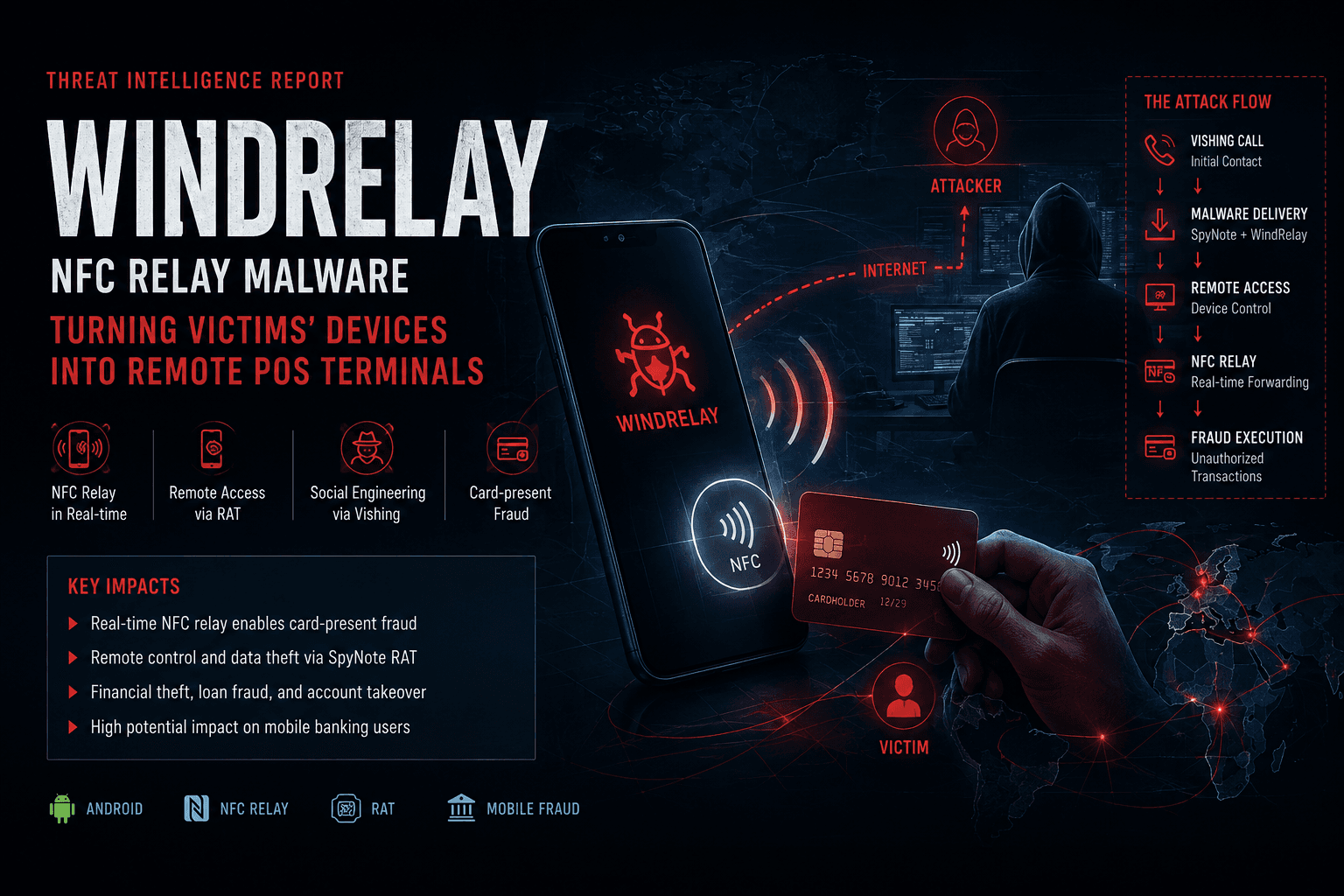
Did you know that it only takes 13 short minutes from the moment the victim picks up the phone to receive the support call from the "bank employee" until all the money in the account is evaporated and an online loan has just been activated in their name.
The scary thing about this fraud scenario is not the speed, but the "anomaly" that surpasses all familiar defense logic: The victim did not read the OTP code, the banking application did not alert screen sharing, and the device was not publicly accessed. All the attacker needs is to convince the victim to perform a seemingly completely harmless action: applying a physical ATM card to the back of his or her own phone.
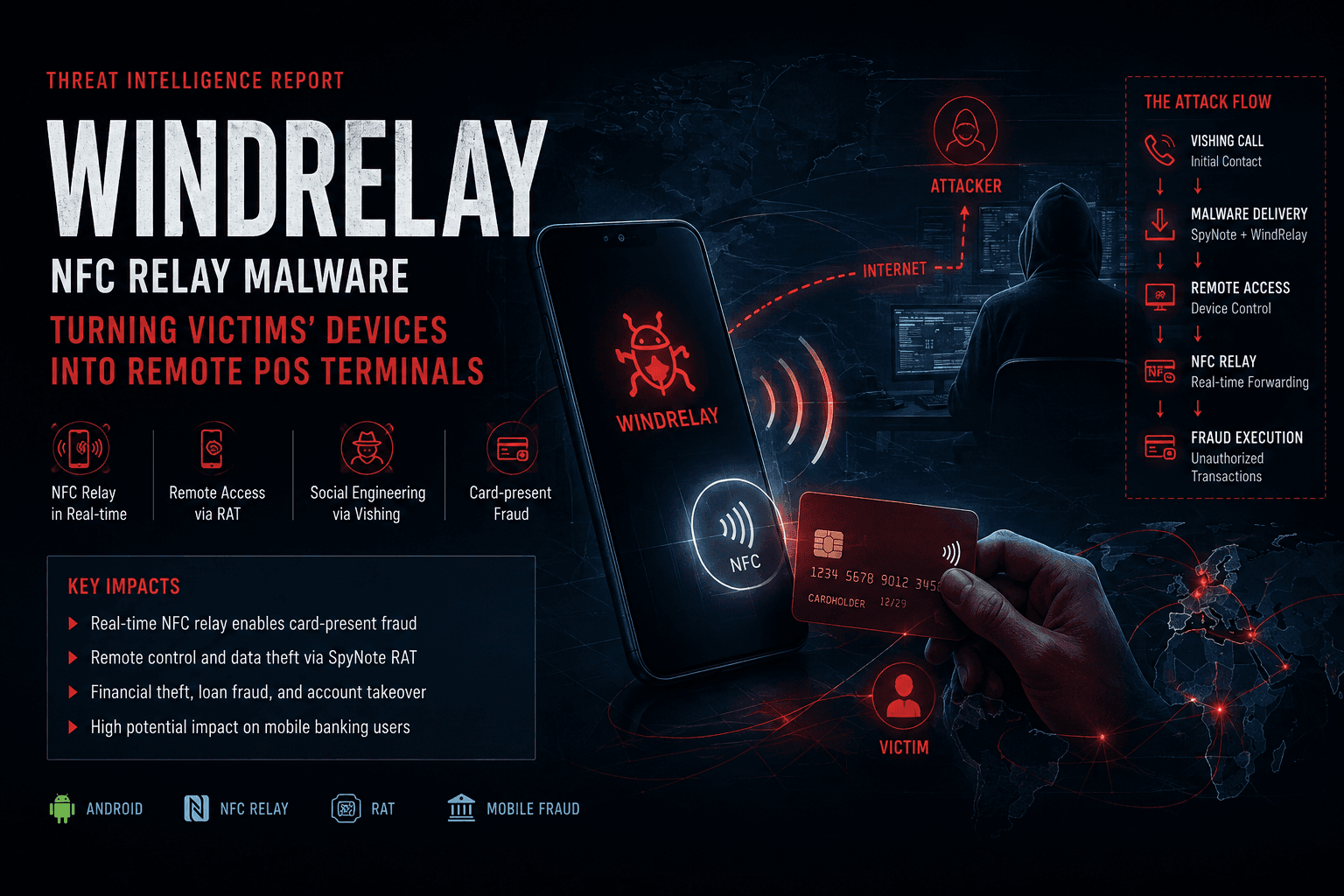
Using a sophisticated combination of a psychological manipulation script (Vishing), the SpyNote RAT remote control trojan and a completely new line of NFC Relay malware called WindRelay, the crooks turned the victim's phone into a real-time remote POS card swiping machine.
How does this combination work? How can chip card data from the back of a phone be turned into cash at an ATM hundreds of kilometers away in just a few seconds? Details of the 13-minute attack scenario and techniques to bypass banking security solutions will be analyzed in detail below.

Event Timeline
Unlike traditional mobile malware attacks, which take days to lie dormant (dwell time), the WindRelay campaign is tightly scripted and carried out continuously in real time:
| Timeline | Attacker Actions & Progression |
|---|---|
| 00:00 - 02:00 | Reconnaissance & Vishing Call: The attacker pre-collects the victim's name and phone number, then impersonates a bank employee calling to inform them of a security incident or a locked card. |
| 02:00 - 05:00 | SpyNote RAT Deployment: The attacker sends a link tricking the victim into sideloading an APK application. This app contains the SpyNote RAT but has its App Label changed to exactly match the victim's own name to eliminate any suspicion. |
| 05:00 - 08:00 | Silent WindRelay Sideloading: As soon as SpyNote establishes a remote control connection, the attacker stealthily installs a second malware — WindRelay — via Android's PackageInstaller without the victim's knowledge (bypassing the need for Screen Sharing). |
| 08:00 - 11:00 | NFC Card Interception: Using the pretext of "verifying the credit limit" or "reactivating the card," the attacker instructs the victim to tap their physical bank card against the back of their phone. |
| 11:00 - 13:00 | Fraud Execution: WindRelay streams the NFC data and the one-time transaction cryptogram back to the C2 server. The attacker feeds this data into an emulator device at a physical transaction point to withdraw cash from an ATM or make a POS payment, while simultaneously approving a digital loan on the victim's banking app. |
Attack Chain

Phase 1: Reconnaissance & preparation of "The Trap"
At this early stage, Fraudsters do not fish offshore or send mass spam messages, but instead they plan to select targets extremely carefully from leaked data on forums such as black markets, etc.
Here the attacker collects the victim's full name and phone number in advance. They use a malicious code generation tool (SpyNote Builder) to package the fraudulent application. The most special point: The crooks change the application display label (App Label) to the victim's correct name (For example, the installation file will display the application name as "Nguyen Van A" instead of an unfamiliar name).

Why do victims fall into the trap? When opening the installation link, the victim sees the application bearing his own name, so he is easily convinced that this is the "Personal Identification Profile Update Application" sent specifically to them by the bank.
Phase 2: Infiltrating & Gaining Remote Control
The essence of this stage is to establish a remote control "bridge" through a phishing call (Vishing).
At this point, the scammer pretends to be a bank support staff and calls directly: "Your account is having a security problem, you need to install a verification application right during this call." Under constant urging via phone, the victim clicked to download the APK file and granted basic permissions to the SpyNote RAT application. Here they are psychologically beating careless users.
Technical key point: Once installed, SpyNote RAT silently opens a reverse shell to the attacker's server. At this point, the crooks have officially taken control of the device remotely. However, they do not rush to perform obvious actions such as reading messages or scrolling through the screen to avoid making the victim suspicious.

Phase 3: Secretly Installing "Secret Weapon" WindRelay & Ne Security Radar
At this stage, the attacker's goal is to inject specialized NFC malware into the device without leaving any traces on the screen. While the phone call is still ongoing to attract the victim's attention, from the control server, the fraudster orders SpyNote RAT to automatically download and install the second malware - WindRelay through the hidden installation service of the Android system (PackageInstaller). The victim does not see any notifications or installation screens appear at all.

Surely you will wonder why it can get through bank protection software?
Current banking applications often detect fraud by finding apps that abuse Accessibility Service permissions or have Screen Sharing enabled. But, WindRelay does not use these two features. It runs completely in the background as a static system service. In addition, WindRelay also uses DUMP permission to check whether the system is running in an analysis/antivirus environment to hide itself.
Phase 4: Turn Your Phone Into an Underground NFC "Card Swipe Machine".
The attacker's task at this stage is to collect physical bank chip card data via short-range NFC waves.
The scammer gave instructions over the phone: "To complete account/loan limit verification, take out your physical ATM/Visa card and press the card firmly against the back of the phone for about 10 seconds."
As soon as the plastic card touches the back of the phone, the WindRelay malware immediately activates the NFC reader (android.permission.NFC). The victim's phone is now turned into a miniature POS card machine. WindRelay reads all encrypted data from the EMV chip on the card, including the One-Time Cryptogram. This is a dynamic code that normally only comes out when you swipe the card into the real POS machine.
Stage 5: Stream Data Via Internet & Swipe Cash Card Remotely
The essence of this is to shoot card data in real time (Real-time Relay) to withdraw money at a remote ATM or card swiping machine. The way the attacker performs will be shown through the following specific stages:
Stream Data: The moment the card touches the back of the phone, WindRelay packages the chip data and sends it super-fast over the Internet to the C2 server (using IPs like 185.100.87.116).
Card Emulation: In another place (possibly hundreds of kilometers away), the fraudster's accomplice holds a second Android phone with a card emulation application installed. This phone receives data from C2 and transmits NFC waves back out.
Withdrawal/Payment: The accomplice applies the second phone to an ATM that supports contactless withdrawal (Contactless ATM) or POS card machine. The ATM/POS machine recognizes this as a valid chip card transaction and releases cash or approves payment immediately.
Dual-Monetization: At the same time, on the victim's computer, the crook uses remote control of SpyNote RAT to access the Banking application and click to approve an online loan (Digital Loan), causing the victim to both lose all deposit money and incur a new loan debt.

Technical Details
Techniques to personalize SpyNote RAT with Builder Tool
Analysis of SpyNote samples obtained during the campaign revealed that the attacker used an improved Builder toolkit. This tool allows flexible customization of parameters before spreading:
Analysis of SpyNote samples obtained during the campaign revealed that the attacker used an improved Builder toolkit. This tool allows flexible customization of parameters before spreading:
App Label: Assign an identification string that matches the victim's name.
Package Name: Randomly changed to pass Static Signatures.
C2 Configuration: Embedded control server IP/Domain corresponding to each campaign.
Reconnaissance: Name + Phone Number ──► SpyNote Builder ──► Create APK containing App Label = "Victim Name"
WindRelay's access and evasion mechanisms
Unlike traditional Banking Trojans (such as Anatsa or SharkBot) that focus on Overlay Attack, WindRelay is designed to be minimalist and specialized for NFC Relay tasks:

android.permission.NFC: Plays the role of Card Reader (P2P / Reader Mode) reading EMV chip data.
android.permission.DUMP: Query memory and OS state to test sandbox/emulator.
Custom Protection Layer: Lock internal services with signature protection level to prevent other security applications on the same device from interfering or obtaining information.
Real-time NFC Relay architecture
The NFC Relay process between two devices is set up with extremely low latency (Latency < 500ms) to avoid EMV transaction timeouts:

Typical EMV transactions require the card to generate an dynamic cryptogram (ARQC). Because this cryptogram is only valid for a single transaction, the fraudster cannot "save it for later use" but must relay the data immediately while the victim is touching the card on the phone.
Indicators of Compromise - IOCs
Network Indicators (C2 IP Addresses)
88[.]86[.]124[.]114
185[.]100[.]87[.]116
185[.]100[.]87[.]223
213[.]218[.]160[.]48
File Hashes (WindRelay Samples - SHA-1)
852322e063872a025b711d5adf08531eac36a265
11f9fb29f2cc142e81c804f53599ae36282c95b3
50cf07b97ef999e9fc5c7efae19d0e5f39db39fa
850680506df7892d43b3382f0f89a06ef18837c7
1371b2b2da10ed178d26a7aad191634553f865ae
91e66d640b2a570bd83b408b51ebbf21e95e7469
39060c673aefa0902cb5fc787fa53364cad9ed6f
e2e836d16a1b50d4d091f7ae507b82c0a8e05376
MITRE ATT&CK For Mobile Mapping
| Phase | Technique ID | Technique Name | Details Applied in Campaign |
|---|---|---|---|
| Initial Access | T1456 | Drive-By Compromise | Luring the victim to download an APK file from an external link via vishing. |
| Execution | T1407 | User Execution | The victim manually clicks to install the SpyNote APK file. |
| Persistence | T1406 | Obfuscated Files | Changing the app label to match the victim's name; encrypting internal strings. |
| Defense Evasion | T1643 | Access Notifications / Permissions | Avoiding the use of Accessibility/Screen Share to bypass system scans. |
| Credential Access | T1412 | Local Data Staging | Reading EMV chip card data via NFC communication. |
| Command & Control | T1637 | Application Layer Protocol | Streaming NFC data via TCP/TLS protocol to the C2 server. |
| Impact | T1448 | Financial Theft | Executing ATM cash withdrawals, POS payments, and registering for digital loans. |
Expert Comments
NFC fraud attacks are not a new theory, but the WindRelay campaign has marked the technical maturity of cybercriminals by bringing NFC Relay into a real attack scenario (Live Operation).
The Shift from Passive Malware to Real-Time Coordinated Attacks
Previously, mobile banking malware mainly operated passively: collecting SMS OTP, stealing passwords via overlay screen (Overlay), or recording keystrokes (Keylogging). With WindRelay, attackers combine voice social engineering (Vishing) and real-time NFC Relay infrastructure. The call not only plays the role of seducing the installation but also serves as a control channel, urging the victim to perform a physical operation (touch the card) at the right time when the crook stands in front of the ATM or card swiping machine.
Leaking through current Banking security solutions
One worrying point is that current banking applications mainly focus on defending against:
Accessibility Service permissions are abused.
The screen is shared (Screen Sharing / Streaming) or controlled remotely (Remote Desktop tools such as TeamViewer, AnyDesk).
WindRelay does not use the above features at all. Stealthily installing WindRelay through a RAT that already has system permissions allows it to operate completely under the supervision layer of the banking security SDK.
Risk warning for the Vietnamese market
In Vietnam, the wave of contactless payments (Tap-to-Pay), online account opening (eKYC) and biometric authentication via NFC chips on CCCD/bank cards are growing very quickly.
The scenario "Impersonating a police agency/bank employee calling and asking people to apply their CCCD card or ATM card to the back of the phone to update biometric data/account verification" is a tangible risk. If criminal groups apply the WindRelay scenario in Vietnam, the financial consequences for users and the reputation of banking institutions will be extremely serious.
Recommendation
For Banks & Financial Institutions (BFSI)
Immediate (0-24h)
Update IOC indicators (IPs C2, SHA-1 Hashes) into the network security monitoring system (SIEM/Threat Intelligence Platform).
Review online loan disbursement transactions occurring in a very short period of time along with unusual Contactless card swipe transactions.
Short-term (1-7 days)
Cross-Channel Session Correlation: Implement detection logic on the Mobile Banking application if the device has a new application installation event (Sideloading Event) or is having a voice call (Active Phone Call) at the time of making a sensitive financial transaction or applying for a loan.
Apply cooling-off period: Set a period to delay online loan disbursement or require additional authentication (Step-up Authentication / OTP via independent channel) if mixed risk signals are detected on the device.
Long-term
- Promote communication for customers: Affirm that the Bank will NEVER ask customers to touch the ATM/NFC card on the phone during a support call to "recover account" or "verify loan".
For End Users
Absolutely do not sideload APK files from strange links: Never install applications from files sent via Zalo, Telegram or SMS from someone claiming to be a bank employee or police officer — even if the application file name displays your correct personal name.
Be wary of NFC operation requests: Do not touch the bank card or CCCD chip attached to the back of the phone following anyone's instructions via voice call.
Turn off the NFC feature when not in use: Only turn on NFC on your smartphone when actively making personal payment transactions.
References
Gone with the WindRelay: A New Malware Combo Behind a Growing Fraud Scheme | Group-IB Blog
13-Minute WindRelay Malware Attack Uses SpyNote RAT and NFC Relay Malware to Drain Victim Accounts
WindRelay Android Malware Turns Victims' Phones Into NFC Relays for Payment Fraud