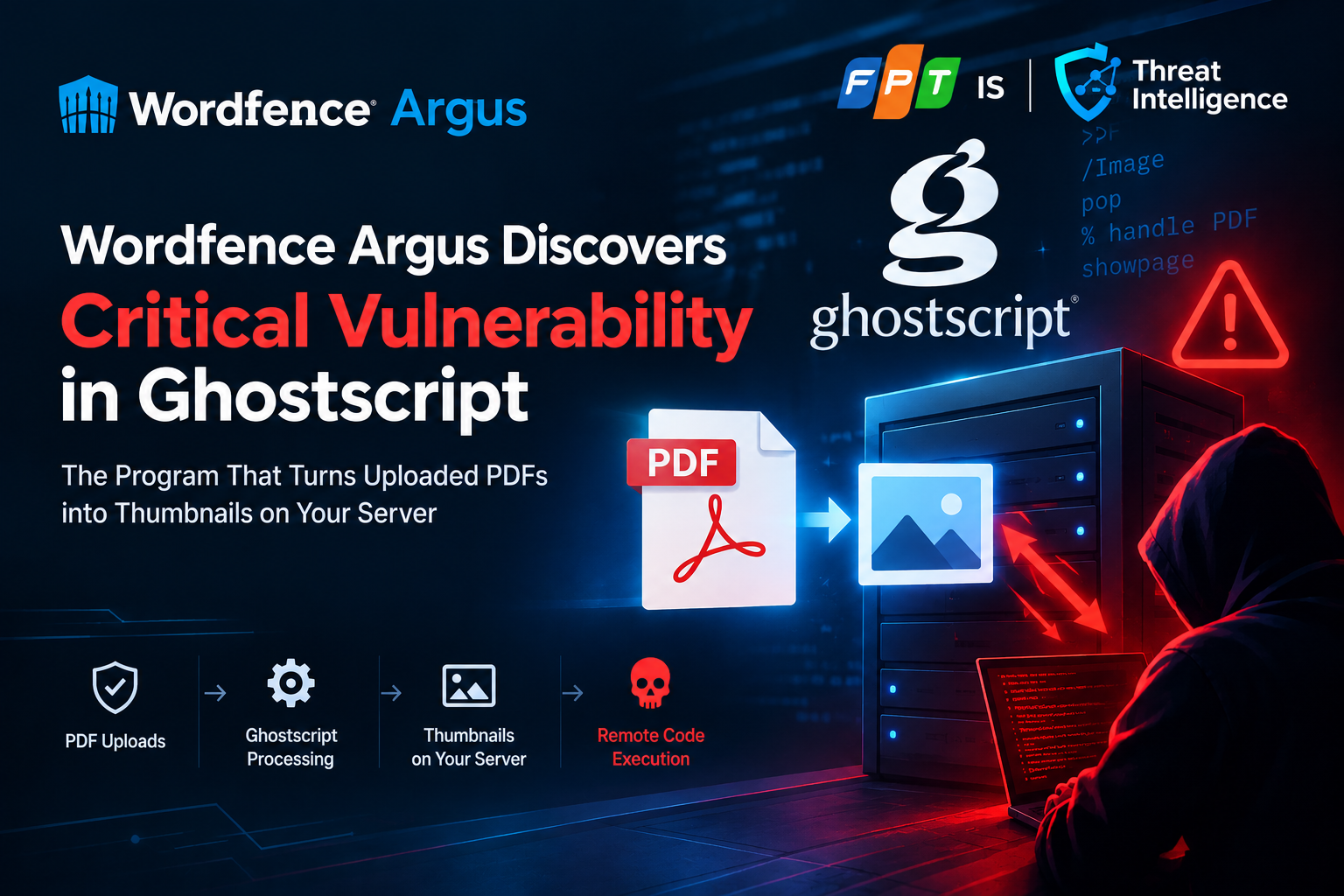
From PDF file uploads to server hijacking: An in-depth analysis of the Ghostscript vulnerability CVE-2026-39919
Introduction to Ghostscript
If you are running a WordPress website, a content management system (CMS) or an online application portal, chances are your server is running Ghostscript every day without your knowledge.
Developed since 1988 and currently maintained by Artifex Software, Ghostscript is an open source interpreter that serves as the backbone for handling the PostScript page description language and PDF file format. Technically, Ghostscript acts like a Raster Image Processor (RIP): it reads vector graphics commands, text and code inside PDF/PostScript documents to "draw" them into bitmap images (such as PNG, JPEG) that can be displayed on the screen or inserted into the printing system.
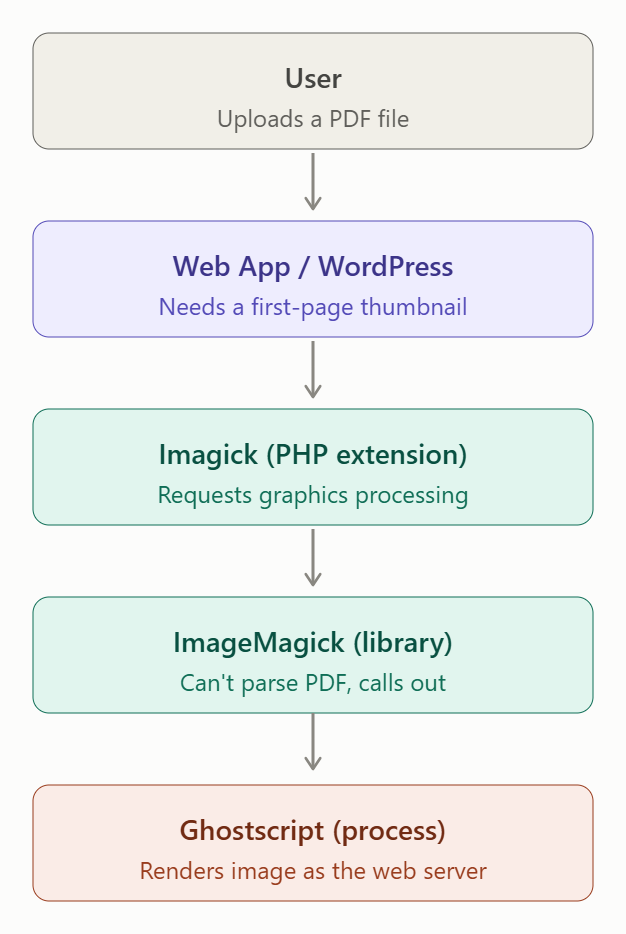
Very few programmers or administrators directly interact with Ghostscript via the gs command line. Instead, it is present as a deep dependency:
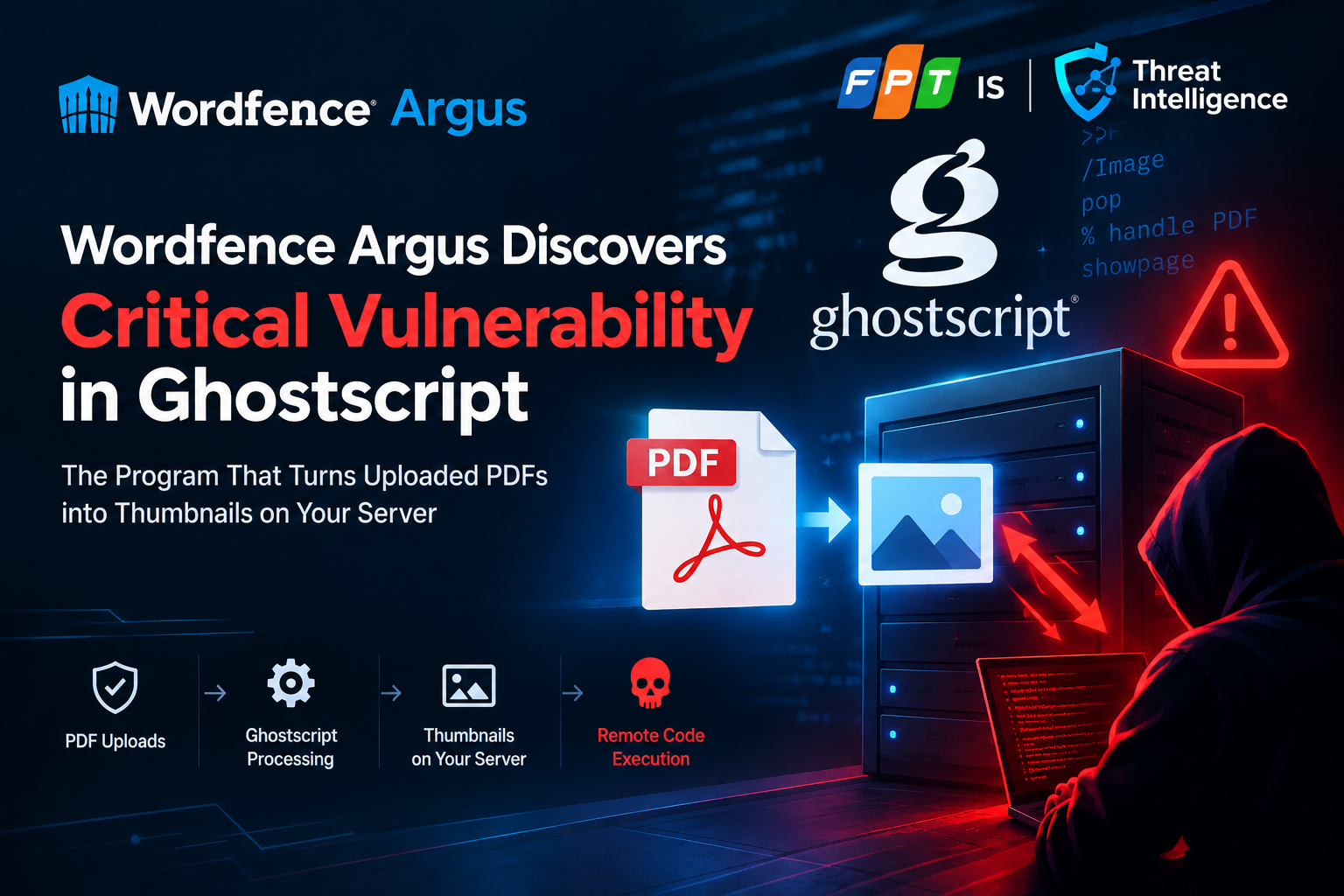
When a user uploads a PDF file (resume, contract document, invoice), the web system often wants to automatically generate a preview thumbnail for the first page.
Popular image processing libraries such as ImageMagick or the PHP-Imagick extension do not have an internal mechanism to read and understand the complex pagination structure of PDF. They will silently initiate an operating system child process to delegate this task to Ghostscript.
Information security hot spot
From a security perspective, the combination of long-standing legacy C source code and the PostScript language makes Ghostscript an especially sensitive attack surface:
PostScript is essentially a Turing-complete programming language: A PostScript file contains not only static data but can also contain loops, variables, and system file access operators.
Handling complex embedded formats: To display a PDF page, Ghostscript must integrate a series of decoders for image compression standards (JPEG 2000, JBIG2) and binary fonts. Any loophole in the buffer index calculation at the native C layer can lead to serious memory overflow vulnerabilities (like CVE-2026-39919).
Execution permissions: When called by a web server, the Ghostscript process usually directly inherits the permissions of the web service (
www-dataornginx). This means an attacker can turn a normal document file download into a remote code execution (RCE) springboard to take control of the server.
Technical Background
The vulnerability CVE-2026-39919 was discovered by the Wordfence Threat Intelligence team (through the Wordfence Argus automated testing system) and was officially patched by Artifex in September 2026.
CVE ID: CVE-2026-39919
CVSS v3.1 score**:** 9.8 (Critical) — Vector:
CVSS:3.1/AV:N/AC:L/PR:N/UI:N/S:U/C:H/I:H/A:HCVSS v4.0 Score**:** 9.3 (Critical) — Vector:
CVSS:4.0/AV:N/AC:L/AT:N/PR:N/UI:N/VC:H/VI:H/VA:H/SC:N/SI:N/SA:NCWE Classification: CWE-122 (Heap-based Buffer Overflow) / CWE-787 (Out-of-bounds Write)
Versions affected: Ghostscript from 9.21 to 10.07.1 (any version before 10.08.0 with OpenJPEG decoding pipeline enabled)
Fix version: Ghostscript 10.08.0 (Upstream) and corresponding backport patches from Linux distributions
Multi-tier Dependency Chain
The unique danger of CVE-2026-39919 lies in the architectural location of the vulnerable software. Most website owners or application developers do not directly install or call Ghostscript in the application source code. Instead, Ghostscript operates as a background service underneath an indirect call chain.
When the server receives the file, if the application performs tasks that create metadata or generate preview images (such as the wp_create_image_subsizes() function in WordPress from version 4.7 and above), the gs process will automatically start in the background under the web server process account (www-data or nobody).
Intensive Mining Mechanism
The nature of JPEG 2000 image structure in PDF
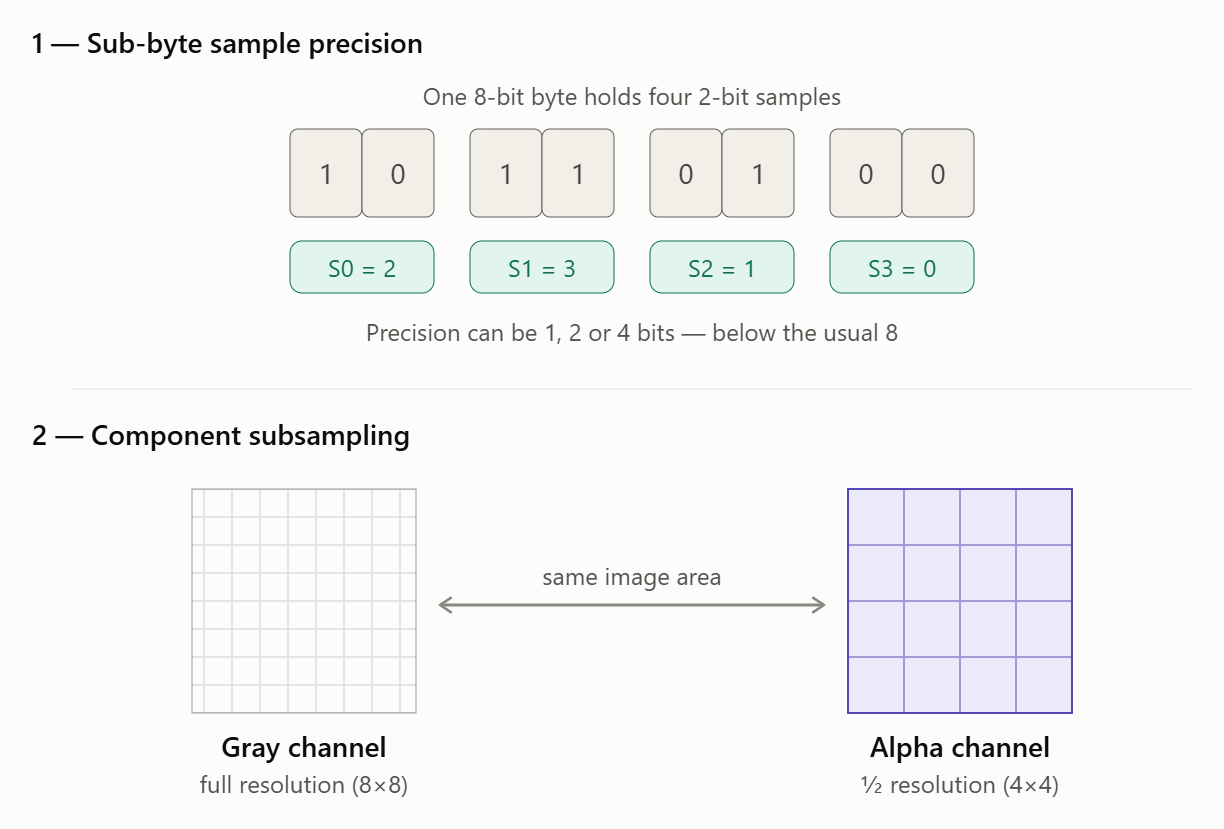
PDF files allow embedding stream graphic objects (Streams) using the advanced compression format JPEG 2000 (JPX/JP2). The JPEG 2000 standard allows components in the same image to have heterogeneous technical properties:
Sub-byte sample precision: The bit depth of each data sample can be less than 8 bits (for example, 1-bit, 2-bit, or 4-bit). With a 2-bit pattern, the four patterns will fit into a single byte (8 bits).
Component Subsampling: Different data channels (such as the grayscale channel and the alpha channel) may have mismatched sampling coefficients and resolutions.
Cause of buffer overflow at base/sjpx_openjpeg.c
The vulnerability arises in Ghostscript's OpenJPEG decoder integration adapter (base/sjpx_openjpeg.c), specifically in the function that handles reading and reconstructing scanlines with subsampled components.
When receiving an image with a scan line consisting of 1,024 2-bit samples:
Memory allocation step (Allocation): Ghostscript calculates the correct size needed in heap memory to hold the packed data stream: 1,024×2 bits=2,048 bits=256 bytes1,024×2 bits=2,048 bits=256 bytes. The library allocates exactly one heap memory block with a capacity of 256 bytes.
Data Unpacking Loop: In the loop of writing data into the buffer, the programmer omitted the packing logic. Instead of combining four samples (2 bits each) into one byte, the decompression loop writes an independent byte for each data sample.
The result is a loop that continuously writes 1,024 bytes to a memory block that only has a capacity of 256 bytes. The amount of data overflowing the heap memory boundary is up to: 1.024−256=768 bytes
Exploitation Flow
The bytes overflowing the back of the buffer are not random data but are extracted directly from pixel patterns in files controlled by the attacker. The memory area immediately behind the overwritten buffer is Ghostscript's internal memory allocation management structure (heap bookkeeping metadata).
By accurately calculating pixel values in PDF files:
The attacker overwrites heap management pointers (freelist pointers, chunk headers) or virtual table pointers (vtable/function pointers). When Ghostscript finishes the rendering process and conducts the cleanup phase, the memory management process will read the tampered pointers and redirect the Instruction Pointer to the payload that executes the shellcode or performs ROP (Return-Oriented Programming). As a result, the attacker gains remote command execution (RCE) permissions under the authority of the web server process.
The attacker overwrites heap management pointers (freelist pointers, chunk headers) or virtual table pointers (vtable/function pointers).
When Ghostscript finishes the rendering process and conducts the cleanup phase, the memory management process will read the tampered pointers and redirect the Instruction Pointer to the payload that executes the shellcode or performs ROP (Return-Oriented Programming).
As a result, the attacker gains remote command execution (RCE) permissions under the authority of the web server process.
Why is the -dSAFER parameter completely ineffective?
When calling Ghostscript, image processing frameworks almost always add the -dSAFER protection flag to enable a sandbox environment, restricting PostScript operators from interfering with the file system and executing OS shell commands.
However, the -dSAFER flag only applies to the high-level logic layer of the PostScript scripting language. In the case of CVE-2026-39919, the error occurs in the native C binary source code layer of the JPX image format decompressor, deep below the script interpreter layer. A memory overflow directly corrupts gs's process address space before any of -dSAFER's logical control mechanisms have a chance to intervene.
Realistic Exploitation Recording & Portability Testing
In-the-wild Status
At the time of publication, CVE-2026-39919 has not been recorded as being widely exploited in the wild and is not in the CISA KEV (Known Exploited Vulnerabilities) category. However, the researchers successfully demonstrated the weaponization of the vulnerability into complete RCE exploit code in a real-world test environment.
The PoC sample exploit file is only 1,029 bytes in size, only 1 byte different from a normal valid PDF file (in the resolution declaration field of the transparency element).
Portability testing: The danger of uniform builds
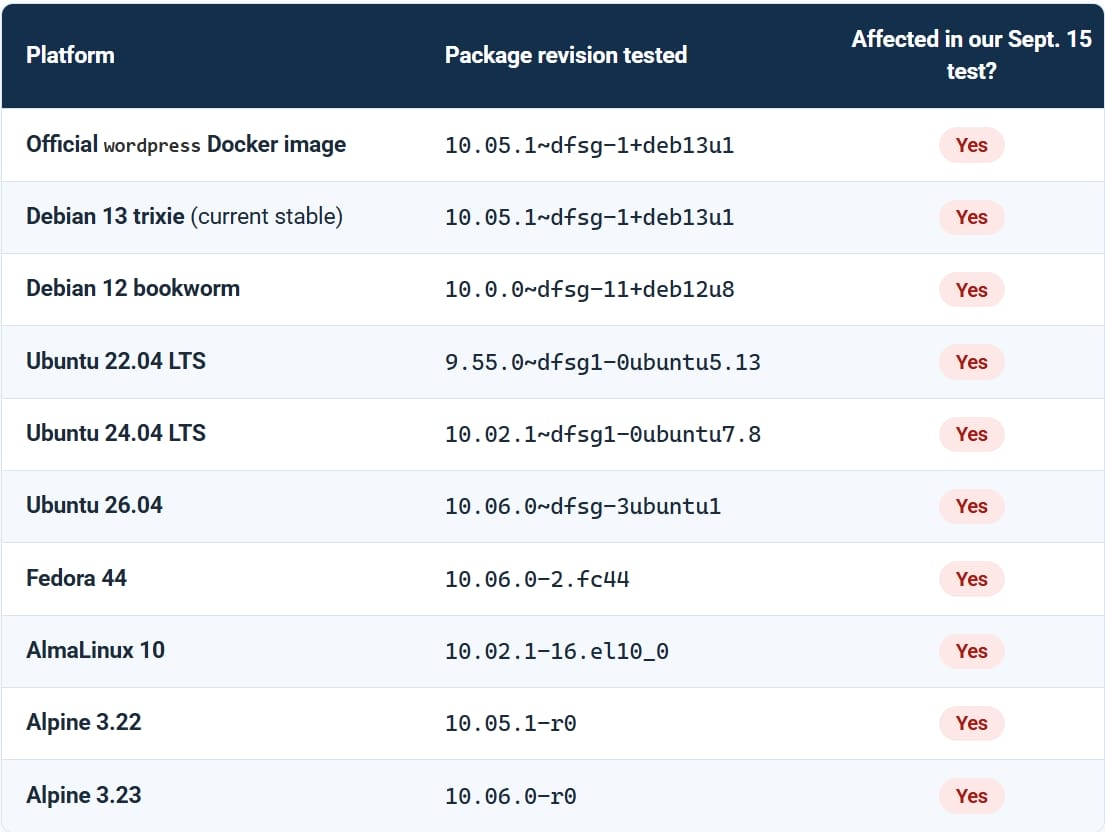
During the research process, Wordfence tested two PoC exploit files over 10,240 executions on 10 different 64-bit Linux distribution environments:
| Test environment | Tested package version | Original PoC exploitation result |
|---|---|---|
| Official WordPress Docker image | 10.05.1~dfsg-1+deb13u1 | Crashes (build tuning required for RCE) |
| Debian 13 (Trixie) | 10.05.1~dfsg-1+deb13u1 | Crashes |
| Debian 12 (Bookworm) | 10.0.0~dfsg-11+deb12u8 | No crash on sample file / crashes on resize |
| Ubuntu 22.04 LTS | 9.55.0~dfsg1-0ubuntu5.13 | Crashes |
| Ubuntu 24.04 LTS | 10.02.1~dfsg1-0ubuntu7.8 | Crashes |
| Fedora 44 | 10.06.0-2.fc44 | Crashes |
| AlmaLinux 10 | 10.02.1-16.el10_0 | Crashes |
| Alpine Linux 3.22 / 3.23 | 10.05.1-r0 / 10.06.0-r0 | Crashes |
Experimental conclusion:
"One-size-fits-all payload" does not exist: A single PoC file cannot successfully exploit RCE on all operating systems due to differences in memory addresses, compiler flags, and heap allocation architecture (glibc ptmalloc vs musl allocator).
Extremely dangerous in homogeneous environments: When leaving the Ghostscript executable intact and only changing the font configuration, language, or subsystem libraries, the exploit works successfully on 100% (4/4) of the target environments.
Lessons from HEIF Heist: Recent research by the Hacktron team (HEIF Heist campaign targeting the libheif library) shows that: with the support of decompilation tools and automation models, it only takes hackers 1 to 2 days to fine-tune a heap overflow payload that accurately adapts to the target's specific build.
Vulnerability handling timeline
| Date | Event |
|---|---|
| 2026-08-23 | Wordfence Argus discovers the vulnerability and confirms RCE on a lab system |
| 2026-08-24 | Anonymous report submitted to Artifex; vendor acknowledges the bug the same day |
| 2026-09-08 | Artifex releases an official fix in Ghostscript 10.08.0 |
| 2026-09-15 | CVE-2026-39919 is officially published in the international vulnerability database |
| 2026-10-12 | Wordfence and cybersecurity media outlets publish detailed technical analysis |
MITRE ATT&CK
| Tactic | Technique ID | Technique Name | Exploitation context |
|---|---|---|---|
| Initial Access | T1190 | Exploit Public-Facing Application | Upload a malicious PDF to a public-facing web application form |
| Execution | T1203 | Exploitation for Client Execution | Exploit a buffer overflow in the Ghostscript document handler |
| Execution | T1059.004 | Unix Shell | Execute shell commands after hijacking the instruction pointer |
| Defense Evasion | T1562.001 | Disable or Modify Tools | Disable or bypass Ghostscript’s -dSAFER isolation mechanism |
| Persistence | T1505.003 | Web Shell | Plant a backdoor or web shell in the web directory after gaining RCE |
Detection & Response
Blind spots of traditional file inspection solutions
The malicious PDF file exploiting CVE-2026-39919 is a completely structurally valid PDF document:
Standard magic bytes (%PDF-1.x).
The .pdf extension and MIME-type application/pdf are correct.
Pass all header checks or signature-based antivirus scans. The anomaly lies deep within the sampling matrix of the JPEG 2000 image stream.
Identification signs on the server (Host & SIEM Detection)
1. Detect recurring Crash of Ghostscript (SIGSEGV Exit Code 139)
When an attacker probes the memory structure (spray/brute-force heap layout), the Ghostscript process will continuously encounter segmentation faults (Segmentation Fault).
Notably, from version 5.6, the WordPress Core source code (wp-includes/class-wp-image-editor-imagick.php) integrates an automatic retry mechanism (Trac #48853): if the first Ghostscript call fails, WordPress will trigger the Ghostscript process a second time with a different parameter. Therefore, a malicious PDF file will cause at least 2 Ghostscript processes to crash consecutively.
2. Detect unusual child process generation behavior from Ghostscript
In normal operation, gs only reads input files and outputs image files (PNG/JPEG) on disk or stdout. Ghostscript never initiates a command shell process or network engine.
Incident Response Procedures
Identification:
Review the web server log to look for POST requests to upload PDF files that have unusual response times or return error code 500 from the image processing module.
Check the auditd/syslog log for gs segfault events.
Containment:
Isolate the web server in question from the internal network.
Immediately apply PDF disabling policy on ImageMagick (see Recommendations section).
Eradication:
Check for newly created files in the wp-content/uploads/ directory or temporary directories /tmp, /dev/shm.
Check for background processes that are listening for network connections (reverse shell).
Recovery:
Update a clean version of Ghostscript from the secure repository.
Change all authentication information (database credentials, API keys) stored on the server.
Lessons Learned:
- Decouple document processing to a separate worker environment.
Expert Comments
The security analysis team stated that, despite having a CVSS severity score of 9.8, CVE-2026-39919 is not a "wormable" vulnerability that can be automatically scanned and exploited en masse across the Internet like Log4Shell before. The biggest barrier to widespread attacks is memory architecture fragmentation between different operating system builds.
However, for Targeted Attack / APT campaigns or standardized infrastructure deployment targets, this is a particularly dangerous vulnerability.
Risk to infrastructure in Vietnam
According to our observations in actual cybersecurity monitoring activities:
Level of invisible dependence: In Vietnam, thousands of online public service portals, financial and banking information portals (loan application receiving system, KYC download of PDF documents, statements), recruitment platforms and e-commerce websites all deploy automatic document processing features. Most of these systems use the default configuration of Linux distributions with the ImageMagick and Ghostscript toolkits pre-installed.
Habit of forgetting system packages: While application operations teams regularly update web source code (WordPress core, Laravel, Drupal), OS-layer binary packages such as ghostscript are rarely updated without a regular patching cycle for the server.
Explosive Risk from Shared Container Images: The trend of infrastructure containerization (Docker/Kubernetes) using pre-built base images (like official WordPress or PHP images) means that hundreds of an organization's servers share the exact same binary build of Ghostscript. This completely removes the portability barrier of exploit code: a payload successfully adapted to that container image will work across the rest of the system.
Recommended action
To ensure system safety against the risk of exploitation from CVE-2026-39919, administrators and security teams need to implement a layered defense roadmap:
Urgent (0 - 24 hours)
1. Check the exact version of Ghostscript installed
Important note: Do not use the gs --version command because many Linux distributions backport security patches to older versions (for example, Ubuntu 22.04 patches on version 9.55 but gs --version still shows 9.55.0).
Check the specific revision number through your package manager:
dpkg -s ghostscript | grep -E "(Package|Version|Status)"rpm -q ghostscript
Distributions that already have an official patch:
Ubuntu 22.04 LTS: packages from 9.55.0~dfsg1-0ubuntu5.14 or later
Ubuntu 24.04 LTS: packages from 10.02.1~dfsg1-0ubuntu7.9 or later
Debian 13 (Trixie): packages from 10.05.1~dfsg-1+deb13u2 or higher
AlmaLinux 10: via update ALSA-2026-74464
2. Apply urgent Workaround solution (If unable to update immediately)
Disable permissions to read and process PDF formats in ImageMagick's policy file. This action will prevent ImageMagick from calling Ghostscript when receiving PDF files:
Open the file /etc/ImageMagick-6/policy.xml (or /etc/ImageMagick-7/policy.xml) and add the following line inside the tag:
<policymap>
<!-- Block ImageMagick from calling Ghostscript to parse PDF -->
<policy domain="coder" rights="none" pattern="PDF" />
<policy domain="coder" rights="none" pattern="EPS" />
<policy domain="coder" rights="none" pattern="PS" />
</policymap>
3. Kiểm soát các điểm tiếp nhận dữ liệu tải lên
Temporarily disable or restrict access to public PDF submission forms that do not require authentication.
Short term (1 - 7 days)
Update the operating system and software packages: Run the comprehensive system upgrade command:
sudo apt-get update && sudo apt-get --only-upgrade install ghostscriptsudo dnf update ghostscript
Rebuild Container Base Images: Đối với các hệ thống chạy Docker/K8s, tiến hành kéo base image mới nhất và build lại toàn bộ container image với tham số
--no-cache:docker build --no-cache -t my-web-app:latest
Log Review: Check system logs within the past 30–60 days to look for signs of unusual gs segfaults
Long Term (Sustainable Architecture & Operations)
Principle of document processing service isolation (Converter Isolation): Does not allow the main web application to directly handle rendering or converting documents on the same web server. Move PDF processing to a separate microservice or worker running in a separate container/sandbox (no API key, database credential, and no lateral access to the internal network).
Apply Seccomp & Resource Limits: Restricts the syscalls that the graphics process is allowed to execute (blocks network-related calls and child process creation).
Automate container image scanning: Integrate security scanning tools (Trivy, Grype) into the CI/CD pipeline to early detect outdated OS layer libraries before deploying to production environments.
References
Ghostscript flaw lets hackers hijack servers via PDF uploads
Comments
Join the discussionNo comments yet. Be the first to comment.