Knight Office: The Phishing-as-a-Service Kit That Steals Microsoft 365 Sessions
Overview
On September 2, 2026, Huntress published an analysis of Knight Office — a newly discovered phishing-as-a-service (PhaaS) kit, uncovered while investigating an AiTM (Adversary-in-the-Middle) attack on August 18, 2026 against an organization in the Huntress customer base.
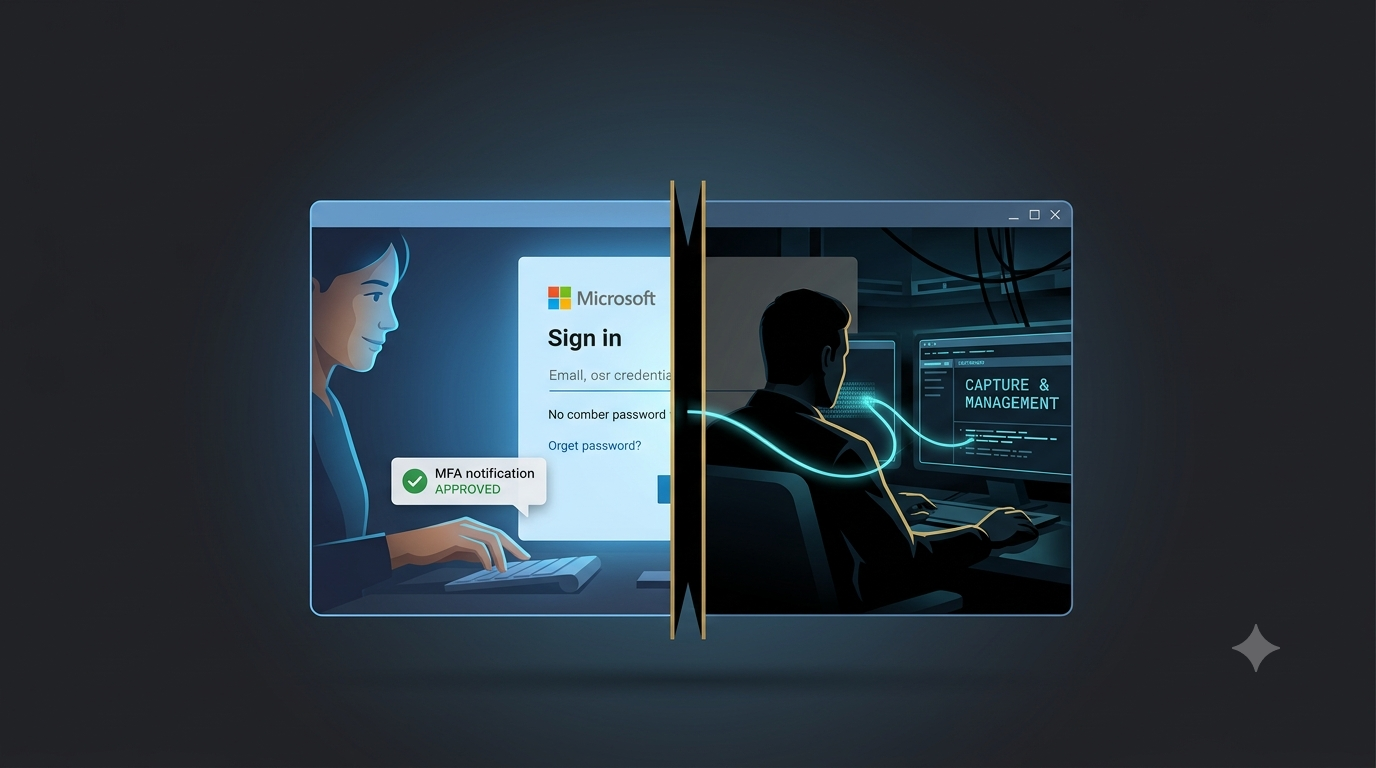
Knight Office belongs to a generation of phishing kits that never need to steal a password. Instead, it exploits Microsoft's own legitimate device authentication flow (deviceauth) to trick users into completing the entire sign-in process — including tapping "Approve" on their MFA prompt — while the attacker's infrastructure silently intercepts the resulting session token. That stolen token is immediately replayed from data-center infrastructure, letting the attacker access the account as the legitimate user with no password and no MFA challenge of their own.
More critically: after gaining access, the attacker registers an attacker-controlled device into the victim's Microsoft Entra ID tenant and binds a Windows Hello for Business (WHfB) credential to the compromised account — planting a backdoor that survives even after the stolen token is revoked.
Huntress linked the kit's control panel to at least 9 confirmed attacks within its customer base over two weeks, and found more than 700 lure emails matching the same template reported through its Security Awareness Training platform since April 2026.
Context: The Shift Away From Stealing Passwords
Knight Office is not the first kit to take this approach. Huntress has previously tracked similar kits called EvilTokens and Kali365, both centered on stealing session tokens (AiTM) or OAuth access tokens (device code phishing) rather than passwords.
Why token theft is growing: MFA has become a baseline security standard in most enterprises — and older attack methods (credential phishing, password spray, brute force) are fully blocked when MFA is enforced. Token theft solves this differently: instead of trying to bypass MFA, it waits for the user to complete MFA legitimately, then captures the fully authenticated session. From Microsoft's perspective, everything looks like a normal successful login.
| Attack generation | Technique | Status when MFA is enabled |
|---|---|---|
| Traditional credential phishing | Harvests username + password | Fully neutralized |
| Password spray / brute force | Guesses passwords | Fully neutralized |
| AiTM (Knight Office) | Captures session token after user completes MFA | MFA is completely useless |
Technical Analysis
1. The Knight Office Console — Discovered Through a Live Incident
Huntress didn't find this kit through proactive hunting — it emerged from investigating a real incident. When the SOC investigated two anomalous post-MFA authentication events on a Microsoft 365 account on August 18, analysts identified IP 73.125.13[.]x (redacted) — registered to Comcast Cable but flagged by Spur IP Intelligence as a callback proxy associated with multiple proxy resale operators — as the first sign of an AiTM attack.
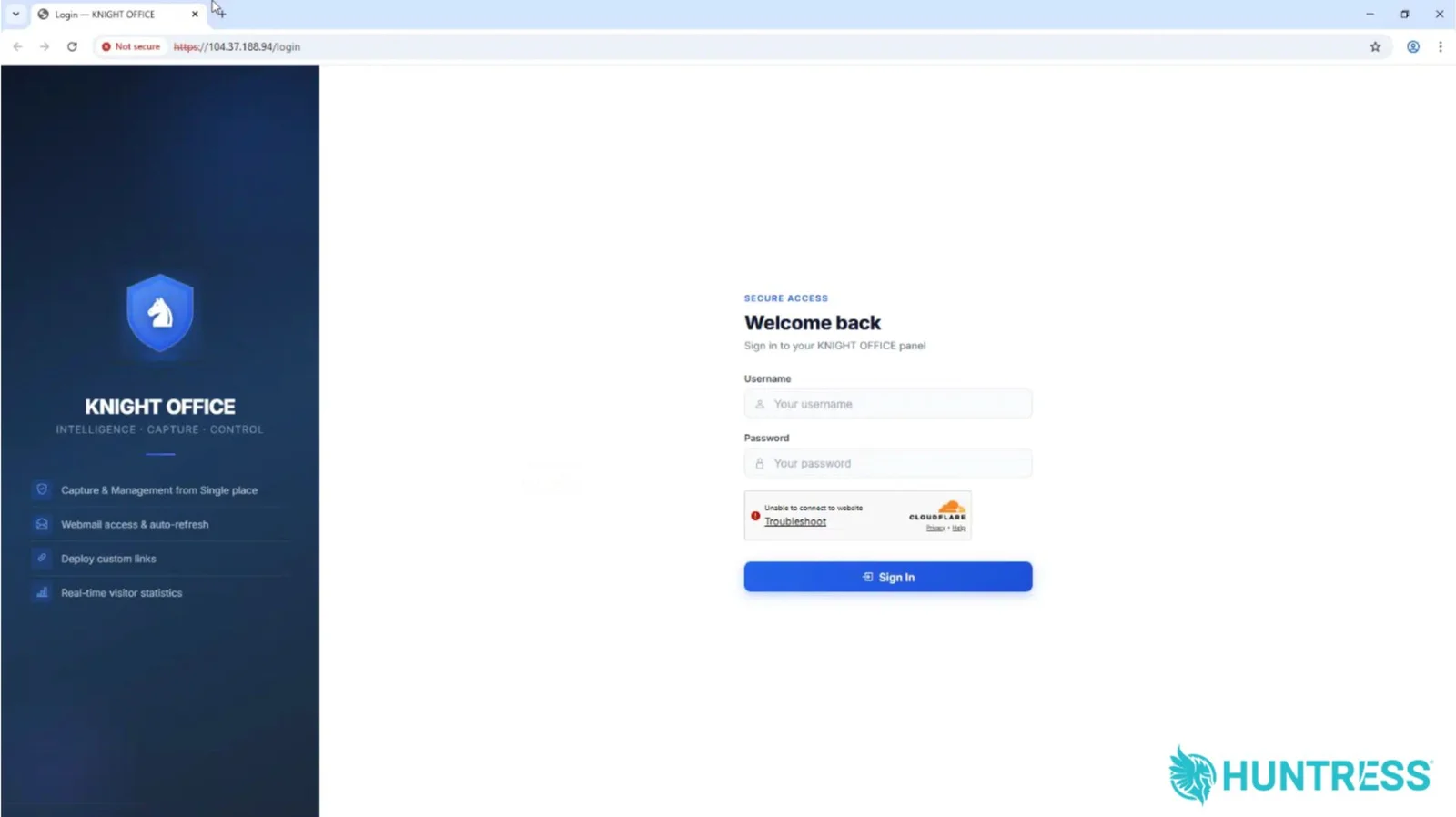
Tracing the token-replay IP 104.37.188[.]94 through Validin revealed the Knight Office operator console — a fully functional web dashboard built with Python Flask (plus the Flask-WTF add-on), protected by Cloudflare Turnstile (bot verification), with a login page explicitly titled Login — KNIGHT OFFICE.
Features advertised on the dashboard:
"Capture & Management from Single place" — manage all victims and stolen tokens from one screen
"Webmail access & auto-refresh" — access victim email directly within the console
"Deploy custom links" — deploy custom phishing links
"Real-time visitor statistics" — live visitor tracking
An important distinction Huntress emphasizes: this console is the operator-facing interface — separate from the kit source code, which is the victim-facing side of the attack (HTML phishing page templates, credential capture scripts, etc.). Huntress accessed the console, not the full kit source.
Pivoting from the IP on Validin and VirusTotal revealed at least 25 domains using the .vu TLD serving as phishing pages.
2. The Lure — Forged to Appear From the Victim's Own Address
The initial email is styled as a DocuSign signature request with urgency cues pushing immediate action. Its most distinctive feature is a self-spoofing technique: the From, To, and Return-Path headers are all forged to make the email appear to come from the recipient's own email address — creating the impression of an internal notification rather than an unsolicited message from a stranger.
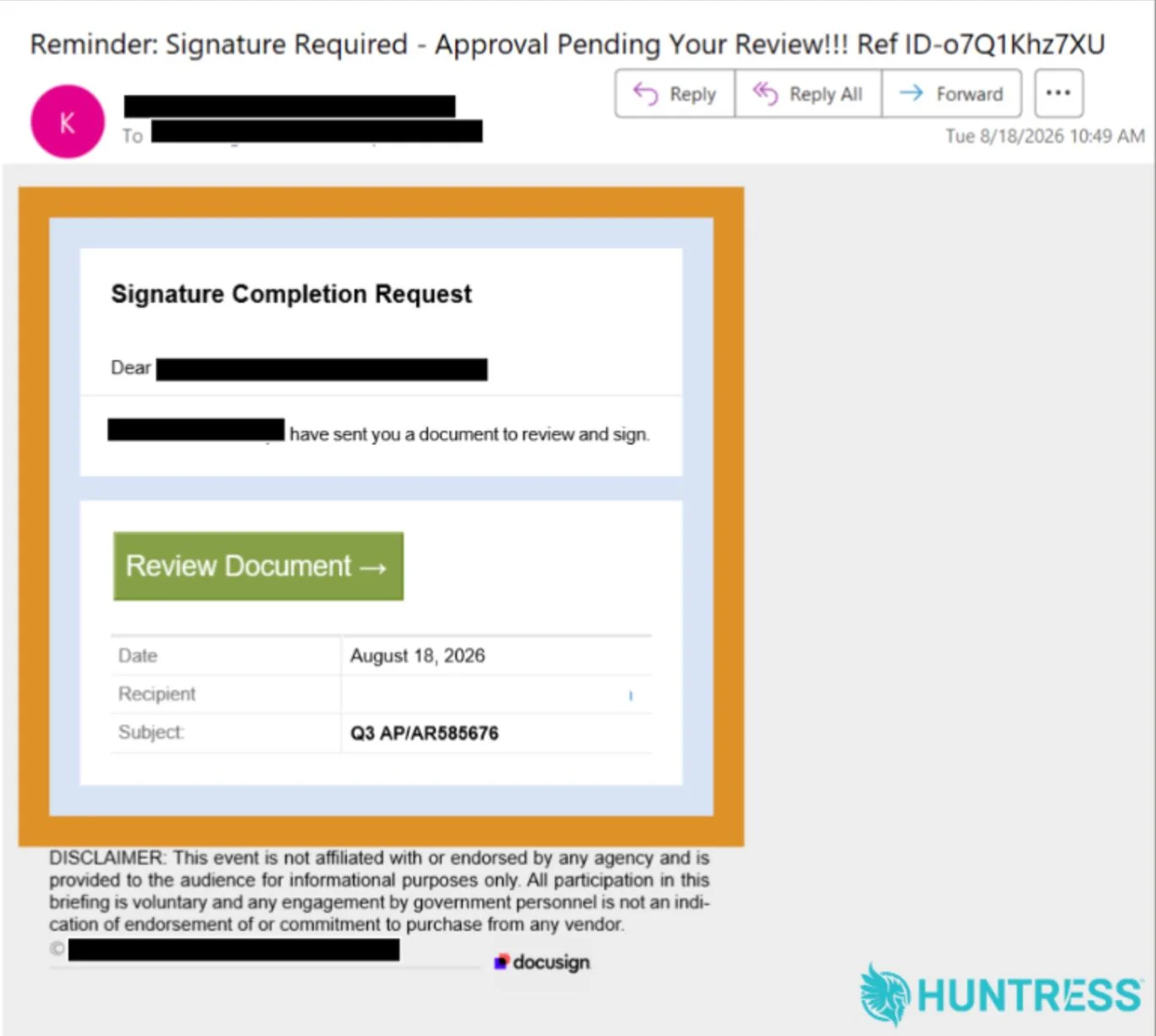
Lure sender IP in the investigated incident: 154.127.53[.]78. Analyzing this IP on VirusTotal revealed an additional 14 related emails sharing the same content and template.
Confirmed subject line variants:
Reminder: Signature Required - Approval Pending Your Review!!! Ref ID-<10 random characters>
You Missed (2) lmportant VoiceMessage; Please Review Now!!! REF-<10 characters>
Sjc Shared an lmportant Document with you that required your Attention and Slgnature!! - REF-<10 characters>
VERlVIED: Caller left <random digits> minutes <random digits> seconds REF-<10 characters>
lmportant: (3) Playback-MSG Arrived from <name> - Listen Now
A distinctive campaign fingerprint: the lowercase letter "l" is substituted for "i" in words such as lmportant (Important), Slgnature (Signature), and VERlVIED (VERIFIED) — a deliberate technique to evade spam filters that scan for exact keyword matches.
3. The Redirect Chain — Hiding the Final Destination Behind Legitimate Layers
The email's call-to-action button routes the victim through a multi-hop redirect chain, each step using a legitimate platform or site to obscure the true destination from email security scanners:
Email link
    └─► Monday.com (legitimate work management platform — used as a tracking redirect)
            └─► Compromised Joomla website (intermediate relay — taken down by the time Huntress investigated)
                    └─► Fake Microsoft SharePoint or Teams landing page
Routing through legitimate Monday.com is the critical step: many email security tools check domain reputation along the redirect path — Monday.com has very high reputation, so the link is not flagged immediately. The compromised Joomla site serves as a second-layer relay, further obscuring the final phishing domain.
4. The Device Auth Technique — Using Microsoft Itself to Deceive Users
This is the most technically sophisticated element of Knight Office. The final phishing landing page does not display a fake Microsoft login form to harvest username and password like traditional phishing. Instead:
Step 1: The page presents the victim with a device authentication code and a prompt to "Sign In With Microsoft." The page impersonates either a SharePoint document or a Teams voicemail waiting to be viewed.
Step 2: When the victim clicks "Sign In With Microsoft," the page opens a new browser tab pointing to Microsoft's real deviceauth page — the same page Microsoft uses to authenticate devices like TVs, printers, and mobile apps.
Step 3: The victim is instructed to paste the 9-character code that the phishing page provided into the form on Microsoft's real page. Microsoft's own page even warns the user: "don't enter codes from sources you don't trust" — a warning that is easily overlooked in context.
Step 4: After entering the code and clicking Next, Microsoft prompts the victim to sign in with their real credentials and approve the MFA push on their phone — exactly as they would for any legitimate sign-in.
Step 5: The user completes the entire authentication flow legitimately. Microsoft issues a session token — which the attacker's infrastructure intercepts and feeds into the Knight Office console for immediate use.
Why does this defeat MFA? Because MFA is not bypassed — the user genuinely approves a technically valid MFA request. The problem is that the device authentication code the victim pasted into Microsoft's real page was a code controlled by the attacker, so the session Microsoft issues is bound to the attacker's infrastructure, not the user's device. The entire process appears completely normal in Microsoft's logs — zero incorrect password attempts, zero alerts triggered.
5. Token Replay and Evading Detection
Once the session token is captured, the attacker replays it from data-center hosting infrastructure using a distinctive User-Agent:
python-requests/2.34.2, OAuth2:Token
Because the token was fully authenticated (including MFA), Microsoft's authentication log records zero failed password attempts. Password-based detection alerts (failed login, password spray detection) never fire. The only authentication failures logged were from expired tokens or missing device keys — not recognized as attack indicators under standard alerting configurations.
This is why AiTM token theft is invisible to traditional monitoring tools: no authentication anomaly, no bad passwords, no brute force — only a successful sign-in from an unfamiliar IP, for which many organizations have no alerting configured.
6. Persistence — A Backdoor That Survives Token Revocation
This is the most dangerous phase of Knight Office post-compromise. The attacker doesn't stop at using the stolen session token — they execute a sequence of steps to ensure long-term access, even after the security team discovers the breach and revokes the token:
Step 1 (failed): From IP 104.37.188[.]94, the attacker attempts two OAuth 2.0 authentications using replayed tokens targeting the Microsoft Authentication Broker app — both fail because the NGC key (required for Windows Hello for Business) doesn't yet exist.
Step 2: Registers an unauthorized host into the victim's Microsoft Entra ID tenant and completes a rogue, attacker-controlled device registration.
Step 3: Binds a Windows Hello for Business (WHfB) credential to the compromised account (confirmed via User-Agent Dsreg/10.0 (Windows 10.0.19044.1826)).
Step 4 (success): Signs back in using WHfB passwordless authentication. Successful.
The implication: WHfB is a feature Microsoft designed to strengthen authentication for legitimate users (password-free sign-in using cryptographic keys tied to a device). But when an attacker enrolls their own WHfB key against a victim's account, that same feature becomes a persistent backdoor: they can sign back in at any time even after the password is changed, MFA is reset, or the original stolen session token is revoked — as long as the rogue WHfB credential remains bound to the account.
7. Campaign Scale
From Huntress internal telemetry:
At least 9 token-replay authentication events on M365/Google Workspace accounts monitored by Huntress, linked to IP
104.37.188[.]94within a two-week window.More than 700 emails using the same template and lure pattern reported through Huntress's Security Awareness Training (SAT) platform since April 2026 — suggesting the campaign had been running for at least five months before discovery.
From OSINT:
Analysis of
104.37.188[.]94on Validin/VirusTotal revealed at least 25 phishing domains using the.vuTLD.14 emails connected to the same campaign discovered by analyzing the lure sender IP
154.127.53[.]78.
Risk Summary
| Risk Dimension | Level | Rationale |
|---|---|---|
| MFA bypass capability | Critical | MFA is not technically "bypassed" — the user self-approves; the session token is captured immediately after legitimate authentication completes |
| Detection difficulty | Very High | Zero bad password attempts; Microsoft logs record a successful sign-in; token replayed from data center rather than an immediately suspicious IP |
| Persistence of access | Very High | WHfB backdoor survives token revocation; requires auditing and removing rogue Entra ID devices and WHfB credentials |
| Evasion of traditional tools | High | Password-failure-based alerts, brute-force detection, and password-spray detection all fail to trigger |
| Infrastructure scale | High | 25+ phishing domains, callback proxies, Tencent Cloud replay infrastructure; campaign ran for at least 5 months |
| Potential impact | Critical | Full M365 access: email, Teams, SharePoint, OneDrive, enterprise apps; potential escalation to BEC or tenant takeover |
IOCs & Artifacts
Network Indicators
| Indicator | Type | Description |
|---|---|---|
104.37.188[.]94 |
IP | Knight Office console hosting IP; also used to register rogue device into Entra ID |
154.127.53[.]78 |
IP | Lure email sender IP in the investigated incident |
73.125.13[.]x |
IP (redacted) | AiTM callback proxy — Comcast-registered IP flagged by Spur as a commercial proxy |
idoej[.]com |
Domain | Domain hosting the Knight Office console (found via reverse IP lookup) |
Tencent Cloud ranges: 43[.]x, 170.106[.]x, 162.62[.]x, 49.51[.]x |
IP ranges | Token replay infrastructure |
Phishing Domains (.vu TLD)
advancedplacyncement[.]vu
amstardmzsmc[.]vu
arandasoftzfdware[.]vu
avisoretentiunionllc[.]vu
capitalflwxinancialpartners[.]vu
certififiycationedge[.]vu
connectivnqzityltd[.]vu
crrbcearegroup[.]vu
digitaltrafwwrficsystems[.]vu
exceltecbusinessbwpsolutions[.]vu
genamewwgdiamarketing[.]vu
globaieflsoftinc[.]vu
globalmixeucbdmodetechnologyinc[.]vu
globalprojectspvtltd[.]vu
joinbusinessmanagementconsdjeulting[.]vu
kentmanqhfufacturingcompany[.]vu
kleepxrnlinecorporation[.]vu
knsinternacshtional[.]vu
monttmmlrustcompany[.]vu
mtprormtductions[.]vu
realestatecotblrp[.]vu
siottxgroup[.]vu
summitcapitaltrapojininggroup[.]vu
techcompositnkoes[.]vu
techromixsolutionlonsinc[.]vu
Behavioral / Forensic Indicators
Token replay User-Agent:
python-requests/2.34.2, OAuth2:TokenWHfB enrollment User-Agent:
Dsreg/10.0 (Windows 10.0.19044.1826)Console Cloudflare Turnstile Sitekey:
0x4AAAAAADrkE-VuOnNDfr6WConsole page title:
Login — KNIGHT OFFICEEmail subject pattern:
Reminder: Signature Required - Approval Pending Your Review!!! Ref ID-<10 characters>and variants (see Section 2)Text fingerprint: lowercase "l" substituting for "i" in
lmportant,Slgnature,VERlVIEDEntra ID signals: New device registered from an unfamiliar IP shortly after a successful sign-in; new WHfB credential not initiated by the user or IT
MITRE ATT&CK Mapping
(Per the MITRE ATT&CK mapping published by Huntress in the original report)
| Tactic | Technique ID | Technique Name | Description in Campaign |
|---|---|---|---|
| Resource Development | T1608.005 | Stage Capabilities: Link Target | Uses Monday.com open redirect parameter to conceal the true destination; uses a compromised Joomla site as an intermediate relay |
| Initial Access | T1566.002 | Phishing: Spearphishing Link | DocuSign-style lure email with an href link rather than a file attachment |
| Execution | T1204.001 | User Execution: Malicious Link | Social engineering urges the victim to click the link in the email |
| Persistence | T1098.005 | Account Manipulation: Device Registration | Registers a rogue device into Entra ID; binds a WHfB credential to the victim's account |
| Defense Evasion | T1078.004 | Valid Accounts: Cloud Accounts | Uses legitimately stolen session tokens — completely bypasses password-based detection alerts |
| Defense Evasion | T1684.002 | Social Engineering: Email Spoofing | Self-spoofing technique — email headers forged to appear to come from the recipient's own address |
| Credential Access | T1111 | MFA Interception | Relay intercepts session token at the moment the user approves the MFA prompt |
| Credential Access | T1557 | Adversary-in-the-Middle | AiTM infrastructure sits between victim and Microsoft, capturing session tokens in real time |
| Credential Access | T1528 | Steal Application Access Token | Intercepts and harvests valid session tokens for unauthorized M365 access |
| Command and Control | T1090.003 | Proxy: Multi-hop Proxy | Multiple routing layers — Monday.com, compromised Joomla, callback proxy — to conceal the true origin |
| Command and Control | T1665 | Hide Infrastructure | Masks operational servers behind legitimate platforms, compromised websites, and proxy networks |
Assessment
Knight Office is the clearest example in 2026 that MFA alone is no longer a sufficient defense against modern phishing attacks. The critical point to emphasize: this is not because MFA was "bypassed" in a technical sense — no vulnerability in the MFA protocol was exploited. Users were asked to approve an MFA request that was completely valid from a technical standpoint; they simply didn't know that what they were authorizing was an attacker-controlled code. This is a failure of user awareness and user experience design, not a technical failure of MFA itself.
The device auth technique is what makes Knight Office more sophisticated than conventional AiTM kits. Rather than building a fake Microsoft login page (which browser-based page inspection and anti-phishing tooling can often detect), Knight Office uses Microsoft's own real deviceauth page as the surface where users enter their credentials. This means a user checking the URL bar sees microsoft.com — a fully legitimate domain. Nothing is fake about the page they're looking at; the only fake element is the 9-character code they were handed from the prior page.
The WHfB persistence step is the most consequential escalation. Many organizations, upon discovering a compromised account, will reset the password and revoke active sessions — and consider the incident resolved. But if they don't audit and remove the rogue Entra ID device registration and the attached WHfB credential, the attacker can sign back in immediately. This is a step many IR teams miss because it requires checking the Microsoft Entra admin center — not just the Microsoft 365 admin center — and specifically reviewing authentication methods registered against affected accounts.
For organizations in Vietnam running Microsoft 365, this is a concrete and immediate warning. Most current defense strategies focus on blocking failed logins — failed MFA monitoring, sign-in risk policies based on bad passwords, MFA fatigue protection. Knight Office demonstrates that the next generation of attackers has shifted to stealing successful logins — and doing so without leaving a single failure signal in any log. If an organization has no alerting for M365 sign-ins from unfamiliar IPs (particularly data-center and callback-proxy ranges) after MFA has already been approved, they may never know the account was compromised.
Recommendations
Detecting AiTM Token Theft
Shift detection focus from "failed logins" to "anomalous successful logins": Alert on post-MFA authentication events originating from:
Data-center IP ranges unrelated to the user's normal location
IPs flagged by Spur or other IP intelligence as callback proxies or residential proxies
Anomalous User-Agents such as
python-requests/x.x.xin M365 authentication context
Detect "two-IP sessions": In AiTM, the initial sign-in step (victim IP) and the token-callback step (attacker proxy IP) typically differ. Alert when the callback IP is inconsistent with the initial sign-in IP within the same authentication session.
Monitor Microsoft Entra ID sign-in logs for the
python-requestsUser-Agent associated with OAuth Token grants — a strong signal of automated token replay.
Post-Incident Investigation and Remediation
Audit Entra ID registered devices: After any M365 security incident, immediately check Entra ID → Devices for any device registered from an unfamiliar IP or without IT authorization. Delete unauthorized devices.
Audit and remove unauthorized WHfB credentials: In Entra ID → Users → Authentication Methods for affected accounts, review and remove any Windows Hello for Business key not created by the user or IT.
Revoke all active sessions via "Revoke all sessions" in Entra ID — not just a password reset. Changing a password does not automatically invalidate active session tokens.
Disable synchronized accounts in on-premises identity systems if applicable, to prevent the attacker from re-establishing a session from an on-premises path.
Prevention
Deploy Conditional Access Policies sensitive to location and device compliance: Block authentication from data-center IPs or non-compliant (non-Intune-managed) devices for sensitive applications.
Enable Entra ID Protection to detect token replay from anomalous IPs (the "Anomalous token" detection feature).
Use FIDO2 security keys or passkeys instead of conventional MFA (SMS/authenticator app): These methods are bound to a specific domain and cannot be phished even through AiTM — making them a genuine defense against this attack class, not just MFA hygiene.
User awareness training: Train employees to never enter a code from one webpage into a different tab — even if that second tab is a real Microsoft page. A simple rule: if you didn't initiate a sign-in request yourself, don't approve it.
Block
.vudomains and the IOC IPs at the email gateway and proxy level.
References
Comments
Join the discussionNo comments yet. Be the first to comment.