Operation BlueDash: When Legitimate RMM Becomes the Backdoor, and a Public GitHub Repo Tells the Whole Story

Summary
There is no malware in this campaign.
The final payload the victim receives is the official Level RMM installer, downloaded directly from Level's own infrastructure, installed via msiexec with a single command-line parameter. That parameter is an attacker-controlled enrollment key, and it automatically registers the endpoint into their RMM environment — the victim approves no connection, sees no RMM interface, and receives no prompt.
ZeroBEC tracks this activity as Operation BlueDash, published 21 July 2026. The chain opens with an email claiming a document was too large to send directly and had therefore been shared securely through Microsoft Teams, routing through a compromised business website to a counterfeit Microsoft Store page demanding a Teams update before the document could be opened.
But the most unusual thing about this report is not the attack chain. ZeroBEC reconstructed the campaign's entire development history — every infrastructure rotation, every added RMM, every loader generation — because the operators ran it from a public GitHub repository with a full commit history dating back to 6 February 2026.
Priority action: inventory which RMM tools are actually running in your environment and which are approved. Without that list, every detection measure downstream has nothing to anchor on.
Why RMM Became the Payload of Choice
Before the attack chain, BlueDash needs its context: this is not an isolated case but an expression of a measured trend.
In the 2026 Threat Detection Report, Red Canary observed RMM tools appearing as the ultimate payload in an increasing number of campaigns, particularly web-based phishing. NetSupport Manager climbed from seventh to fourth on their top ten threat list.
RMM tools are legitimate administrative utilities that managed service providers, security vendors and IT departments use to manage employee workstations remotely. They are readily available, often free, highly reliable and easy to use. Once an adversary installs one on a compromised system, they have a professional-grade administration platform — the command line, the desktop UI, and access to any file on the system.
Red Canary lists three advantages RMM holds over traditional malware:
Easy to use by design, purpose-built for remote interaction. That is the product's function.
No need to code anything yourself. Things like persistence simply become a checkbox.
They are signed, letting them evade controls and alerts that expect malicious binaries to be unsigned. On top of that, traffic generated by many RMM tools flows through infrastructure and domains owned by the companies that develop them, which is unlikely to be flagged as suspicious and blends into routine network traffic.
The perception problem is the more worrying part. Red Canary states it plainly: many SOCs consider unapproved RMM tools in their environment a symptom of "shadow IT" and only a minimal cause for concern. In practice, ransomware crews, state-funded adversaries and financially motivated threats of every variety routinely abuse them.
If an adversary is lucky — or has done their homework — and picks an RMM the organisation already permits, detection becomes immensely more complicated. Even when they abuse an unpermitted tool, organisations are often slow to respond or reluctant to block it outright for fear of breaking a legitimate business use case.
The 16 RMM tools Red Canary detected being abused in 2025: Action1, Chrome Remote Desktop, ConnectWise ScreenConnect, Datto/CentraStage, GoRelo, GotoHTTP, ITAgent, Itarian, Level, LogMeIn Resolve, N-Able N-Sight, NetSupport Manager, PDQ Connect, SimpleHelp, Syncro, Velociraptor.
Some developers have pushed back: LogMeIn Resolve added installer logic that flags renamed RMM installers (a common hallmark of abuse), and ScreenConnect, PDQ and Velociraptor have taken steps of their own. But as Red Canary notes, when a developer makes their particular tool harder to abuse, adversaries simply adopt a new one. Operation BlueDash proves the point: it adds Level RMM to the known ecosystem.
Timeline Reconstructed From Commit History
This is the most distinctive part of ZeroBEC's report. It is rare to get a campaign timeline built from the attacker's own git log.
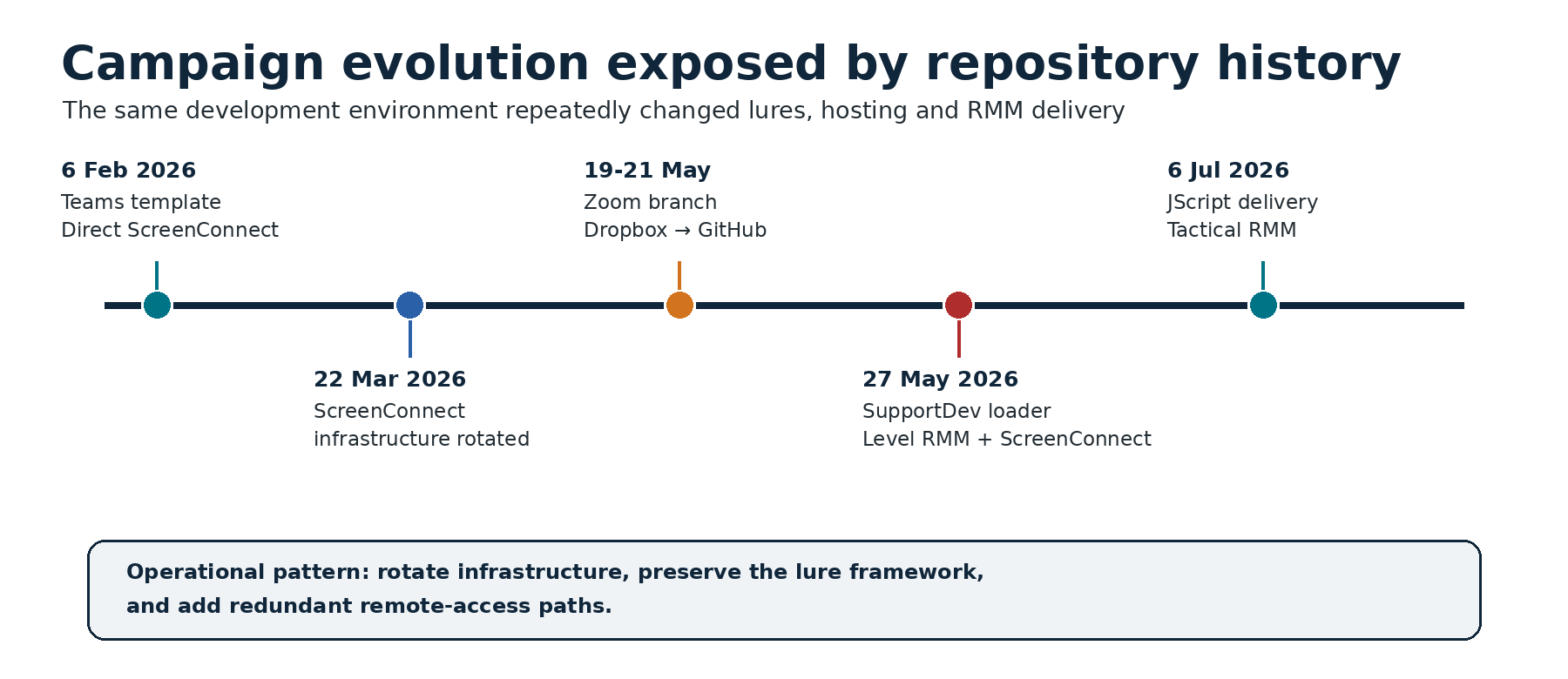
Key campaign changes reconstructed from the Teams and Zoom repository histories (source: ZeroBEC).
Microsoft Teams branch — repository Bluedashltd
| Date | Repository change | Operational significance |
|---|---|---|
| 6 Feb 2026 | Repository created with the fake Teams/Microsoft Store page and supporting images | First observed source-controlled deployment of the Teams lure |
| 6 Feb 2026 | The Update action pointed directly to an attacker-controlled ScreenConnect client | Earliest observed RMM delivery path |
| 6 Feb 2026 | teamvem[.]com added through the repository CNAME and GitHub Pages |
Connected the phishing domain to the source repository |
| 22 Mar 2026 | The ScreenConnect download endpoint was replaced | Infrastructure rotation while preserving the lure |
| 27 May 2026 | Direct ScreenConnect delivery replaced by supportdev.exe |
Introduced a multi-RMM loader (Level + ScreenConnect) |
| 27 May 2026 | CNAME changed from teamvem[.]com to support[.]berrydev[.]xyz |
Migrated the custom domain while the older site continued through Netlify |
| 27 May 2026 | supportdev.exe moved into the primary repository |
Consolidated phishing and payload delivery in one development environment |
Zoom branch — repository rustovni
| Date | Repository change | Operational significance |
|---|---|---|
| 19 May 2026 | Repository created with invite.html, install-guide.html, microsoft-store.html and Zoom-themed assets |
Parallel campaign using the same fake-update framework |
| 19 May 2026 | bsupport.exe hosted through Dropbox and linked from the phishing pages |
Used a legitimate cloud-storage service for payload delivery |
| 19 May 2026 | gustavodev[.]xyz added as the GitHub Pages CNAME |
Connected the Zoom lure to another attacker-controlled domain |
| 21 May 2026 | bsupport.exe and bsupport.zip moved from Dropbox into GitHub hosting and releases |
Rotated payload hosting while keeping the campaign operational |
| 6 Jul 2026 | Older executables removed, ZoomInstallerSetup.js added |
Shifted the branch to JScript-based Tactical RMM deployment |
External context
| Date | Event |
|---|---|
| 3 Mar 2026 | Microsoft Defender Security Research publishes its analysis of signed workplace-app impostors deploying ScreenConnect, Tactical RMM and MeshAgent |
| May 2026 | ZeroBEC publishes a separate ScreenConnect campaign whose phishing emails passed DKIM, SPF and DMARC |
| Sep 2025 | Red Canary and Zscaler publish joint research on multiple web-based phishing campaigns dropping ITarian, PDQ, SimpleHelp and Atera |
| 21 Jul 2026 | ZeroBEC publishes Operation BlueDash |
The timeline is more than a list of indicators. It exposes the operators' workflow: reuse the same visual framework, rotate custom domains and cloud services, replace RMM instances, preserve older code during revisions, and expand the number of remote-access mechanisms available after execution.
Kill Chain
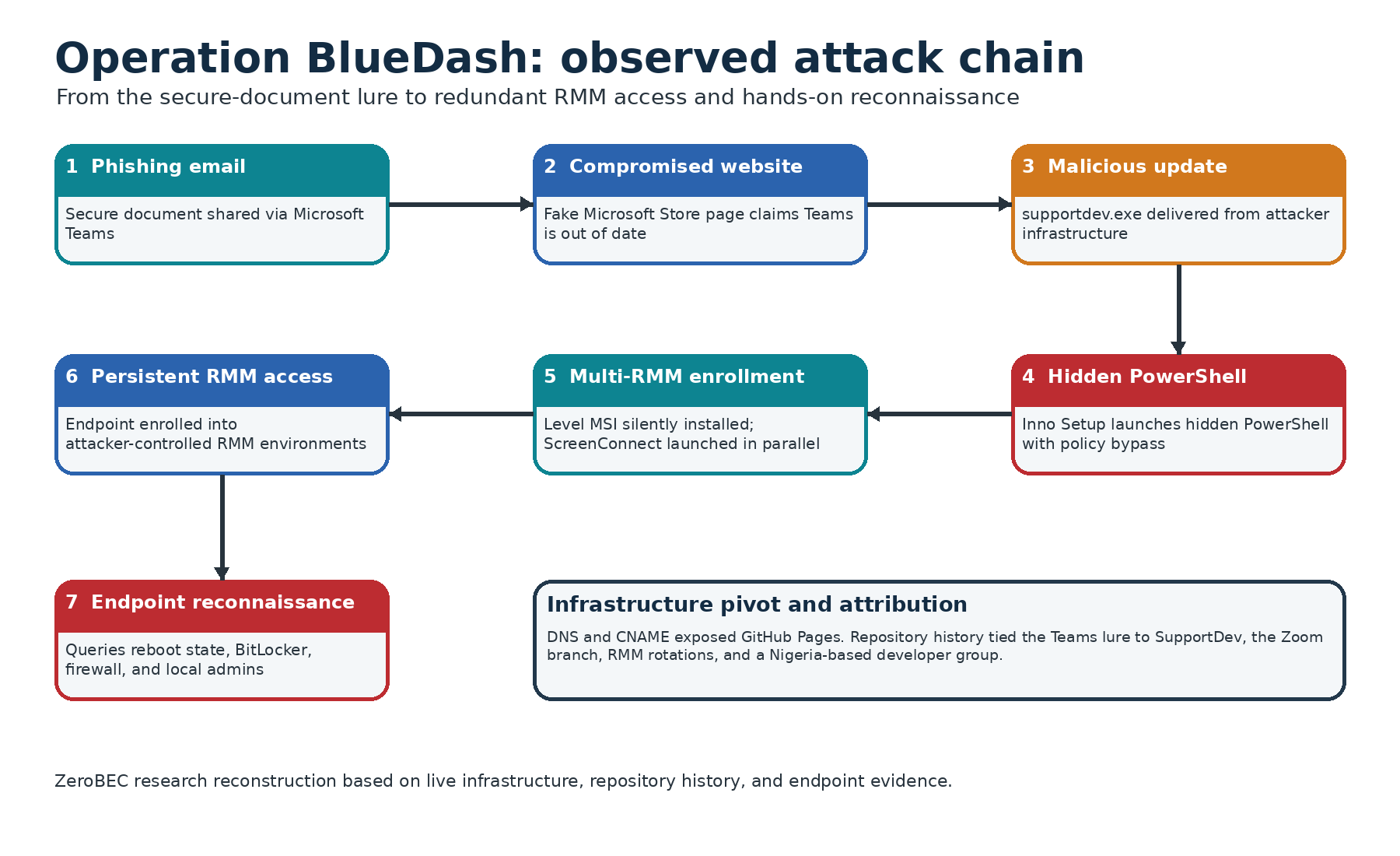
The observed Operation BlueDash chain, from phishing email to multi-RMM access and operator reconnaissance (source: ZeroBEC).
The victim receives a phishing email stating a document was too large to deliver directly and had been shared securely through Microsoft Teams. It asks the recipient to select "Access Your Secure Document" and recommends opening the file from a desktop or laptop.
The embedded link points to a path on a compromised Turkish website:
zerrinperde[.]com[.]tr/Microsoftteam/invite-teams.The landing page is a Microsoft Store clone reproducing the real design closely — Teams branding, product details, screenshots, and even a fake Windows taskbar. The user is told an update is required before the secure document can be accessed.
Clicking Update downloads
supportdev.exefromsupport[.]berrydev[.]xyz.supportdev.exeis an Inno Setup package that launchespowershell.exewithExecutionPolicy BypassandWindowStyle Hidden.PowerShell downloads the official Level RMM MSI from Level's own infrastructure into the user's temporary directory.
It invokes
msiexec.exewith a quiet installation switch and the attacker-controlled enrollment parameterLEVEL_API_KEY=GxSCHE8EZwfyYN3iPQHPai8D.The same PowerShell command downloads and executes a ScreenConnect client from
sqnchzmt4lsc[.]net, creating a second remote-access channel.The endpoint is automatically enrolled into the operators' Level RMM environment.
The operator connects interactively through the RMM channel and runs a reconnaissance sequence to assess the host.
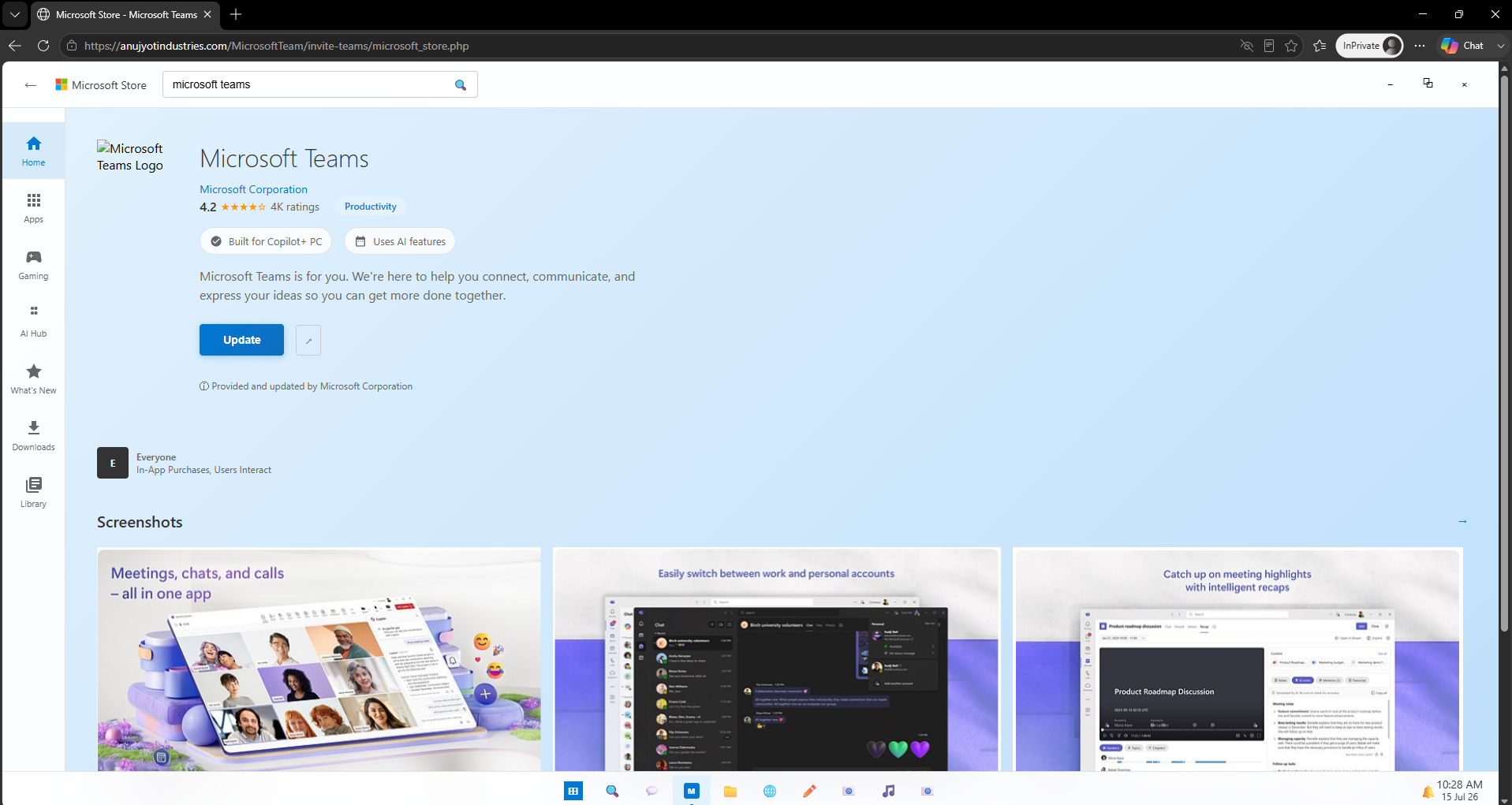
The counterfeit Microsoft Store page presenting a Microsoft Teams update (source: ZeroBEC).
An Attacker Mistake Became an Investigative Lead
By the time ZeroBEC began its analysis, the original phishing page was gone. They pivoted to historical URL intelligence and found another site hosting an identical lure: anujyotindustries[.]com.
On that page, clicking Update opened an installation guide and initiated a file named MicrosoftTeams_Update.exe. But that file was not a valid executable — it contained the phishing page's own HTML, because the installApp() function pointed back to the page itself.
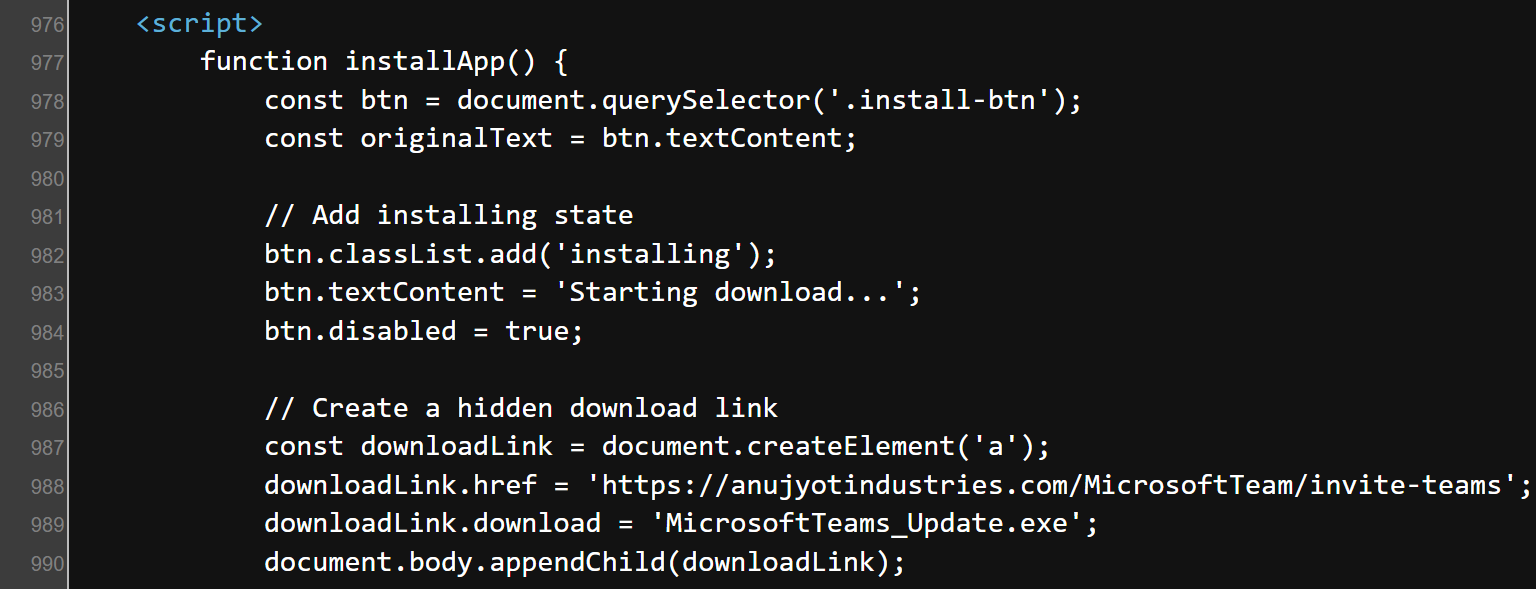
The installApp() function pointed the download to the phishing page rather than a payload (source: ZeroBEC).
That branch was likely disabled, misconfigured, under development, or stripped of its payload before analysis. It still exposed the campaign's page structure, filename conventions and JavaScript logic — and those became pivots for locating a functional deployment elsewhere.
How ZeroBEC found it is worth recording: they used the phishing page's own title — "Microsoft Store - Microsoft Teams" — as a search pivot. That revealed teamvem[.]com, a live deployment with the same page design, social-engineering narrative and fake Microsoft Store workflow. DNS analysis showed the site was deployed through Netlify, exposing the hostname bluedashlimited[.]netlify[.]app.
This is dorking simple enough to be overlooked, and it works precisely because the operators reuse the same visual framework across every campaign.
Technical Analysis
SupportDev: Silent RMM Enrollment via a Command-Line Parameter
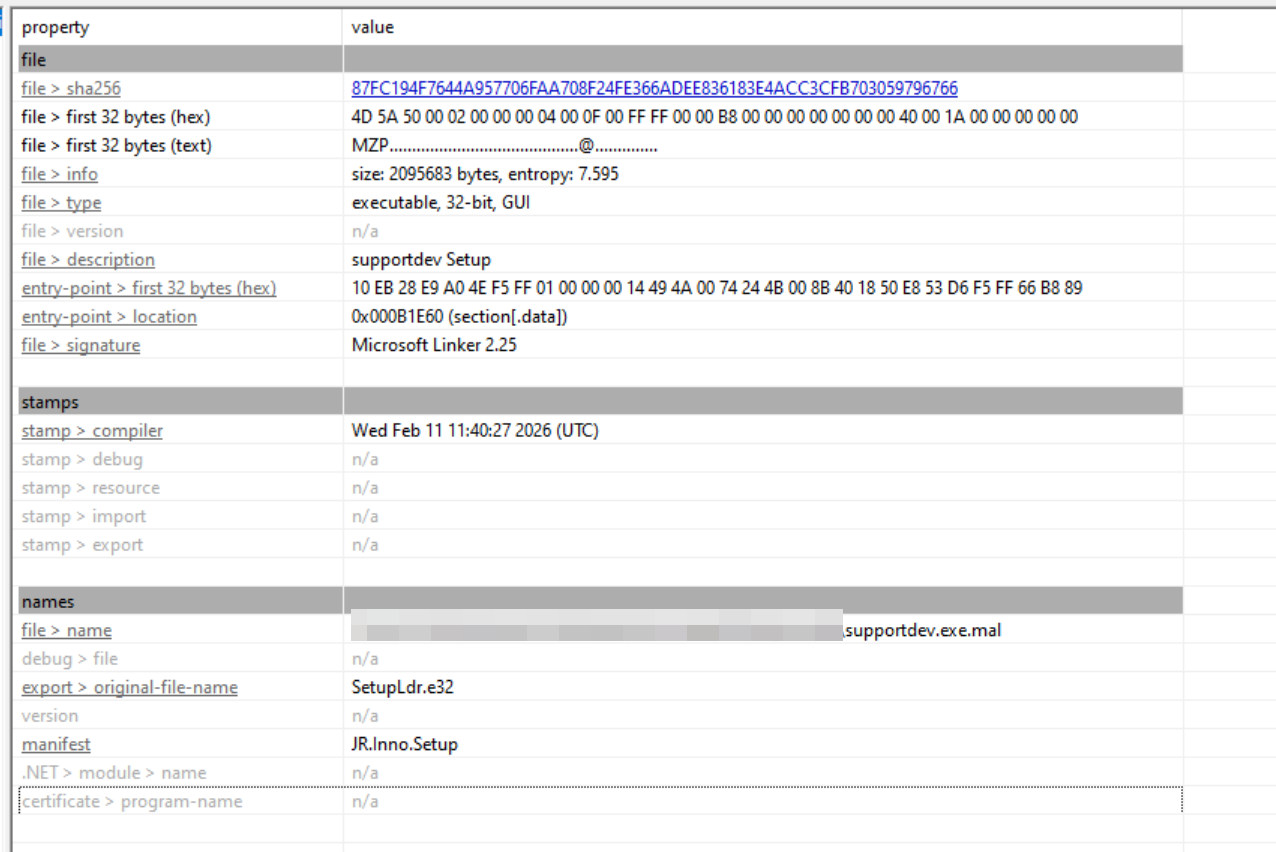
Inno Setup metadata recovered during static analysis of supportdev.exe (source: ZeroBEC).
supportdev.exe is not a Microsoft Teams installer. It is an Inno Setup package designed to launch a hidden PowerShell command. Unpacking it exposes a short but operationally significant script that creates two independent remote-access paths.
The crux is how Level RMM is installed. Supplying the enrollment parameter during installation automatically registers the endpoint to the operators' Level RMM environment without requiring the victim to approve a connection or interact with the RMM interface. And because the legitimate vendor installer is used, the operators inherit the full functionality and trust normally associated with an approved administrative product.
This is the point that matters most defensively. There is nothing for static analysis to find: the MSI is genuine, the signature is Level's, the download host is downloads[.]level[.]io. The only malicious element in the entire transaction is the value of a command-line parameter.
Redundancy Is the Design Goal, Not a By-Product
The same PowerShell command downloads and executes a ScreenConnect client from sqnchzmt4lsc[.]net.
The parallel use of Level RMM and ScreenConnect is central to the campaign's resilience. Removal or disruption of one product does not necessarily eliminate the attacker's second remote-access channel.
The report supplies direct evidence that the design works: at the time of analysis, the ScreenConnect endpoint was no longer operational — but the Level path remained functional and continued to enroll test systems into the attacker-controlled RMM environment. Half the infrastructure was dead and the campaign was still running.
For incident responders the implication is concrete: when you find an unauthorised RMM on a host, the next question is "is there another one", not "is it removed yet".
The Operator's Reconnaissance Checklist
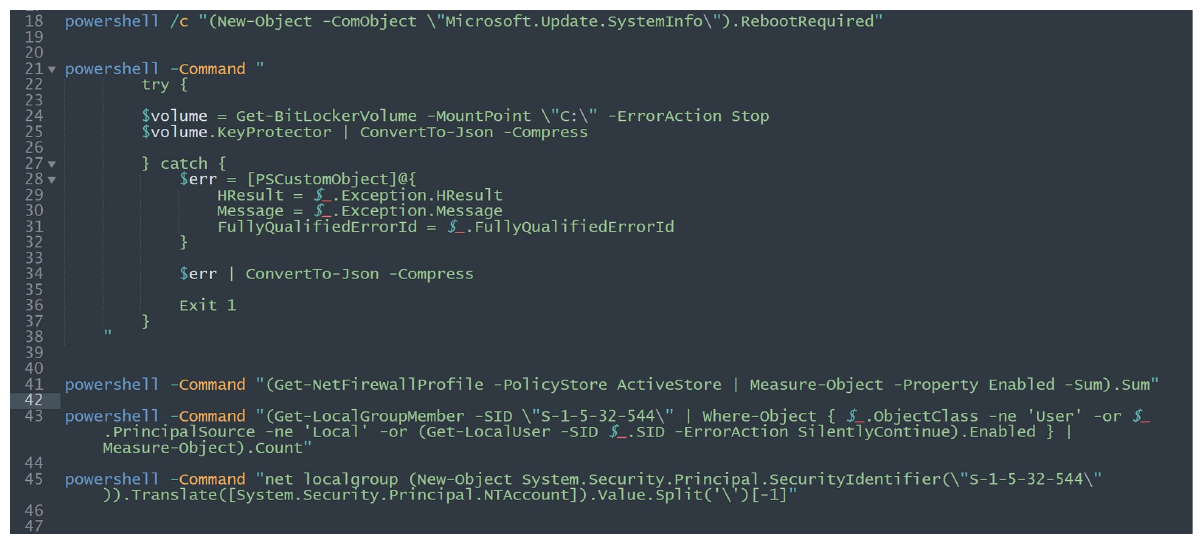
PowerShell commands the operators executed through the RMM channel to inspect the compromised endpoint (source: ZeroBEC).
ZeroBEC captured commands executed after the remote-management agent was installed. These were not required to complete the installation — they are follow-on assessment, and they demonstrate the operators were actively evaluating the system rather than running a purely automated install workflow.
| Observed command | Likely objective | MITRE ATT&CK |
|---|---|---|
Microsoft.Update.SystemInfo.RebootRequired |
Determine whether the host is awaiting a reboot and whether persistence or further installs might be disrupted | T1082 |
Get-BitLockerVolume -MountPoint C: and KeyProtector |
Determine whether the system volume is protected and identify key-protector configuration | T1082 |
Get-NetFirewallProfile -PolicyStore ActiveStore |
Measure enabled firewall profiles and evaluate host-network restrictions | T1518.001 |
Get-LocalGroupMember for SID S-1-5-32-544 |
Count or enumerate members of the local Administrators group | T1069.001 |
Resolve the localized name of SID S-1-5-32-544 |
Identify the local Administrators group name regardless of system language | T1069.001 |
ZeroBEC assesses this sequence as a practical operator checklist: determine system state, understand encryption and firewall posture, identify privileged local users — then decide how to continue.
That last command is the detail I find most telling. Resolving the localized name of SID S-1-5-32-544 is not something you write for a single target. It is something you write when you already know your victims will be running Windows in a variety of languages. That is the signature of systematic multinational targeting, not an opportunistic hit.
And as ZeroBEC points out, this is where the defensive opportunity sits: the commands originate through an unauthorised RMM context rather than an approved IT workflow.
The Zoom Branch: JScript Replaces the Executable Loader
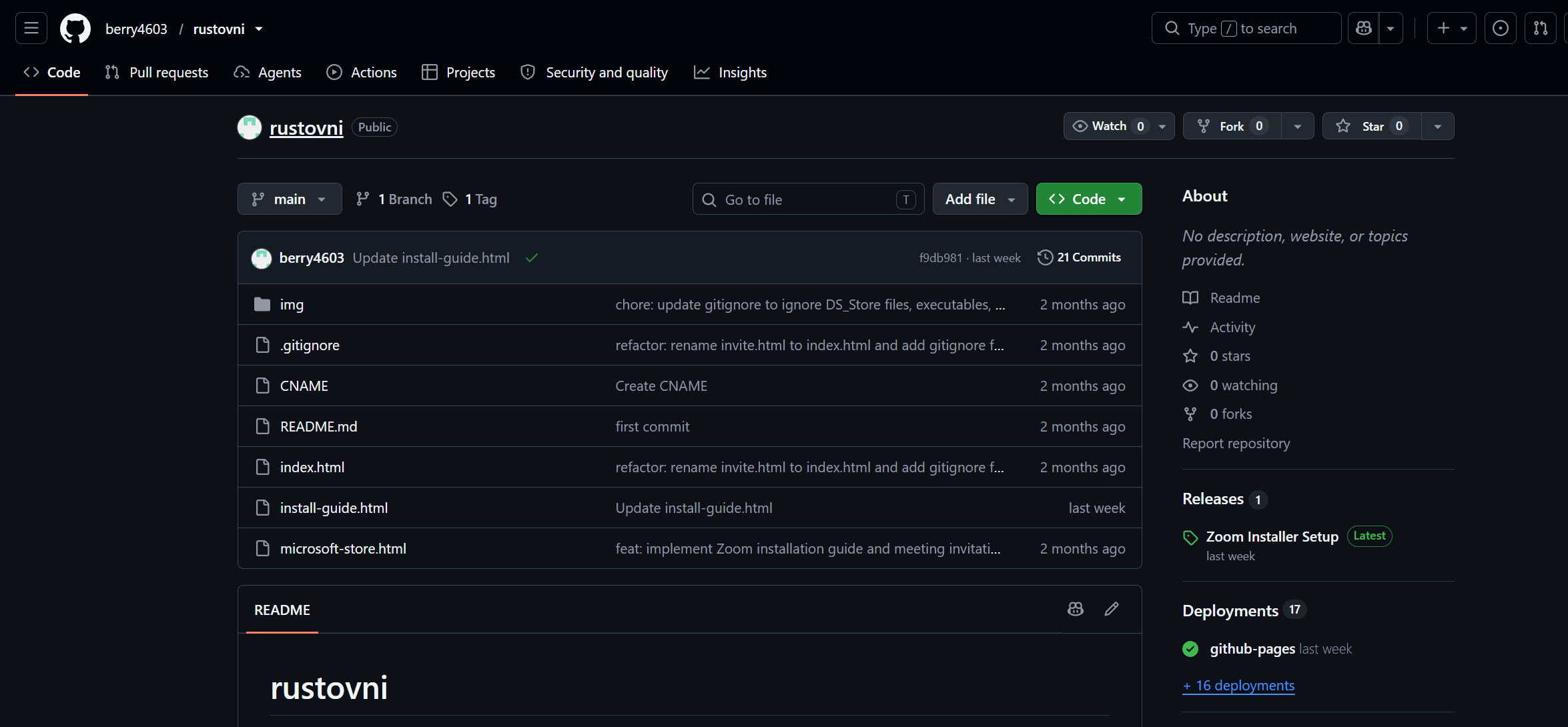
The repository hosting the Zoom meeting lure and payload-delivery components (source: ZeroBEC).
A second repository in the same development ecosystem exposed a Zoom-themed operation. Its design and workflow closely mirror the Teams branch: a meeting lure, an "out of date" message, a counterfeit Microsoft Store page, and a download presented as a legitimate software update.
The later Zoom branch downloads ZoomInstallerSetup.js, which:
Attempts to relaunch itself with elevated privileges through the
runasverbDownloads the Tactical RMM agent from its official GitHub release
Installs it under the Windows temporary directory
Enrolls the device into attacker-controlled infrastructure using an embedded authentication token
Includes paths for both 64-bit and 32-bit installations
Starts the agent service, completing persistent remote access The script references
api[.]investrneent[.]comas the Tactical RMM server. Worth noting: this is a typosquat of "investment", using the letter pairrnto resemble anmat a glance. The same infrastructure cluster includesrmm[.]investrneent[.]comandmesh[.]investrneent[.]com.
The Zoom campaign confirms Operation BlueDash was never tied to one brand, one payload, or one RMM product. The operators can preserve the social-engineering framework while changing the workplace application, the scripting language, the payload host and the remote-management platform.
What Makes BlueDash More Durable Than a Typical Campaign
Operation BlueDash is significant because its strength does not come from a novel malware family. It comes from operational flexibility and the deliberate abuse of trusted administrative tooling.
Redundant access. SupportDev attempts to establish both Level RMM and ScreenConnect on the same endpoint.
Legitimate binaries. The operation retrieves official RMM installers, reducing reliance on custom malware and letting activity resemble normal administration.
Independently rotating infrastructure. ScreenConnect instances, custom domains, compromised websites, GitHub Pages, Netlify, Dropbox and GitHub-hosted payloads can each be replaced separately.
Reusable lure framework. The same fake Microsoft Store model supports Teams and Zoom narratives and adapts to other workplace brands.
Source-controlled operations. Repository history enables rapid changes, preserves prior delivery logic, and exposes a continuous development process.
Interactive follow-on activity. Operators use their RMM access to inspect endpoint security and privilege posture before deciding how to proceed. My own reading of this: the campaign's strength comes from software engineering practice, not from malicious code. This group runs phishing as a product — with a repository, versions, a dedicated branch per lure brand, and old code preserved through refactors, exactly as an ordinary development team would. Disrupting one URL or one RMM instance removes neither the remaining access path nor the next version of the delivery chain.
On Attribution
ZeroBEC attributes Operation BlueDash to a specific group of developers operating from Nigeria at moderate-to-high confidence, based on converging technical and OSINT evidence rather than the registration details of a single domain: continuity of repository control over months, direct campaign artifacts held in the repositories, overlap between the Teams and Zoom branches in development practice and infrastructure patterns, and independent identity pivots.
They also state their confidence in tiers: high that the Teams and Zoom campaigns originate from the connected GitHub development ecosystem; moderate-to-high that the operation is attributable to the identified Nigeria-based developer group. ZeroBEC deliberately withholds individual account handles and personal identity details, and found no evidence the GitHub account was compromised or repurposed by an unrelated actor.
That tiered presentation is worth borrowing for internal reporting: separate what you are sure of from what you infer, and state where the line falls.
Indicators of Compromise
All indicators are taken from ZeroBEC's Operation BlueDash report. Domains and URLs are defanged. Historical infrastructure may no longer be active. The Tactical RMM authentication token was redacted by ZeroBEC; the Level key is retained because it is a campaign indicator.
Domains and hosting infrastructure
zerrinperde[.]com[.]tr          # compromised site used in the original Teams lure
anujyotindustries[.]com         # compromised site hosting an identical Teams/Store page
teamvem[.]com                   # active Teams-themed phishing domain
bluedashlimited[.]netlify[.]app # Netlify deployment of the Teams phishing page
support[.]berrydev[.]xyz        # GitHub Pages custom domain, hosts the SupportDev payload
linux[.]berrydev[.]xyz          # related domain in the same infrastructure cluster
gustavodev[.]xyz                # GitHub Pages custom domain for the Zoom campaign
api[.]investrneent[.]com        # attacker-controlled Tactical RMM API server
rmm[.]investrneent[.]com        # related Tactical RMM infrastructure
mesh[.]investrneent[.]com       # related Mesh/Tactical RMM infrastructure
sqnchzmt4lsc[.]net              # ScreenConnect client delivery infrastructure
Payload URLs and enrollment key
hxxps://support[.]berrydev[.]xyz/supportdev[.]exe
hxxps://downloads[.]level[.]io/level[.]msi                    # OFFICIAL Level RMM installer
hxxps://sqnchzmt4lsc[.]net/Bin/ScreenConnect[.]ClientSetup[.]exe?e=Access&y=Guest
hxxps://sympatico15[.]screenconnect[.]com/Bin/ScreenConnect[.]ClientSetup[.]exe?e=Access&y=Guest
hxxps://bgustavo[.]screenconnect[.]com/Bin/ScreenConnect[.]ClientSetup[.]exe?e=Access&y=Guest
hxxps://www[.]dropbox[.]com/scl/fi/5ngkfh2iquoa6gm88bhhr/bsupport[.]exe?rlkey=...&dl=1

LEVEL_API_KEY=GxSCHE8EZwfyYN3iPQHPai8D    # attacker-controlled Level RMM enrollment key
File hashes (SHA-256)
87fc194f7644a957706faa708f24fe366adee836183e4acc3cfb703059796766  supportdev.exe
528dc74c8cafafbda1cd0d73fac20b8f439138891367069a9b074e8b029b0241  bsupport.exe
d6fc85f882af49191a83aaf5d27e06312762e3c5ee8034c5ab5b3743660556e7  bsupport.zip
ecd52efea05171b5acc1d84e643c77c0db91bdf8eabd36fa44a745f789e9612c  ZoomInstallerSetup.js (v1)
aff8cff96ef17a45d15da185d4698d453a433c117ee59d78e058191115284341  ZoomInstallerSetup.js (v2)
4ee0d3004e986f99cb4e6ae3d2bae2cdd40e1383554f2f233e403d1826d59c24  ZoomInstallerSetup.js (v3)
8483a435344cf3a594623cef7373c57704db7a3d81d5593a35f5a74c2d880717  SupportCenterTest.exe
090344137429fd43b12cc5dda8c9e6ae8e64e6e1e89c3d355444c3d11616179e  Workstation.exe
a4d174069cc01d1ce501131e1a05fe7a96b272f7566ce613b98930c84f69c72a  Level1.msi
592574c5590f39e38243dc75c212f4a2e524f5f88538a74c54445876ec437da7  supportcenterdev.exe
0c869c2d54bdac05b3e96ccaa5a73ef3f457d260bd618565ec5f02dda6927ceb  ScreenConnect.ClientSetup.msi
6e337c305d0b0f181a3f50e2956a906037e23bceacfea3ce95c051c295b044d9  ScreenConnect.ClientSetup.exe
Development infrastructure
hxxps://github[.]com/berry4603/Bluedashltd
  -> Teams phishing source, CNAME configuration, SupportDev loader, 14-commit history

Commit e6b0d5d77c62542943ed980c544d29eba7c54e4b
  -> historical revision with direct ScreenConnect delivery and residual earlier loader code

Repository: rustovni
  -> related Zoom campaign that evolved to JScript-based Tactical RMM delivery
Filenames and on-host artifacts
supportdev.exe                    # Inno Setup loader (Teams branch)
MicrosoftTeams_Update.exe         # download filename on the broken branch
bsupport.exe / bsupport.zip       # Zoom branch loader (early stage)
ZoomInstallerSetup.js             # Zoom branch JScript loader (later stage)

# Behaviour worth watching
powershell.exe -ExecutionPolicy Bypass -WindowStyle Hidden   spawned by an Inno Setup executable
msiexec.exe with an enrollment key that does not match the organisation's tenant
wscript.exe / cscript.exe running installer-named scripts from Downloads or temp
Tactical RMM agent installed under the Windows temporary directory
RMM tools to inventory (source: Red Canary, observed abused in 2025)
Action1                    Level                     PDQ Connect
Chrome Remote Desktop      LogMeIn Resolve           SimpleHelp
ConnectWise ScreenConnect  N-Able N-Sight            Syncro
Datto/CentraStage          NetSupport Manager        Velociraptor
GoRelo                     Itarian
GotoHTTP                   ITAgent
The presence of any tool on this list is not by itself malicious. The list serves inventory and allowlist policy work, not blanket blocking.
MITRE ATT&CK Mapping
| Tactic | Technique ID | Technique Name | Observed in campaign |
|---|---|---|---|
| Resource Development | T1584.006 | Compromise Infrastructure: Web Services | Compromised Turkish and Indian websites hosting lure pages |
| Resource Development | T1608.001 | Stage Capabilities: Upload Malware | Payloads hosted on GitHub Pages, Netlify, Dropbox |
| Initial Access | T1566.002 | Phishing: Spearphishing Link | Secure-document and meeting lures directing users to compromised or attacker-controlled sites |
| Defense Evasion | T1036 | Masquerading | Pages and files impersonating Microsoft Teams, Zoom, Microsoft Store, software updates |
| Execution | T1204.002 | User Execution: Malicious File | Victims instructed to download and run the purported workplace-app update |
| Execution | T1059.001 | Command and Scripting Interpreter: PowerShell | SupportDev launching hidden PowerShell to fetch and install RMM agents |
| Execution | T1059.007 | JavaScript | ZoomInstallerSetup.js deploying Tactical RMM |
| Execution | T1218.007 | System Binary Proxy Execution: Msiexec | Official Level MSI installed silently with an enrollment parameter |
| Privilege Escalation | T1548.002 | Bypass User Account Control | JScript self-elevation via the runas verb |
| Command and Control | T1105 | Ingress Tool Transfer | Loaders retrieving Level, ScreenConnect and Tactical RMM installers |
| Command and Control | T1219 | Remote Access Software | Level RMM, ScreenConnect and Tactical RMM providing persistent remote control |
| Persistence | T1543.003 | Create or Modify System Process: Windows Service | The Tactical RMM agent service is started |
| Discovery | T1082 | System Information Discovery | Operators querying reboot status and BitLocker configuration |
| Discovery | T1518.001 | Software Discovery: Security Software Discovery | Operators measuring enabled Windows Firewall profiles |
| Discovery | T1069.001 | Permission Groups Discovery: Local Groups | Operators enumerating local Administrators group membership |
Assessment
If one sentence should carry into the SOC from this campaign: there is nothing to block.
Try listing what a signature-based system could do against the BlueDash chain. The Level MSI is genuine, downloaded from downloads[.]level[.]io, signed by Level. The Tactical RMM agent comes from its official GitHub release. The ScreenConnect client is a real client. msiexec.exe and powershell.exe are Microsoft binaries. The first website in the chain is a real business that was compromised, not a freshly registered domain.
The only malicious element in the entire transaction is the value of a command-line parameter — and no static analysis tool distinguishes a legitimate API key from an attacker's.
What remains is context. Who installed it? From where? Does it fall inside an approved IT workflow? This is exactly ZeroBEC's point about the detection opportunity: the reconnaissance commands originate from an unauthorised RMM context rather than a legitimate operational process. The commands themselves — checking BitLocker, reading firewall configuration, counting Administrators group members — are things a real administrator might do any day.
On the group's maturity. What struck me reading the report was not the technique but the process. They have a repository, a commit history, a branch per lure brand, old code preserved through refactors, and scheduled infrastructure rotation. This is how a software development team works, applied to phishing. The direct consequence: their release cycle is considerably shorter than most organisations' blocklist update cycle.
There is an irony worth noting too: it is precisely this professional operation on public GitHub that gave ZeroBEC a view into the campaign that ordinary endpoint telemetry could never provide.
Relevance for Vietnam
The "unfamiliar RMM" signal is saturated in the Vietnamese environment. Many domestic businesses outsource IT, and it is not unusual to have several providers at once for different areas — one for infrastructure, one for workstations, one for applications. The result is that "there is an unfamiliar remote-control tool on this machine" is normal for a great many organisations. When a signal saturates, it stops being a signal. This is why inventory has to precede detection: you cannot recognise the abnormal without a list of the normal.
Local administrator rights remain common. Red Canary makes the point directly: environments where ordinary users hold local admin rights — and can therefore freely install RMM tools — make the problem considerably worse. In many Vietnamese enterprise environments this is still the default for operational reasons.
The Teams and Zoom lures land on real working habits. "The document was too large so it was shared through Teams" and "your Zoom client is out of date, update before joining" are situations staff genuinely encounter. Worth noting for awareness training: most training content teaches users to check the sender domain and the link domain. Here the link points to a real business website that was compromised — checking the domain contributes nothing, and telling users to "watch for unfamiliar domains" is advice that does not apply to this exact scenario.
The first thing to do is not buy a tool but take an inventory. Red Canary points to Surveyor — a free open-source tool with a ready-made definitions file for many RMM products — as a starting point for profiling what your environment is actually running. The results may show both legitimate users running tools outside the catalogue and genuinely malicious activity.
Recommendations
Inventory first, detect second: profile which RMM tools are actually running in the environment and build an approved list covering products, server domains, tenant identifiers, publisher certificates and valid enrollment keys.
Block unapproved RMM with application control (WDAC, AppLocker, or your EDR's application controls) rather than alerting only — this is the one measure that works when the binary is genuine and signed.
Alert on
msiexeccarrying an RMM enrollment parameter when that product is not approved or the key does not match your tenant; alert as well on hidden PowerShell spawned by an Inno Setup executable from Downloads or temp.When you find an unauthorised RMM, do not stop at the one you found: isolate the host, remove every remote-access channel, rotate affected credentials, and review the actions performed through the RMM console — many RMM tools log their own activity.
For approved RMM platforms: require MFA, and monitor the creation of new agents, sites, API keys and unattended-access sessions.
Adjust awareness training content: treat "secure document", "meeting transcript" and "update required before continuing" narratives as a combined risk signal, and tell users plainly that a link to a real business website can still be a malicious link.
References
ZeroBEC — Operation BlueDash: Multi-RMM Workplace Phishing (21 July 2026) — original report, including sample Microsoft Defender XDR hunting queries
The Hacker News — Operation BlueDash Deploys Level RMM and ScreenConnect via Fake Teams Update (27 July 2026)
Red Canary — Remote monitoring and management tools, Threat Detection Report 2026
Red Canary & Zscaler — Four phishing lures in campaigns dropping RMM tools (September 2025)
Red Canary — Remote control: Detecting RMM software and other remote admin tools
Microsoft Defender Security Research — Signed malware impersonating workplace apps deploys RMM backdoors (3 March 2026)
ZeroBEC — ScreenConnect phishing campaign passing DKIM, SPF and DMARC (May 2026)
Red Canary — Surveyor: environment RMM profiling tool
LOLRMM — a catalogue of RMM tools and how each one works
Ransomware Tool Matrix — RMM Tools — RMM tools known to be abused by ransomware operators
MITRE ATT&CK — T1219: Remote Access Software