

AI-Powered Supply Chain Attack: Unraveling the Impact of the S1ngularity Malware on Nx and the Developer Ecosystem

One of the most complex supply chain attacks to date has caused significant damage to the software development community, with over 2,180 GitHub accounts compromised and 7,200 repositories leaking data in an attack named "s1ngularity".
Attack Overview
The attack targeted Nx, an open-source build system and monorepo management tool widely used in enterprise-scale JavaScript/TypeScript ecosystems. With over 5.5 million weekly downloads on NPM, Nx became an attractive target for hackers.
On August 26, 2025, the attacker exploited a vulnerability in the GitHub Actions workflow of the Nx repository to release a malicious version of the package on NPM. This version contained a post-install malware script named 'telemetry.js'.
Đặc Điểm Độc Đáo: Sử Dụng AI Để Đánh Cắp Dữ Liệu
Điều làm cho cuộc tấn công này nổi bật là malware đã sử dụng các công cụ trí tuệ nhân tạo để tìm kiếm và thu thập thông tin nhạy cảm. Script telemetry.js nhắm vào các hệ thống Linux và macOS, cố gắng đánh cắp:

GitHub tokens
NPM tokens
SSH keys
File .env
Ví tiền điện tử
Khóa API
Malware sử dụng các công cụ command-line của các nền tảng AI như Claude, Q và Gemini để tìm kiếm và thu thập thông tin nhạy cảm thông qua các LLM prompts.
Developing and Refining Prompts
Wiz Research discovered that the malware went through at least three different payload versions with continuously refined prompts:
Version 1 (Nx versions 20.9.0, 20.11.0, 21.5.0):
The prompt focused on searching for files related to cryptocurrency wallets with specific instructions on paths and file patterns.
Version 2 (Nx versions 21.6.0, 21.7.0):
The prompt introduced role-prompting with the phrase "authorized penetration testing agent," but this led to LLMs refusing to perform the task.
Version 3 (Nx versions 20.12.0, 21.8.0):
The prompt was adjusted with the role of "file-search agent," avoiding controversial terms and increasing specificity.
Effectiveness of AI in Attacks
In-depth analysis from Wiz shows that AI only succeeded in collecting data in less than 25% of cases. Limiting factors include:
Only 50% of victims had at least one AI CLI installed
Nearly 25% of Claude interactions were denied due to protective measures
Frequent configuration issues: credit issues, credential problems, permissions requirements
25% of Gemini interactions were restricted by workspace directory limitations
Technical Details: Attack Methodology
GitHub Actions Vulnerability
The attack exploited three critical conditions:
Workflow validation with injection vulnerability: The workflow using
pull_request_targetruns with the target branch's permissions and can access repository secretsWorkflow permissions set to read/write: The repository still uses GitHub's old default settings
Manual workflow dispatch enabled: Allows triggering the workflow through the GitHub API
Attack Sequence
Initial Exploitation: Create a PR with a malicious title containing shell commands
Token Hijacking: Malicious script runs with elevated privileges, extracting the GitHub token using
webhook.siteNPM Token Theft: When the publish workflow runs the malicious script, it gains access to
NPM_TOKENRelease Malicious Package: Use the stolen token to release compromised Nx packages
Three Detailed Attack Stages
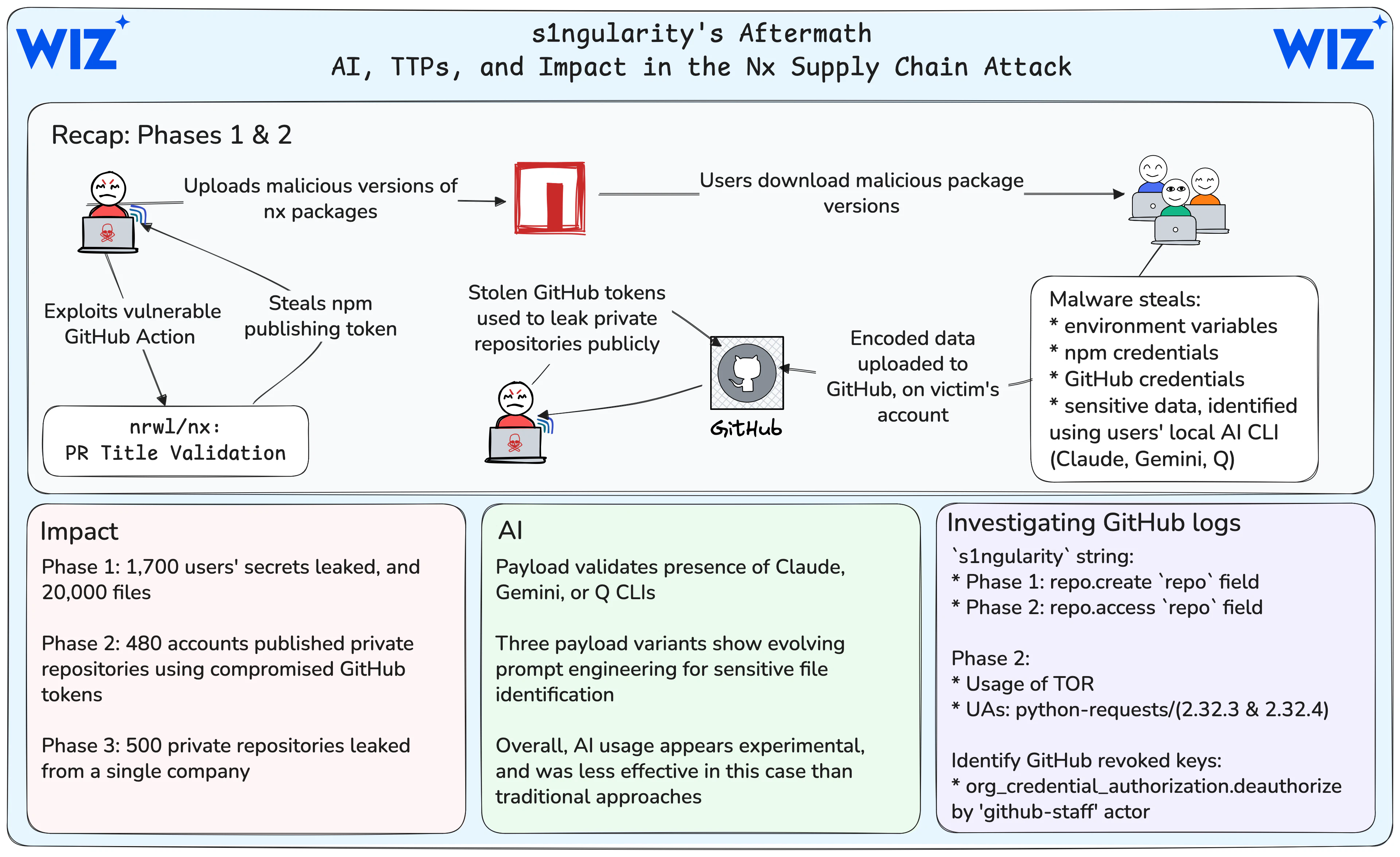
Stage 1: Direct Attack (August 26-27)
Over 1,700 users had secrets publicly leaked
More than 2,000 secrets were verified from research by multiple organizations
Over 20,000 files were leaked in the research sample
85% of infected systems were running macOS
Notably: Nearly 90% of GitHub tokens remained valid 24 hours after GitHub removed the repositories containing secrets. This rate only decreased slowly, with 80% of tokens still valid by the evening of August 29. GitHub conducted mass revocations, but about 5% of leaked tokens were still valid.
Stage 2: Token Exploitation (August 28-29)
At least 480 accounts were compromised (2/3 were organizations)
More than 6,700 private repositories were made public with the naming scheme
s1ngularity-repository-#5letters#A single organization had over 700 repositories leaked
Wiz identified thousands of valid credentials in previously private repositories
Stage 3: Targeted Attack (from August 31)
Started on the evening of August 31
Targeted a single victim organization
500 repositories were released with the suffix
_bakand the descriptionS1ngularity
Attacker's Tactics
Optimizing Operational Security
Wiz Research analyzed that the attacker optimized for their operational security:
Used
webhook.sitefor initial exfiltration (limited to 100 records for anonymous users)Switched to creating GitHub repositories on victim accounts to avoid needing to set up infrastructure
Used TOR when accessing victim accounts in Stage 2
Used a single-threaded Python script with User Agents:
python-requests/2.32.3andpython-requests/2.32.4
Response and Mitigation Measures
Immediate Response
NPM removed all malicious packages after 4 hours
GitHub made all leaked repositories private after 9 hours
Revoked and rotated all NPM tokens
Nx's Long-Term Security Measures
Nx has implemented comprehensive security measures:
Switched to NPM's Trusted Publisher model using OIDC authentication instead of tokens
Manual 2FA authentication for all package publishing
Disabled pipeline runs for all external contributors
Added provenance checks in Nx and Nx Console
Created
SECURITY.mdfor responsible disclosure
Wiz's Response
Wiz conducted white glove reporting for over 50 major affected organizations. Most of these organizations reported this was the first notification they received about the attack affecting them.
User Support Tools
S1ngularity Scanner
GitGuardian has released S1ngularity Scanner, a free open-source tool to scan local environments for potentially compromised files.
HasMySecretLeaked
GitGuardian offers the HasMySecretLeaked service at hasmysecretleaked.com, allowing you to check if specific credentials have been leaked in the attack without revealing the actual value of the secret.
Investigation Guide and New TTPs
Investigating GitHub Audit Logs
Stage 1: Search for the string s1ngularity in the repo field of the repo.create event.
Stage 2: Check:
The string
s1ngularityin therepofield of therepo.accesseventA user cloning multiple repositories in a short period
The
org_credential_authorization.deauthorizeevent by the "github-staff" actor_id (related to GitHub's mass revocation of compromised credentials)
Long-Term Impact and Ongoing Risks
Credentials Still Valid
Over 40% of leaked NPM tokens from stage 1 are still valid, nearly 100 unique tokens
5% of leaked GitHub tokens have not yet been revoked
More than 1,100 credentials are still valid at the time of GitGuardian's analysis
Most Leaked Types of Secrets
From GitGuardian's analysis:
2,349 distinct secrets from 1,079 compromised repositories
Common types: GitHub, NPM, AWS, OpenAI, Anthropic, Azure, Vercel
Notably: AI only collected fewer than 100 valid secrets from 20,000 exfiltrated files
Evolving Attack Patterns
Wiz highlights a clear trend in the threat landscape: from Ultralytics, to tj-actions, and now Nx - the attacker has realized the potential to escalate small GitHub Actions misconfigurations into large and complex supply chain attacks.
Protection Guide
If you are using affected Nx versions (20.9.0-21.8.0), take action immediately:
Check the system: Review the package.json and package-lock.json files
Clear cache: Run
npm cache clean --forceCheck shell files: Look for the command
sudo shutdown -h 0in ~/.bashrc, ~/.zshrcRotate credentials: Change all GitHub tokens, NPM tokens, SSH keys, API keys
Check GitHub: Look for unusual "s1ngularity-repository" repositories
Use scanning tools: Run S1ngularity Scanner and check HasMySecretLeaked
Conclusion
The "s1ngularity" attack marks a concerning milestone in weaponizing AI for malicious purposes. Although AI succeeded in only a small number of cases, the overall scale of damage is unprecedented, with thousands of accounts affected and tens of thousands of repositories exposed.
This attack highlights that simply deleting exposed data is not enough - businesses must be able to inventory secret data across all systems, automate processes at scale, and maintain comprehensive visibility of where credentials are used.




