CWPdoor warning: "Invisible" backdoor targets more than 340,000 Control Web Panel servers
Overview
What happens when an attacker does not need to remotely exploit the vulnerability to issue commands, but turns the administrative web server itself into a passive puppet? CWPdoor represents a sophisticated step forward in Linux persistence techniques: directly modifying the Nginx request processing lifecycle in the Control Web Panel to create a two-way control channel protected by asymmetric cryptography.
No black-box scanner can activate or detect the backdoor without possessing the attacker's RSA Private Key. More surprisingly, the malicious code directly interferes with the context module array in memory to disable access logging in a split second, while also restoring the file system's timestamp intact. How can a deep root backdoor exist without crashing the web service? And why does the simultaneous appearance of the infamous Ebury malware in Brazil raise big questions about this chain of attacks? The answer lies in the following detailed decompilation analysis sections.
What is Control Web Panel?
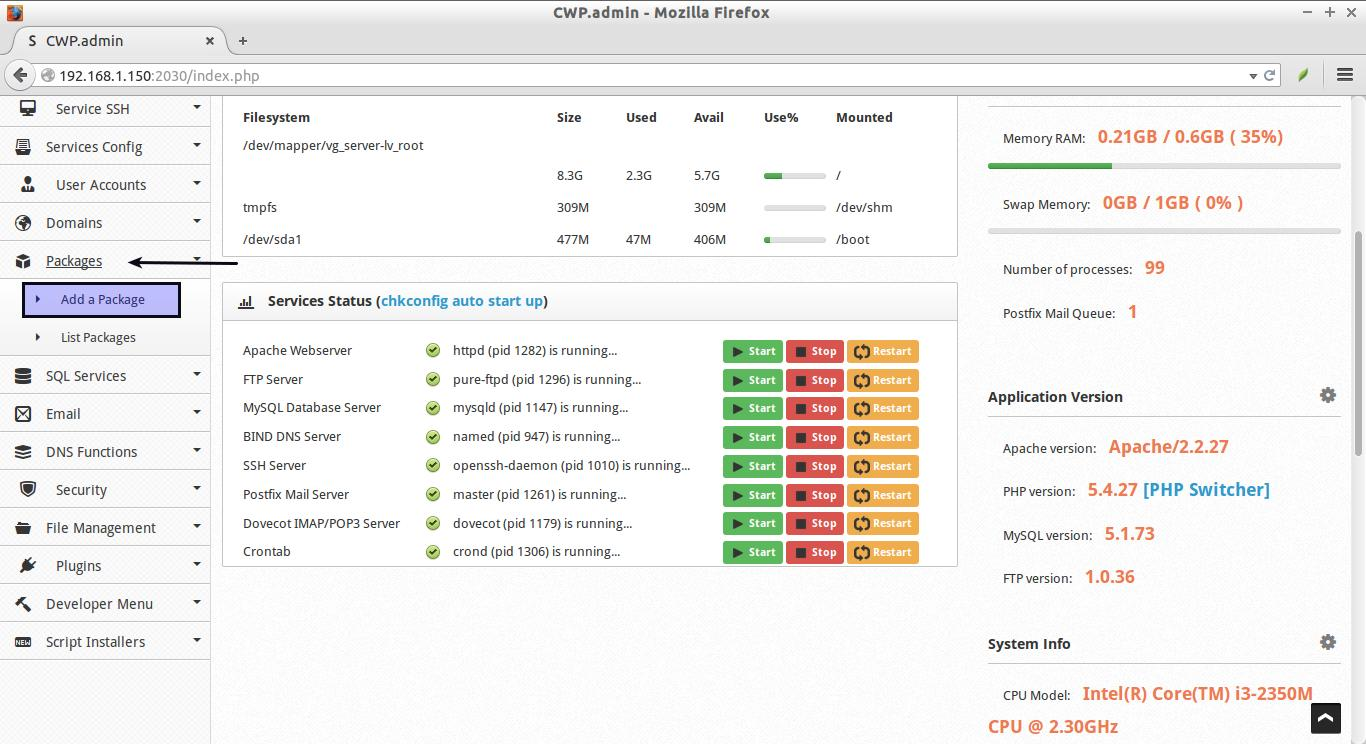
Control Web Panel (CWP), formerly known as CentOS Web Panel, is a hosting server management platform on Linux.
CWP provides a centralized administration interface for many services:
- Manage websites and virtual hosts.
- Manage DNS.
- Manage accounts and email services.
- Database management.
- Manage server resources and configuration.
- Administer web server components. A key component in this architecture is cwpsrv, a custom web server based on Nginx, responsible for serving CWP's administration interface and integrated applications.
Because cwpsrv resides on the HTTP handle of the administrative interface, controlling or replacing this binary could create an unauthorized access channel within legitimate components of the system.
Context of Discovery & Timeline
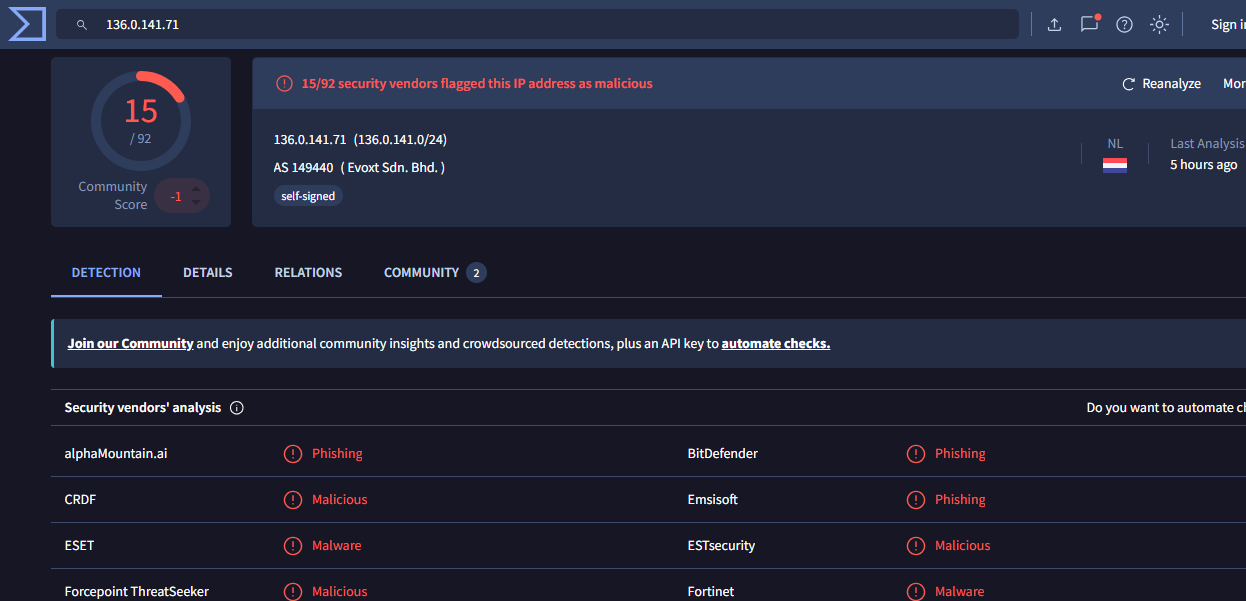
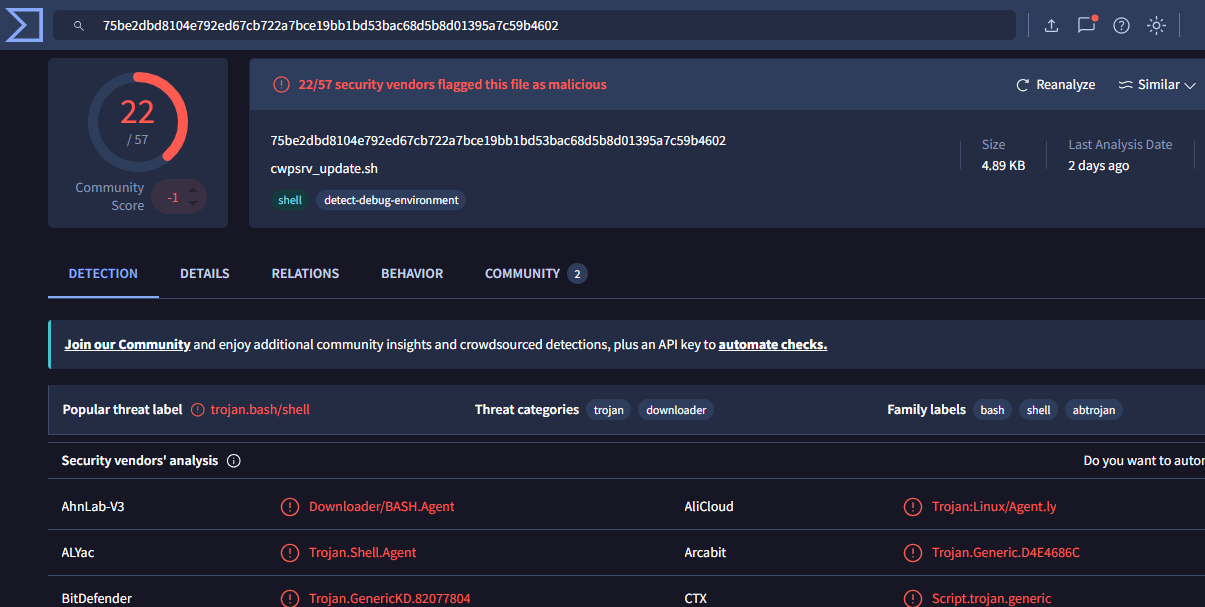
On June 29, 2026, QiAnXin XLab's Cyber Security Threat Monitoring & Analysis (CTIA) System recorded an unusual shell script named cwpsrv_update.sh. This script downloads a binary file named cwpsrv from the control server IP address 136.0.141.71 and proceeds to overwrite the service file of the same name on the victim Linux server.
The decompilation process confirmed that the downloaded cwpsrv file had its source code modified and recompiled to integrate a sophisticated passive backdoor. The research team named this malware CWPdoor.
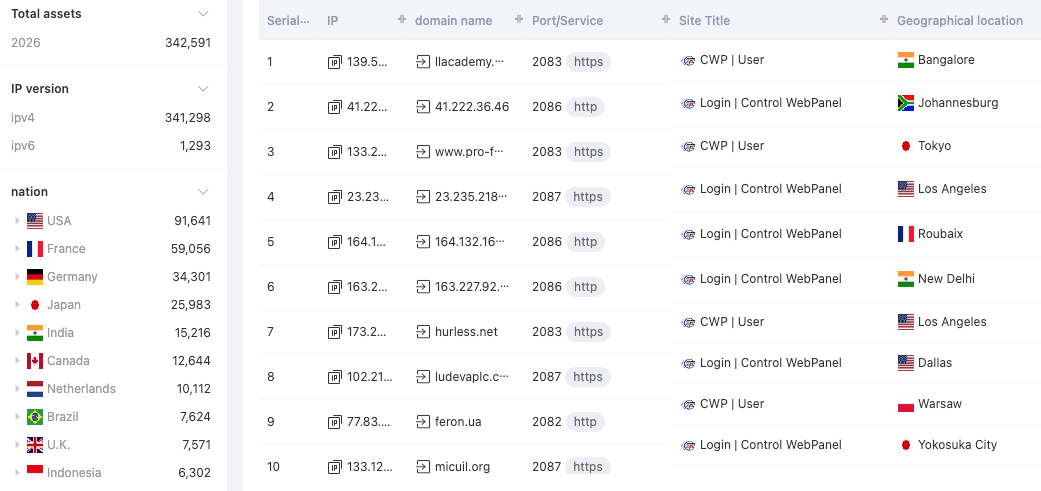
Data collected by the QiAnXin Hunter platform shows that more than 340,000 Control Web Panel entities were publicly operating on the global Internet within 30 days before the announcement. This is fertile ground for large-scale exploitation campaigns, especially in the web hosting and virtual server (VPS) segments.
On September 30, 2026, a compressed archive named evidencia.tgz was uploaded to VirusTotal from Brazil. Inside the file are two malicious components: libkeyutils.so.1.5.2 (identified as Ebury's infamous OpenSSH credential-stealing backdoor) and cwpsrv.suspeito. The analysis results confirm that cwpsrv.suspeito is the binary sample of CWPdoor. Notably, all Antivirus solutions on VirusTotal at that time rated this file as safe (0/70 detections).
Infection Scenario: How cwpsrv_update.sh works
The malicious code does not spread itself directly through the network using a worm, but uses a shell script named cwpsrv_update.sh (MD5 hash code: e505d4ffa21cf494a5dc2d7c8f4f1236). This script serves as an alternative deployment tool, disguised as an official version update.
The execution process of cwpsrv_update.sh demonstrates careful consideration of persistence and trace removal:
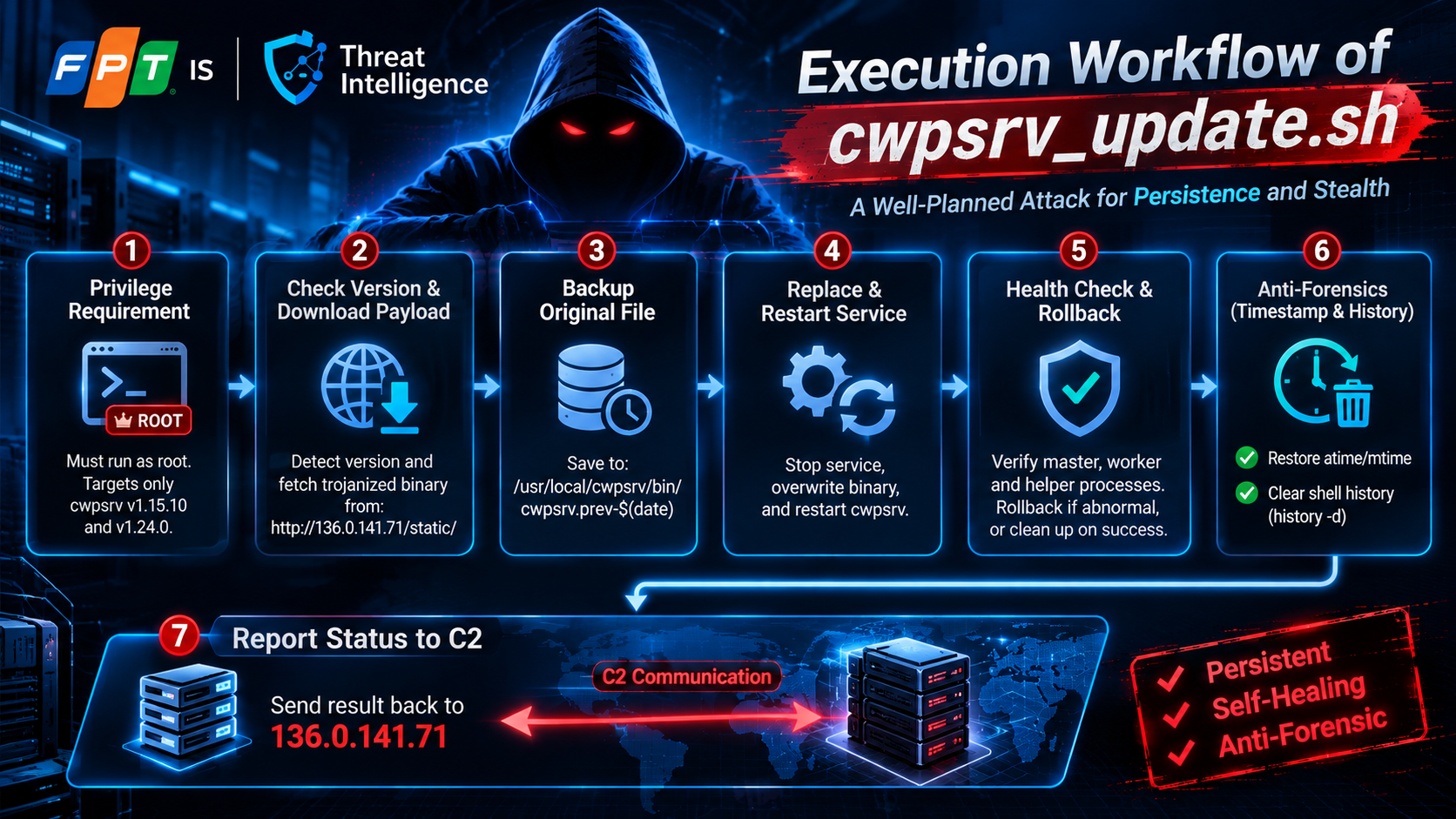
Required privileges: The script must run as
root. The script only supports two specific target versions ofcwpsrv, 1.15.10 and 1.24.0.Check Version & Load Payload: The script checks the current
cwpsrvversion on the server, downloads the corresponding trojanized binary package fromhttp://136.0.141[.]71/static/and checks for compatibility.Safe backup: Before intervention, the original file is backed up at the path:
bash/usr/local/cwpsrv/bin/cwpsrv.prev-$(date +%Y%m%d-%H%M%S)
Replace and launch: The
cwpsrvservice is stopped, the malicious binary is overwritten to the/usr/local/cwpsrv/bin/cwpsrvlocation, then the service is reactivated.Health Check and Rollback mechanism: The script checks whether the
master,workerand specifichelperprocesses are operating properly. If an anomaly is detected, the script automatically restores the original backup to avoid crashing the web administration service, preventing administrators from detecting problems. If the boot is successful, temporary files and backups are immediately deleted.\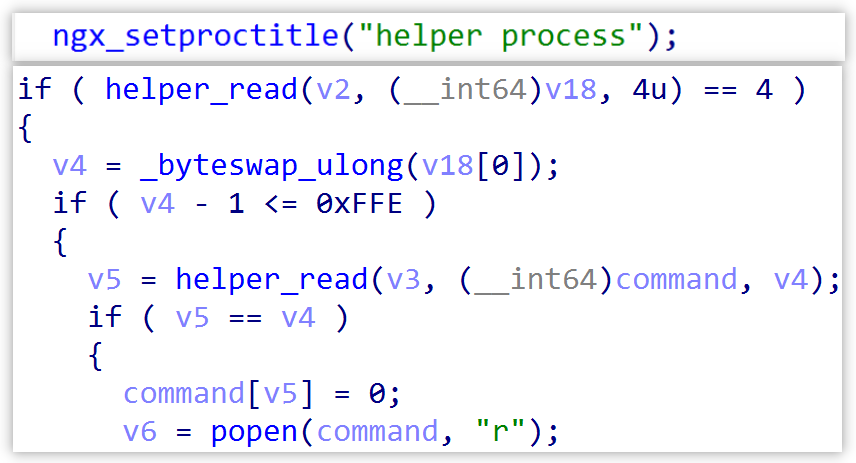
Erase system traces (Anti-Forensics): Whether the replacement process succeeds or fails, the script restores the access time (
atime) and modification time (mtime) of the binary file as well as the parent directory to their original original values. Next, the history-dcommand is activated to completely remove the session's command history. When administrators check the system with basic tools likels -lorstat, the files look like they have never been touched.Status report: After completing the deployment, the installation results are sent back to the control server
136.0.141.71.
CWPdoor In-Depth Technical Analysis
The customizable nature of cwpsrv
Control Web Panel (CWP) is a popular server management solution on the Linux platform (CentOS, Rocky Linux, AlmaLinux). The heart of the CWP interface is cwpsrv — a web server version compiled and tweaked by the CWP development team directly from the Nginx source code.
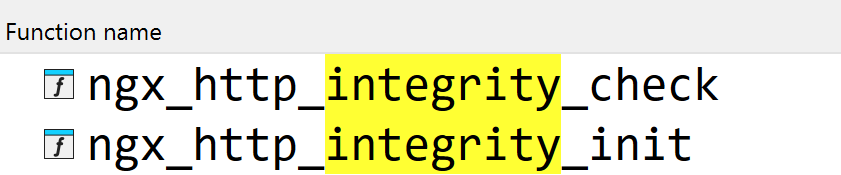
CWPdoor developers did not insert malicious code into the PHP script of the web interface or drop the web shell on disk. Instead, they directly modify Nginx's C source code, add two main functions named ngx_http_integrity_init and ngx_http_integrity_check, and then recompile it into a complete 64-bit ELF executable. Even though the binary file has been stripped of its common symbol table, the custom function names are retained, facilitating decompilation analysis.
Hook 1: Initialize & Setup IPC (ngx_http_integrity_init)
The ngx_http_integrity_init function serves as the injection point for the backdoor, called at the end of Nginx's ngx_http_block configuration analysis phase:
- Locating the logging module: The function traverses the global
ngx_modulesarray to find and store the index of thengx_http_log_modulelogging module. This index is cached to serve the log suppression technique at a later stage. - Environment cleanup: Scans and destroys helper processes left over from previous sessions.
- Set up IPC channel: Create and bind a local Unix domain socket named: n
gx_http_integrity_helper
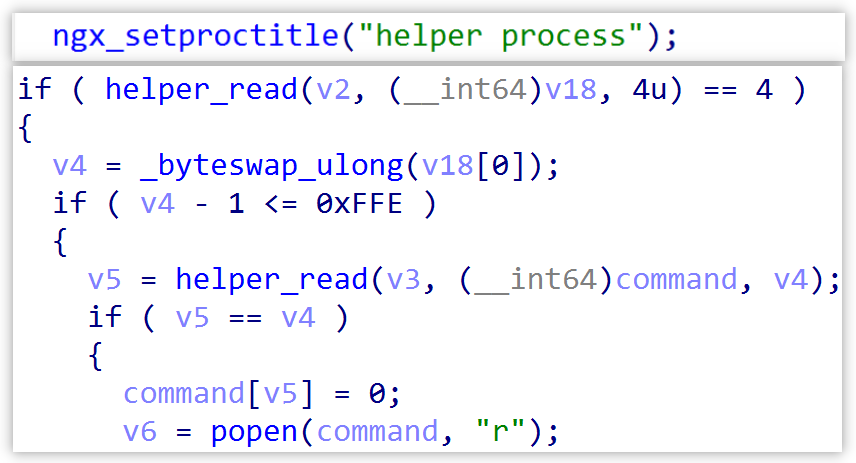
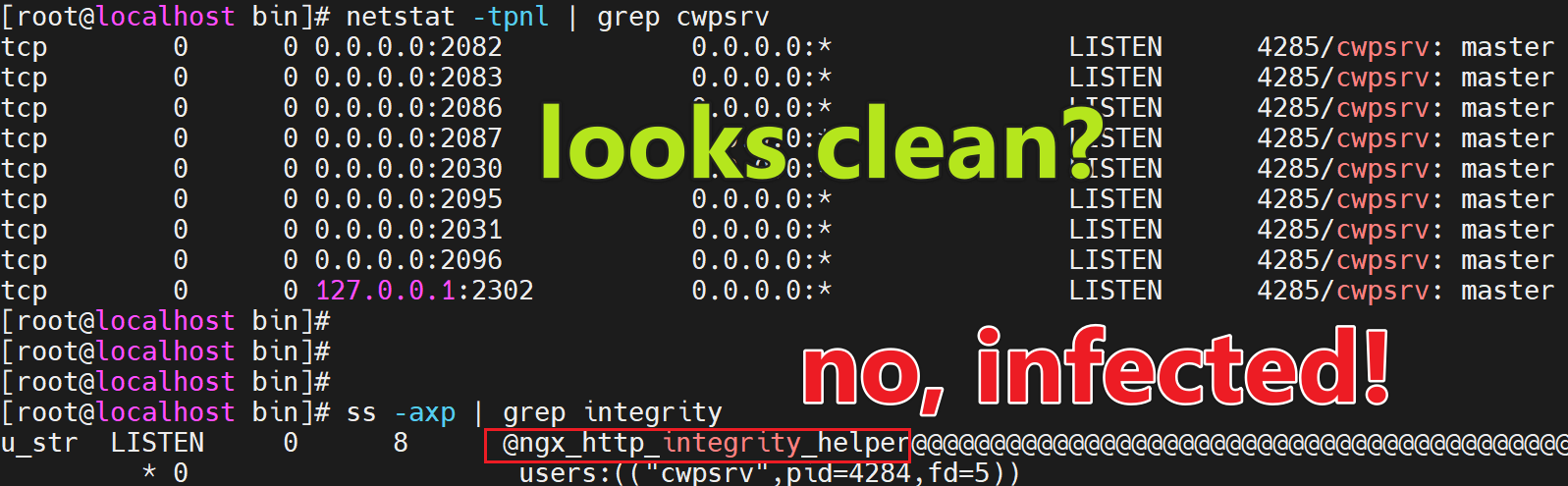
Create an executable process: Fork a separate helper child process that connects directly to this domain socket. The helper process acts as a specialized worker that only does one task: receive decoded commands from the master process and execute them directly on the operating system with the highest privileges.
Hook 2: Passive Trigger & Cryptographic Validation (ngx_http_integrity_check)
The ngx_http_integrity_check function is placed right at the entry point of the ngx_http_process_request request processing function. Any HTTP/HTTPS data flow entering the web panel interface must pass through this block.

The backdoor extracts 3 custom header fields in the HTTP request:
| HTTP Header | Format / Encoding | Technical Role |
|---|---|---|
X-Ngx-Integrity-Time |
Integer (Unix Epoch) | Timestamp for replay-attack protection (±300s window) |
X-Ngx-Integrity-Data |
Base64 string (IV + Ciphertext) | Carries the control command, symmetrically encrypted with AES-256-CBC |
X-Ngx-Integrity-Sig |
Base64 digital signature | RSA digital signature that verifies the attacker's identity |
The authentication process takes place according to strict steps:
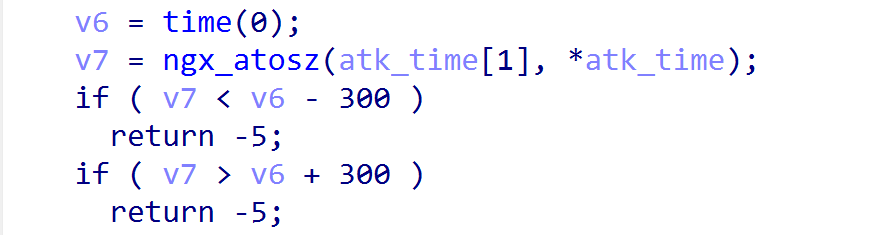
Time Check (Replay Protection): The value in
X-Ngx-Integrity-Timeis matched with the system time. If the deviation exceeds the ±300 seconds (5 minutes) window, the request is denied activation.Recover Public Key: In binary, the RSA public key is obfuscated by XOR operation with byte value
0x55. When run, the program performs reverse XOR byte by byte to retrieve the original public key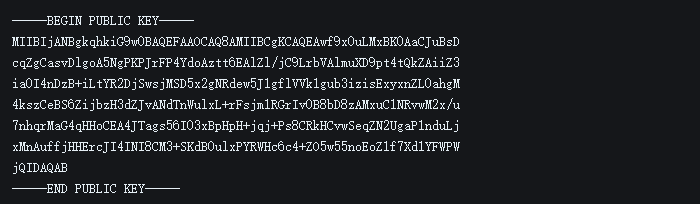
RSA digital signature authentication (Authorization Control): The check signature string is a combination of two fields: :
. The attacker uses the secret RSA Private Key to create a digital signature that is injected into the X-Ngx-Integrity-Sig. Because the private key is held only by the attacker, no third party (including analysts or security scanning tools) can activate this backdoor without the corresponding private key.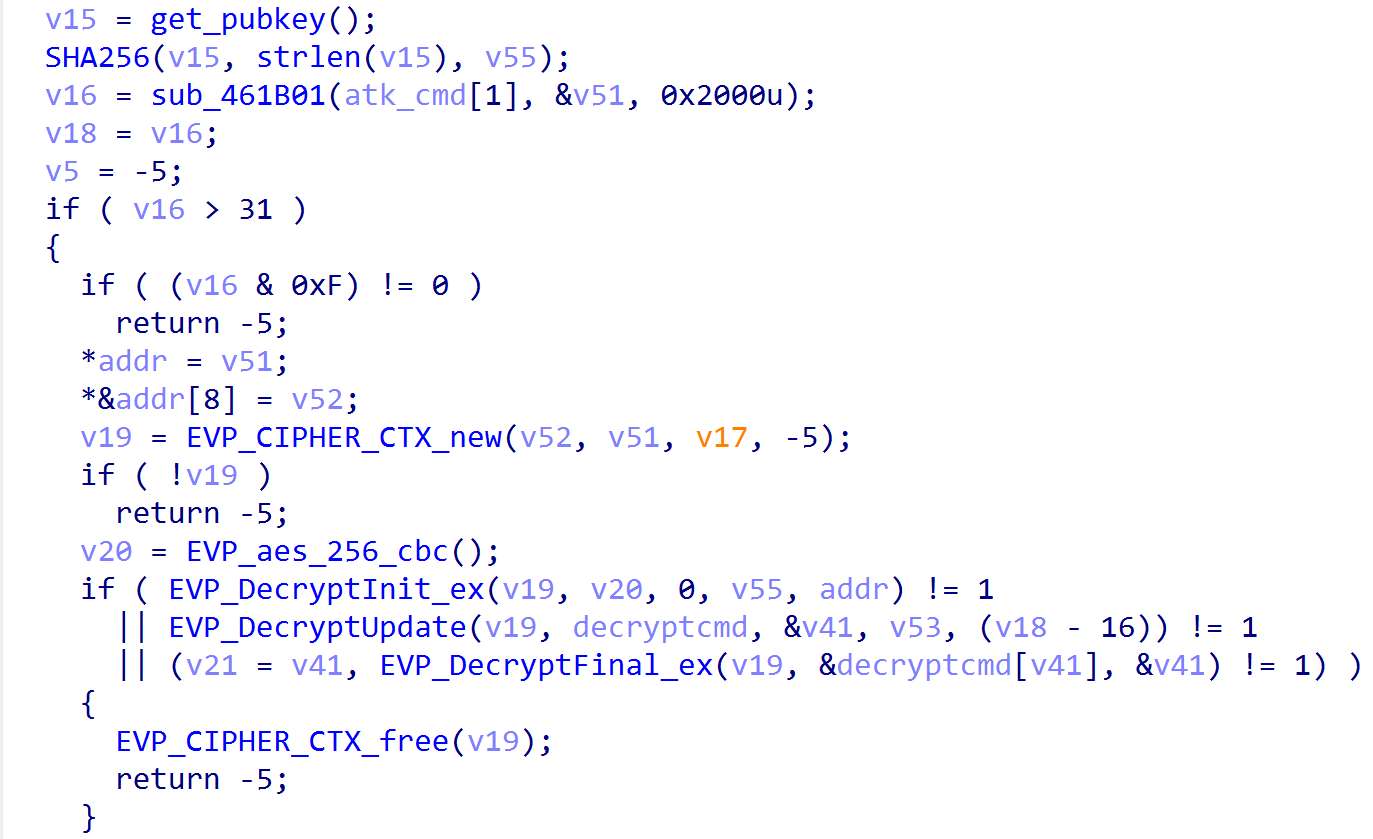
Fail-safe Silent Fallback: If any condition is not satisfied (time error, signature mismatch, corrupted data format), the processing flow immediately returns control to Nginx to process like a normal HTTP request. There were no error messages or crashes, making it completely impossible to probe the black-box from the outside.
Command Processing & Two-Way Communication
When the signature is successfully verified:
X-Ngx-Integrity-Datastring value is Base64 decoded. Of these, the first 16 bytes are extracted as the Initialization Vector (IV), the rest is the symmetric ciphertext.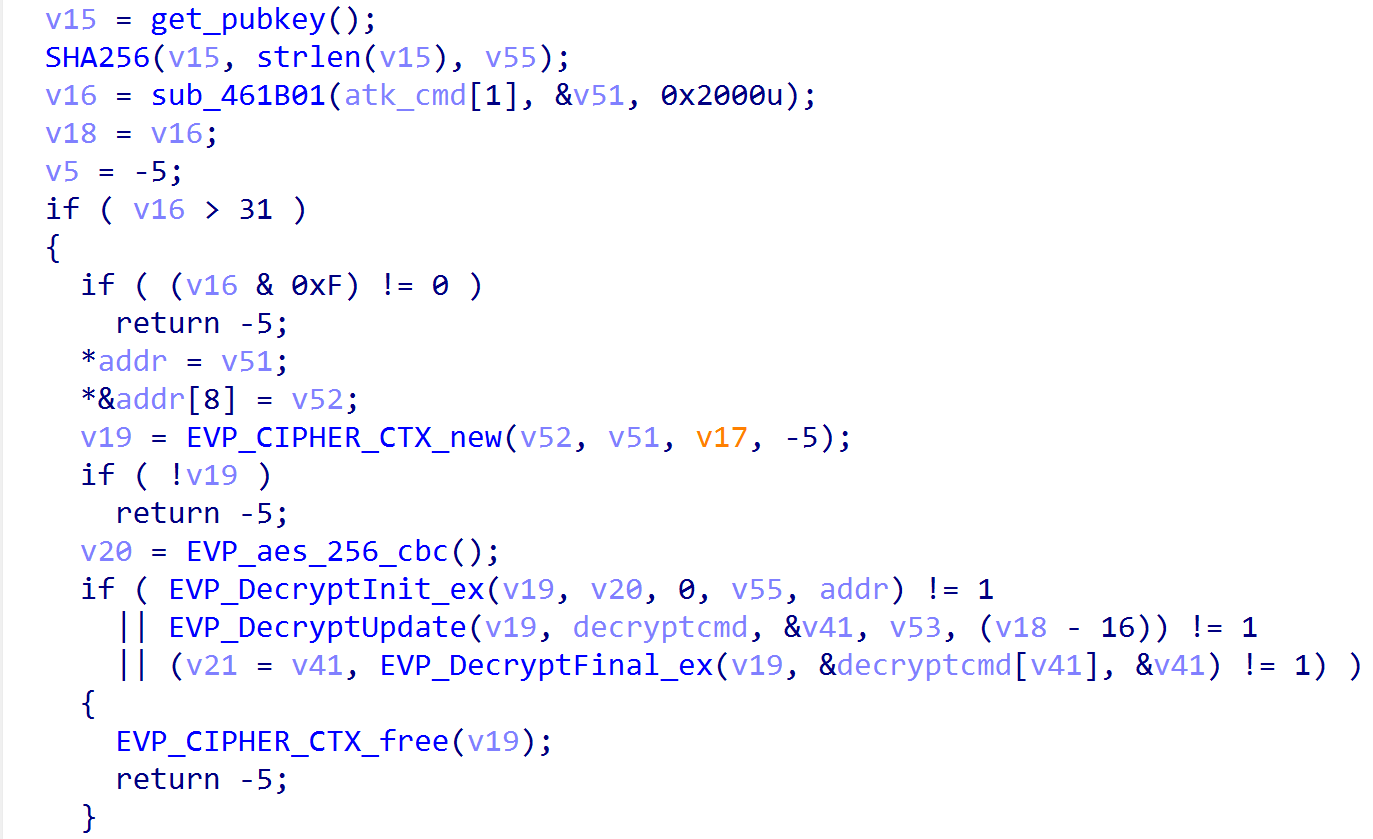
The AES-256 secret key is dynamically generated by taking the SHA-256 hash of the entire RSA Public Key character string embedded in the source code.
The
cwpsrvprocess decrypts the ciphertext using the AES-256-CBC algorithm to receive clear shell commands, then passes the command through the Unix domain socketngx_http_integrity_helperto the helper child process.The child process executes the command with root privileges, collects the entire output stream (stdout/stderr), AES encrypts the entire result and then passes it back to the master process.
The master process packages the encoding result into an HTTP 200 Response with header:
Content-Type: application/octet-stream
This two-way data exchange channel is completely hidden within the regular HTTPS/HTTP sessions of the administration web service itself.
Log Suppression Technique (Log Suppression)
CWPdoor's most cunning point lies in its real-time trace deletion mechanism. In Nginx's modular architecture, each HTTP request maintains a module context array.
When the backdoor is successfully activated, it copies and directly interferes with the context array of the request itself, replacing the context pointer of ngx_http_log_module (which was saved in the initialization step) with an empty pointer or fake pointer. As a result, when the request completes processing, Nginx completely skips the access logging phase. Administrators who audit the access.log file will not see any traces of requests containing the X-Ngx-Integrity-* header.
Unknown Initial Vector & Simultaneous Appearance of Ebury
A big question highlighted by both QiAnXin XLab and BleepingComputer: How did the attacker get cwpsrv_update.sh into the server and execute it as root in the first place?
The research report confirms that there is currently no confirmed evidence of the initial vulnerability (Initial Access Vector) used to distribute this updater script. However, looking at Control Web Panel's security history, the platform's attack surface has always been a favorite target of cybercriminal groups:
- Remote code execution (RCE) vulnerability: Previously, CWP had many serious vulnerabilities that allowed unauthenticated command execution as root, typically CVE-2025-67888 (unauthenticated OS command injection vulnerability on versions before 0.9.8.1209).
- Facefish malware campaign: Threat actors once scanned a series of CWP servers on the Internet, exploiting old vulnerabilities to implant the Facefish Linux rootkit.
- Brute-force / Credential Stuffing attack: Because most CWP servers open SSH ports (port 22) and panel ports (ports 2030/2031) directly to the Internet, leaking administrative passwords is a very common scenario.
Regarding the evidencia.tgz data package uploaded from Brazil on September 30, 2026 containing both CWPdoor and Ebury (libkeyutils.so.1.5.2):
- Ebury is a famous line of credential-stealing and access-maintaining malware that has compromised nearly 400,000 Linux servers during its 15 years of operation (according to ESET's report).
- QiAnXin XLab recommends not hastily concluding that the group behind Ebury is the author of CWPdoor. In a public hosting server environment, a server being infiltrated by many different groups of hackers and implanted with independent toolkits is a frequent phenomenon.
IOCs
File Hashes (MD5)
- e505d4ffa21cf494a5dc2d7c8f4f1236
- 965aea67fb40de1bab5169ada993349f
- d3f4e95113d49ab3991b45e457bda75b
URL
- http://136.0.141[.]71/static/cwpsrv_update.sh
- http://136.0.141[.]71/static/cwpsrv_1.15.10
- http://136.0.141[.]71/static/cwpsrv_1.24.0
IP
- 136.0.141.71
MITRE ATT&CK
| Tactic | Technique ID | Technique Name | Application in CWPdoor |
|---|---|---|---|
| Execution | T1059.004 | Command and Scripting Interpreter: Unix Shell | The cwpsrv_update.sh script runs system setup and service management commands |
| Persistence | T1543.002 | Create or Modify System Process: Systemd Service | Directly replaces the cwpsrv service binary to keep permanent access |
| Defense Evasion | T1070.003 | Indicator Removal: Clear Command History | The history -d command deletes the root shell session history |
| Defense Evasion | T1070.006 | Indicator Removal: Timestomp | Uses touch -r to restore the original atime/mtime of the binary and its parent directory |
| Defense Evasion | T1562.001 | Impair Defenses: Disable or Modify Tools | Tampers with the Nginx module context array to disable access logging |
| Defense Evasion | T1027 | Obfuscated Files or Information | XOR-encodes the RSA public key with byte 0x55; encrypts the payload with AES-256-CBC |
| Defense Evasion | T1036.005 | Masquerading: Match Legitimate Name or Location | Names the binary the same as the legitimate file /usr/local/cwpsrv/bin/cwpsrv |
| Command and Control | T1071.001 | Application Layer Protocol: Web Protocols | Uses normal HTTP/HTTPS traffic over the web panel ports as the C2 channel |
| Command and Control | T1573.002 | Encrypted Channel: Asymmetric Cryptography | Passively triggered by an RSA digital signature, with content encrypted using AES-256 |
Expert comments & Risks in Vietnam
From the perspective of malware analysis and operation of the Cyber Security Monitoring Center (SOC), our team draws some in-depth assessments:
Professional level of malware development
CWPdoor is not a patchwork of kiddie scripts. The developer has a very good grasp of Nginx's internal architecture — from the hook mechanism into the ngx_http_block configuration processing process, request lifecycle intervention at ngx_http_process_request, to the context module management structure of the logging system. Combining RSA asymmetric digital signatures with AES-256 encryption and timestamp binding not only ensures absolute security for attackers (anti-replay, anti-backdoor hijacking by third parties), but also completely eliminates the possibility of unintended activation by common vulnerability scanners.
The fatal blind spot of traditional monitoring processes
The vast majority of basic SOC monitoring and digital forensics processes at businesses rely on two pillars:
- Monitor web access logs to look for unusual requests, injected strings or malicious web shells.
- Scan Antivirus/EDR signatures for newly created files or check file modification timestamps.
CWPdoor resolves all of the above measures. The malware does not create new service ports, does not create periodic outbound C2 connections like beaconing, does not leave log traces, and perfectly recovers timestamps. This is the exact definition of an "invisible Passive Backdoor".
Actual impact in the Vietnamese market
In Vietnam, Control Web Panel is widely deployed at low-cost Web Hosting service providers, individuals providing WordPress website management services, and small and medium enterprises (SMEs) who want to save on cPanel or DirectAdmin license costs.
The general operating characteristics of this group of subjects are:
- Make the admin console open directly to the Internet (port 2030/2031) without VPN protection or IP Whitelist.
- Linux servers almost never have EDR or Auditd solutions installed, only ClamAV is installed (which is completely helpless against custom recompiled binary files).
- Lax patch management policy, often skipping CWP version updates due to concerns about conflicting configurations of running web services.
If a CWP server is compromised by CWPdoor, the entire customer database, website source code, emails, and financial information stored on that server are all under the attacker's control without the administrator's knowledge.
Defense Recommendations
If you are operating a Linux server with Control Web Panel (CWP) installed, please calmly follow the 3 specific instructions below:
Step 1: Quick 1-minute test (Is my server infected?)
The CWPdoor malware leaves no traces in the regular log file, but it is required to create an "underground bridge" (Unix socket) to transmit commands. You just need to open the terminal, log in as root and run exactly one command:
ss -axp | grep integrity
- Case 1 (Safe): No results appear on the screen (blank). Your server is not currently installed with this backdoor.
- Case 2 (Red alert): The screen displays a line containing the text ngx_http_integrity_helper. Your server has definitely been hijacked.
Step 2: "Emergency" plan if the server is detected to be infected
When CWPdoor appeared, the attacker took root — the highest power on the operating system. Just deleting a malicious file is not safe enough, because the bad guys may have installed other backdoors. Please proceed according to the following procedure:
- Disconnect the network immediately: Close the CWP administration ports on the Firewall or temporarily disconnect the server's network so the attacker cannot continue to send control commands.
- Safest solution — Reinstall the server from scratch (Rebuild OS):
- Please only backup the website source code and pure database. Absolutely do not back up binary files of the operating system.
- Create a completely clean new server/VPS, install the latest operating system and CWP version from the home page, then restore website data. This is the only way to ensure 100% clean malware.
- If on-site repair is required (Temporary plan):
- Find a clean backup of the web server (usually located at
/usr/local/cwpsrv/bin/cwpsrv.prev-*created by the hacker's script) to overwrite the infected cwpsrv file, or download the official installation package from CWP. - Upgrade Control Web Panel to the latest version from the home page.
- Rerun the command
ss -axp | grepintegrity to ensure the strange socket is completely gone.
- Find a clean backup of the web server (usually located at
- Change the entire access "key":
- Immediately change the server
rootpassword and CWP administrator account password. - Revoke and change all SSH keys (
authorized_keys). - Change database password (MySQL/MariaDB) and important API keys stored on the server.
- Immediately change the server
Step 3: Three golden rules to never be attacked again
- Never "open" the control panel to the whole Internet:
- The administrative login port (port 2030, 2031...) is where hackers first target. You should configure your firewall to only allow access from your home or company IP address, or only allow access via VPN. When hackers cannot find a login portal, they cannot activate the backdoor.
- Be wary of update scripts of unknown origin:
- Absolutely do not download and run scripts floating on strange forums or from external IP addresses. Any updates to CWP must be made through the developer's official release channel.
- Perform independent data backup to outside (Off-site Backup):
- Periodically back up your source code and database to a separate cloud storage service (Google Drive, Amazon S3, or other backup server). In the worst case the server is compromised, you can rebuild a new system in a few dozen minutes without worrying about losing data or being blackmailed.
References
Hackers backdoor Linux servers using trojanized CWP web server
CWPdoor: The Invisible Backdoor Living Inside Control Web Panel
CWPdoor Linux Backdoor Hides in Control Web Panel: Detection and Response Guide
Comments
Join the discussionNo comments yet. Be the first to comment.