Inside the SC Malware Network: When Deleting Files Is No Longer Enough to Kill Backdoors

Overview
Imagine you have just wiped out the root directory of a hacked website, restored the original source code from backup and are confident that the system is completely clean of malware. But just a few seconds later, without any trace of strange access, all backdoor files automatically appeared intact as if they had never been deleted.
It's not a spiritual phenomenon or a cache error - it's the power of SC Malware, a WordPress malware family recently discovered by cybersecurity experts.
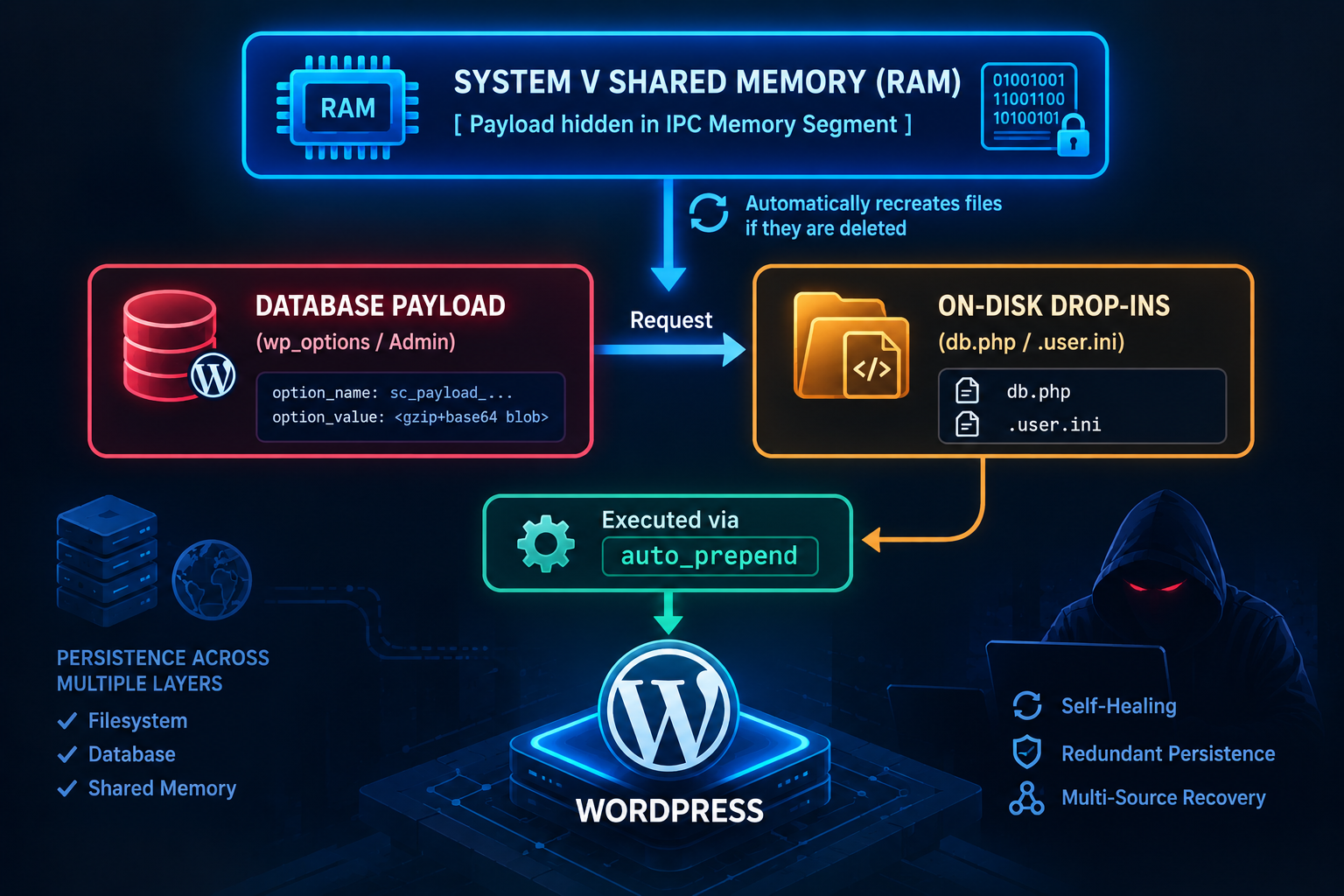
Completely different from traditional intrusion techniques, SC Malware does not depend on the hard drive. It hides itself as a self-healing network (Self-Healing Mesh) interwoven between the Database control panel, the shared memory partition (System V Shared Memory) hidden deep in the server's RAM, and receives control commands through smart contracts (Smart Contracts) on the Ethereum Blockchain network.
If you just find and delete files, you are just "cutting the grass". Malicious code in RAM and Database will immediately regenerate the entire malicious source set after just one click.
The analysis report below will dissect the technical "immortality" mechanism of SC Malware and reveal the precise 5-step process of thread interruption to completely eliminate this threat.
Context of SC Malware Detection
At the end of September 2026, incident analysts at Sucuri recorded a series of continuous re-infection incidents on a series of WordPress websites even though administrators had continuously deleted backdoor files and restored backups.
Root Cause Analysis (RCA) results show that the adversary does not apply the traditional backdoor model (which only relies on one or several hidden PHP files such as shell.php, wp-tmp.php). Instead, they deploy an interwoven code loading ecosystem (Mesh Loaders) consisting of at least 8 distributed components. If any component is deleted, the remaining components located in RAM or Database will automatically relaunch and overwrite the malicious file back to the hard disk in just a few seconds.
Self-Healing Mesh Architecture Analysis
The key point that makes SC Malware's "immortality" ability is the multi-layer self-healing mechanism (Multi-Vector Self-Healing). Below are the 8 core components that make up this network:
Preload Codes via .user.ini (auto_prepend_file)
Malicious code interferes with the .user.ini configuration file at the website's root directory, exploiting the auto_prepend_file directive:
auto_prepend_file = "/home/victim/public_html/wp-content/uploads/2026/01/sc_loader.php"
This configuration forces the PHP Engine to load and execute the sc_loader.php script before any WordPress PHP files (including index.php or wp-config.php) are launched.
Taking advantage of Drop-Ins: advanced-cache.php and db.php
WordPress supports Drop-in files to customize caching and database infrastructure:
wp-content/advanced-cache.php: Loaded automatically when the WP_CACHE variable is enabled in wp-config.php. Malicious code inserts hidden payload here to intercept all HTTP request streams.|
wp-content/db.php: Allows overriding the wpdb database connection class. The malicious code inserts hooks into db.php to directly interfere with SQL queries, ready to restore the payload if it detects that the configuration in the Database has been deleted.
Maintaining System V Shared Memory (RAM)
This is the most sophisticated technique of SC Malware. The malicious code takes advantage of the PHP shmop (Shared Memory Operations) extension to create shared memory partitions on Linux/Unix:
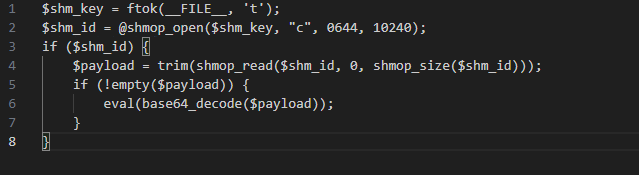
Thanks to this mechanism, even if the administrator deletes the entire public_html directory, the running PHP-FPM process still stores the payload in RAM. As soon as a new HTTP request activates the PHP process, malicious code from RAM will immediately write the sc_loader.php and .user.ini files back to the hard disk.
Write Malicious Code to the wp_options Table in the Database
The malware encodes the entire payload as a Base64 / Serialized object string and stores it in the wp_options table under seemingly valid option_names (e.g. wp_schema_check_v2, _transient_sc_cache).
Insert Code into Must-Use Plugins (MU-Plugins) & Active Themes
The malicious code creates files in the wp-content/mu-plugins/ directory. Files in this folder are automatically executed by WordPress without needing to be activated in the admin page. At the same time, the malicious code inserts a short code into the functions.php file of the active theme as a final fallback mechanism.
Phased Activity Flow Analysis
The operating mechanism of SC Malware operates in a closed self-healing loop (Self-Healing Loop) consisting of 5 main stages:
Phase 1: Infiltration & Mesh Deployment
Attackers exploit RCE vulnerabilities in plugins/themes or use leaked credentials to upload the initial installation file. Once executed, the malicious code does not create a single webshell but is dispersed into 8 mesh components: the .user.ini file, the Drop-ins advanced-cache.php/db.php, sc_loader.php in mu-plugins/, and the payload stored in wp_options.
Phase 2: Load RAM Memory & Install Rooting (RAM Seeding & Persistence)
The malicious code activates the shmop library to open the shared memory partition (System V Shared Memory segment) directly on the server RAM. The entire loader is compressed/encrypted into this partition. From this point on, the main payload is no longer dependent on the file on disk. Even if the entire web directory is deleted, the PHP-FPM process still stores this malicious code in RAM.
Phase 3: Synchronizing Commands From Blockchain (Blockchain C2 Sync)
The malicious code establishes outbound HTTPS connections to public Ethereum RPC Nodes (Cloudflare RPC, Infura). It sends a JSON-RPC eth_call query that reads stored data from a Smart Contract specified by the Attacker to get the real C2 address, new fetch command, or latest JavaScript Skimmer code.
Phase 4: Concealment & Interception (Anti-Forensics & Stealth Interception)
Malicious code sets up filters (hooks) to bypass administrators and security tools:
Hook into users.php to hide the anonymous Admin account.
Hook into all_plugins to hide malicious plugins.
Check User-Agent / IP: If the IP/User-Agent of the Admin/Scanning Bot is detected -> Malicious code returns a clean interface. If you are a regular visitor -> Activate malicious code.
Phase 5: Payload Activation & Self-Healing Trigger
Execute Payload: When a normal user accesses, the malware inserts JS code to steal card information (Checkout Skimmer) or redirects to betting/spam page.
Enable Self-Healing: As soon as a new HTTP request is sent to the server after the administrator deletes the file, the PHP process will load the payload from Shared Memory (RAM) or Database. The code in RAM detects the missing file and automatically regenerates the file immediately before the website can finish rendering.
C2 Control Channel via Blockchain (Ethereum RPC)
Instead of connecting directly to a fixed IP or Domain C2 (which is easily blocked by Firewall/WAF), SC Malware exploits Web3 / Blockchain infrastructure.
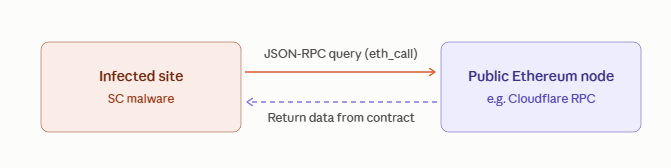
How it works:
Sending RPC queries: The malware issues standard JSON-RPC eth_call HTTPS POST queries to reputable public Ethereum nodes (such as Cloudflare Ethereum RPC Gateway, Ankr, Infura).
Reading Smart Contract data: Malicious code queries a Smart Contract address pre-programmed by the attacker. The returned data contains the actual C2 IP information or the new PHP script encoded in the transaction data field.
Evasive advantage:
Traffic going out is completely valid HTTPS to reputable domains (cloudflare-eth.com, mainnet.infura.io).
This C2 infrastructure cannot be taken down by reporting Domain Abuse or taking down the Server.
Big challenge with traditional threat intelligence feed-based WAF/SIEM solutions.
Anti-Forensics Techniques
SC Malware is equipped with a series of self-protection mechanisms to bypass both administrators and security plugins:
Hide Anonymous Admin Account
The malicious code creates hidden admin accounts in the wp_users table, then interferes with WordPress's users_list_table_query_args hook. When the administrator opens the Users page in the Dashboard, the malicious code automatically removes hidden account IDs from the SQL query, causing the list to display completely normally.
Block Warnings From Security Plugins
The malicious code adds hooks to the all_plugins filter to hide malicious plugin files in the Installed Plugins list. Additionally, it proactively finds and disables data tables or scan flows of plugins such as Wordfence, Sucuri Security, iThemes Security by overriding security configuration constants.
Identification & Fingerprint Access
The malicious code checks User-Agent, HTTP_ACCEPT_LANGUAGE and the visitor's IP address. If access is detected from the logged in Admin's browser or from security scanning bots (such as Googlebot, VirusTotal, Sucuri Scanner), the malicious code will stop working or return clean content. The malicious code only activates malicious actions (inserting JS Skimmer, redirecting betting pages) for normal users from search engines.
Step-by-Step Remediation
To completely eliminate SC Malware without being re-infected, it is necessary to follow the sequence of thread interruptions from Memory -> Database -> File System.
Step 1: Execution Cutoff
Switch Nginx/Apache to maintenance mode or temporarily block all external HTTP requests to the site.
Disable the auto_prepend_file feature by renaming or deleting the .user.ini and .htaccess files in the root directory.
In the wp-config.php file, temporarily add a plugin loading block constant and edit the file:

Step 2: Free up System V Shared Memory (Clear Shared Memory)
Restart the entire PHP processing service (PHP-FPM) and Web Server to kill the RAM saving processes:

Check and delete leftover System V IPC shared memory partitions:
ipcs -m
for id in $(ipcs -m | grep www-data | awk '{print $2}'); do ipcrm -m $id; done
Step 3: Database Sanitization
Review the wp_options table, removing rows containing questionable encoding strings or SC_ prefixes:

Check the correct Admin list using direct SQL query (bypassing the WordPress Dashboard interface):

=> Immediately delete strange accounts that are not under the management of the organization.
Remove malicious Cron tasks in cron transient:

Step 4: Clean & Replace File System Source Code
Delete the entire WordPress Core source code file, keeping only the wp-content folder and wp-config.php file (tested).
Download the official WordPress installer from wordpress.org and overwrite the entire Core.
Check the wp-content/ directory:
Delete the files wp-content/advanced-cache.php and wp-content/db.php.
Delete the wp-content/mu-plugins/ folder.
Re-install all Themes and Plugins from the original source (Official Repository).
Re-authorize standard folders and files:
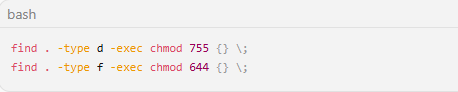
Step 5: Change Secret Keys & Configure Monitoring After Incident
Change the entire Secret Salts string in wp-config.php using the official WordPress API tool (https://api.wordpress.org/secret-key/1.1/salt/) to disable the entire current login session.
Change Database password, Admin account password, FTP/SSH password.
Set WAF rules to block outbound connections to Ethereum RPC nodes that are not in the allowed list.
Recommendations for Wordpress Users and Admins
Urgent (Done Within 0 - 24 Hours)
Check advanced configuration file permissions: Immediately check the existence of .user.ini, wp-content/advanced-cache.php, and wp-content/db.php files. If your website does not use custom Caching or Database plugins, delete or carefully check the content of these files.
Disable direct file editing in Dashboard: Add the following 2 configuration lines to the wp-config.php file to prevent attackers (or malicious code) from modifying code directly from the admin page:
define('DISALLOW_FILE_EDIT', true);define('DISALLOW_FILE_MODS', true);
Check the Administrator account (Admin) with direct SQL: Does not depend on the list in the WordPress Dashboard interface. Log in to phpMyAdmin / MySQL CLI and run the following command to detect hidden Admin accounts:
SELECT ID, user_login, user_email FROM wp_usersWHERE ID IN (SELECT user_id FROM wp_usermeta WHERE meta_key='wp_user_level' AND meta_value=10);
Restart the PHP-FPM / Web Server process: If you suspect the website is infected, restart PHP-FPM immediately to free up the shared memory partition (System V Shared Memory) that is storing the hidden payload in RAM.
Short Term (Done in 1 - 7 Days)
Redeem all Secret Salts & Credentials:
Replace the Secret Keys/Salts string in wp-config.php via the official WordPress tool (https://api.wordpress.org/secret-key/1.1/salt/) to cancel all current login sessions (cookies/sessions).
Change passwords for Database, FTP/SSH, cPanel/DirectAdmin accounts and all WordPress Admin accounts (must enable 2-factor authentication - 2FA).
Set up a file integrity monitoring mechanism (File Integrity Monitoring - FIM): Use security tools/plugins that can automatically compare the checksum of WordPress Core, Theme, Plugin with the original repository on WordPress.org to immediately detect when files are inserted with strange code.
Monitor outbound network connections (Outbound Traffic): Configure Firewall/Egress Rules to block or warn when there are suspicious HTTPS POST requests from the server to public Ethereum RPC ports (cloudflare-eth.com, mainnet.infura.io, rpc.ankr.com).
MITER ATT&CK Technical Classification Table
| Tactic | Technique ID | Technique Name | Technique Description in SC Malware |
|---|---|---|---|
| Persistence | T1505.002 | Server Software Component: Web Shell | Uses Drop-ins (db.php, advanced-cache.php) and .user.ini to maintain code execution capability. |
| Persistence | T1546.012 | Event-Triggered Execution: Shared Modules | Stores malicious code in System V Shared Memory (RAM) so it reloads automatically whenever a new PHP process starts. |
| Defense Evasion | T1564.001 | Hide Artifacts: Hidden Files & Directories | Hides malicious files in the uploads/mu-plugins directories and hides Admin accounts from the Dashboard. |
| Command & Control | T1102.002 | Web Service: Bidirectional Communication | Abuses public Ethereum Blockchain RPC endpoints to receive C2 commands anonymously. |
| Execution | T1059.001 | Command and Scripting Interpreter: PowerShell/PHP | Dynamically executes malicious PHP code using the eval() function and base64 encoding. |
IOCs
Files & Configuration
[File Path] /public_html/.user.ini (contains the auto_prepend_file directive)
[File Path] /public_html/wp-content/advanced-cache.php (contains encoded eval code)
[File Path] /public_html/wp-content/db.php (contains a hook that overrides wpdb
[File Path] /public_html/wp-content/mu-plugins/sc_loader.php
[Database Option] wp_options -> option_name = 'wp_schema_check_v2'
[Database Option] wp_options -> option_name = '_transient_sc_cache'
[Memory Segment] System V IPC memory segments owned by the web user with a non-standard payload size
C2 Blockchain
https://mainnet.infura.io/v3/\*
Expert Comments & Lessons for Hosting Environment in Vietnam
According to observations of FPT IS SOC Team, the appearance of SC Malware reflects the complex development trend of malicious code lines targeting e-commerce CMS.
In Vietnam, many businesses and agencies are operating WordPress systems on cheap Shared Hosting cPanel/DirectAdmin infrastructures. Inherent limitations of this environment include:
Lack of PHP memory partition isolation (IPC Memory Insecurity): Many Hosting providers configure PHP-FPM to run under a representative account or do not isolate the System V Shared Memory partition between Virtual Hosts. This allows malicious code at an infected site to "spread underground" through RAM memory to other sites located on the same physical server.
Surface cleaning habits: Most administrators, when detecting a hack, only scan files with plugins or delete alarm files. The mindset of "deleting files is clean" has completely failed against SC Malware's Self-Healing Mesh architecture.
Strategic recommendation: Organizations need to shift to a Containerized storage model (Docker/K8s) or enable radical isolation mechanisms (chroot, CloudLinux CageFS) for the PHP-FPM process, and at the same time set up a real-time file integrity monitoring solution (File Integrity Monitoring - FIM).
References
WordPress Backdoor Rebuilds Itself After Cleanup Using Files, Database, and Shared Memory
SC WordPress Malware: A Self-Healing Mesh of Loaders, Drop-Ins, and a Blockchain-Controlled Backdoor
WordPress Malware Keeps Coming Back: SC Backdoor Cleanup | MagicWP