

New Phishing Attack Fakes Zoom Meeting Invitations to Steal Login Information

Phishing campaign
A sophisticated phishing campaign has emerged, exploiting the popularity of Zoom meetings to target business users with fake meeting invitations that appear to be sent by colleagues. The attack uses social engineering tricks to create a sense of urgency, prompting victims to click on malicious links embedded in seemingly legitimate emails. When users click, these links lead them through a phishing sequence designed to steal Zoom login credentials.
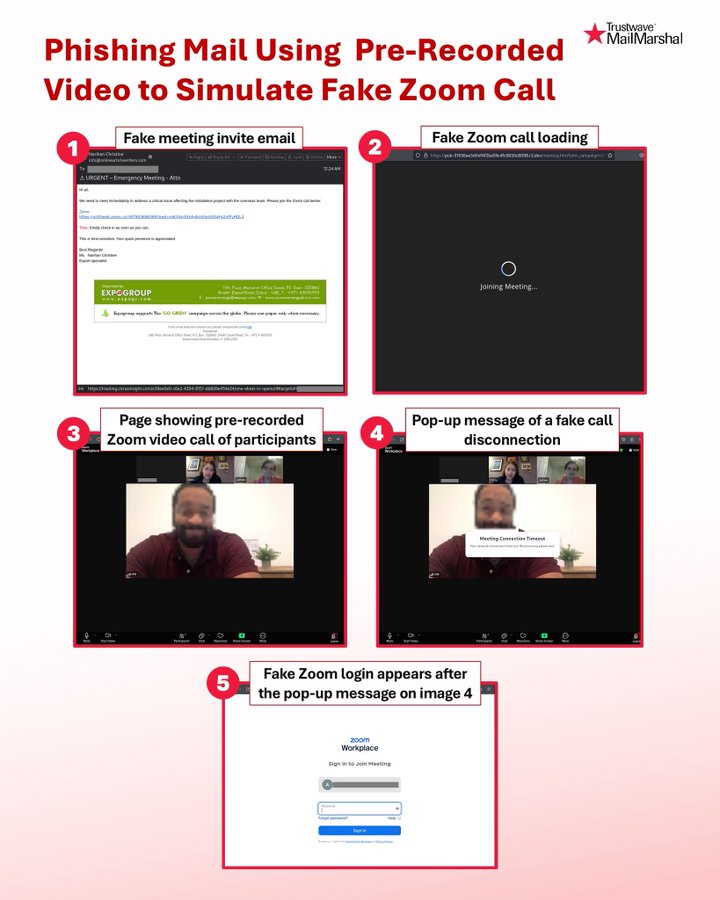
These phishing emails are cleverly designed to look exactly like official Zoom meeting notifications, complete with the familiar logo, professional formatting, and language that makes recipients feel they need to respond immediately. Typically, the email subject lines are urgent, such as "Missed Zoom Call" or "Urgent Meeting Request," to prompt recipients—especially busy employees juggling multiple tasks—to click without thinking twice. When users click the link in the email, they are taken to a fake Zoom meeting interface, where an image shows colleagues waiting in a video meeting. This creates the impression of a real meeting happening, putting psychological pressure on users to join immediately.
Security researchers from SpiderLabs discovered this campaign on May 19, 2025. They noted that the attackers used pre-recorded videos to simulate a real meeting environment, making it easier to deceive victims. "This attack is a new advancement in phishing techniques, combining animated elements to overcome user skepticism," the research team stated in their initial warning report.
Attack method
The attack process is well-structured, consisting of five clear stages. After receiving the phishing email and clicking on the malicious link, the victim sees a loading screen that mimics the Zoom interface, making them believe they are about to join a real meeting. Then, the website switches to playing a pre-recorded video showing images of "participants" in a meeting, creating a convincing illusion of a live conference call. Shortly after, users receive a fake notification about being disconnected, along with a fake Zoom login window. The goal of this step is to trick users into entering their account information, thereby stealing their login credentials.
The attack infrastructure is sophisticated, using multiple domains. Initially, tracking was done through subdomains of cirrusinsight.com, while the fake meeting pages were hosted on the r2.dev service.
Network traffic analysis shows that stolen login information was sent through endpoints of the Telegram API. This method allows attackers to collect victim data in real-time while exploiting popular communication channels like Telegram to evade traditional monitoring and security systems.
Recommendations
To prevent this phishing attack, FPT Threat Intelligence offers the following recommendations:
Raising user awareness is key: Conduct regular training on phishing techniques, especially fake meeting invitations.
Carefully check emails: Verify the sender's address, spelling errors, and links before clicking.
Do not rush to respond to urgent emails — verify through other channels like internal chat, phone, or in person.
Check links before accessing them; if they seem strange or unrelated to Zoom's official domain (like
zoom.us), do not access them.Do not log into Zoom from links in emails — open the Zoom app directly or visit the official site.
Enable two-factor authentication (2FA) for Zoom and work email accounts.
Block or monitor access to suspicious domains, including subdomains of
cirrusinsight.comand hosting services liker2.devif not legitimately used within the organization.Monitor network traffic to detect unusual connections to the Telegram API or commonly abused messaging platforms.
Update email filtering rules (email gateway) to detect phishing content or brand spoofing.
Use endpoint security solutions that can detect abnormal behaviors like fake logins or data theft.
IOC
hxxps://tracking[.]cirrusinsight[.]com/e39ee0e9-c6e2-4294-8151-db8d9e454e24/one-ebext-in-openurl#targetid=john[.]doe@company[.]com&uname=john[.]doe&4030483277383-2874893
hxxps://pub-51656ae3d0ef4f2ba59cdfc6830c8098[.]r2[.]dev/meeting[.]htm?utm_campaign=8634688-zm-30000&utm_source=ppc#targetid=john[.]doe@company[.]com&uname=john[.]doe&4030483277383-2874893
hxxps://api[.]telegram[.]org/bot7643846141:AAH3xkttszS0hQgqj7PaS_f7XetLz-_DTQc/sendMessage




