

OctoV2 Android Banking Trojan - New Malware Disguised as Deepseek AI

Just a SOC Analyst ^^
Security experts have discovered a sophisticated Android banking Trojan campaign masquerading as a newly emerged AI chatbot to deceive users. This malware, known as OctoV2, is being distributed through phishing websites mimicking the official Deepseek AI chatbot application.
Phishing Method
The malware is distributed via a malicious phishing link hxxps://deepsekk[.]sbs
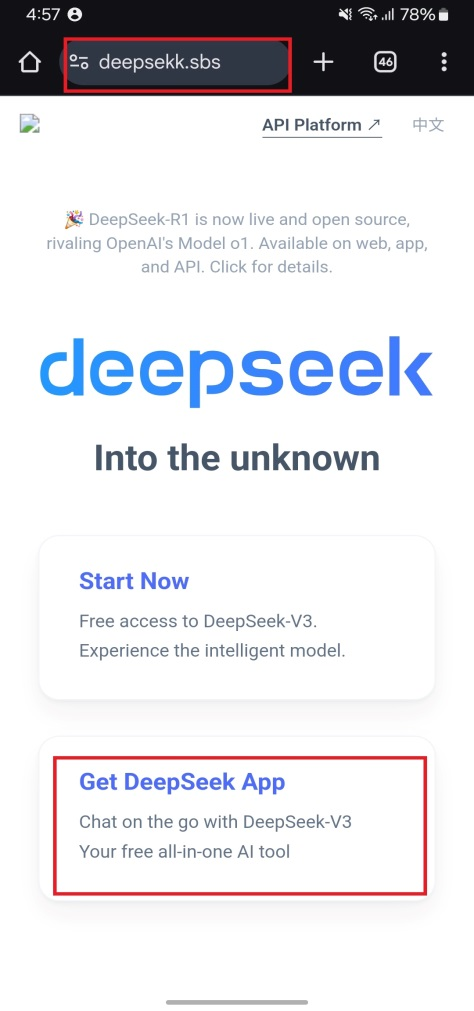
Figure 1. Fake DeepSeek application website
When users click on the message, it downloads the malicious DeepSeek.apk file (Hash: e1ff086b629ce744a7c8dbe6f3db0f68) from the website hxxps://deepsekk[.]sbs/DeepSeek.apk and saves the file to the device's “Sdcard/Downloads” directory as shown in Figure 2.
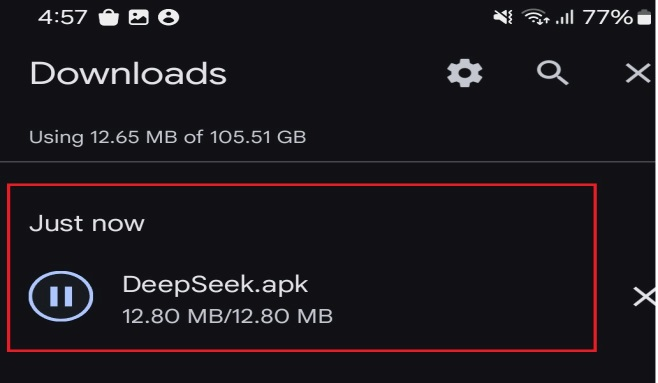
Figure 2. Location of the Deepseek application
When users fall for the trap and install the malicious “DeepSeek.apk” application, it impersonates the DeepSeek icon on the device's home screen.
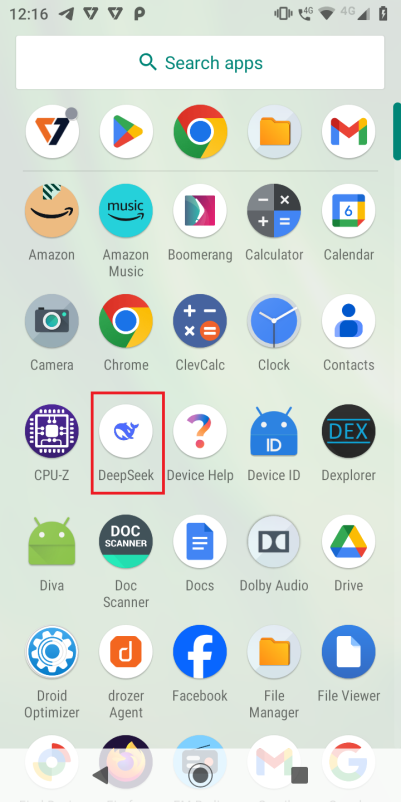
Figure 3. Fake Deepseek application icon created by malware
When users launch the malicious Deepseek application, an update screen appears. When users click "Update," a "Allow from this source" notification pops up, requesting the installation of another additional application.
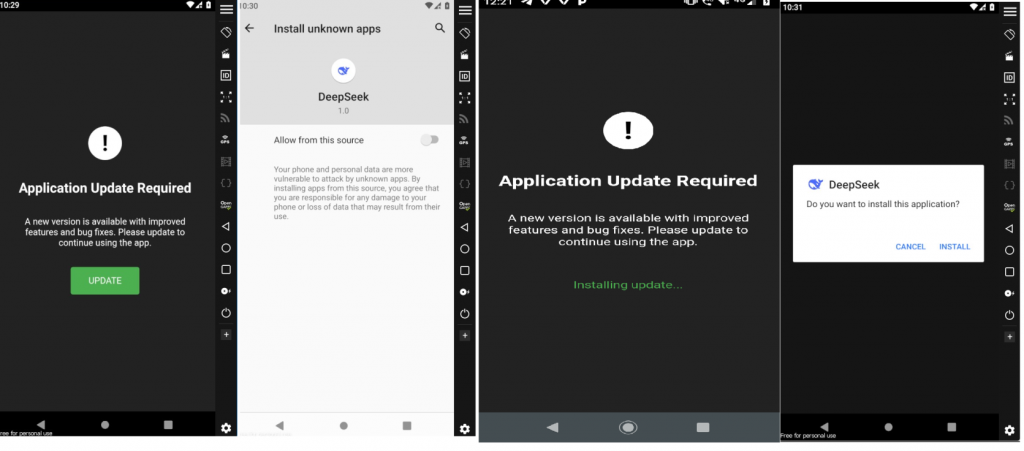
Figure 4. Installation of fake Deepseek client application
After completing this process, another Deepseek application icon appears on the device's home screen, as shown in Figure 6. Based on this, researchers concluded that two versions of the malicious Deepseek software are installed on the device, each with a different package name.
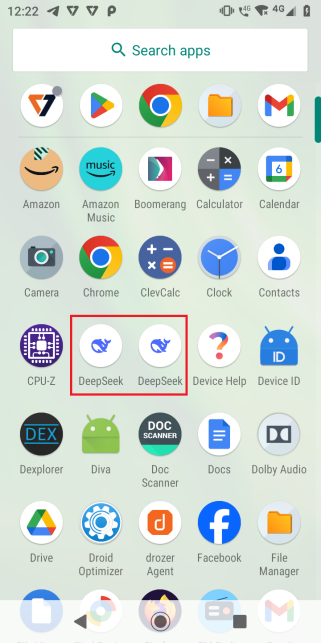
Figure 5. Multiple Deepseek icons created by malware
To verify this, use Logcat to display the installation process of the two APKs, as shown in Figure 6 below.
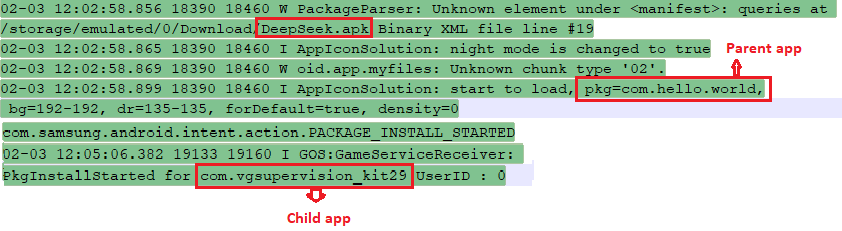
Figure 6. Logcat log
After analysis, researchers identified the package “com.hello.world” as the parent application and “com.vgsupervision_kit29” as the child application. Once the child application “com.vgsupervision_kit29” is installed on the device, it often suggests that users enable Accessibility Services on the device until users allow this application to enable Accessibility Services.
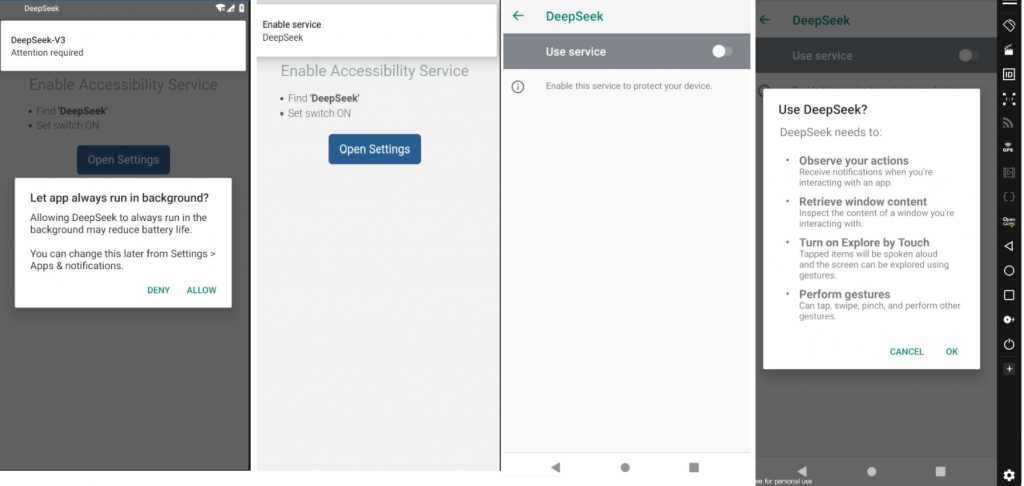
Figure 7. Accessibility service request from malicious application
Technical Analysis
Information Extraction
To continue the analysis, security researchers attempted to extract the original “deepseek.apk” using 7-Zip, but the file was encrypted with a password. This is one of the self-protection mechanisms of the malware, and it is becoming increasingly common. Furthermore, reverse engineering tools like APKTool and Jadx could not analyze these APK files, as shown in Figure 8.
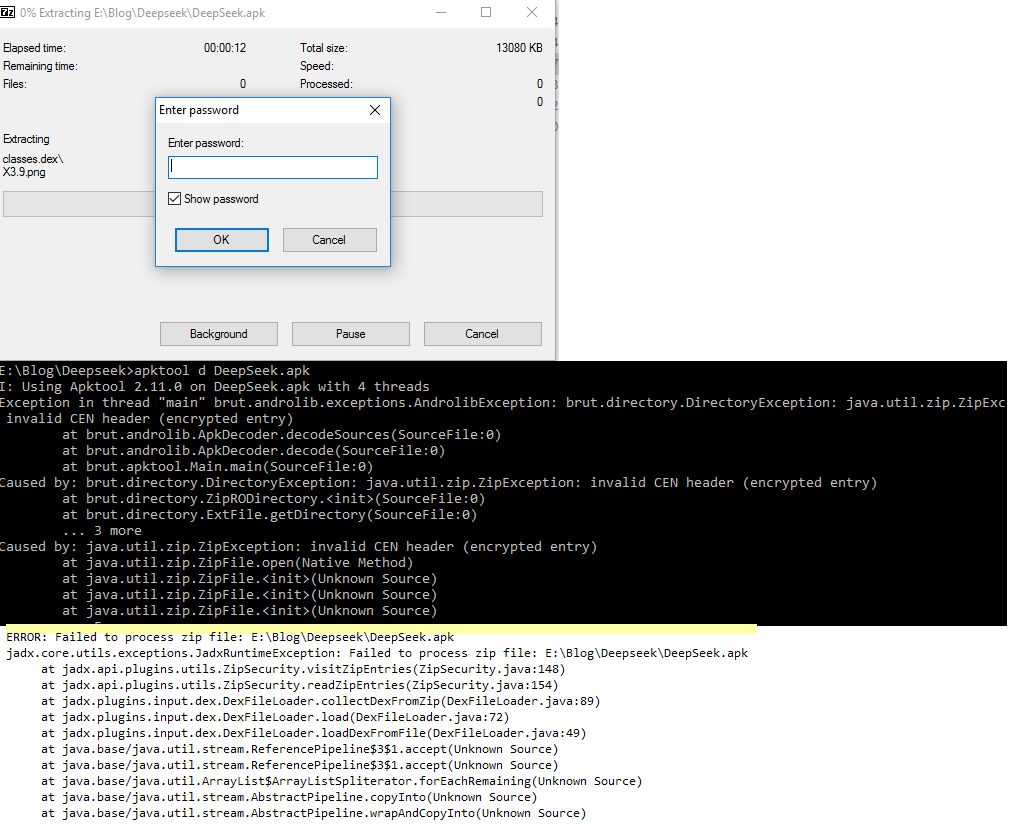
Figure 8. 7zip and reverse engineering tools unable to analyze the malware
However, when the malware is installed, the Android SDK aapt tool successfully analyzed and extracted the files created by the application.
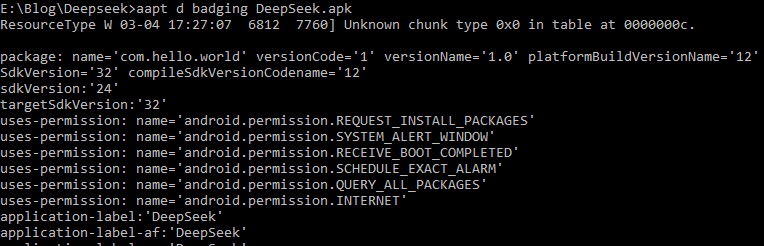
Figure 9. Successfully analyzed by aapt
Analysis of Child Application Installation Behavior in Android Environment
When users launch the application with the package name “com.hello.world,” the application searches the accompanying resource directory to identify the existence of a file with the extension .cat, as illustrated in Figure 10.
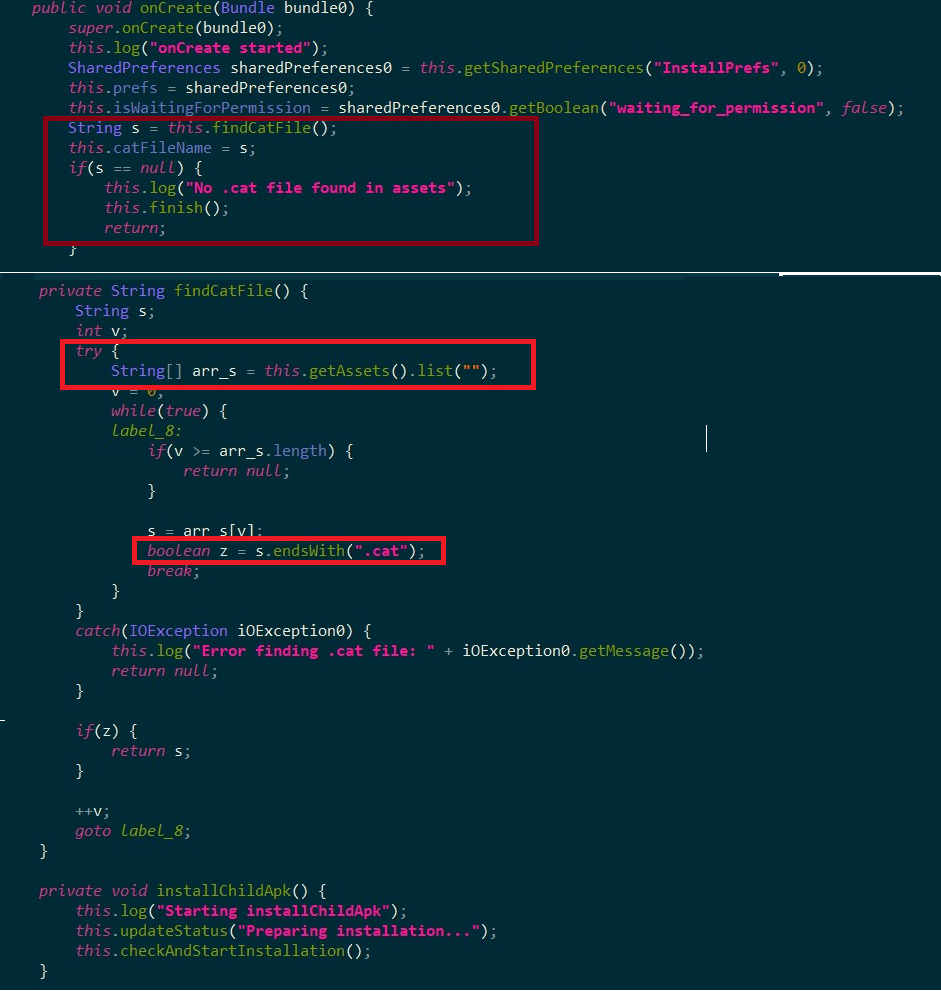
Figure 10. Scanning process of .cat file in the application's resource directory
After detecting the .cat file, the application extracts its contents and writes it to the internal cache directory with the temporary name Verify.apk. The application then uses the getPackageArchiveInfo() method to verify the validity of this file as an installation file (APK). If verification is successful, the system initiates the application installation process, as recorded in Figure 11. It is noteworthy that the .cat file may come with password protection.
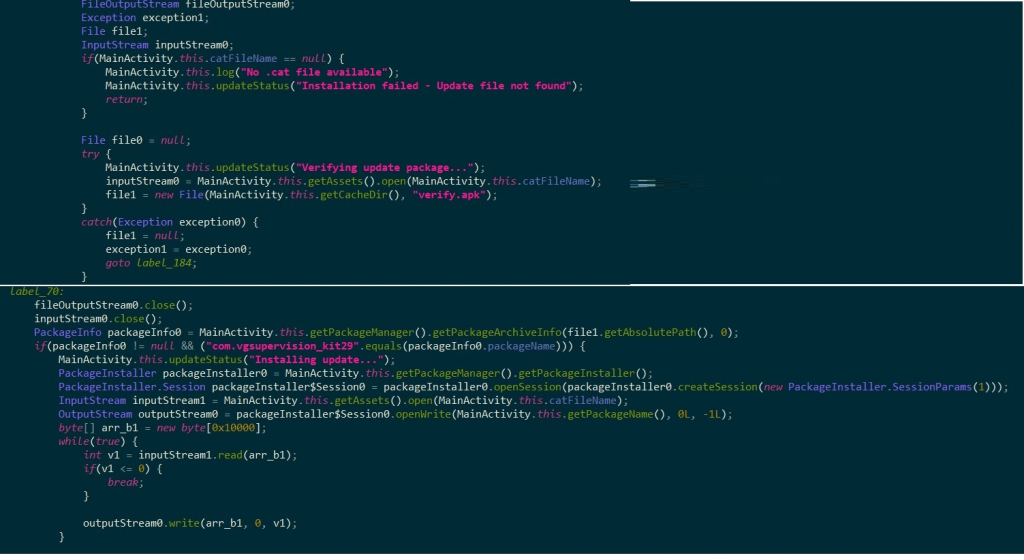
Figure 11. Processing and installation of application from .cat file
Communication with Command and Control Server (C2)
After the child application is installed (the application package is recorded as “com.vgsupervision_kit29”), the next operational mechanism includes using a Domain Generation Algorithm (DGA) to create dynamic communication domains. The goal is often to avoid detection or blocking by static domain blocklists.
The malware then scans the list of installed applications on the device and sends this information to the C2 server. The malware control commands and C2 server information are usually stored in an XML configuration file inside the shared_prefs directory, as shown in Figure 12.
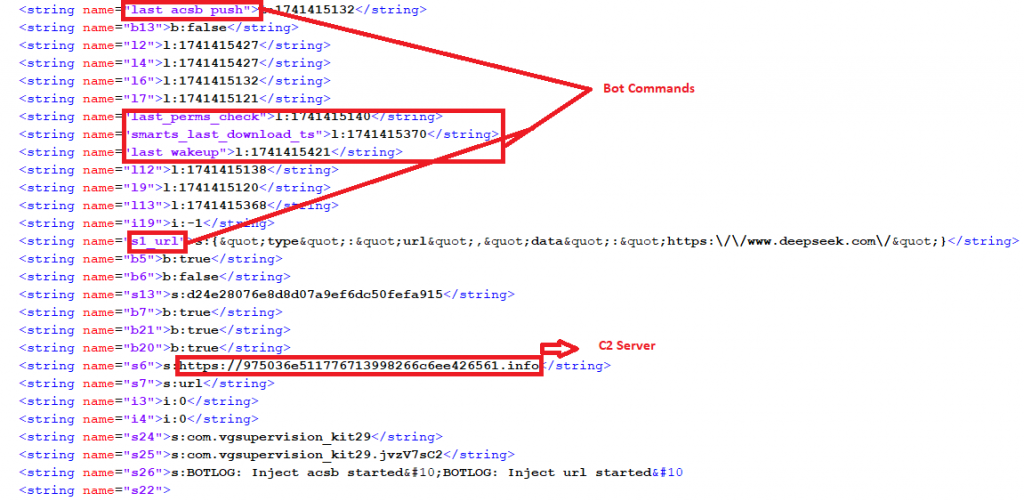
Figure 12. Malware control commands and C2 server information
IOCs Related to OctoV2 malware
Package Name
| Package Name | Hash | Detection Name |
| com.vgsupervision_kit29 | 99fe380d9ef96ddc4f71560eb8888c00 | Trojan ( 0056e5201 ) |
| com.hello.world | E1FF086B629CE744A7C8DBE6F3DB0F68 | Trojan ( 005bc2f21 ) |
URL
| hxxps://deepsekk[.]sbs/DeepSeek[.]apk |
Recommendations
FPT Threat Intelligence recommends several measures for organizations and individuals to prevent this malware attack campaign:
Secure Data Backup: Ensure regular offline backups to recover data in case of encryption or data loss due to malware.
System Updates: Always update security patches for the operating system, applications, and firmware to protect devices from known vulnerabilities.
Permission Management: Limit application access permissions to only what is necessary, especially for applications requiring sensitive access like SMS, calls, and storage.
Account Security: Use strong, unique passwords and enable multi-factor authentication (MFA) for all administrative accounts, Google accounts, and related services.
Data Encryption: Implement encryption for sensitive data to protect against theft or unauthorized access if the device is compromised.
Attack Surface Reduction: Remove or disable unnecessary applications and services to reduce the potential for exploitation.
Security Awareness: Train employees to recognize mobile malware, infection methods through attachments, QR codes, and fake applications.
Application Monitoring and Supervision: Set up monitoring tools and alerts for any unauthorized application installations or unusual behavior like automatic data transmission.
Restrict Non-Google Play Installations: Configure devices to only allow installations from trusted stores like Google Play. Limit enabling the "Unknown sources" option.
Use Mobile Security Software: Install reputable security solutions to monitor abnormal behavior, check for malicious applications, and provide real-time protection.




