

Osiris: New ransomware is quietly disabling antivirus with malicious drivers
Osiris, a new ransomware discovered in November 2025, is quietly destroying your system even if you have installed enough antivirus software.

Overview
In today's ransomware world, where attack groups constantly copy, rename, and reuse old tools, Osiris emerges as a stark reminder that the game is still evolving. Without fanfare or loud announcements on underground forums, Osiris has chosen to infiltrate systems quietly, disable core defenses with malicious drivers, steal data before encryption, and leave behind a paralyzed infrastructure.
Notably, in November 2025, analysts recorded the Osiris campaign targeting a large food chain corporation in Southeast Asia. Although it's a new ransomware, the tools and techniques used indicate that this is an experienced threat actor group, with many signs linking to the Inc ransomware group and Medusa ransomware.
The analysis below will provide you with the most comprehensive and detailed look at Osiris Malware, from the impact of this malware on targets to the execution flow that attackers are silently carrying out on your system.

Targets and Impact
Targets large F&B businesses in Southeast Asia.
Encrypts data combined with information theft (double extortion).
Disables security software using the BYOVD technique.
Exfiltrates data to cloud storage before encryption.
Technique BYOVD
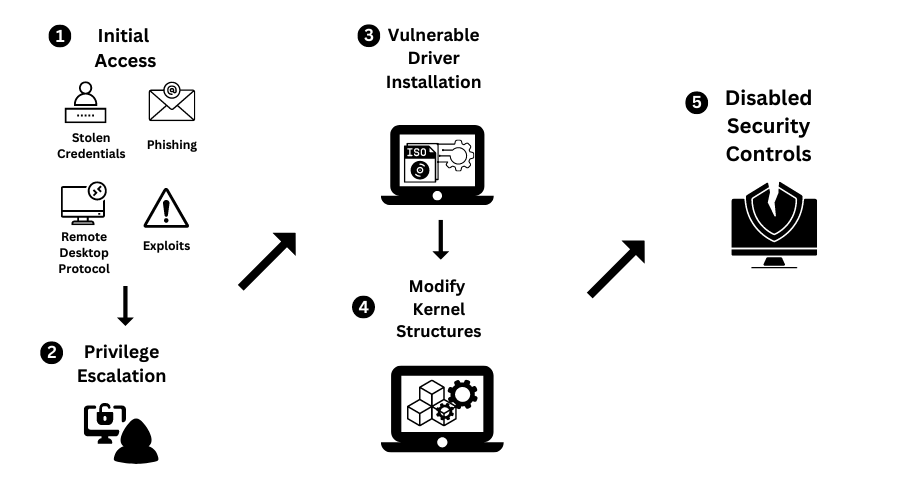
As mentioned, in this campaign, the attacker will use the BYOVD - Bring Your Own Vulnerable Driver technique to compromise and infiltrate target systems. So, what is this technique?
BYOVD (Bring Your Own Vulnerable Driver) is a kernel-level attack technique where the attacker brings their own legitimate driver with security vulnerabilities and then loads this driver into the victim's system to:
Escalate privileges to Ring 0 (kernel mode).
Disable antivirus/EDR.
Bypass operating system protections.
Execute actions that user-mode malware cannot perform.
A BYOVD attack sequence involves 5 specific stages, each with its own impact.
Step 1: Initial intrusion.
Step 2: Introduce a vulnerable driver into the system.
Step 3: Load the driver.
Step 4: Exploit the vulnerability in the driver.
Step 5: Perform malicious actions.
Attack Flow

In the first stage, which is the initial intrusion into the system, attackers will try to gain an initial foothold in the victim's system. Some documented communication techniques include: phishing emails, exposed RDP, exploiting unpatched public-facing services, or downloading malware via loader/dropper. These methods allow attackers to gain access to the target system.
Once they have successfully infiltrated, they begin setting up the environment to load additional tools and prepare for further attacks. In this stage, they will load backdoors or remote administration tools (RAT, remote agent).

Additionally, they will set up persistence mechanisms on the target system using legitimate Windows processes: Scheduled Task, Service, or Registry Run Key. In the recorded campaign, two C2 domains were used by the attackers to maintain and receive data:

Moving to the next stage, deploying BYOVD is considered one of the most crucial links for the campaign's success. The attacker set up a Poortry/Abyssworker driver masquerading as a Malwarebytes anti-exploit driver. Simply put, they load a legitimate driver that has vulnerabilities. With this action, the attacker can easily:
Kill security processes.
Disable callbacks.
Bypass self-protection.
This is considered the "heart" of the campaign; once the defenses are down, everything that follows becomes much easier for the attacker.
Right after this step, the attacker will expand their control over the entire system and domain. Here, the attacker will perform Dump credential (LSASS, token) to obtain Domain admin and Service account. Once they have this information, they continue to move laterally within the internal network: SMB, RDP, or Remote execution.

Next, their target will be to collect important files: financial documents, contracts, or customer data, and upload them to the cloud as well as intermediary servers. As you know, by this step, backups are no longer enough to fix what's happening.
Of course, finally, data is encrypted using a hybrid method: ECC + AES-128-CTR, with each file using its own AES key. The encrypted files are given the extension .Osiris.

To increase pressure on the target, the attacker continues to threaten to publish the data, count down the time, or prove the data is real to increase pressure on the victim and demand a ransom.

Conclusion
Osiris is not just a new ransomware variant; it is clear evidence of the evolution of modern cyberattack campaigns. The combination of BYOVD techniques to disable security solutions, stealing data before encryption, and destroying recovery mechanisms shows that today's ransomware has become an organized, multi-layered, and well-prepared attack chain.
The concern is not Osiris itself, but the trend it represents: hackers are exploiting the most trusted components of the operating system, like drivers and legitimate tools, to bypass traditional defenses. In this context, security models relying solely on antivirus or post-incident response are no longer effective.
The lesson is clear: defense must precede attack. Controlling drivers, monitoring abnormal behavior, managing access rights strictly, and maintaining a secure backup strategy are no longer "recommendations," but mandatory requirements. Osiris is just a new name on the ransomware list, but the techniques it uses are likely to continue appearing in more sophisticated forms in the future.
Recommendations
System Protection
Always update Windows and drivers from official sources (Windows Update).
Do not install cracked drivers, software, or keygens → these are common ways for ransomware to enter.
Use antivirus with BYOVD protection (Defender with Memory Integrity enabled, or a reputable EDR).
Data Backup
Backup following the 3-2-1 rule:
3 copies
2 different storage types
1 copy offline / not constantly connected
Do not keep the backup drive always connected to the computer.
Be Cautious with Strange Files / Emails
Do not open strange attachments (especially
.exe,.zip,.iso,.lnk).Be wary of fake IT emails, invoices, and security notifications.
Disable macros in Office if not absolutely necessary.
Access Management
Enable MFA for RDP, VPN, email, admin accounts
Do not expose RDP to the public Internet.
Apply least privilege (do not use admin accounts for daily tasks).
IOCs
File Hash
fff586c95b510e6c8c0e032524026ef22297869a86d14075cd601ca8e20d4a16
c74509fcae41fc9f63667dce960d40907f81fae09957bb558d4c3e6a786dde7d
fc39cca5d71b1a9ed3c71cca6f1b86cfe03466624ad78cdb57580dba90847851
d78f7d9b0e4e1f9c6b061fb0993c2f84e22c3e6f32d9db75013bcfbba7b64bc3
824e16f0664aaf427286283d0e56fdc0e6fa8698330fa13998df8999f2a6bb61
231e6bee1ee77d70854c1e3600342d8a69c18442f601cd201e033fa13cb8d5a5
44748c22baec61a0a3bd68b5739736fa15c479a3b28c1a0f9324823fc4e3fe34
Ce719c223484157c7f6e52c71aadaf496d0dad77e40b5fc739ca3c51e9d26277
8c378f6200eec750ed66bde1e54c29b7bd172e503a5874ca2eead4705dd7b515
79bd876918bac1af641be10cfa3bb96b42c30d18ffba842e0eff8301e7659724
C189595c36996bdb7dce6ec28cf6906a00cbb5c5fe182e038bf476d74bed349e
5c2f663c8369af70f727cccf6e19248c50d7c157fe9e4db220fbe2b73f75c713
44e007741f7650d1bd04cca3cd6dfd4f32328c401f95fb2d6d1fafce624cc99e
D524ca33a4f20f70cb55985289b047defc46660b6f07f1f286fa579aa70cf57a
5bd82a1b2db1bdc8ff74cacb53823edd8529dd9311a4248a86537a5b792939f8
534bd6b99ed0e40ccbefad1656f03cc56dd9cc3f6d990cd7cb87af4cceebe144
39a0565f0c0adc4dc5b45c67134b3b488ddb9d67b417d32e9588235868316fac
Malicious Domain




