StreamRat: When the Delivery Channel Is Paid Advertising and the Landing Page Coaches Victims Past Their Own Security Warnings
Summary
On 2 September 2026, ThreatFabric published StreamRat — a new Android banking trojan distributed through Meta and TikTok advertisements impersonating a free TV streaming service, aimed at Spanish-speaking users. One advertising campaign reached approximately 570,000 Meta users in just three weeks, from 11 June to 3 July 2026.
Two points are worth framing the whole article around.
First, the delivery channel is paid advertising. As Malwarebytes puts it, we routinely warn people not to click suspicious links in unexpected texts or emails — but malicious advertising is much harder to recognise, because it appears in the same feeds where people expect to find promotions, videos and recommendations. Malwarebytes calls this campaign a perfect demonstration of why after-the-fact ad checks are inadequate for protecting social media users.
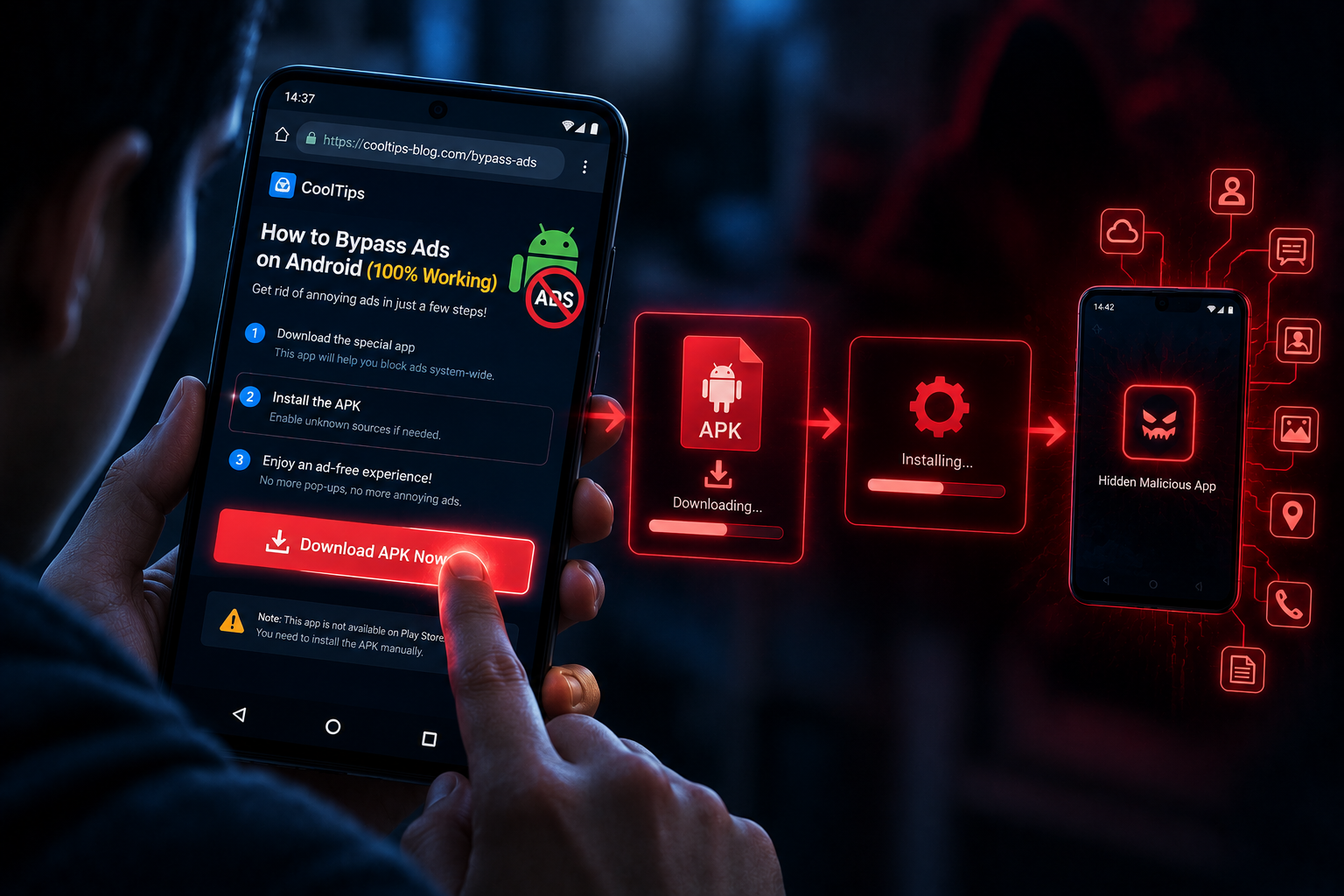
Second, the landing page is not a download page but a guidance system. It detects the operating system, detects which application the victim used to open the link, and then displays instructions tailored accordingly — designed specifically to walk the user step by step through the very security warnings that should have made them stop and think.
An important note on the 570,000 figure. That is advertising reach, not downloads or infections. Malwarebytes states this explicitly and we preserve the distinction. The number demonstrates how quickly paid advertising can put a scam in front of a very large audience, not the actual scale of infection.
Priority action: add one specific warning to awareness training — an application requesting both the ability to install other applications and VPN functionality is a serious risk signal, regardless of what it claims to be.
Background: One Actor, Three Malware Families
ThreatFabric found the campaign in late July 2026 while monitoring advertisers within the Meta ecosystem using TV streaming-themed lures already familiar from prior research into IPTV campaigns. The campaign was named "Steamtv Esp."
Tracing the payload surfaced the detail that tied the pieces together: the file was retrieved from a GitHub repository belonging to the same user who had previously distributed the Mirax trojan, and the dropper closely resembled the one previously used to deploy the Mirax payload. But the final payload this time was a previously unseen trojan.
Key points about this actor:
Has used at least three different financial malware families: GodFather, Mirax and StreamRat
Based on the control panel code, StreamRat appears to have been developed as a Malware-as-a-Service offering
The vast majority of observed victims were located in Spain
The Infection Chain
Stage 1: Preparing the advertising campaign
The criminals deploy a website and purchase Meta ads themed around streaming services. One such campaign reached approximately 570,000 Meta users between 11 June and 3 July 2026.
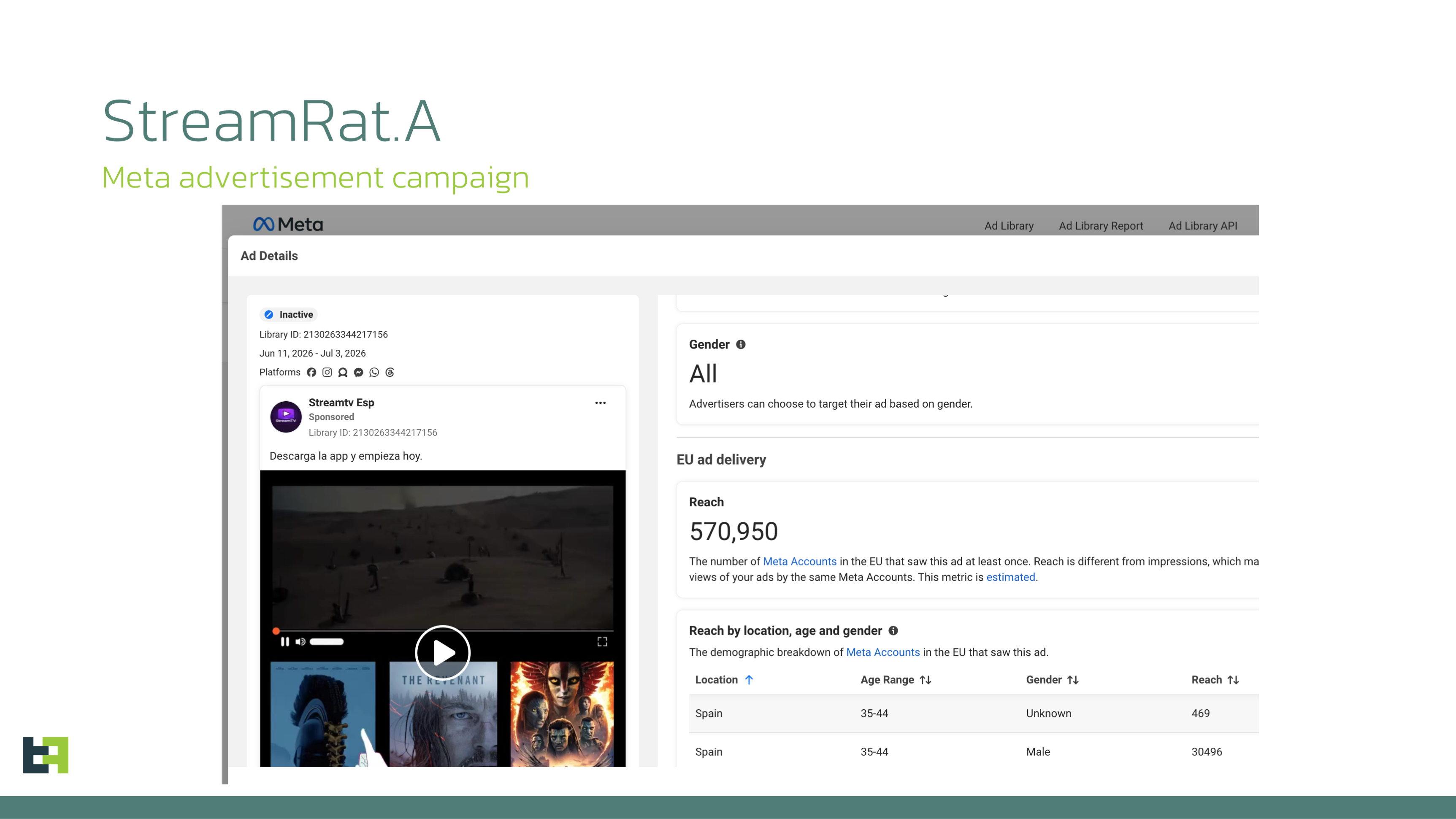
Advertising banner from the "Steamtv Esp." campaign (source: ThreatFabric).
Campaign data shows the primary targets were Meta users in Spain. ThreatFabric could not determine which specific Meta platform was the main focus, but assesses the same banners were likely displayed on both Facebook and Instagram. The same banners were also used to distribute the malware through TikTok.
Stage 2: The landing page — a guidance system, not a download page
This is the part most worth examining closely, because it shows how much investment went into the social-engineering layer.
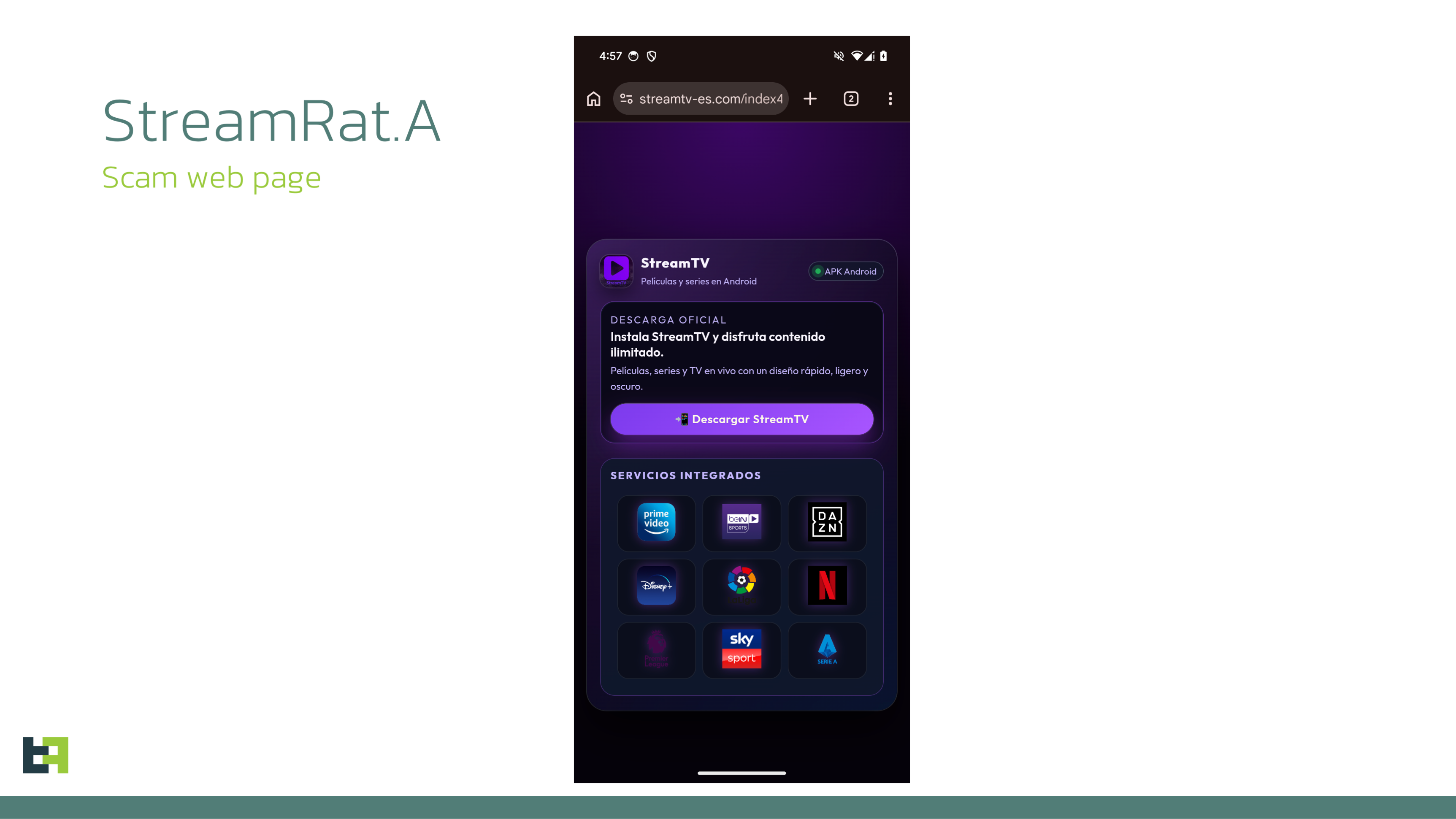
The website posing as a streaming platform (source: ThreatFabric).
First filter — the operating system. The website uses JavaScript to determine whether the visitor is on an Android device. If another operating system is detected, the page displays an error and prevents the download simply by hiding the download button.
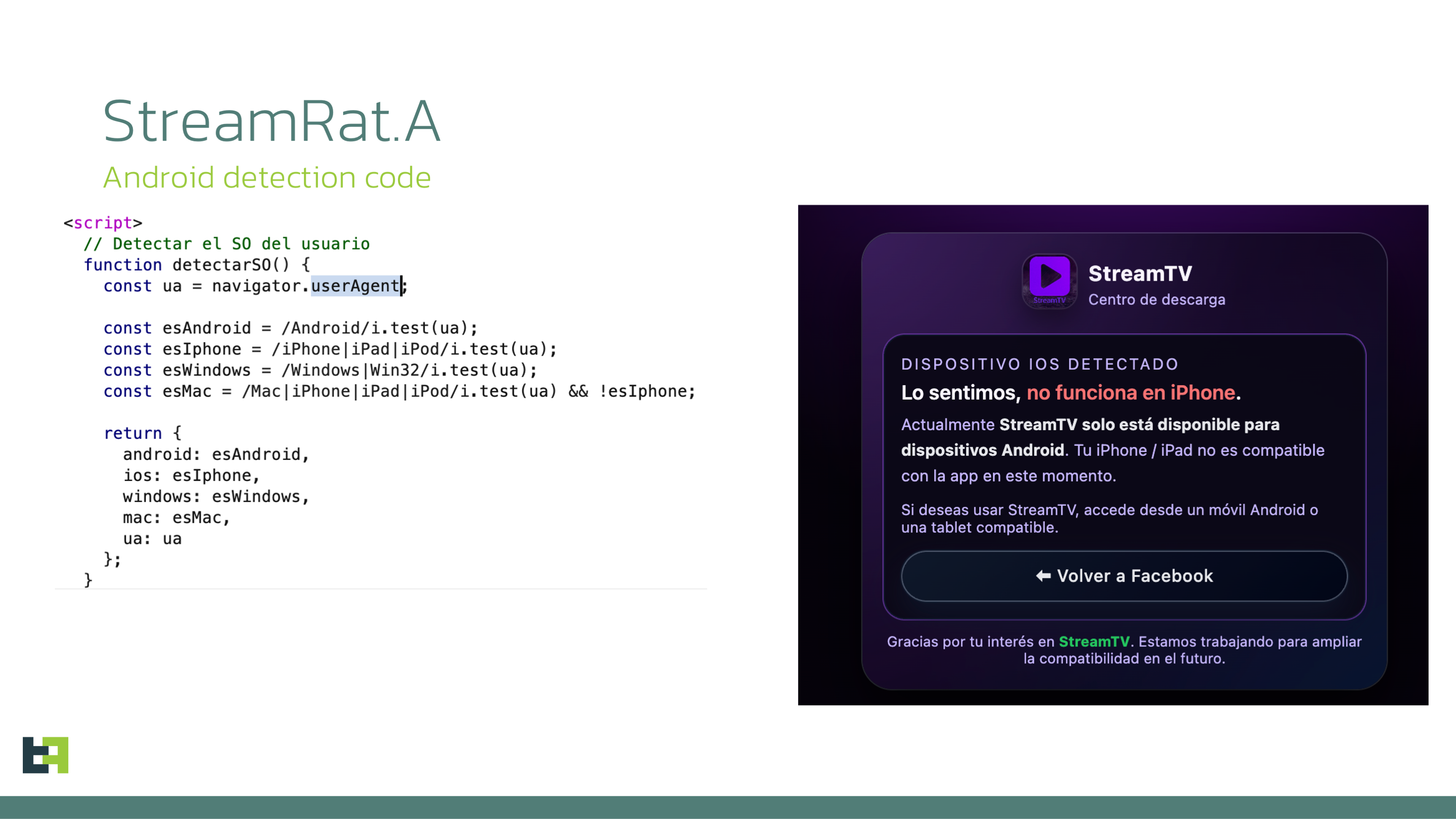
The error shown to non-Android devices (source: ThreatFabric).
Second filter — the source application. If the device is Android, a download button appears. Clicking it redirects the victim to a page named r1edmi.html, whose purpose is to determine which application the victim used to open the lure: Instagram, TikTok, Facebook, or a standalone browser. The instructions shown depend on that result; by default the page shows a six-step instruction set for Chrome.
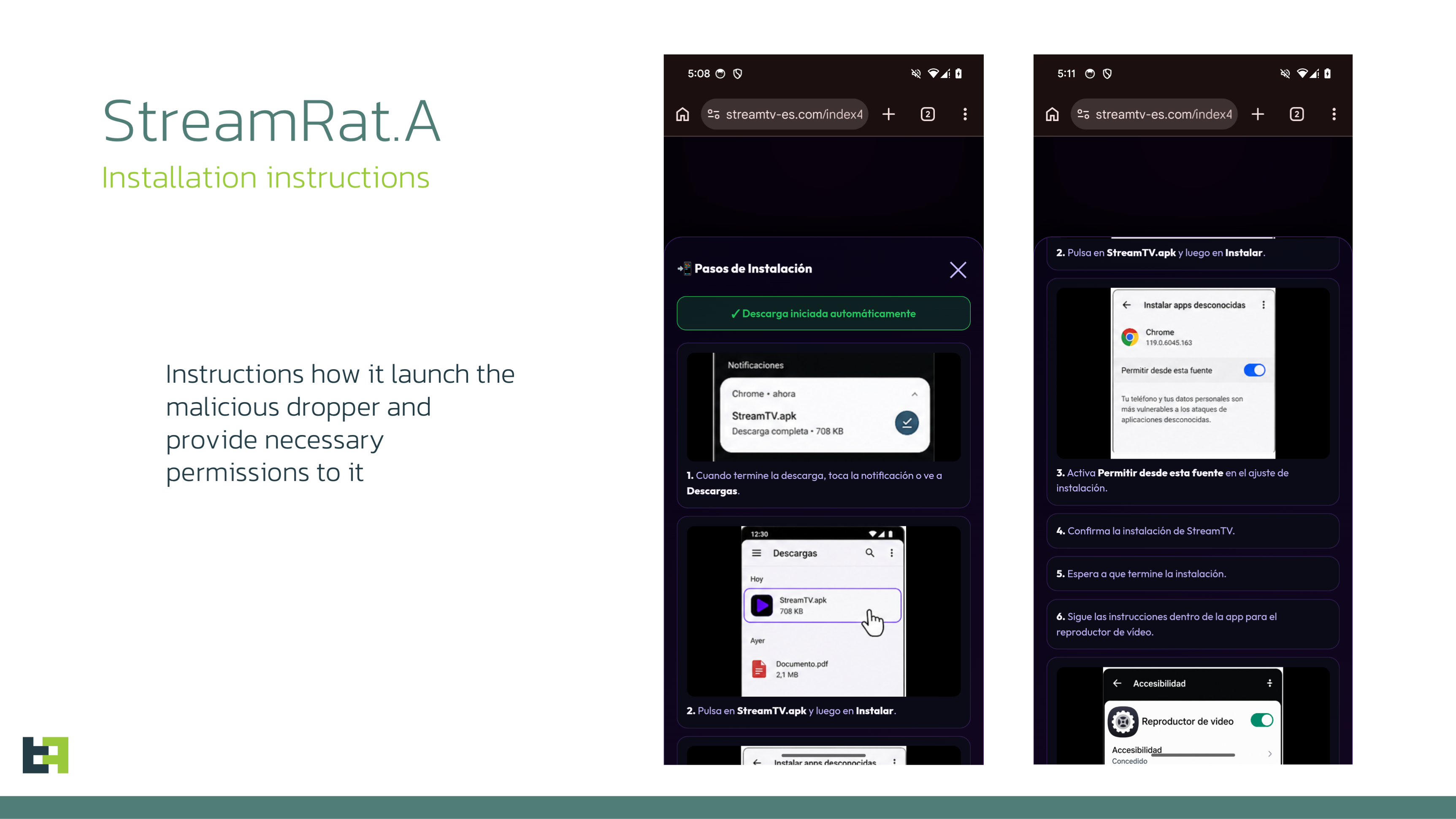
Step-by-step instructions guiding the victim to enable unknown sources and grant Accessibility access (source: ThreatFabric).
Unsurprisingly, the instructions guide the victim through enabling installation of applications from unknown sources in Chrome and granting access to Accessibility Services.
Malwarebytes describes this precisely: this was not a generic malicious download page. It was designed to coach people through the security warnings that would normally make them stop and think.
A dedicated backend and real-time notification. As the redirect happens, the page script calls a backend API that sends a notification via Telegram. While showing the instructions, the page also queries the backend API for the currently active malware download URL — meaning the download address can change without editing the page.
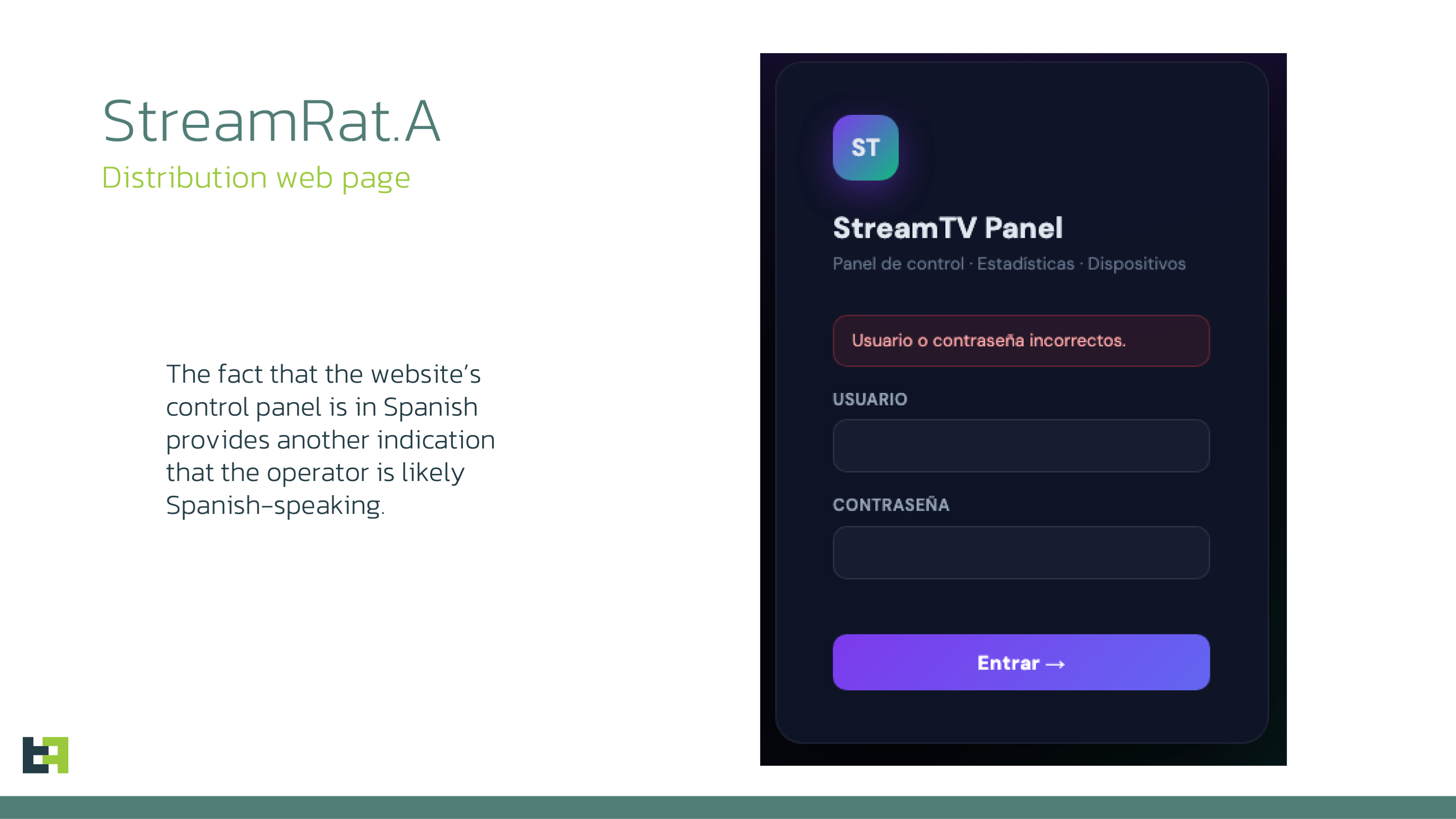
The distribution website has its own dedicated control panel (source: ThreatFabric).
Notably, the distribution website itself has a dedicated control panel. This is not a static page put up and forgotten.
Once the URL is received, the script instructs the browser to download a file named app.apk.
Stage 3: The dropper
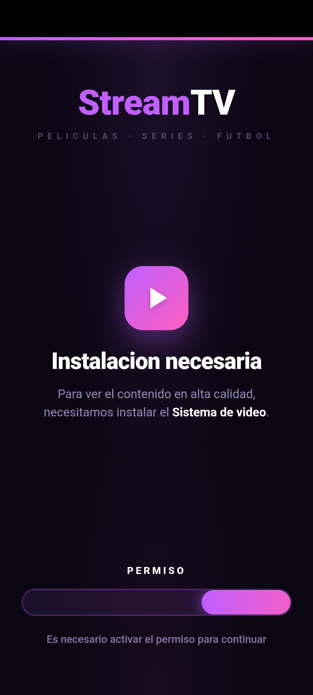
The dropper interface (source: ThreatFabric).
The dropper's interface consists of interconnected HTML pages containing embedded JavaScript, each loaded at a specific stage:
set_launcher.html     Checks and requests the dropper be set as default Home app
index.html            Main page, automatically triggers the payload download
vpn_required.html     The VPN permission stage
Hijacking the default launcher. set_launcher.html checks whether the dropper is configured as the device's default Home application. If not, the victim is prompted to set it as the default launcher. From that point onward, whenever the victim presses the HOME button, they are redirected back to the dropper interface.
This is a strong coercion technique and deserves separate emphasis. The HOME button is an Android user's instinctive escape route when something looks wrong — capturing it removes the easiest way out.
Downloading and installing the payload. index.html automatically triggers the download in the Android component using a URL embedded in the page. The payload is saved to the SD card, in the Downloads folder, as update_{timestamp}.apk.
ThreatFabric flags a detail relevant to investigation: the dropper stores the payload in the public Downloads directory rather than in its private application storage. For analysts, that is an artifact that persists on disk and can be recovered.
The dropper then requests permission to install applications from unknown sources and installs the payload using Android's session-based package installation mechanism.
Cleaning up afterwards. Once the payload starts, the dropper disables the blocking VPN connection, waits until the payload obtains Accessibility Services access, and then removes itself as the default Home application.
Stage 4: StreamRat
Immediately after launch, StreamRat requests Accessibility Services. Once granted, the trojan connects to its C2 server.
After a short exchange, the bot receives command id 35, instructing it to send the list of all installed applications. StreamRat collects the list, splits it into chunks of up to 50 entries with the final chunk marked isLast=true, and a 10 millisecond delay between chunks.
In parallel, the trojan captures data entered by the victim and continuously monitors which application is displayed on screen. Whenever the foreground application changes, StreamRat sends two requests — maintenance_check and injection_check — both containing the package name of the currently visible application.
From this point, subsequent stages depend on the operator's actions.
Blocking the Internet With a Fake VPN
ThreatFabric describes this as a relatively new TTP already observed across multiple droppers and apparently gaining popularity.
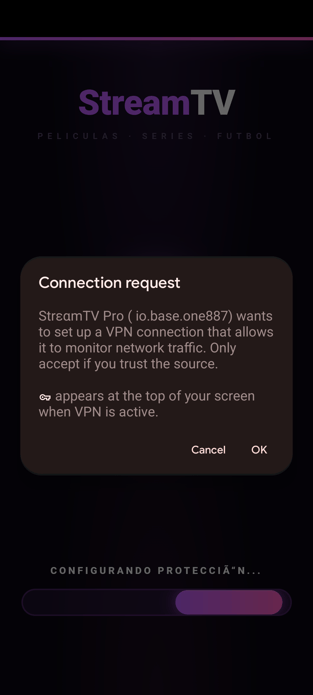
The VPN permission request in the dropper (source: ThreatFabric).
The mechanism. At a stage before downloading the final payload, the dropper requests permission to create a VPN connection. If granted, it establishes the connection and routes all device traffic through it, while explicitly excluding the dropper itself. At the same time, no traffic processing takes place and the traffic is not forwarded anywhere.
After the payload is successfully installed and executed, the dropper turns the VPN off so the payload can communicate with the control server normally.
ThreatFabric's assessment of the purpose. They believe this is intended to temporarily deprive other applications of internet connectivity, potentially preventing security products from performing cloud-based checks of the payload. Google Play Protect is a particularly plausible target, as it is enabled by default on Play Protect-certified devices and performs additional analysis of applications installed from unknown sources.
But ThreatFabric's assessment is carefully hedged, and we preserve that hedge: Play Protect also provides offline detection for known potentially harmful applications, meaning the mechanism does not completely disable its protection. They assess the technique is more likely intended to reduce the effectiveness of online reputation and code-analysis mechanisms rather than bypass Play Protect entirely.
An operational implication ThreatFabric infers. This is their inference rather than an observation, but it has concrete investigative value: the resulting loss of connectivity is also potentially visible to the victim, as messengers and other online services will temporarily stop working. And if the threat actor is guiding the victim through the infection process in real time, communication would likely need to continue over a regular cellular voice call rather than through a messenger or social-media calling service affected by the network disruption.
For a team working a suspected case, that suggests a specific line of questioning: was the victim on a voice call during installation, and did they notice other applications losing connectivity.
And this is the most valuable heuristic the report produces. ThreatFabric concludes that regardless of the exact motivation behind the technique, the combination of an application declaring both package-installation capabilities and VPN functionality should be treated as a notable risk signal and deserves closer scrutiny.
That is a concrete rule, immediately usable in an app vetting process or mobile threat defence configuration, and it does not depend on knowing any hash or family name in advance.
StreamRat's Capabilities
C2 protocol
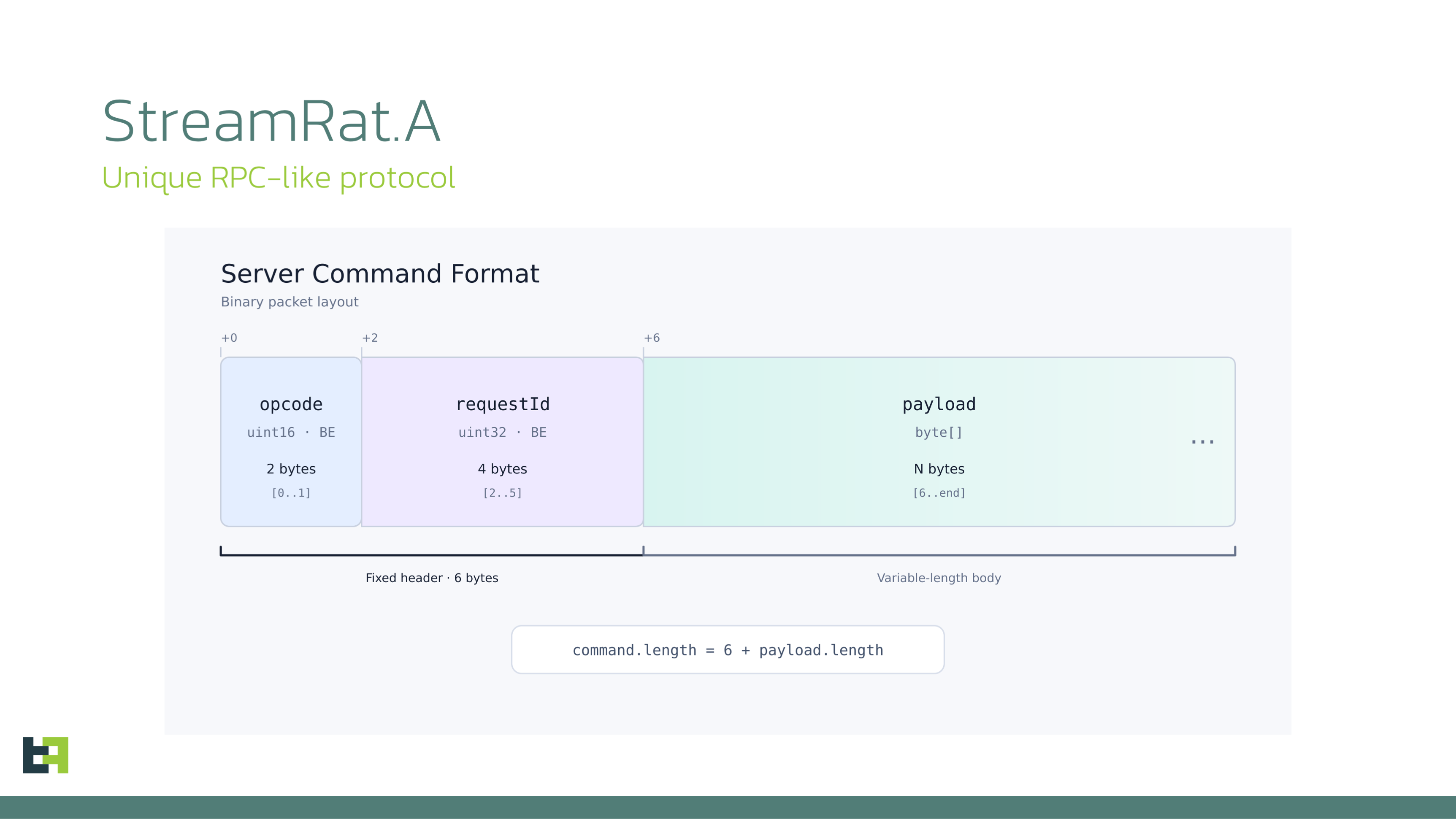
StreamRat's C2 communications (source: ThreatFabric).
The bot sends a GET request to upgrade the connection to WebSocket. Alongside the Upgrade: websocket header, the request carries three custom headers:
X-Device-Id        Unique device identifier
X-Device-Model     Device manufacturer and model
X-Api-Level        Android SDK / API level
On top of the WebSocket sits an RPC-like protocol supporting both plain-text and binary-text formats in both directions. The bot sends the device fingerprint as a regular JSON string, while the installed application list and screencast frames are transmitted in binary-text form.
# Binary command format from the server
first 2 bytes     command opcode
next 4 bytes      command identifier (reused in the response)
from byte 6       command payload

# Binary response format from the bot
first 4 bytes     command identifier
next 1 byte       execution status (0 = success, 1 = error)
next 4 bytes      payload length
from byte 9       payload data
The one design weakness: the C2 address is hardcoded in the trojan and is not designed to be changed dynamically. The same applies to the bot tag. For defenders this means blocking the C2 cuts the bot off — unlike families using dead drop resolvers or layered fallback.
VNC and HVNC
StreamRat supports screen streaming in two modes, and the difference between them matters directly to the user.
VNC — via the MediaProjection API. On receiving a command, the bot launches Android's native screen-capture permission dialog and then automatically interacts with that dialog, selecting full-screen capture and the option to share all applications rather than only StreamRat itself.
Once permission is granted, the bot uses standard Android mechanisms such as createVirtualDisplay() and ImageReader to obtain a copy of the screen, encoding frames as WebP images.
Two implementation details stand out:
Duplicate frames are not transmitted. The bot calculates an Adler-32 checksum over the relevant content of each frame; if it matches the previous frame, the new one is discarded.
Aggressive compression by default. The screen is scaled down to 35% of its original dimensions and encoded as WebP at 40% quality. ThreatFabric assesses this as fairly aggressive but likely sufficient for effective remote interaction while significantly reducing bandwidth. When a static overlay is active, the bot switches to
WEBP_LOSSLESSto preserve maximum quality; frame size is capped at 20 MB. HVNC — via AccessibilitytakeScreenshot(). In this mode the bot captures a screenshot every 200 milliseconds through the Accessibility API, scales it to 35%, encodes it as WebP at 40% quality, and sends it using the same frame format.
The key difference between the two modes is their visibility to the victim. Screenshot capture through the Accessibility API is not directly visible to the user, while MediaProjection-based screen casting can typically be identified by the screen-sharing indicator displayed in the Android status area.
This is worth telling end users plainly: the absence of a screen-sharing indicator is not evidence that nobody is watching your screen.
Accessibility Node Viewer
This can be viewed as a text-based form of screen casting: instead of receiving a bitmap of the victim's screen, the operator sees a reconstructed representation built from individual AccessibilityNodeInfo elements.
ThreatFabric assesses this as one of the fastest ways to collect, transmit and visualise what is currently displayed on the victim's device. The process:
Dump the complete UI element tree via the Accessibility Service API, including element bounds and associated text
Serialize the structure into a JSON object
Calculate an Adler-32 checksum over the serialized JSON
Compare with the previous dump's checksum; discard if they match The use of Adler-32 deduplication in two separate places — VNC frames and UI tree dumps — is something ThreatFabric highlights in its conclusion: the optimisation reduces unnecessary transmission and backend load, and such engineering choices are more consistent with experienced developers building for scalability than with an inexperienced malware author.
Overlays
Automatic overlays. Whenever the screen state changes due to a non-system application, the bot sends maintenance_check and injection_check with the package name. The server responds with overlay configurations.
For injection_response, the overlay body is extracted from the html field and saved to local storage under the injections directory as <package_name>.html. A dedicated Activity containing a WebView is launched with JavaScript enabled and a JavaScript interface exposed by the Android code; the saved HTML is loaded into the WebView and subsequently deleted. The interface exposes a single function, saveAndClose, to pass victim-entered data back to the Android component.
Immediate overlays. Static overlays activated on demand, whose primary purpose is to distract or deceive the victim while the operator remotely interacts with the device through Accessibility:
Black overlay — covers approximately 98% of the screen with a black layer. Victim touches are blocked while the operator can still observe the screen and control the device.
Fake update overlay — behaves like the black overlay, differing mainly in appearance: the victim sees a screen resembling a legitimate system update interface.
Custom overlay — generated from an HTML page supplied by the operator.
Injection overlay — a fully interactive overlay using a WebView with a JavaScript interface.
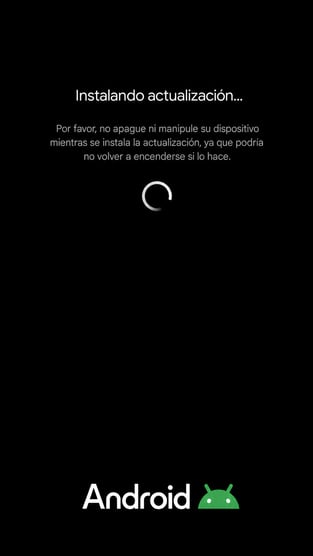
The fake Android update installation overlay (source: ThreatFabric).
Command set
StreamRat supports 21 commands from C2. Some of the more notable:
| Command | Description |
|---|---|
| 1 | Execute a shell command |
| 4 | Paste specified text via ClipboardManager or an Accessibility action |
| 16 | Remote control via performGlobalAction() — supports lock_screen, back, home, click, swipe, swipe_path, recents, notifications |
| 17–19 | Tap at coordinates, swipe between two points, custom swipe from JSON |
| 24–25 | Lock the screen, wake the device |
| 32 | Control screen capture — start/stop and selection between VNC (MediaProjection) and HVNC (Accessibility takeScreenshot()) |
| 33 | Control the Accessibility Node Viewer |
| 34 | Control static overlays — black screen, update screen, custom screen; also controls anti-uninstall protection |
| 35 | Control applications and notifications — launch by package name, extract icons, retrieve the installed app list, create fake notifications with a specified title, text, icon and URL |
| 36 | Launch an HTML injection overlay |
| 37 | Unlock the device using a previously intercepted PIN or pattern |
| 38 | Enable or disable automatic acceptance of MediaProjection permission requests |
Commands 37 and 38 deserve separate emphasis. Command 37 means StreamRat does not merely steal the screen lock code — it reuses it to unlock the device. Command 38 means the operator can remove the permission prompt the user would otherwise see.
The Panel: Evidence of a Malware-as-a-Service Model
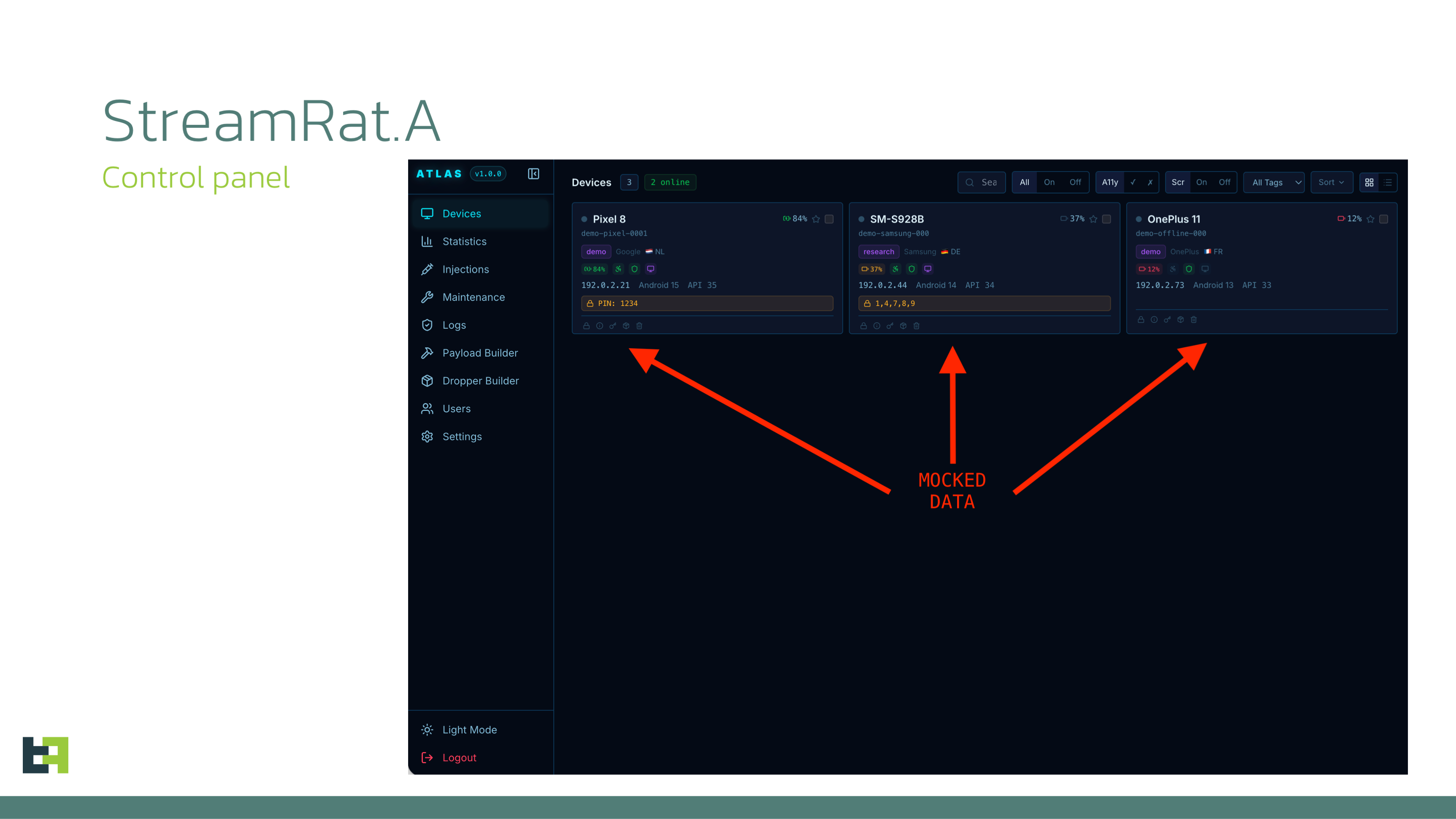
The StreamRat panel reconstructed by ThreatFabric from its code; all victim data shown is synthetic (source: ThreatFabric).
ThreatFabric identified several servers associated with the StreamRat infrastructure, one of which hosted the panel. They analysed the panel code and reconstructed its interface as an operator would see it, preserving the original UI elements, styles and navigation — with all victim-related data synthetic.
The panel contains nine pages:
| Page | Contents |
|---|---|
| Devices | Overview of all infected devices — manufacturer and model, region, battery level, Android version/API level, intercepted PIN or pattern if available, and current Accessibility Services status |
| Statistics | Statistical data grouped by several parameters |
| Injections | Management of injection overlays |
| Maintenance | Management of static overlays |
| Logs | History of executed commands |
| Builder | StreamRat payload builder |
| Dropper-builder | StreamRat dropper builder |
| Users | Access management — three roles: user, supervisor and admin |
| Settings | Telegram bot and chat configuration for notifications |
Three details in that table are clear evidence of the MaaS model: builders for both the payload and the dropper, and a three-tier role separation that ThreatFabric assesses as designed for a MaaS model, allowing operators and higher-level administrators to hold different levels of access.
ThreatFabric concludes both the trojan and its control panel appear designed around a MaaS model, leaving the customer primarily responsible for establishing a distribution channel.
Indicators of Compromise
Indicators taken from the ThreatFabric report of 2 September 2026 and the Malwarebytes analysis. IPs are defanged.
Note: the file indicator set is thin — only two hashes. The more useful material is in the behavioural artifacts below.
Samples (SHA-256)
e0714788b4e2518b0d9d4cbf18c7217bb97718e01689d77338f1cc4a230fcb6c
    Application name: StrεαmTV Pro

ba83cc3c9535690191018edf73ca5c6001609df9919462796aa2e551f142e4d3
    Application name: Sistema de vídeo
A detail worth noting in the application name: "StrεαmTV Pro" uses Greek characters in place of Latin ones —
ε(epsilon) foreandα(alpha) fora. This is basic homoglyph substitution, intended to evade simple string matching and make name-based searching harder.
C2
45.147.28[.]59
193.32.2[.]245
Malwarebytes for Android detections
Android/Trojan.Agent.ACRAEEF8A36H36
Android/Trojan.Agent.ACR02DB0614H7
Android/Trojan.Dropper.ACR9B7ECE83D1
Behavioural artifacts — the most usable material
# On device — dropper stage
An application requesting both package-installation capability AND VPN functionality
An application requesting to be set as the default Home application
A VPN connection that is active but forwards traffic nowhere
update_{timestamp}.apk in the public Downloads directory
Three dropper pages: index.html, set_launcher.html, vpn_required.html

# On device — payload stage
An injections directory holding transient <package_name>.html files
An overlay covering roughly 98% of the screen and blocking touch input
An overlay imitating the Android system update screen
A screen-sharing indicator appearing with no meeting or recording session active

# On the network
A WebSocket upgrade GET carrying three custom headers:
  X-Device-Id, X-Device-Model, X-Api-Level
Endpoints: maintenance_check, injection_check
App list sent in 50-entry chunks, 10 ms delay, final chunk marked isLast=true
WebP frames scaled to 35%, quality 40%, capped at 20 MB
HVNC: screenshots captured on a 200 ms cycle

# On the distribution site
An r1edmi.html page identifying the source application
A backend API returning a dynamic payload URL and sending Telegram notifications
Download filename app.apk
Assessment
The weakness exploited here is not an Android vulnerability but Android's own permission flow — and the landing page was built specifically to walk the user through it step by step.
This is what makes StreamRat more notable than its technical capabilities. Everything in the chain requires the victim's active consent: enabling unknown sources, granting Accessibility, setting an unfamiliar app as the default launcher, permitting VPN creation. Android asks exactly the questions it should ask.
The problem is that the attacker prepared an answer for every one of those questions, and displayed the instruction set matching the exact application the victim was using. This is not a story about careless users — it is a deliberately built reverse-training process, with its own backend, its own control panel and real-time notifications.
The most valuable heuristic from this report is ThreatFabric's conclusion: an application declaring both package-installation capability and VPN functionality should be treated as a notable risk signal. This is a rare kind of rule — concrete, independent of hashes and family names, and applicable to unknown samples. If your organisation runs mobile threat defence or an app vetting process, this belongs in it now.
On the screen-sharing indicator. The detail that HVNC uses Accessibility's takeScreenshot() rather than MediaProjection has a consequence worth stating plainly to users: the absence of a screen-sharing indicator is not evidence that nobody is watching your screen. A good deal of mobile safety guidance teaches users to watch for that indicator; with StreamRat in HVNC mode, it never appears.
On project maturity. Three signals point the same way: Adler-32 deduplication in two separate places, frame compression tuned with two context-dependent modes, and a panel with builders for both payload and dropper plus three-tier access control. ThreatFabric concludes StreamRat was developed by individuals with prior experience in the Android malware ecosystem, and the evidence supports it.
The one design weakness is the hardcoded, non-rotatable C2. For defenders that is a rare piece of good news: blocking the C2 address cuts the bot off.
Relevance for Vietnam
To state it plainly first: ThreatFabric found the vast majority of victims in Spain, and the campaign targeted Spanish-speaking users. Vietnam is not within the documented scope, and we draw no inference beyond that.
The model is nonetheless highly reusable in the domestic market, for four reasons.
The delivery channel matches exactly. Facebook, Instagram and TikTok advertising is the primary reach channel for most Vietnamese internet users. A paid campaign can put content in front of hundreds of thousands of people in weeks — as the 570,000-in-three-weeks figure demonstrates.
The lure matches local interests. ThreatFabric has prior research on IPTV campaigns targeting football fans across multiple countries. "Free football" or "free movies" is exactly the kind of content that draws attention in Vietnam, and it needs no elaborate localisation to work.
Sideloading is already a habit. Installing applications from APK files outside Play Store is common behaviour domestically — apps not on the store, "modded" apps, apps shared through chat groups and forums. The "enable unknown sources" step, which is a psychological barrier in many markets, is a familiar operation for a great many Vietnamese users.
And because this is MaaS, the barrier to entry is low. ThreatFabric states the model leaves the customer primarily responsible for establishing a distribution channel. The payload, dropper and panel come ready with integrated builders. Localising the landing page into Vietnamese and buying ads targeting Vietnamese users requires no technical capability from the customer.
For organisations with BYOD, note the blast radius: a personal device infected with StreamRat has full VNC and HVNC capability, meaning everything displayed on screen is visible to the operator — including work email, internal applications and two-factor codes. The Accessibility Node Viewer additionally provides the text content in structured form, faster and lighter than screenshots.
Recommendations
Add one specific warning to awareness training: an application requesting both the ability to install other applications and VPN functionality is a serious risk signal — as is a request to be set as the default launcher.
Teach users that the screen-sharing indicator is not a reliable reassurance: StreamRat's HVNC mode captures screenshots through Accessibility and triggers no indicator at all.
Apply ThreatFabric's heuristic in app vetting or mobile threat defence configuration: the combination of declared package-installation capability and VPN functionality warrants closer scrutiny.
Block the two C2 addresses in the IOC list — because StreamRat hardcodes its C2 with no dynamic rotation, this is unusually effective compared with other Android malware families.
For BYOD policy: require MDM enrolment for any device accessing email or internal applications, and monitor Accessibility grants to applications outside the approved catalogue.
If a device is suspected compromised: disconnect Wi-Fi and mobile data, revoke the suspicious app's Accessibility access and remove it, change all passwords and the screen lock code from a separate device, and contact the bank if banking apps were used on that phone. Consider a factory reset if removal cannot be confirmed.
References
ThreatFabric — Uncovering StreamRat: From Meta Ads to Full Device Takeover (2 September 2026) — original report, with the bot command table and IOCs
Malwarebytes — StreamRat Android malware spreads through Meta and TikTok ads, Pieter Arntz (3 September 2026)
ThreatFabric — IPTV campaigns target football fans across multiple countries — prior research on streaming-themed lures
ThreatFabric — Sturnus banking trojan bypassing WhatsApp, Telegram and Signal — a family with a partially similar C2 protocol
Malwarebytes — Sideloading on Android: What it is, why it's risky, and how to do it more safely