

Your GitHub account may be targeted by a phishing campaign with fake security alerts

Recently, there has been a phishing campaign using fake security alerts targeting about 12,000 GitHub users, a service for managing, storing, and sharing source code. If users are not careful and follow the instructions, attackers could gain full access to their GitHub accounts and repositories.
Attack Method
According to a post by the account Luc4m on X, a cybersecurity researcher, a fake security alert titled "Security Alert: Unusual Access Attempt" was initially created in the Issues section of a repository. In the fake alert sent to users, it was stated that there was unusual login activity in Reykjavik, Iceland, with the IP address 53.253.117.8. This fake alert was crafted to look exactly like GitHub's original alert template, including instructions on how to handle the issue and links to those recommendations:
Update password
Review and manage active sessions
Enable two-factor authentication

However, these links all lead to a page requesting GitHub authorization for an OAuth app named gitsecurityapp, which grants many dangerous permissions, giving the attacker full access to the account and repositories.
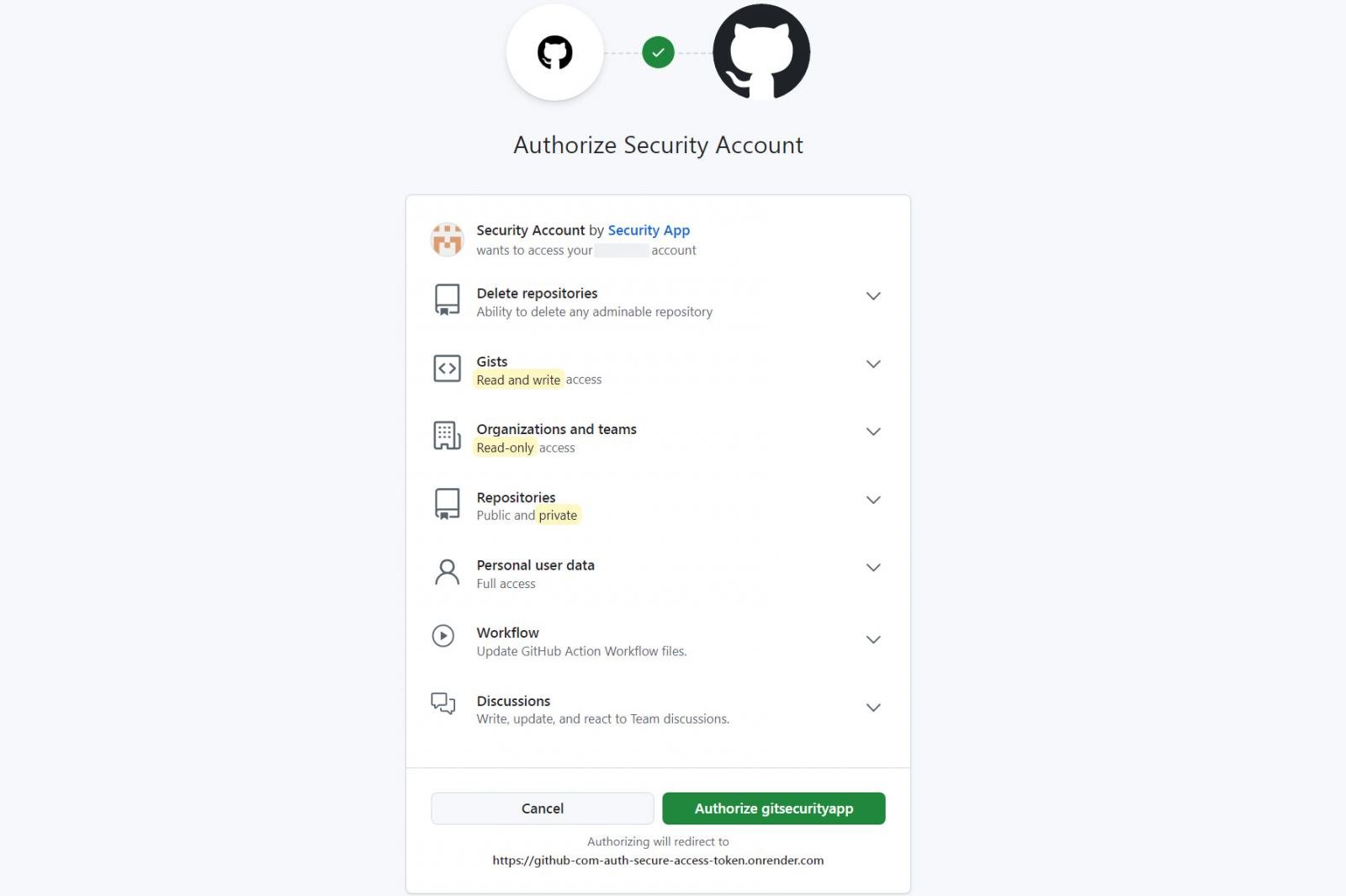
repo: Grant full access to public and private repositories
user: Allow reading and writing to the user profile
read:org: Allow reading of organization members, teams, and projects
read:discussion, write:disscussion: Allow read and write permissions to discussions
gist: Allow access to GitHub gist
delete_repo: Allow permission to delete repositories
workflows, workflow, write:workflow, read:workflow, update:workflow: control GitHub Actions workflows
If GitHub users log in and grant permissions to the OAuth app gitsecurityapp, an access token will be created and sent to the attacker hosted on onrender.com.

This phishing campaign started on March 16 and has targeted about 12,000 people so far. In just a few minutes, there have been nearly 4,000 phishing attempts.

Impact
If users grant permissions, the attacker can:
Read and edit repositories, source code, issues, and pull requests
Steal sensitive information such as intellectual property, algorithms, API keys, login credentials, and private, internal documents...
Inject malware, create vulnerabilities, and backdoors into the source code
Carry out other attack campaigns such as spreading malware, sending phishing messages...
Additionally, even if users take strong password change measures, they cannot revoke the OAuth token, allowing the attacker to remain logged in.
Recommendations
Unlike other traditional phishing methods, this attack does not require login information, making it very difficult to detect. Many users unknowingly grant permissions to third-party applications. Therefore, users need to:
Verify security information alerts. GitHub never sends alerts in repository Issues; they only appear on the Security tab or from an @github.com email.
If you receive a security alert, go directly to your GitHub account settings instead of clicking on the link.
Always check the permissions requested by third parties, ensuring there is no overreach, especially editing permissions.
Go to Settings -> Applications -> Authorized OAuth Apps to check connected applications and revoke access for any suspicious ones.




