Browser "Turned Into Phishing Server": New Threat From URL Blob And Microsoft Teams
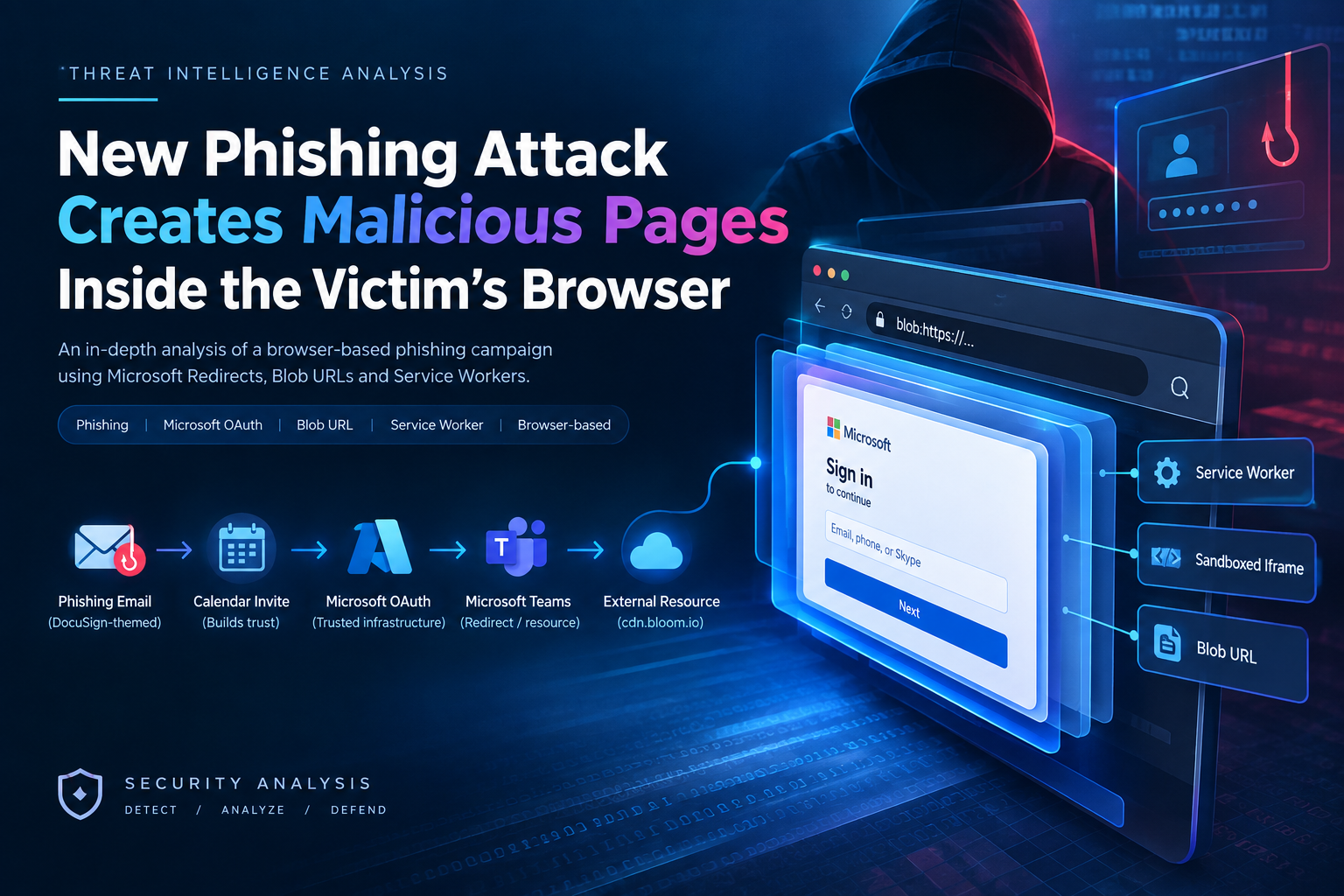
Campaign Summary
What happens if a fraudulent website has absolutely no hosting server, no IP address, and no malicious links for SOC systems to block?
In September 2026, cybersecurity experts at Barracuda announced a phishing campaign impersonating DocuSign that completely exceeded all traditional defense standards. When the victim clicks, instead of leading to a fake website on the Internet, the malicious code controls the victim's browser itself to build a phishing page right in RAM memory through the blob: URL mechanism.
The scary point is that:
The Address Bar shows the root Microsoft domain: The victim observes that the navigation flow is entirely within the login.microsoftonline.com and Microsoft Teams trust infrastructure.
Zero-Static Artifact: The phishing page disappears completely as soon as the browser tab closes. There is no A Record, no separate SSL Certificate, and no static URL for the Secure Email Gateway (SEG) or Web Firewall to detect.
C2 infrastructure runs in the background under the browser: Uses Service Workers and Sandboxed Iframes to maintain real-time connections, allowing attackers to remotely control victims like a professional Phishing-as-a-Service platform.
Timeline of Events in Chronological Order
| Time Offset | Phase / Action | Actor / Component | Technical Details & Artifacts | Severity Level |
|---|---|---|---|---|
| \(T+00:00\) | Phishing Email Delivery | Attacker \(\rightarrow\) Target Victim | DocuSign-themed lure containing a benign .ics (calendar invite) file attachment to bypass email spam filters. |
🟡 Medium (Initial Lure Execution) |
| \(T+00:05\) | Victim Clicks Link | Victim Browser | Clicks malicious link, initiating an OAuth open redirect chain via login.microsoftonline.com. |
🟢 Low (Legitimate Microsoft Domain) |
| \(T+00:07\) | Teams Infrastructure Transit | Microsoft OAuth \(\rightarrow\) MS Teams | Redirect chain routes the browser session directly into the Microsoft Teams resource loader (teams.microsoft.com). |
🟢 Low (No Malicious Code Executed Yet) |
| \(T+00:10\) | External Payload Retrieval | Teams Loader \(\rightarrow\) External CDN | Browser executes a script request to fetch external web assets hosted on cdn.bloom[.]io. |
🟠 High (External Script Loading) |
| \(T+00:12\) | In-Memory Blob URL Assembly | Client-Side Browser Engine | Client-side JavaScript executes URL.createObjectURL(), compiling raw HTML/JS payload into a blob:https://teams.microsoft.com/... URL inside RAM. |
🔴 Critical (In-Browser Phishing Page Rendered; Zero Disk Footprint) |
| \(T+00:15\) | Persistence & C2 Channel Spawn | Service Worker & Sandboxed Iframe | The Blob page automatically registers a background Service Worker and instantiates a sandboxed iframe communicating via postMessage. |
🔴 Critical (Browser Request Interception & C2 Channel Active) |
| \(T+00:30\) | Credential & Session Theft | Victim \(\rightarrow\) Attacker C2 | Victim submits Password/MFA OTP into the fake portal. Data is exfiltrated in real-time to the C2 server via postMessage. |
💀 Data Breach (Account Compromise Achieved) |
Attack Flow Analysis
This attack represents a remarkable evolution from Static Hosted Phishing to Client-Side In-Memory Execution. Below is a detailed analysis of the entire closed attack flow from distribution to account takeover:
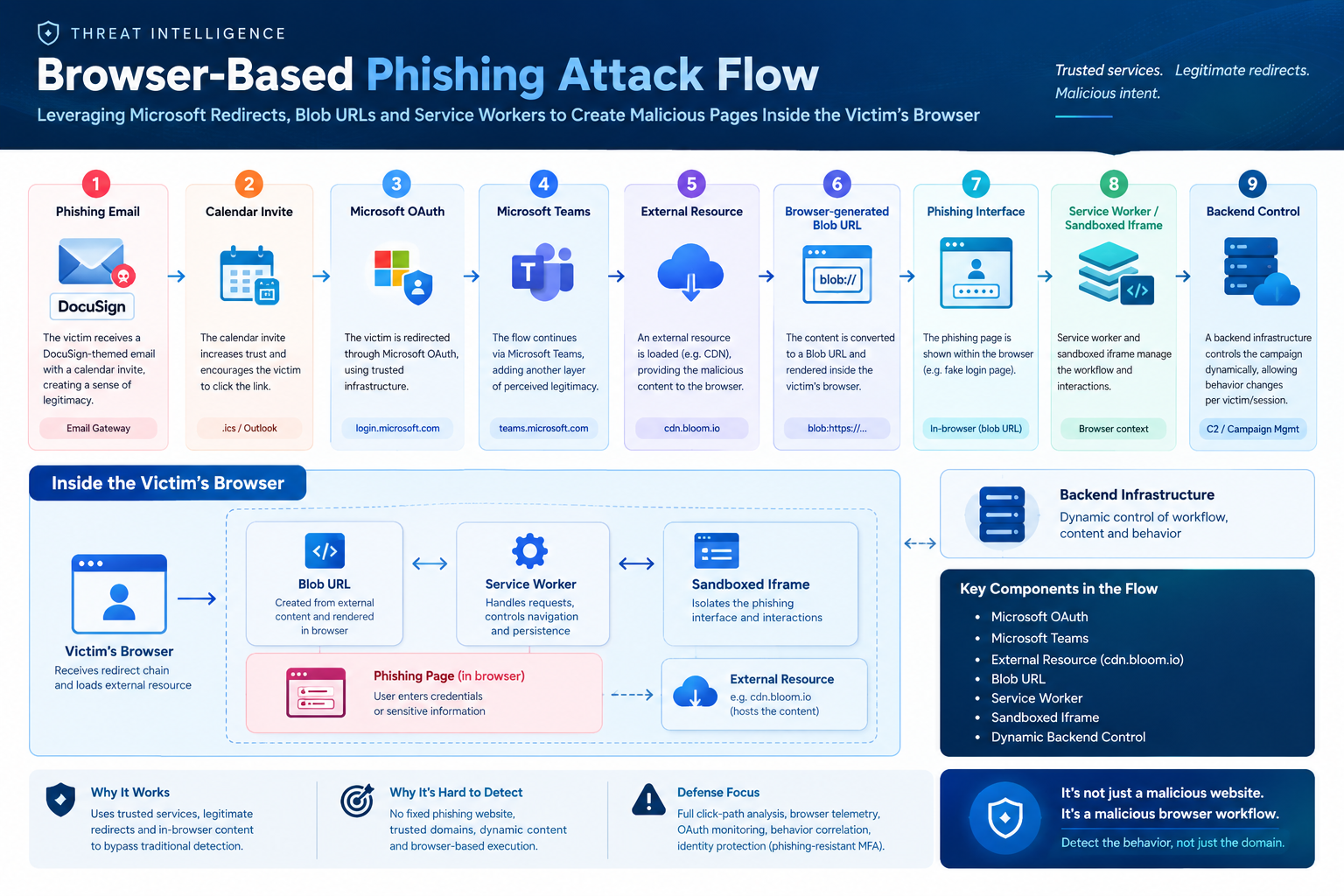
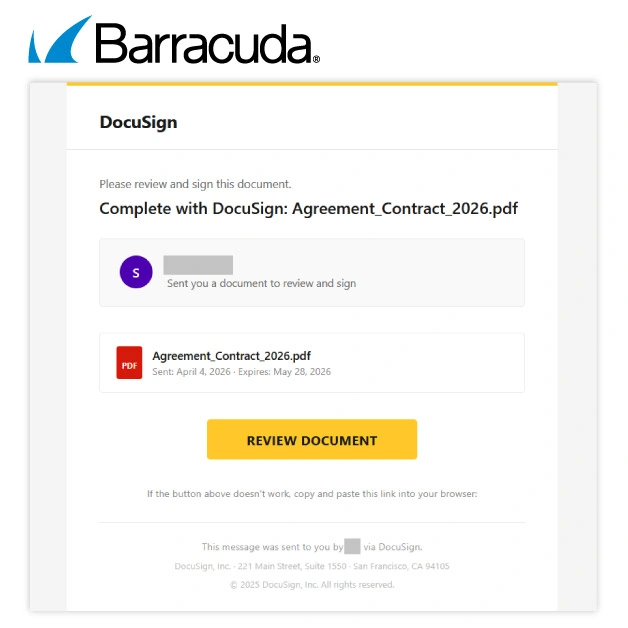
Phase 1: Create decoy & Bypass Email Security system (SEG Bypass)
Decoy scenario: Email pretending to be an urgent document approval notice from the DocuSign service.
Disguise technique: In the email, an Appointment Schedule (.ics) file is attached. This .ics file is completely clean (clean file), does not contain malicious URLs or scripts. The presence of an appointment file helps emails achieve a high reliability score (Spam Score Improvement) when passing through automatic filters such as Exchange Online Protection (EOP) or Proofpoint.
Impact: The email arrives at the victim's Inbox smoothly without being sent to Junk/Spam or being flagged with a suspicious warning.
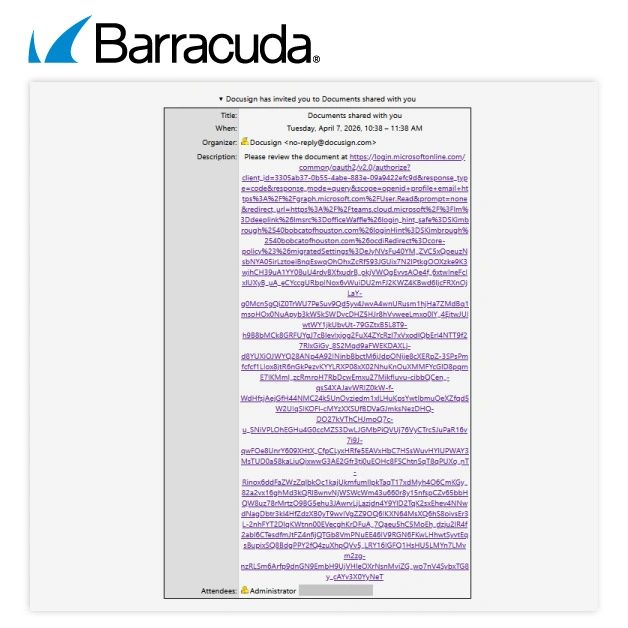
Phase 2: Exploiting Open Redirect & Microsoft Infrastructure Chain of Trust
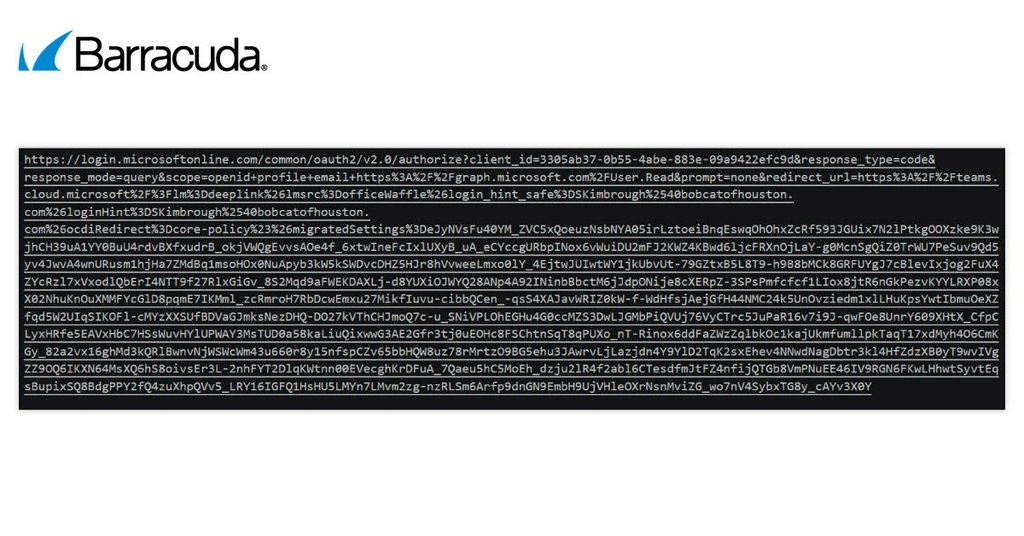
The trusting victim clicks the "Sign Document" button, triggering the navigation sequence: Email Link⟶login.microsoftonline.com⟶Microsoft Teams LoaderEmail Link⟶login.microsoftonline.com⟶Microsoft Teams Loader
Technical details: Attacker abuses the legitimate Open Redirect / Resource Delegation feature of Microsoft OAuth.
Overcoming control barriers: During this process, URL scanning tools (URL Scanner) and SOC staff viewing logs only see traffic going to Microsoft's main domain name (.microsoftonline.com or .microsoft.com). The browser's address bar shows a green SSL security key and a completely valid Microsoft domain name, quelling the victim's suspicions.
Phase 3: Load Payload from Front-end CDN (cdn.bloom[.]io) & Browser-Resident Architecture
Load resources: When the browser loads Teams interface resources, a background script is requested to query the content delivery network https://cdn.bloom\[.\]io/assets/render.js.
Payload characteristics: The returned JS code contains the entire HTML structure, CSS to disguise the DocuSign/Microsoft 365 login interface, along with logic processing functions to capture keyboard events (Keylogger) and convert data.
Stage 4: Build Phishing page in RAM using Blob URL (Client-Side Assembly)
This is the heart of this new attack technique:
- Initializing the Blob object: The browser does not save this HTML file to the hard disk (Disk), nor does it redirect to another external domain. Instead, the client-side script executes the command:
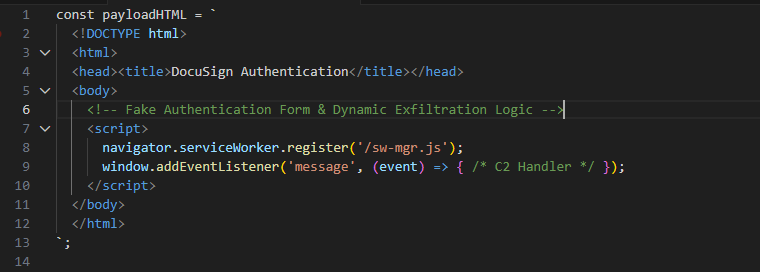
Dangerous properties of Blob URL:
Origin Inheritance: Blob URL inherits the origin of the environment that created it (blob:https://teams.microsoft.com/...). This creates an extremely prestigious cover in the address bar.
Ephemerality: Page data exists only in the browser's session memory (RAM). There are no DNS Query metrics or HTTP GET requests to static HTML pages for SOC/Threat Intelligence systems to collect and put on the blocklist.
Traces automatically erase: When the victim closes the browser tab, the entire phishing page automatically disappears without a trace, causing a deadlock in the investigation of traces (Digital Forensics) if the browser's Memory Dump is not collected in time.
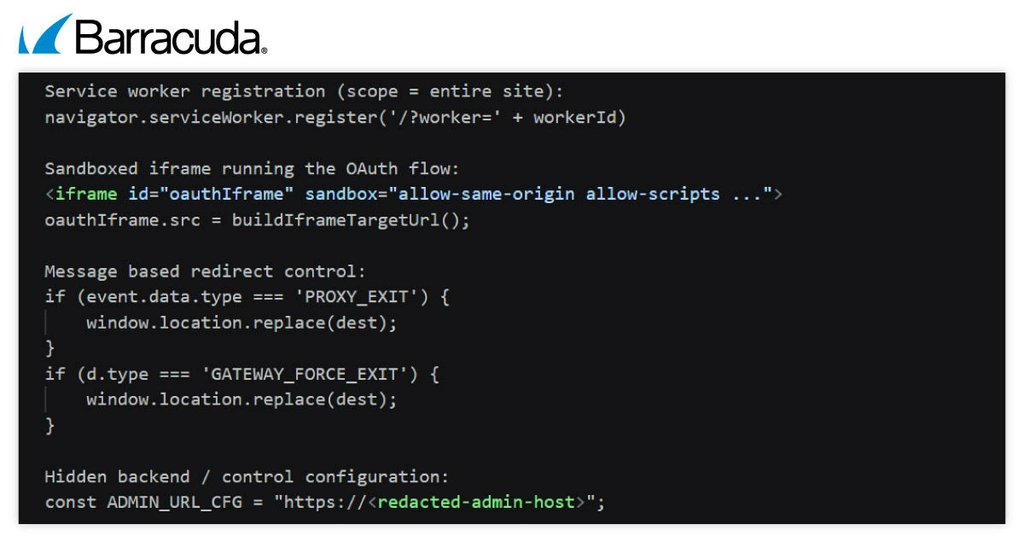
Stage 5: Register Service Worker & Maintain C2 Connection via Sandboxed Iframe
As soon as the Blob page displays the fake DocuSign/M365 interface:
Register Service Worker: The malicious code executes navigator.serviceWorker.register('/sw.js'). This Service Worker acts as a "miniature proxy" located right in the browser. It has the ability to block the entire request/response flow, ensuring that if the victim F5s the page again, the malicious Blob content remains intact.
Initialize Sandboxed Iframe: To avoid being blocked by the browser's Same-Origin Policy (SOP) mechanism when sending data to C2, the Blob page creates a hidden that connects directly to the attacker's Server.
Phase 6: Collecting Credentials & Why the attack is "invisible" against traditional defenses
Underground Information Collection & Transmission: The victim enters Username, Password and OTP authentication code (MFA) into the fake form. Blob page transmits data to C2 via HTML5 API window.postMessage: iframeWindow.postMessage({ user: username, pass: password, otp: code }, '*');
Impact: Server C2 receives realtime data through hidden Iframe and immediately logs in to take over the victim's account (Adversary-in-the-Middle - AiTM).
WHY IS THIS ATTACK INVISIBLE AGAINST TRADITIONAL DEFENSE?
Disable 100% Blocklist URL/static IP: Firewall/Proxy only sees traffic going to blob:https://teams.microsoft.com/... If you block this domain, the business will disrupt the company's entire Microsoft Teams application.
Defeating Email Sandbox: Redirect flow stops at Microsoft Teams service. Only when there is real user interaction will the Blob URL be allocated and rendered in browser memory.
Absolutely taking advantage of user trust: The browser address bar clearly displays the main domain name teams.microsoft.com along with the green SSL security key, completely extinguishing common phishing identification skills.
IOCs & Artifacts
Network Indicators
cdn.bloom[.]io
Behavioral & Host Artifacts
Event: URL.createObjectURL() with MIME type 'text/html' called from front-end SaaS domains.
Event: ServiceWorkerContainer.register() fires immediately after loading resources from cdn.bloom[.]io.
Event: PostMessage telemetry transfers the credential struct between the top-level window and the cross-origin iframe.
Expert opinion
Attack pattern shift
This campaign marks the completion of the Client-Side Phishing Execution model. Previously, attackers had to maintain C2/Hosting servers containing phishing pages and continuously change domain names when detected (Domain Generation Algorithms - DGA or Fast-Flux). Now, by pushing the entire page rendering logic into browser RAM via the Blob URL:
Attacker's infrastructure costs are drastically reduced: No need to maintain hundreds of disguised phishing domains.
The ability to survive (Evasion) increases dramatically: The website does not have an IP, does not have an A Record, does not have its own SSL certificate for scanning systems such as VirusTotal, URLScan.io or Google Safe Browsing to detect and label as malicious in advance.
Direct impact on businesses in Vietnam
In Vietnam, the majority of financial institutions, banks and large businesses depend on two layers of control:
The Secure Email Gateway (SEG) filter checks link reputation in Email.
Static IP/Domain block list on internal NGFW/Proxy/SWG.
This campaign bypasses both layers of control above. When the employee clicks on the link, the browser accesses a valid Microsoft domain, then the phishing page builds directly in RAM. If a business does not have a behavioral monitoring solution at Endpoint/Browser or has not applied FIDO2 MFA, the risk of Microsoft 365 / Corporate Identity account hijacking is very high.
Defense Recommendations
Urgent (Immediate: 0 - 24 hours)
Blocklist Indicators: Immediately add the cdn.bloom[.]io domain name and related IPs to the ban list on DNS Sinkhole, Proxy and NGFW.
Review Microsoft 365 / Teams configuration: Tighten the policy that allows Microsoft Teams to load external resources (External Resource Loading) from unverified domains.
Short-term (Short-term: 1 - 7 days)
Configure Rule EDR/Browser Telemetry: Deploy behavior detection rules (Behavioral Detection) on EDR/XDR:
Warn when browser performs Service Worker registration from content loaded via Blob URL.
Warn when there is a Blob URL containing a sensitive data entry form that inherits Origin from SaaS services such as Teams/OneDrive.
Apply Phishing-Resistant MFA: Required use of FIDO2 Security Keys or Microsoft Authenticator Passkeys for important accounts. Blob URL phishing still fails if the organization applies FIDO2 (because FIDO2 tightly ties the authentication key to the actual Origin of the browser).
Long-term Strategy
Innovating Email & Web Security solutions: Moving from static URL testing to Full Click-Path Analysis solutions capable of executing JavaScript in a dynamic Sandbox environment to detect Blob initiation behavior
Deploy Browser Security / Secure Enterprise Browser: Apply Remote Browser Isolation (RBI) technology or centralized browser management policy to control Service Worker execution and Blob Object initialization from untrusted sources.
References
New Phishing Attack Creates Malicious Pages Inside the Victim’s Browser - SecurityWeek
Browser-based phishing hides pages inside victims’ browsers | Barracuda Networks Blog
What is a Phishing Campaign? | Barracuda Networks
Phishing Pages Built Inside the Browser: Microsoft Redirects and Blob URLs - DEV Community