Hidden under Windows: How HoneyMyte turned the kernel into a fortress?
A sophisticated attack campaign with a rootkit operating in kernel mode targeting government organizations in Southeast Asia and East Asia has just be

Overview
In a context where defensive solutions focus heavily on detecting suspicious behavior in user-mode—a runtime environment where most applications and typical processes of the Windows operating system operate, including browsers, office applications, system services, and most traditional malware—many APT attack groups have shifted their focus to a deeper layer of the operating system to maintain backdoors and fully control the target system. The latest campaign by HoneyMyte (or the Mustang Panda group) is a clear example of this trend.
According to analysts from Kaspersky GReAT, this hacker group has created a validly signed kernel-mode rootkit to protect their main backdoor from traditional AV detection and debugging mechanisms. Instead of relying solely on evasion techniques in user space, the attack group has taken direct control of the Windows kernel, thereby controlling I/O flows, the registry, processes, and the entire lifecycle of the malicious payload.
About HoneyMyte
Who is HoneyMyte
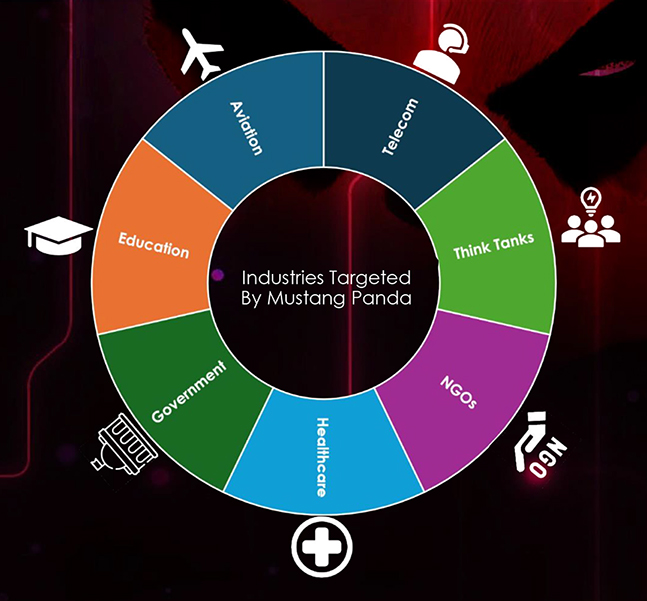
For those who don't know, HoneyMyte is a hacker group originating from China, also known by more familiar names like Mustang Panda, Bronze President, or RedDelta. This group is known for targeted attacks on government organizations, state agencies, and sensitive organizations in Southeast Asia and East Asia, including Vietnam.
The main motive of HoneyMyte is not financial but focuses on information gathering, long-term monitoring, and maintaining a secret presence in the victim's system.
Activity History
Emerging before 2020 with small-scale campaigns, this hacker group has increasingly shown how truly formidable they are, with numerous "achievements" in cybercrime across different stages.
Early Stage (before 2020): Traditional Backdoor & Spear-Phishing.
In the early years, HoneyMyte mainly used:
Email spear-phishing with malicious attachments (DOC, RTF, LNK)
Relatively common user-mode backdoors like PlugX or custom loader variants
During this stage, the group's techniques still relied heavily on user deception and behavioral exploitation, with a medium level of stealth.
Stage 2020–2022: Tool Expansion & Increased Resilience.
From around 2020, HoneyMyte began to:
Develop and deploy their own backdoors, notably ToneShell
Combine multiple persistence methods such as:
registry run keys
scheduled tasks
Windows services
The group also intensified the exploitation of multi-layer infection chains, showing a clear investment in operations and C2 infrastructure control.
Stage 2023–2024: Focus on EDR Evasion.
As EDR/XDR solutions became more common, HoneyMyte adjusted their tactics by:
Enhancing obfuscation and in-memory execution
Reducing disk traces (fileless or semi-fileless)
Mimicking C2 traffic (TLS-like traffic)
The goal now is to extend dwell time in the system rather than rapid expansion.
Stage 2025: Leap to Kernel-Mode.
The campaign announced by Kaspersky in 2025 marks the most significant advancement in HoneyMyte's history:
The group deployed a kernel-mode rootkit as a validly signed Windows driver
The rootkit serves to:
protect the ToneShell backdoor
block process and file removal
control I/O, registry, and access handles
Targets and Impact
Target Southeast Asian and East Asian government organizations.
Deploy the ToneShell backdoor for remote system control.
Hide from security tools using a kernel-level rootkit.
Support long-term cyber espionage activities.
Campaign Details

As mentioned earlier, the HoneyMyte campaign is designed as a multi-layered attack, with the kernel-mode rootkit playing a central role, the layer with the highest privileges on the system. Unlike user-mode malware, which can only interact indirectly with the system, a kernel-mode rootkit has full control over how the operating system operates, monitors, and reacts.
On Windows, kernel-mode rootkits are typically deployed as:
System driver (.sys)
Mini-filter driver
Or a module loaded directly into kernel memory
Taking advantage of this, the hacker group prepared a malicious driver “ProjectConfiguration.sys“ with a stolen digital signature to carry out the campaign.

Notably, the hacker group used a digital signature certificate from Guangzhou Kingteller Technology Co., Ltd. (a valid certificate but expired since 2015) for this driver.
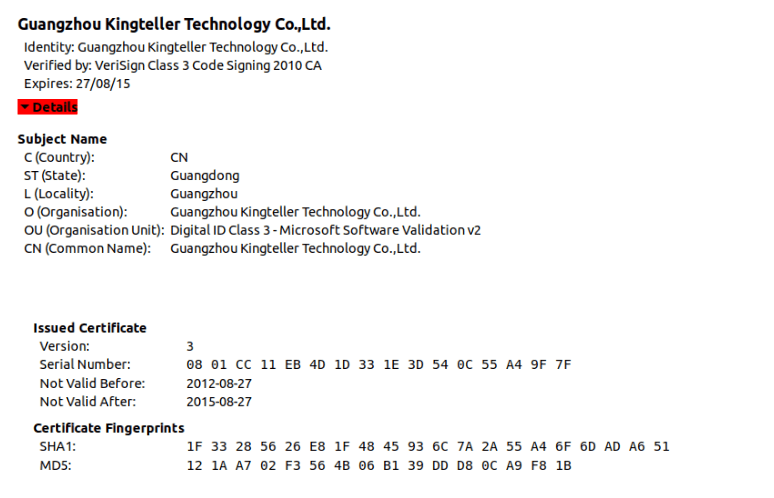
Then they will load the driver into the kernel through a valid mechanism. The key points of this stage are:
The driver is digitally signed with a valid but old/compromised certificate
Bypasses Driver Signature Enforcement
Once loaded, the driver runs with the highest privileges (Ring-0)
Another part of the initial stage is that the kernel-mode rootkit has activated protection and control mechanisms through dynamic API resolution using hash values to hide its true behavior. Interestingly, HoneyMyte does not need C2 at this step and focuses on building a defensive "shield." A polynomial rolling hash has been implemented, which is a very common technique in:
malware
kernel-mode rootkits
shellcode
packers/loaders

The next stage of the campaign is the self-protection capability of the Rootkit. The malware used by the hacker group has various mechanisms to protect itself:
Driver file protection: blocks any attempt to delete or rename the driver file using pre-operation callbacks.
Registry key protection: registers RegistryCallback to block access to keys related to the malware's service.
Process protection: uses ObRegisterCallbacks to prevent any process from accessing the process that has been injected with a backdoor.
Disables WdFilter (Microsoft Defender's driver) by changing the altitude to 0.
After self-protection and establishing the necessary Kernel-Level control, HoneyMyte will proceed to deploy the most dangerous stage of the campaign - distributing ToneShell (creating a User-Mode backdoor).
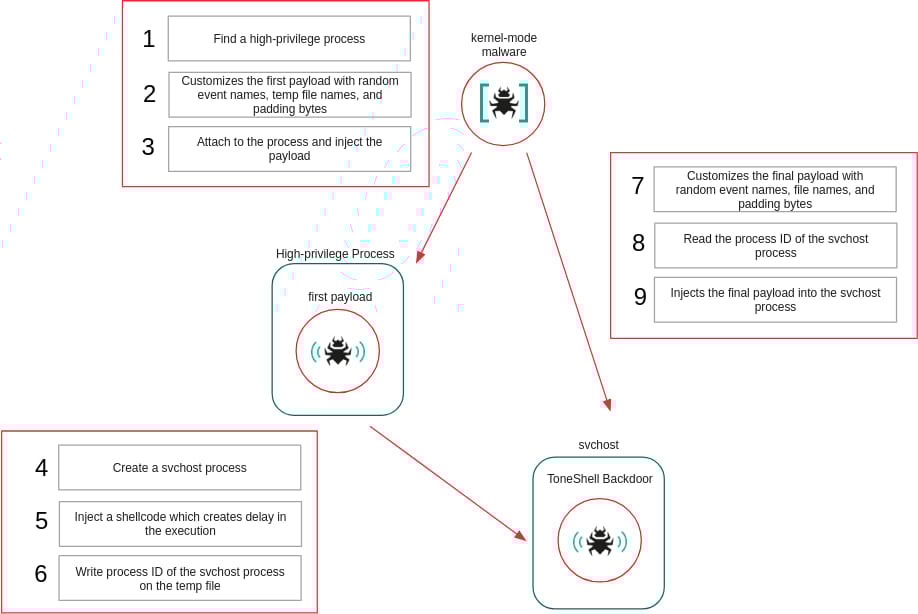
This stage aims to achieve three core objectives:
Execute ToneShell in user mode to communicate with C2 and execute commands.
Hide ToneShell inside a legitimate process.
Place that process under the protection of the kernel rootkit.
First, the hacker group will create or select the svchost.exe process to inject delayed shellcode into it. They choose svchost.exe because:
It is a legitimate system process.
It runs multiple instances.
It has natural network activity.
Injecting shellcode into svchost can result in:
Difficulty distinguishing malicious behavior.
Reduced likelihood of being alerted by rules on cybersecurity monitoring systems.
Once prepared, HoneyMyte APT begins the process of Injecting the ToneShell backdoor into the created svchost.exe process. As mentioned earlier, this ToneShell will hide itself through the rootkit and also has the task of:
Resolving necessary user-mode APIs.
Preparing the memory environment.
Calling the actual loader.
Finally, ToneShell establishes C2 connections via TCP port 443 and uses a fake TLS 1.3 header to disguise traffic. Additionally, the main backdoor will support tasks like:
Uploading or downloading accompanying malware files.
Remote shell and remote session control.


Conclusion
HoneyMyte's shift to using a kernel-mode loader to deploy ToneShell marks a significant evolution in the group's tactics. A kernel-level rootkit allows malware to bypass user-mode security checks and hide from monitoring tools. Organizations need to implement advanced EDR solutions, monitor unusual activity at the kernel level, and conduct memory forensics to detect these sophisticated threats.
Recommendations
Be cautious when opening emails and attachments
Do not open files or links from unknown email sources.
Be especially wary of files with extensions like
.doc,.pdf,.zip,.exethat are unexpectedly sent.
\=> This is the most common infection path for many attack campaigns.
Do not install unknown software and drivers
Only download software from official websites.
Avoid using cracked software or hacking tools.
Do not install unfamiliar drivers when the system makes unusual requests.
Always update the operating system safely.
Enable automatic updates for Windows.
Fully install all security patches.
Limit the use of administrator accounts
Use a regular account for daily tasks.
Only use administrative privileges when absolutely necessary.
Use reliable security software
Install reputable antivirus/EDR and always keep real-time protection enabled.
Do not disable security software to install unknown applications.
Pay attention to unusual signs on your computer
The computer is unusually slow.
There is network activity even when not in use.
Strange processes appear in Task Manager.
IOC
File Hash
36f121046192b7cac3e4bec491e8f1b5
fe091e41ba6450bcf6a61a2023fe6c83
abe44ad128f765c14d895ee1c8bad777
Domain C2
avocadomechanism[.]com
potherbreference[.]com