Honeymyte Returns: How CoolClient is Silently Hijacking Browsers?
Mustang Panda is making a comeback with a silent threat targeting browser data and global user information.

Overview
In recent years, the main targets of the espionage group HoneyMyte (also known as Mustang Panda or Bronze President) have frequently been in Asia and Europe, with Southeast Asia being the most affected.
As an APT group, HoneyMyte uses many complex tools to achieve its goals. These tools include the ToneShell, PlugX, Qreverse, and CoolClient backdoors, USB Tonedisk and SnakeDisk, among others. Recently, they have continued to expand their influence by deploying the CoolClient backdoor with new features aimed at stealing users' browser information and sensitive data.
To better understand the Mustang Panda or HoneyMyte group, readers can refer to the article previously mentioned by the FPT Threat Intelligence team.
Mustang Panda Uses New Malware to Attack the Governments of Myanmar, Vietnam, Taiwan
Main Targets
Browser Data: cookies, browsing history, saved login information, login sessions.
User Identification Information: email accounts, social networks, internal services.
Data for Further Intrusion: authentication tokens and session information to bypass multi-factor authentication (MFA).
High-Value Intelligence Victims: individuals or organizations related to research, technology, or sensitive geopolitical areas.
Overview of the CoolClient Backdoor
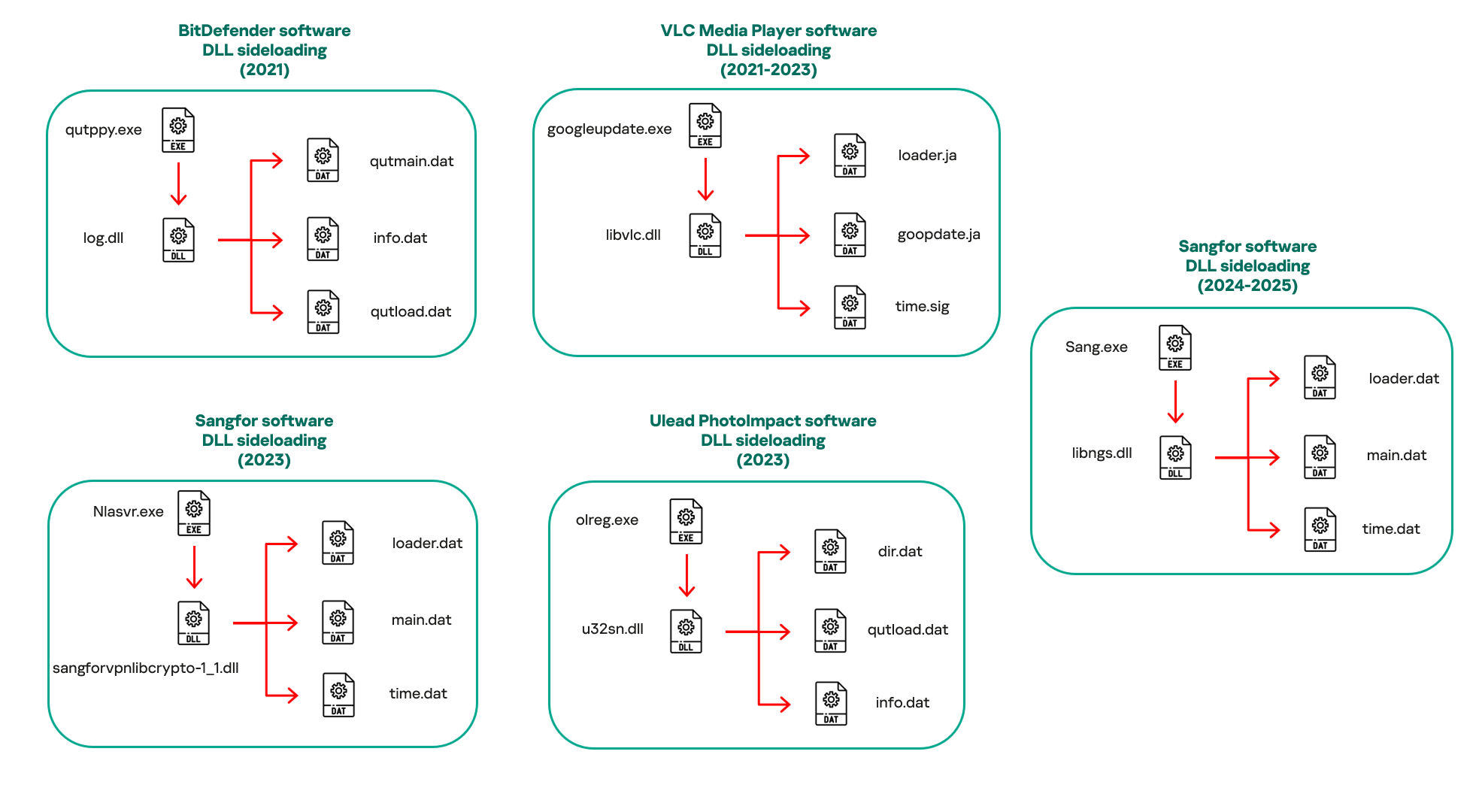
As mentioned, CoolClient is not entirely a newly emerging backdoor and has a long history of cybercrime dating back before 2019. Its predecessors in campaigns attributed to Mustang Panda / HoneyMyte mainly used simple backdoors and custom loaders. Although it did not have an official name at that stage, there were components with similar functions: maintaining access, loading modules, and remote control.
From 2019 to 2020, CoolClient began to be observed as a lightweight backdoor, often deployed after the initial intrusion phase. The main function of the backdoor during this period was usually to act as a bridge, establishing connections to C2, executing basic commands, and gathering system information.
From 2022 onwards, CoolClient began to shift focus by prioritizing user data and login sessions, rather than just controlling the machine. This can be seen as a clear sign of a long-term espionage strategy.
Recently, CoolClient has directly integrated with a specialized browser stealer and uses scripts to flexibly change behavior according to the target.
Campaign Analysis
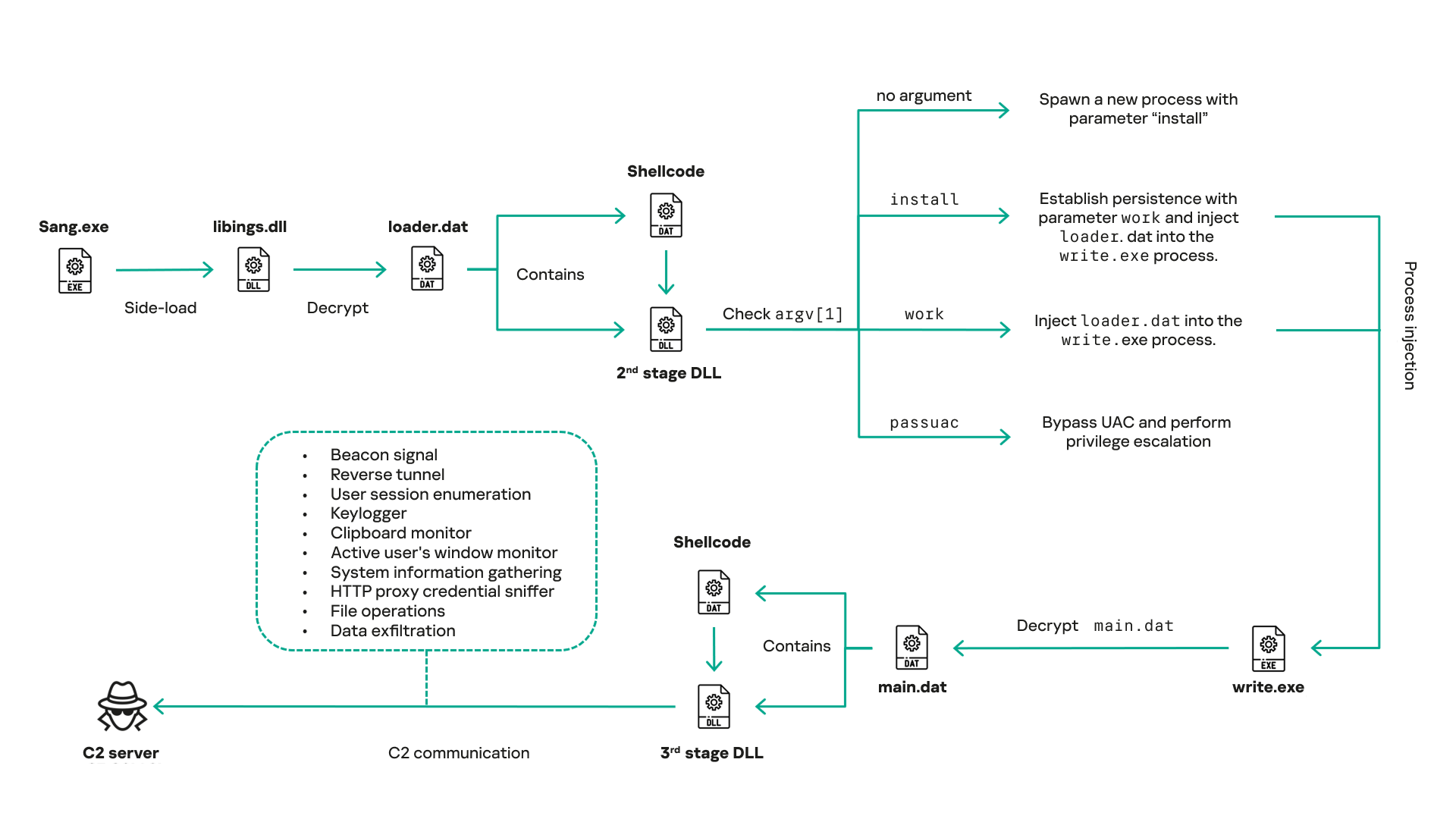
Now let's go through the detailed attack flow in this campaign to better understand the danger of CoolClient. The entire campaign is a multi-stage infection chain. It is designed to hide, escalate privileges, and maintain long-term control over the victim's system.
In the first stage, the attacker uses the Side-loading DLL technique to infiltrate the system. The APT group used the file Sang.exe for disguise; it is not the main payload but rather the initial execution vector in the entire infection chain. The role of this file is more strategic than technical.
Specifically, Sang.exe is used to:
Act as a benign-looking executable.
Automatically load the malicious
libings.dllbecause it is in the same directory.Initiate the entire loader chain without needing exploits or macros.

After loading libings.dll, it immediately calls another payload and executes “loader.dat“. A notable point is that the payload does not exist in a clear form on the disk, reducing the chance of being detected by signature-based detection. This technique in the initial stage cleverly exploits the Windows mechanism that prioritizes loading DLLs from the same directory to avoid detection by some antivirus signatures.

After loading the loader.dat payload, it is decrypted to extract the shellcode and 2nd-stage DLL with the main purposes of:
Separating the payload from the original executable file.
Avoiding static analysis.
Allowing the payload to be updated without changing the original file.
2nd-stage DLL at this point will be used as a bridge in the multi-layer infection chain of the campaign. It will continuously check the command line parameter (argv[1]) - the most dangerous stage behaviorally, but it does not contain a full backdoor. This is also where activities occur:
Process injection.
Persistence setup.
Privilege escalation.
Selecting a legitimate process (write.exe) to act as a host.
At this stage, the hacker group also sets up persistence mechanisms and performs UAC bypass, escalating privileges to a higher level and allowing deeper manipulation of the system.
After gaining privileges and establishing persistence mechanisms on the system, CoolClient will inject malicious processes into the target system. At this stage, the process “write.exe“ will be used as a springboard for a malicious payload “main.dat“..

At this stage, it is also very difficult to detect by EDR/AV systems because the attacker has exploited the legitimate Windows process: write.exe. The entire shellcode as well as DLL stage 3 (complete backdoor). The main functions of DLL stage 3 are to achieve very specific purposes:
Beacon signal (heartbeat)
Reverse tunnel
Enumerate user session
Keylogger
Clipboard monitor
Monitor active windows
Collect system information
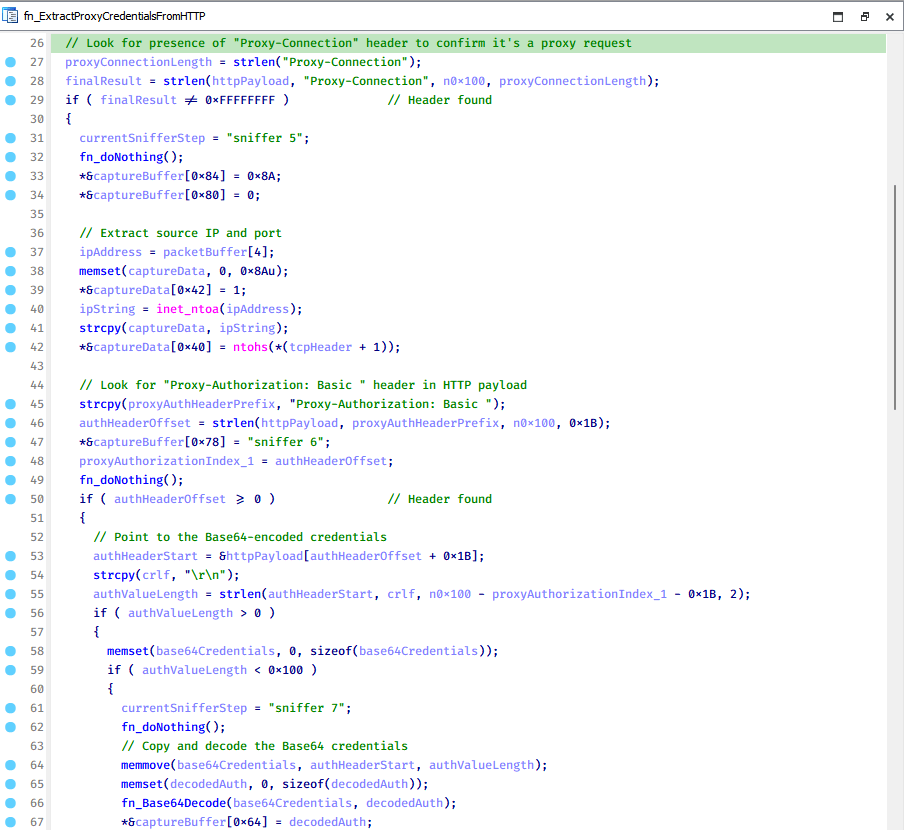
HTTP proxy credential sniffing
File manipulation
Data exfiltration
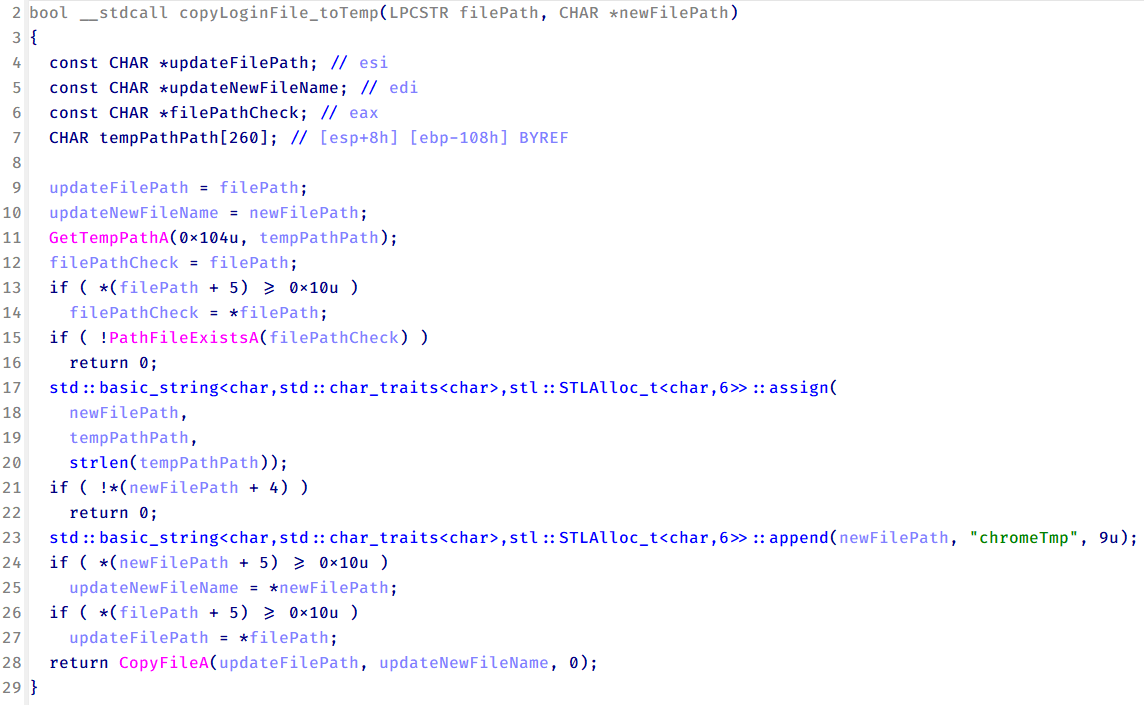
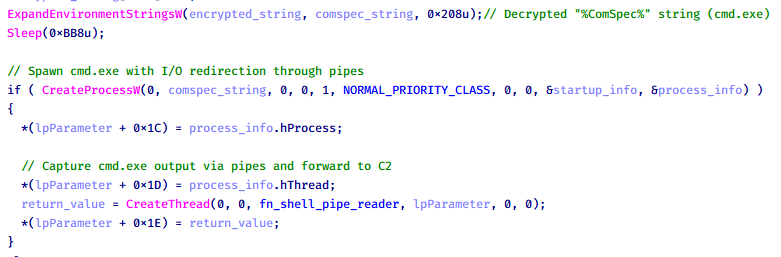
All processes at this stage will continuously connect to the C2 server to receive commands and store information.

Conclusion
The Honeymyte campaign, with the presence of CoolClient, clearly shows the change in how modern threat groups approach targets: quietly controlling user data flow without immediate destruction. Exploiting the browser, a familiar and trusted component, has allowed attackers to collect sensitive information over a long period with almost no clear signs.
CoolClient is not a "noisy" malware, but its sophistication, outward legitimacy, and ability to combine with other components make it a dangerous link in the Honeymyte attack chain. The stolen browser data not only serves immediate espionage goals but also paves the way for deeper infiltration activities in the future.
Honeymyte and CoolClient once again affirm that in the current threat landscape, the most dangerous threats are not the attacks causing immediate disruption, but the silent activities happening right before our eyes.
Recommendations
Strictly control installed software
Only install software from official and reliable sources.
Avoid using "free", "cracked", or unknown developer tools and utilities.
Check digital signatures and publisher information before installing.
Reduce browser risks
Do not save passwords directly in the browser unless absolutely necessary.
Regularly:
Clear cookies and session data.
Check and remove unknown extensions.
Use a dedicated password manager instead of the default password saving feature.
Enhance account security
Enable multi-factor authentication (MFA) for all important accounts.
Do not reuse passwords across services.
Change passwords immediately if unusual login activity is detected.
Regularly update systems and software
Always update:
Operating systems
Browsers
Security software
New patches often fix vulnerabilities exploited by APT groups.
Increase user awareness
Be cautious with emails, attachments, or strange links, even if they seem legitimate.
Understand that modern threats do not necessarily cause errors or slow down the machine, but often operate quietly over a long period.
Regularly check for unusual signs in the system.
IOCs
CoolClient
F518D8E5FE70D9090F6280C68A95998F
1A61564841BBBB8E7774CBBEB3C68D5D
AEB25C9A286EE4C25CA55B72A42EFA2C
6B7300A8B3F4AAC40EEECFD7BC47EE7C
CoolClient plugins
7AA53BA3E3F8B0453FFCFBA06347AB34
A1CD59F769E9E5F6A040429847CA6EAE
1BC5329969E6BF8EF2E9E49AAB003F0B
Browser login data stealer
1A5A9C013CE1B65ABC75D809A25D36A7
E1B7EF0F3AC0A0A64F86E220F362B149
DA6F89F15094FD3F74BA186954BE6B05
Scripts
C19BD9E6F649DF1DF385DEEF94E0E8C4
838B591722512368F81298C313E37412
A4D7147F0B1CA737BFC133349841AAB
CoolClient C2
account.hamsterxnxx[.]com
popnike-share[.]com
japan.Lenovoappstore[.]com
FTP server
- 113.23.212[.]15